When Voice Meets the Physical World: Inside Aiden’s Full-Duplex Agent Architecture

Introduction

Aiden combines two modes of interaction: a Voice Agent that communicates with a person and a GUI Agent that performs concrete operations on a device. The Voice Agent handles the conversation. The GUI Agent interprets visual state and executes actions through standardized keyboard, mouse, and touch input.

For an Agent, the core execution pattern is the Agent Loop. Input and output are usually treated as components around that loop. Improving the interaction model often means adding another input or output path without changing the loop itself.

That approach works for simple voice commands. It becomes insufficient when the Agent must hold a live conversation while carrying out a multi-step task on a real device. Aiden’s full-duplex design addresses this by separating real-time interaction from longer-running task execution.

From Push-to-Talk to full-duplex interaction

Push-to-Talk

Many text-first Agents add speech through a Push-to-Talk flow. A person presses and holds a button, speaks, and waits for the Agent to process the utterance. In this model, voice is essentially a new input method. The Agent Loop remains unchanged, and the response only needs to be converted to speech quickly enough for playback.

Push-to-Talk is simple and predictable, but it creates a hard boundary around each spoken turn. The person must explicitly start every interaction, and the Agent has no natural way to remain available while another operation is still running.

Cascaded pipelines

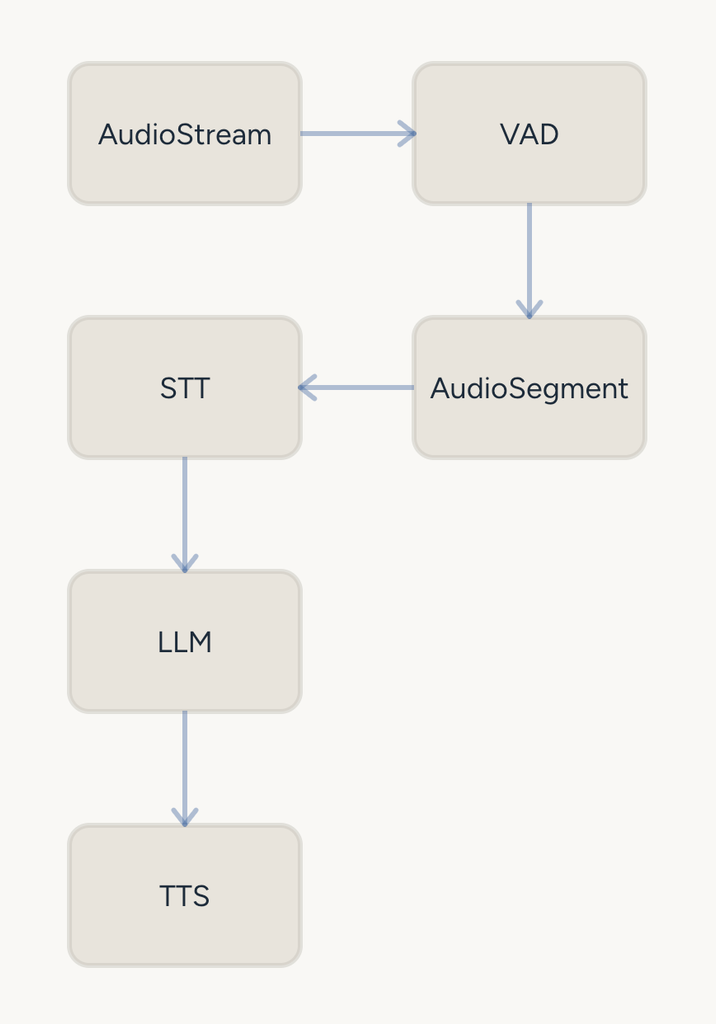
Voice-focused systems often remove the explicit button press by adding Voice Activity Detection (VAD). A typical cascaded pipeline connects voice activity detection, speech-to-text (STT), language-model reasoning, and text-to-speech (TTS).

With deployment optimization and service integration, this pipeline can feel almost real-time. Its components remain separate, however, and the interaction still follows a sequence of handoffs. The language model must wait for upstream processing, while downstream speech cannot start until enough output has been generated.

This creates several limitations. Multiple models and services must cooperate around the LLM’s input and output formats, increasing perceived latency. Speech is reduced to text before reasoning, so information such as emotion, prosody, and non-speech cues may disappear. The system must also handle VAD boundaries, overlapping speech, and conversation interruptions as special cases.
Full-duplex real-time speech

Recent multimodal speech research has explored architectures derived from two-channel, dual-tower dialogue modeling and extended them into multi-stream temporal models. Generative Spoken Dialogue Language Modeling investigates dual-tower modeling over two-channel conversational audio to produce more natural turn-taking. Moshi presents a speech-text foundation model and full-duplex dialogue framework that models the user and the system in parallel streams.

These models can support ToolCall and simple task execution while preserving a more continuous interaction. They are optimized for real-time conversation, but they are not necessarily the best models for complex visual reasoning or long device workflows.

A practical solution is therefore to divide responsibilities. The real-time voice model handles the immediate exchange, while a stronger model handles complex tasks in the background. This leads to a foreground-and-backend Agent architecture.

Aiden’s architecture requirements

Aiden’s core capability is the use of standardized device-control commands together with visual model reasoning. The Agent can inspect a screen and operate a phone or computer through keyboard, mouse, or touch input. This places higher demands on both model capability and the control layer that connects the model to the device.

Voice interaction adds a second requirement: low response latency. Aiden needs to preserve the responsiveness of a voice conversation without sacrificing the reasoning and execution required by a GUI task.

The existing STT mode already provides a basic cascaded architecture. The full-duplex mode extends that foundation by reusing the existing task-execution capability while adding a real-time voice interaction layer.
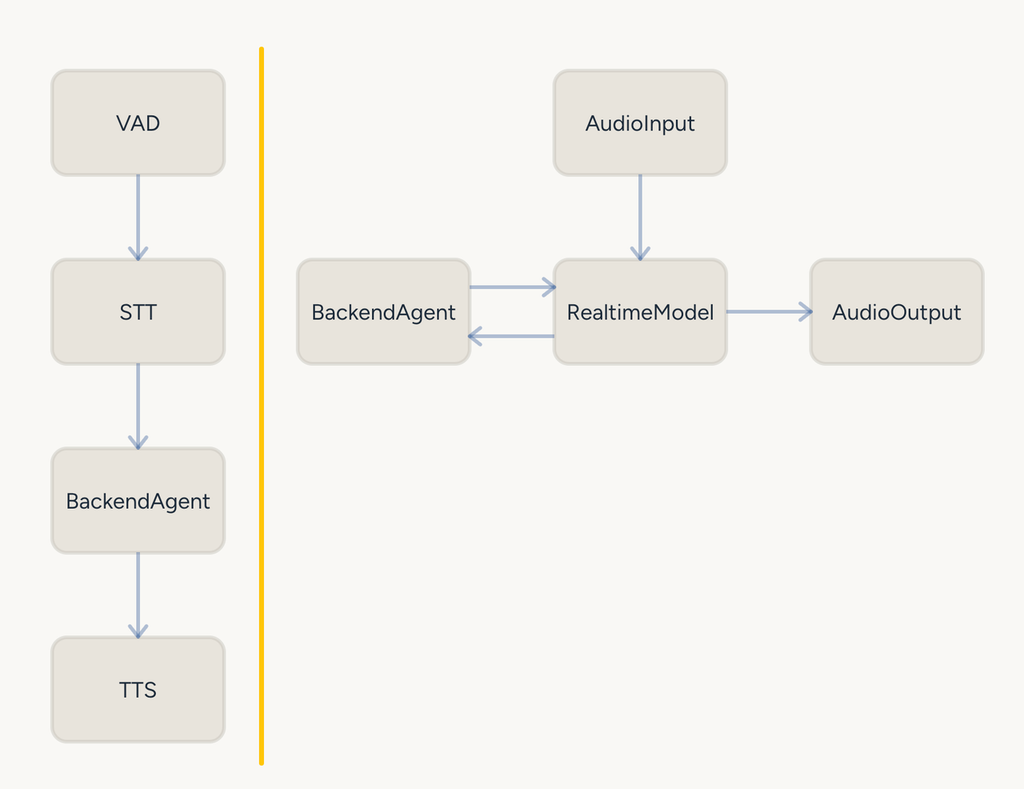
The Backend Agent remains the ordinary task-execution unit in both STT and Realtime modes. In Realtime mode, the foreground model is a specialized interaction layer between the Backend Agent and the person. It does not replace the Backend Agent or create a second implementation of device operation.

This is a form of multi-Agent architecture, so the system must define how the Agents coordinate and how their contexts are managed. Aiden’s tasks are often complex and may take a significant amount of time. That execution rhythm conflicts with the low-latency requirements of a foreground real-time Agent. The two Agents are logically separated and coordinate asynchronously through a task queue, while sharing controlled access to the device runtime.

Task design

The backend task queue provides a lifecycle for work that continues beyond the current voice exchange. The lifecycle is intentionally explicit.
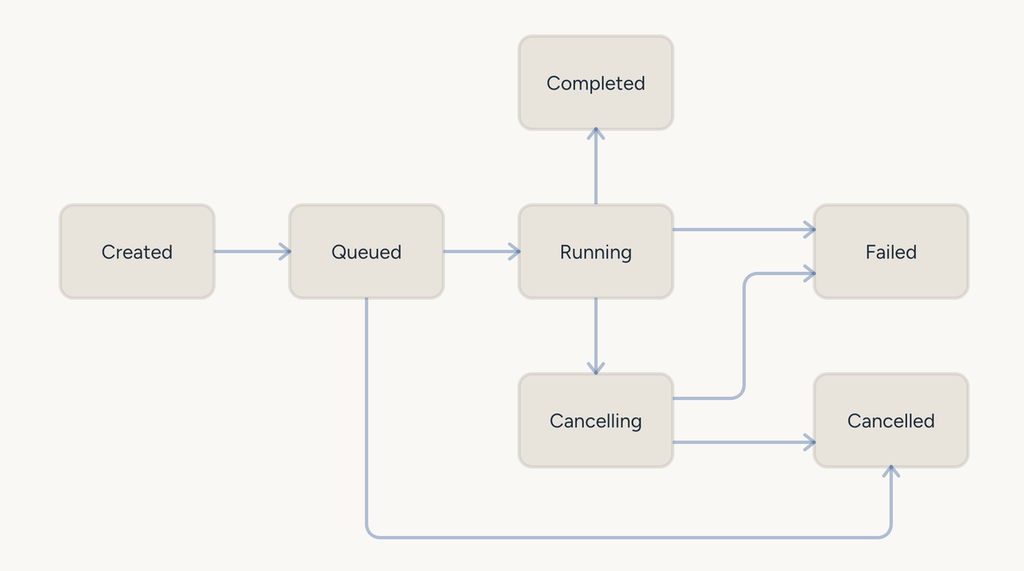
Completed means that task execution has reached its end state. It does not mean that the intended result was necessarily achieved.

Failed means that an exception or other abnormal condition interrupted execution and the task could not finish normally.

Keeping task completion separate from task success gives the foreground Agent a more accurate basis for communicating results. A finished task can be reported as finished without being described as successful when the execution result does not support that claim.

The foreground Agent does not run the same task-state lifecycle. It receives relevant information from the backend through a notification queue. When several task results arrive close together, the queue uses a 500-millisecond aggregation window. If another result arrives during that window, the window is extended. The results are then combined before they are delivered to the foreground Agent, preventing a series of short notifications from triggering multiple competing responses.

The runtime also avoids injecting an AgentTask user message while the foreground Agent is in the middle of answering. A background result should not unexpectedly cut off a response that is already being produced. Notification timing is therefore part of the interaction design, not merely an implementation detail.

Context design

Realtime mode delegates device work to a backend task manager, while STT mode invokes the existing agent loop directly. Both reuse the same underlying device-operation runtime and tools.
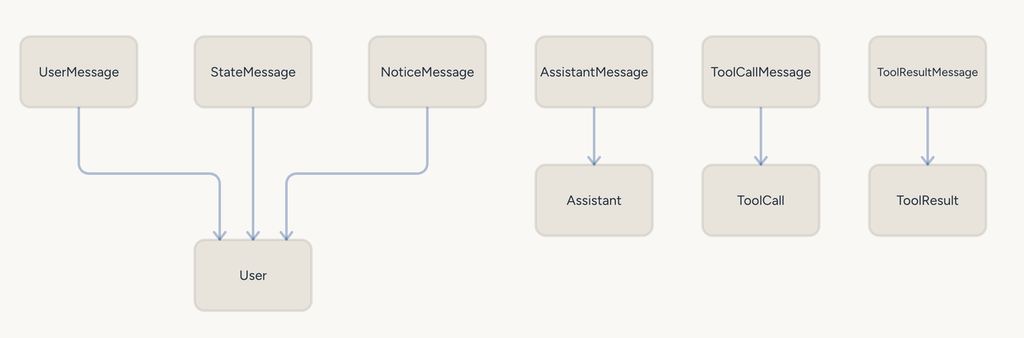
Aiden’s runtime works with seven message categories. Most are conventional language-model message types. State and Notice are runtime-specific types that are converted into ordinary UserMessage objects when the runtime connects to a model endpoint.

State messages

The environment around Aiden is not static. External device type, application state, and other runtime conditions can change while a task is running. These updates are usually small, but the model needs to see them to make the next decision correctly.
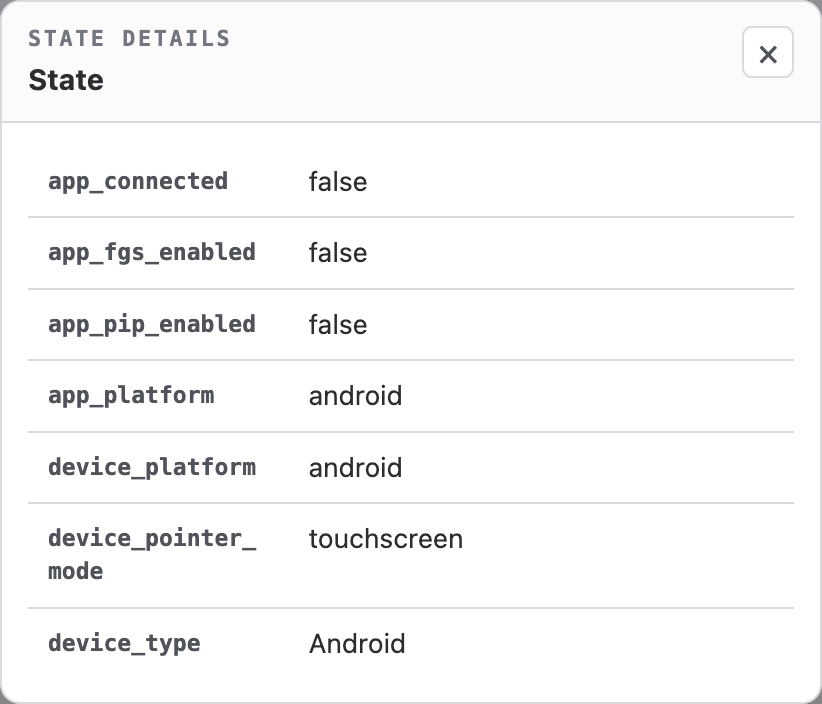
Instead of changing the system prompt whenever the environment changes, Aiden appends a StateMessage to the context. This keeps the system-level prompt stable and avoids unnecessary loss of cached prompt material.

When a person starts a new conversation turn, or when the Agent calls a tool and automatically captures a new screen, the current runtime state can be introduced through a StateMessage. The model can then reason about the latest device and Aiden state alongside the ordinary conversation.

Notice messages

NoticeMessage carries information generated by the Aiden Agent Runtime. It can notify or correct the Agent without pretending that the information came directly from the person.

For example, when LoopGuard detects repeated tool calls, the runtime can inject a Notice asking the Agent to leave the loop. When a backend task completes or fails, its result can be delivered to the foreground context as a Notice. This provides a consistent channel for runtime events, task results, and behavior corrections.
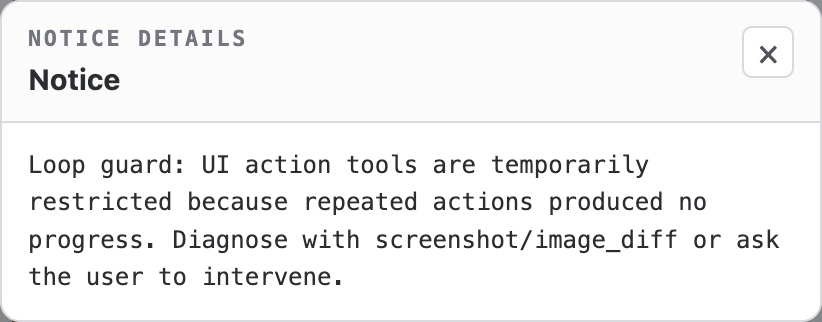
At the model boundary, the runtime converts these messages into UserMessage objects. The model can therefore incorporate runtime state and task events through its normal context-processing path, while the runtime retains control over how those events are created and scheduled.

Tool design

The asynchronous task queue gives the foreground Agent a small set of explicit tools for managing backend work:

  • create_agent_task creates a backend task.
  • cancel_agent_task requests cancellation of a task.
  • query_agent_task retrieves the current task state.

Real device tasks may also reach a step that requires authorization or manual action. Aiden uses a dedicated pair of tools for this handoff:

  • request_user_action is called by the Backend Agent when a person must provide or complete an action.
  • response_user_action is called by the foreground Agent to return the required information.

Because most Aiden tasks control a physical device, the current design preserves serial execution. After request_user_action, the backend Agent Loop can finish its current run while the task itself remains in the managed Running state. Once the required action is available, the task can continue without losing its execution identity or device context.

The foreground Agent also retains lightweight tools for conversational work, including get_current_time and recall_memory. Device-oriented work remains the responsibility of the Backend Agent.

Persistent background tasks

The Backend Agent currently acts as a single task-execution unit. Multiple tasks are not simultaneously placed in the Running state. This is a deliberate constraint for a system in which tasks commonly require exclusive control of one device, one screen, and one input path.

Serial execution keeps the relationship between observation and action understandable. The backend observes a screen, performs an input operation, receives the resulting state, and continues from that state. Allowing several device tasks to operate concurrently would make ownership of the screen and input path ambiguous, so concurrency is not part of the current execution model.

Conclusion

Aiden’s full-duplex design is not only an audio upgrade. It is a runtime architecture for coordinating two different kinds of Agent work:

  • a foreground Realtime Agent that keeps the conversation responsive;
  • a Backend Agent that performs longer, visually grounded device tasks;
  • an asynchronous queue that separates their timing and lifecycle;
  • State and Notice messages that carry runtime information across isolated contexts;
  • explicit tools for task control and human handoff;
  • serial execution that preserves clear ownership of the physical device.

Together, these pieces allow Aiden to remain available for conversation while a device task continues in the background. The design is intended for technical evaluation on compatible development setups and has not been validated across every board, phone, operating-system version, or audio configuration.

We invite developers working on voice systems, GUI automation, embedded devices, and Agent orchestration to test the architecture in their own environments. Please share the device and OS combination, audio and trigger paths, task scenario, interruption behavior, task-state transitions, human-handoff flow, and any mismatch between the observed screen state and the Agent’s next action. Precise, reproducible feedback will help us make full-duplex device Agents more robust.
References

Aiden Adds GPIO Quick Capture for Searchable Screen Memory

Major Update: Aiden has merged PR #546, adding GPIO Quick Capture to reduce the friction of preserving important information when it appears on screen. With this firmware progress, you can deliberately trigger a searchable capture at the moment it matters, then recall the saved information later instead of manually copying what was visible.

How GPIO screen capture memory turns a physical event into recallable context

This GPIO screen capture memory capability is specific to one audited implementation: on the Luckfox Pico Zero, GPIO3 at physical Pin 38 triggers Quick Capture on a falling edge. That prerequisite is exact. Aiden responds when the signal transitions from high to low at that GPIO and pin combination.

The scope matters for embedded and device-memory developers. This is a trigger-based, hardware-specific firmware path, not a generic screenshot feature or a claim of support for other boards, pins, or trigger modes. It does not capture screens on its own. You decide when to invoke the physical event, making the interaction useful when a transient status, identifier, prompt, instruction, or other visible detail needs to become available for later recall.

GPIO screen capture memory follows a focused capture-to-memory path

After the specified falling-edge trigger, Quick Capture captures the current screen and extracts key text from it. Aiden then writes the result as a screen_snapshot memory with source and confidence metadata.

That sequence creates a practical screen snapshot memory rather than asking you to pause your workflow and manually transcribe visible content. The memory system is designed to preserve the screen-derived context needed for subsequent retrieval, without implying that every pixel, screen element, or full original display artifact is stored.

The resulting screen_snapshot memory can be queried with recall_memory. For developers working across embedded capture, vision inputs, and device-state workflows, that means a physical action can create an explicit point of reference in memory. You can mark the moment an important screen is present and return to its searchable information later.

This is a narrow but meaningful physical trigger AI interaction: the trigger is intentional, the capture occurs in response to that event, and the memory is created for recall. Aiden does not treat this update as continuous monitoring or autonomous capture.

GPIO screen capture memory includes configurable retention

Screen-memory TTL defaults to 90 days. Aiden exposes an adjustment for that retention value on the configuration page, allowing you to align the lifetime of captured screen context with the needs of a given development workflow.

The update records source and confidence metadata alongside the stored memory. Those fields provide context associated with the capture record, while the audited update does not establish a specific metadata schema, confidence interpretation, recall ranking behavior, or query format. Similarly, the 90-day default and configuration-page control are the defined retention details; no additional expiration behavior is implied.

For teams experimenting with device memory, the value is straightforward: visible information can remain available as searchable context beyond the immediate screen state. You retain control over when a capture is initiated, while Aiden manages the resulting memory record through its established memory flow.

Why GPIO screen capture memory matters for firmware workflows

Important information often appears at inconvenient moments: a device status, a setup value, an error detail, or a short-lived screen state. Before this path, preserving that information could mean copying, retyping, or otherwise manually recording it before it disappeared.

GPIO Quick Capture gives you a deliberate alternative. When the audited Luckfox Pico Zero GPIO3, physical Pin 38, falling-edge condition is present, you can create a searchable memory from the current screen and revisit it with recall_memory. That reduces manual-copying friction while keeping the feature tied to a defined physical trigger and a specific board context.

Aiden’s firmware work continues to focus on useful device-level interactions that connect screen context to memory without overstating the behavior. Review the implementation reference in PR #546, follow the Aiden firmware repository, and join the Aiden Discord community.

Aiden Builds Persistent Memory for Tasks and Notifications

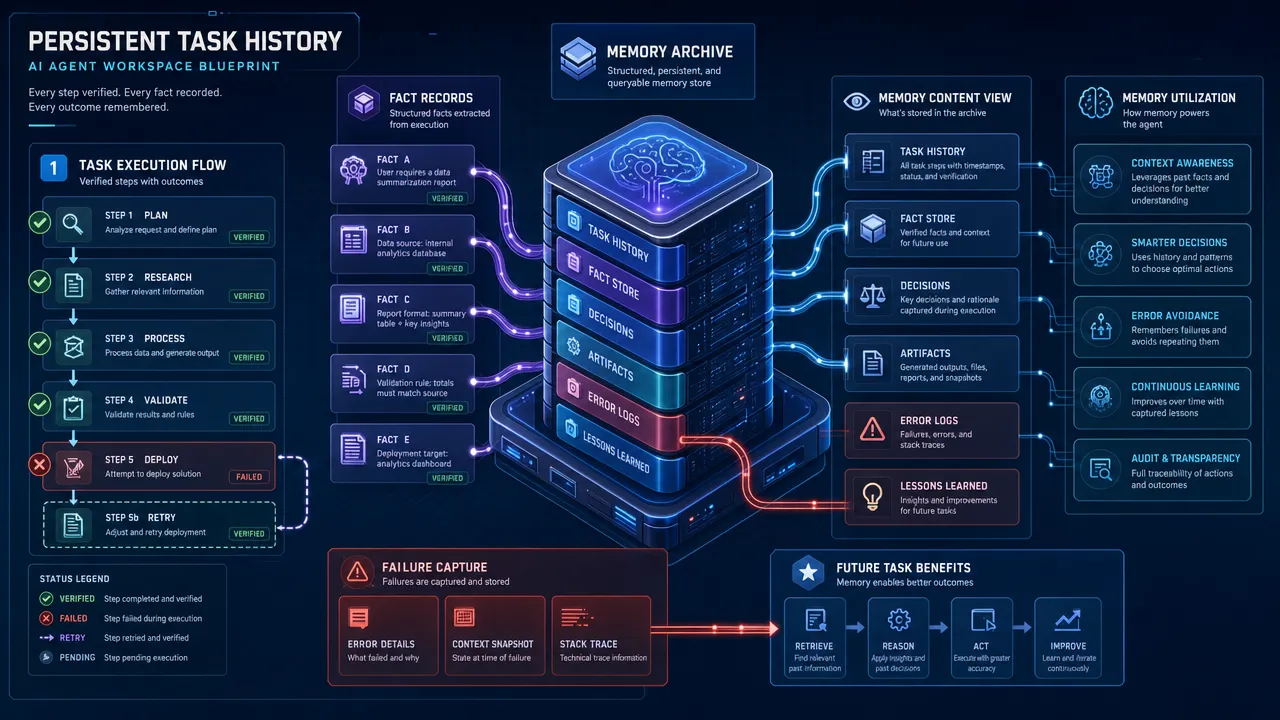
Major Update: Aiden has merged a coordinated firmware series that gives the Agent managed persistent memory for verified task history and notifications, reducing the context loss that slows long-running work. The update spans storage, extraction, merging, conflict handling, recall, cleanup, crash recovery, idempotent writes, deduplication, and end-to-end benchmark coverage across Episode memory and notification flows. You can continue related work with verified history instead of repeating prior explanations, and search relevant notification information instead of manually sorting through duplicates.

How notification memory changes task continuity

The merged firmware work enables the Agent to recall verified task steps, facts, and failure records in later tasks. That is a concrete advance for AI agent task memory: when follow-on work depends on known outcomes, the Agent has a managed path to bring verified history back into the task.

For you, the benefit is less reconstruction. Rather than restating why an earlier approach failed, which facts were established, or which steps already completed, you can continue from retained context when it is relevant. This is especially meaningful for long-running agent tasks that move across distinct sessions or phases of work.

Persistent Task History

This capability is part of a coordinated set of merged changes, tracked in PR #524, PR #548, PR #550, PR #563, PR #562, PR #561, and PR #571. The firmware should be understood as a system-level update, not as a collection of isolated features assigned to individual pull requests.

How notification memory improves retrieval

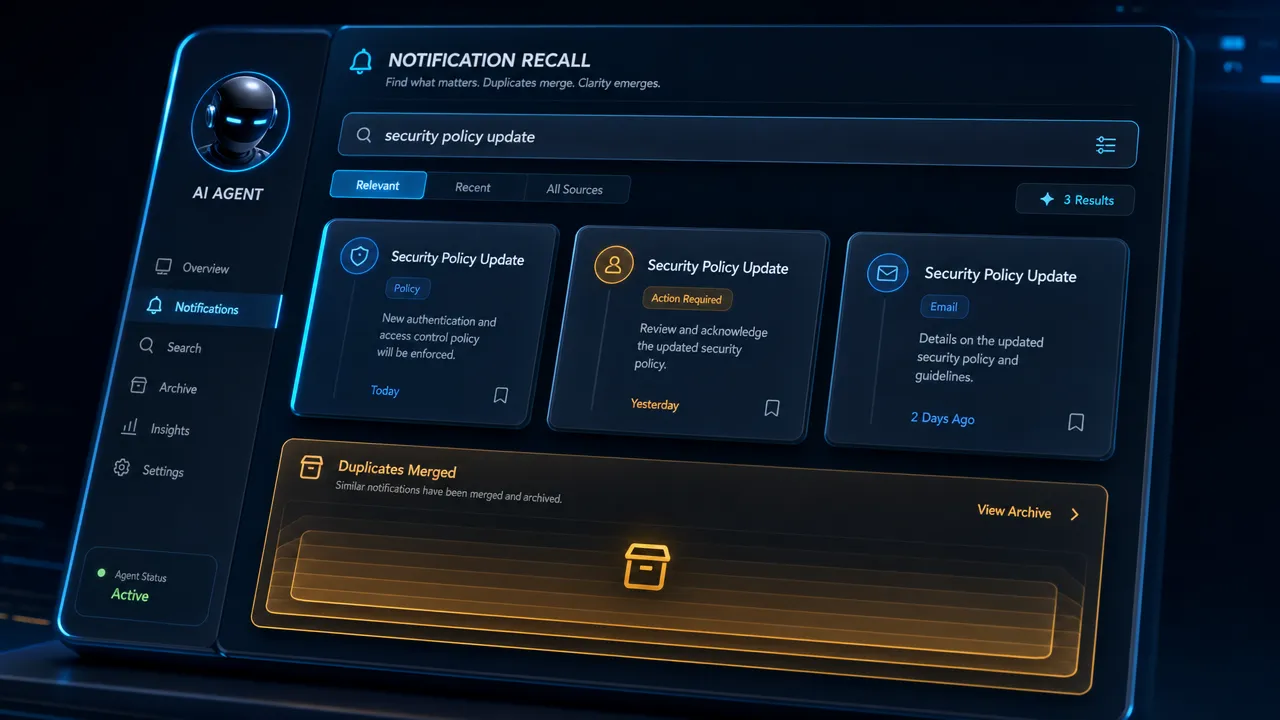
The Agent can query relevant notification information through recall_memory. Instead of manually reviewing a stream that may include duplicates, you can search for the notification context that matters to the task at hand.

The firmware also includes notification deduplication and supports temporary and long-term memory paths. This is not simply about retaining more events. It is about managing notification information so the Agent can retrieve relevant records through a defined memory flow. The audited work includes an end-to-end benchmark for this path, without published benchmark figures or claims about coverage.

Notification Recall

For automation developers, the operational difference is direct: you can search relevant notification information rather than scan repeated notices by hand. The Agent can use recall as part of later work, while storage remains subject to lifecycle handling rather than treating every incoming notice as permanently retained.

How notification memory applies lifecycle and conflict rules

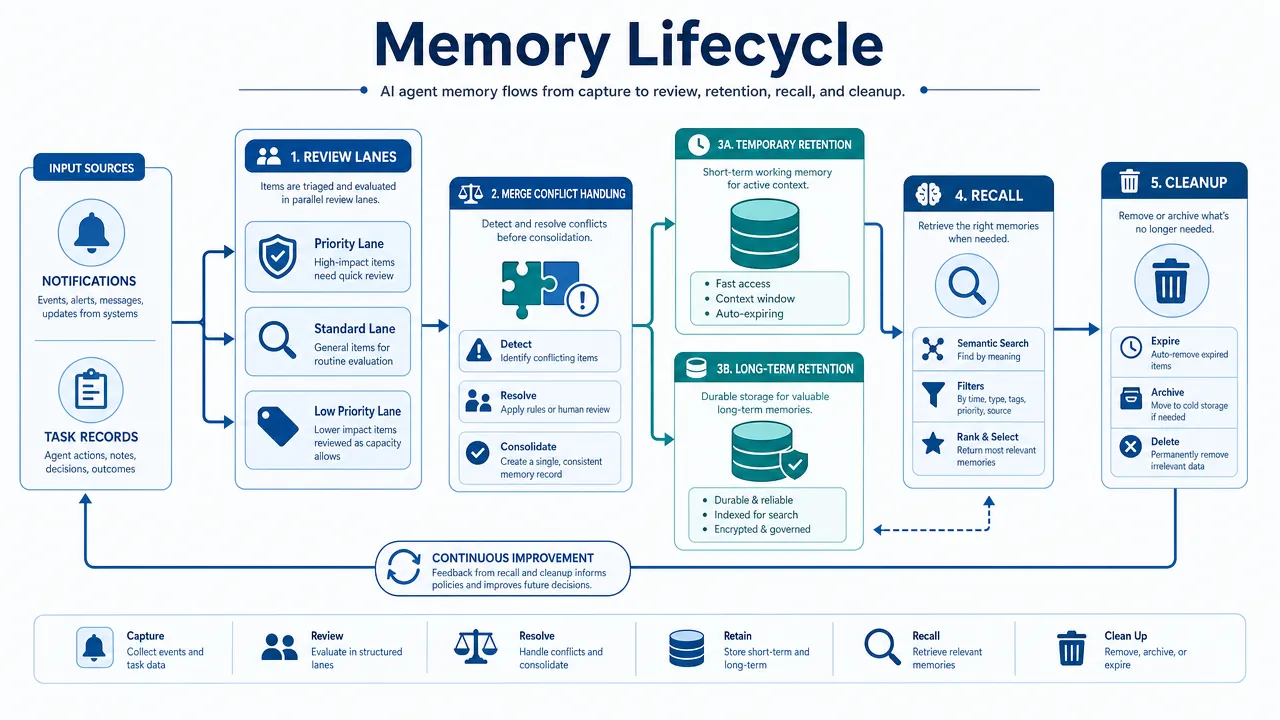
Memory handling now includes managed merging, conflict handling, cleanup, and temporary-versus-long-term treatment. New information is not presented as an unconditional append to an ever-growing record. The storage system has lifecycle and conflict rules for how memory items are handled across Episode memory and notifications.

The merged work also includes crash recovery and idempotent-write considerations. These additions strengthen the memory path around interrupted or repeated operations, but they are not a claim that every interruption is recovered or that duplicates can never occur.

Memory Lifecycle

The current audited behavior establishes managed continuity and retrieval for verified records. It does not establish complete capture of notifications, exhaustive recall in every task, indefinite retention, or automatic conversion of every notification to long-term storage. Broader capabilities remain future product direction, not a claim of this firmware update.

Where notification memory work continues

This release moves Aiden’s firmware forward by making task history and notifications more usable across later work while keeping the boundaries clear. The Agent can recall verified steps, facts, failure records, and relevant notification information within the audited scope. You gain a more practical way to resume work and find context without rebuilding it from scratch.

Follow the Aiden firmware repository for the merged implementation and ongoing work, and join the Aiden Discord community to discuss the update with other builders.

Aiden Makes Screen Capture On Demand for Faster Agent Actions

Major Update: Aiden firmware now moves screenshot capture from continuous frame reads to request-driven capture, so the Agent can request a current view when visual context is needed instead of keeping the capture path busy while idle. For vision and device-automation developers, this means less idle frame work and a clearer connection between an Agent action and the screen image used to inform it.

How on-demand screenshots for AI agents align capture with Agent actions

The previous continuous-read approach could keep the capture path active even when the Agent had no immediate visual decision to make. That creates background work during intervals where the next action does not depend on a new screen image.

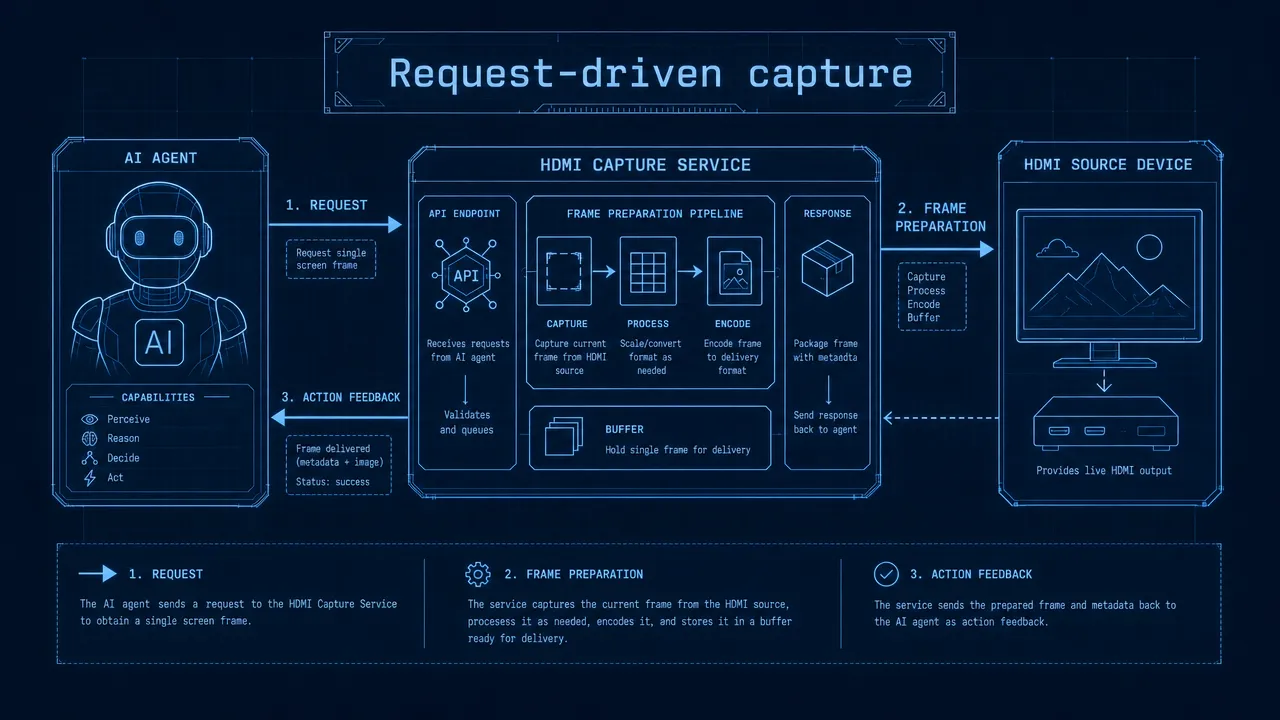
With this update, the Agent requests a frame at the point it needs one. When it needs to inspect an interface, verify the result of an input, or obtain context for the next decision, it can ask the capture service for a current view. When no image is needed, the capture path does not have to remain occupied by continuous screenshot reads.

This request-driven model makes on-demand screenshots for AI agents more deliberate in Aiden’s firmware. You can structure an automation flow around explicit visual checkpoints rather than treating capture as a continuously maintained default. Aiden captures the target display through its HDMI capture path, while the Agent uses screen context to guide device actions.

Request-driven capture

Reusing on-demand screenshots for AI agents in capture sequences

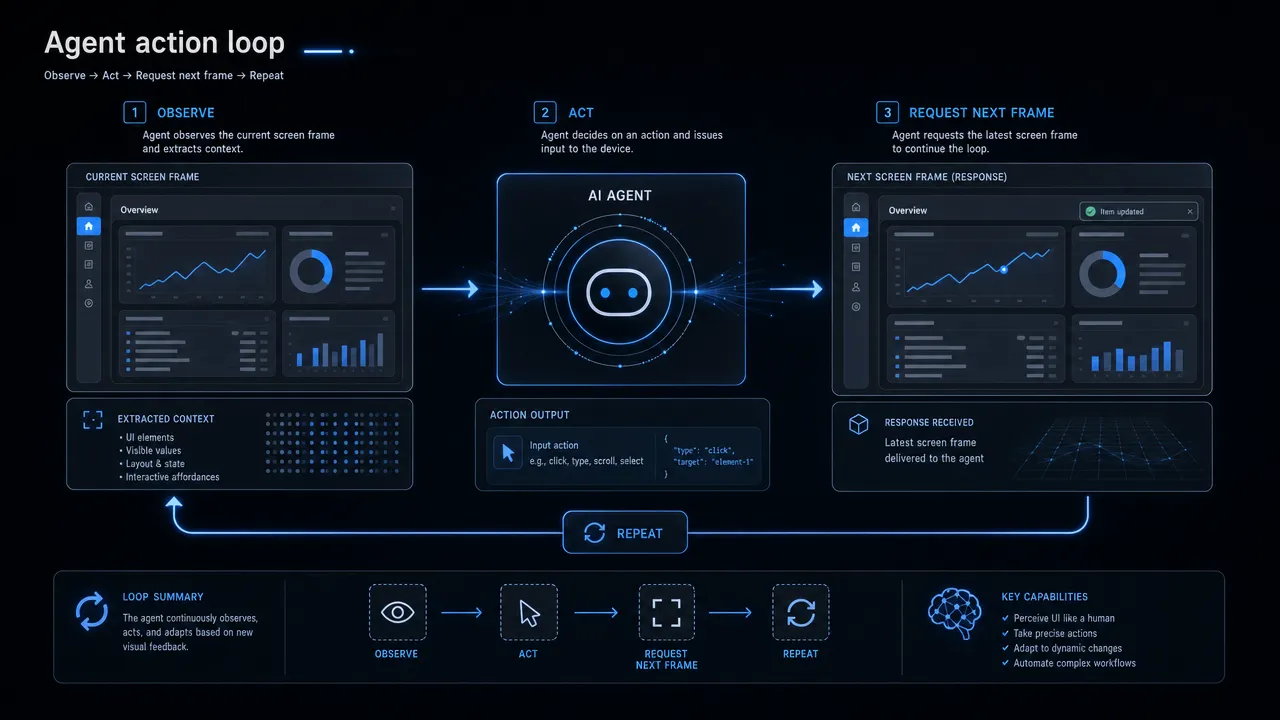
A single action may need more than one screenshot. The Agent might observe an interface, send an input, and then inspect the resulting screen state as part of an ongoing sequence.

For continuous screenshot tasks, the capture service can reuse capture state instead of treating every requested image as an entirely separate capture session. This is an important distinction for workflows that repeatedly observe a changing interface. You can retain a request-driven design without forcing the service to discard useful capture state between closely related frame requests.

The update also introduces configurable persistent STREAMON. When that behavior fits the task, the stream state can remain persistent for a sequence of captures. Combined with capture-state reuse, this gives Aiden a more suitable capture path for repeated observation while preserving the practical benefit of letting the Agent remain idle between unrelated visual needs.

This work is not a claim that every capture task should keep a persistent stream. It provides configuration and reuse behavior for cases where repeated screenshots are part of the same Agent workflow.

Preparing the requested frame before it moves downstream

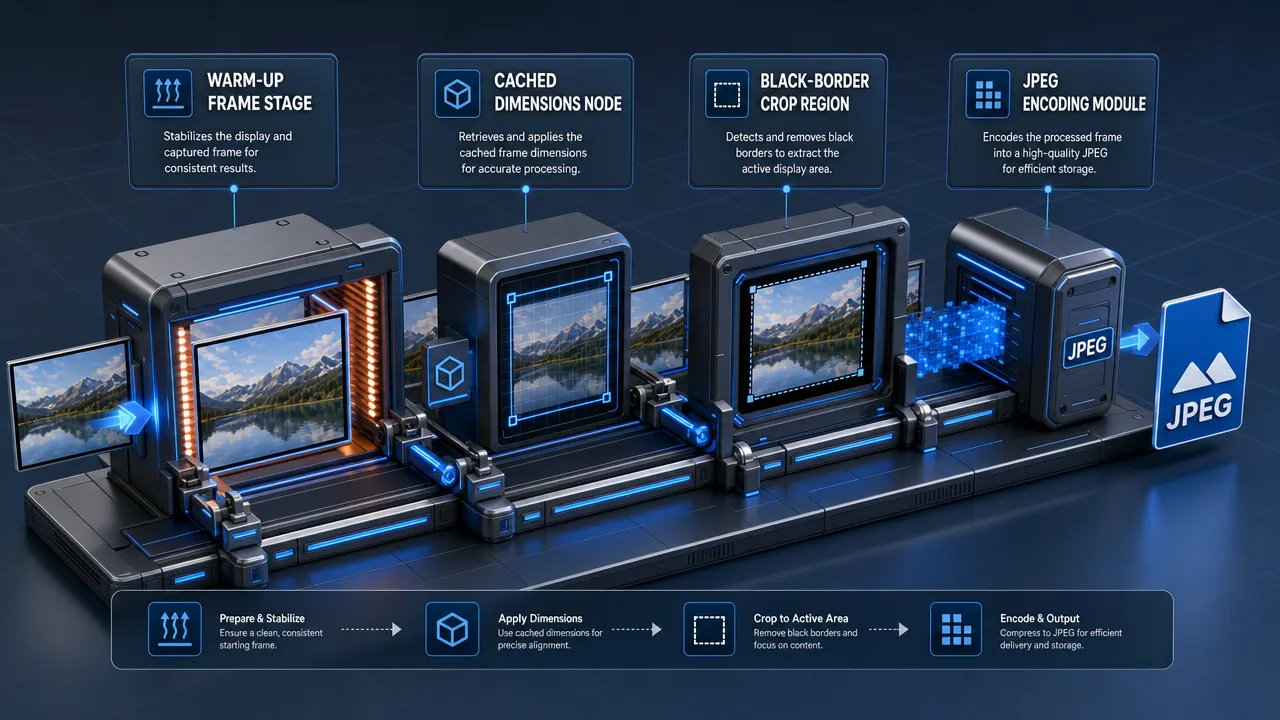
The merged changes also improve how a requested image is handled inside the capture pipeline. Aiden now adds warm-up frames, cached screen dimensions, black-border cropping, and hardware JPEG encoding.

Warm-up frames support the updated capture behavior before the requested image is passed onward. Cached screen dimensions let the capture flow reuse known dimension information rather than repeatedly obtaining it within each capture path. These are focused firmware improvements that support lower-friction handling of requested frames without making unsupported performance claims.

Black-border cropping is especially practical for visual reasoning and UI automation. When cropping is applied, the capture service can remove black borders before the image reaches the next stage. You receive a frame focused more closely on the captured screen content, rather than passing those borders to the downstream model or logic.

Hardware JPEG encoding is also part of the updated pipeline. It expands the encoding path available to the firmware, but it does not imply that every frame uses hardware JPEG encoding. The key change is more explicit control over when a frame is captured, how state is retained across a sequence, and how the resulting image is prepared.

Frame preparation pipeline

Audited Aiden firmware changes

These changes were merged in PR #521 and PR #559. Together, they establish request-driven capture as the central behavior and add the supporting controls needed for repeated screenshot tasks and frame preparation.

For developers building visual automation around Aiden, on-demand screenshots for AI agents provide a simpler operating model: the Agent asks for visual context when it needs it, capture state can be reused during an active sequence, and black borders can be cropped before the image is passed on. The result is a firmware path that better matches how device actions and visual checks occur in practice.

Agent action loop

Follow the Aiden firmware repository for ongoing work, and join the Aiden community on Discord to discuss the update.

Aiden Adds Responses API Context Recovery and Anthropic Stream Support

Major Update: Aiden firmware now adds Responses API mode, configurable context-management and truncation controls, local transcript recovery for expired response references, and Anthropic stream recovery behavior, giving you more control over how an agent task retains or rebuilds state across API interactions.

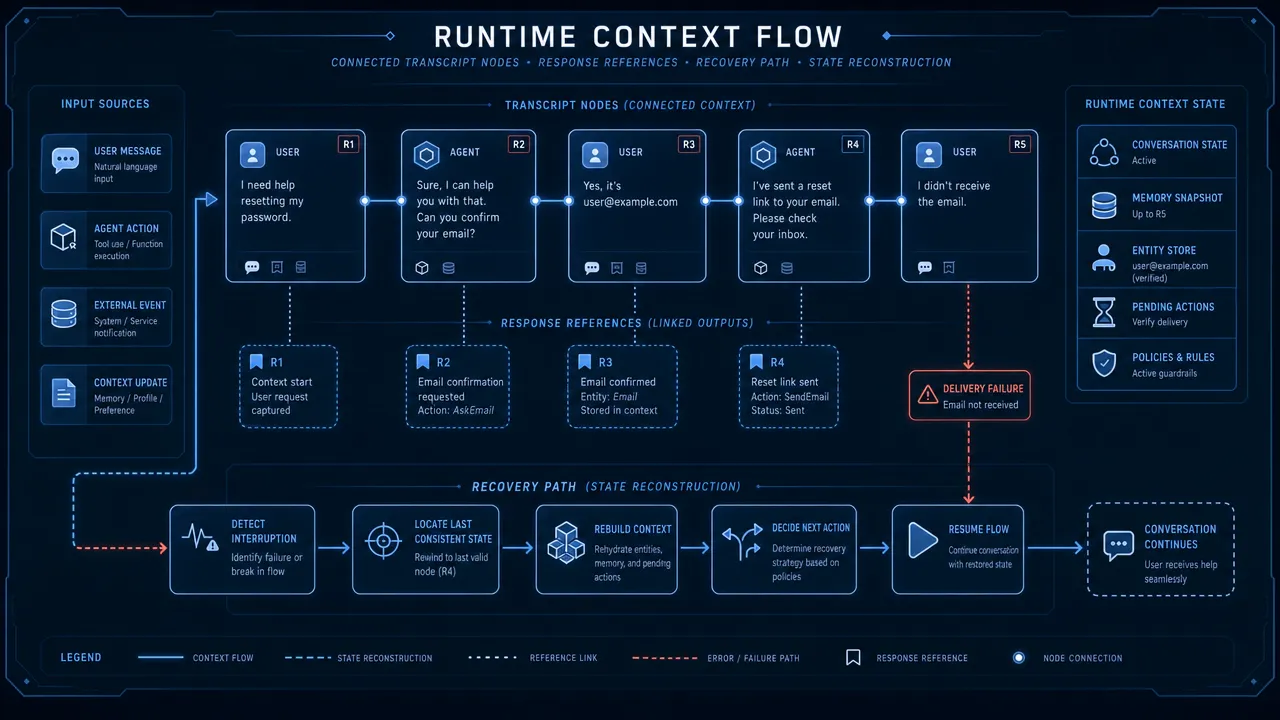
Runtime context flow

How AI agent context recovery keeps task state coherent

Aiden merged PR #542, PR #544, and PR #568 to advance continuity handling in the firmware and on-device agent runtime.

The update introduces a Responses API mode for cases where that interface fits the endpoint your task needs to call. This is an interface-selection capability, not a claim of universal compatibility. When the Responses API path matches your endpoint, you can select it rather than forcing the runtime through a different request pattern.

The same work makes context-management and truncation settings explicit controls. For developers building multi-step agent loops, conversation state is not merely a side effect of prior requests. It is part of the task state that must be carried forward deliberately. The new controls let you determine how Aiden handles that material as the task continues.

This is the practical value of AI agent context recovery in Aiden: you can select the relevant interface, define how context is managed, and retain a clearer path for continuing a task when its earlier response reference is no longer usable.

AI agent context recovery preserves the details a task needs

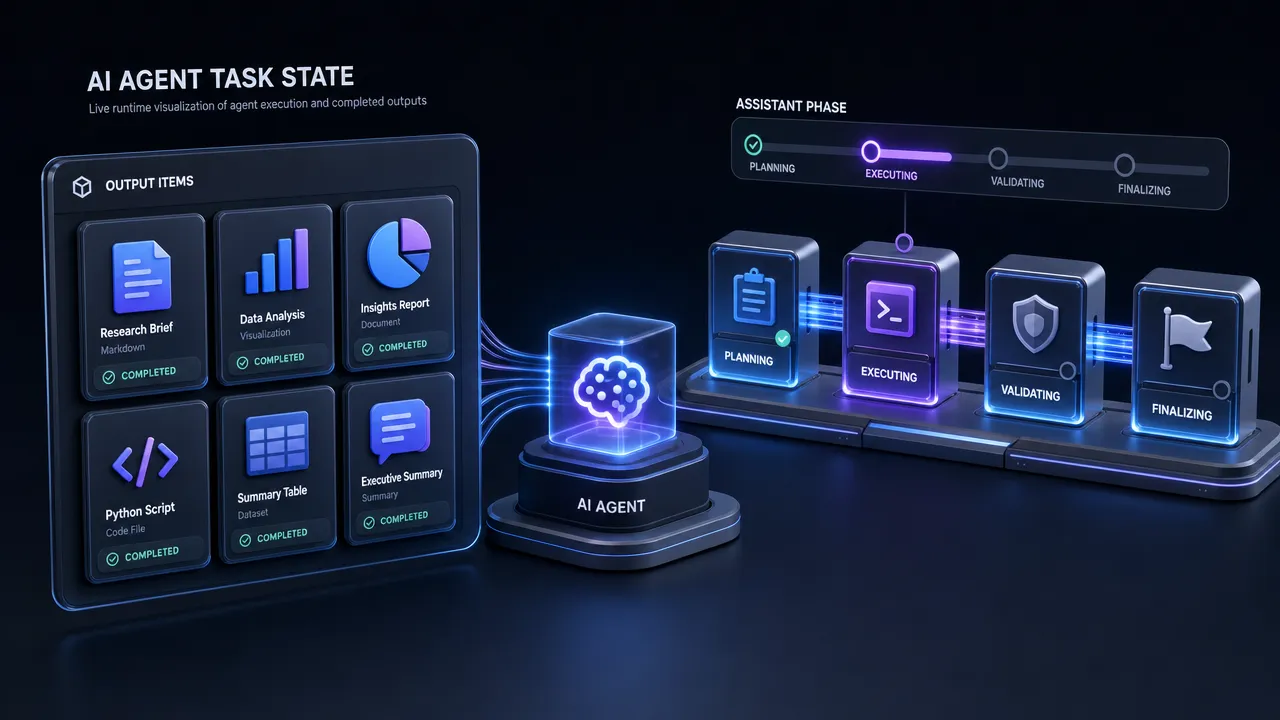
Aiden now preserves complete output items and the assistant phase. Both details matter when a runtime is operating across more than one request-response exchange.

Complete output-item preservation retains full units produced during execution instead of reducing the stored state to a partial representation. Assistant-phase preservation retains the runtime’s position in the interaction sequence. Together, these changes help Aiden maintain a coherent account of what has happened and where the task should resume.

Preserved task state

The effect is especially important when subsequent work depends on more than a final text response. Agent tasks may need to account for the output items that were generated along the way and the assistant phase in which they occurred. Preserving those pieces does not promise that every task can be reconstructed in every condition, but it provides the runtime with a more complete local state record for follow-on processing.

For Aiden, which uses a Go-based agent runtime to evaluate configured multimodal model output and direct device actions through USB HID, coherent state handling is part of keeping a task’s execution path understandable. This firmware progress focuses on the runtime layer that carries conversational material between those API interactions.

AI agent context recovery handles expired response references

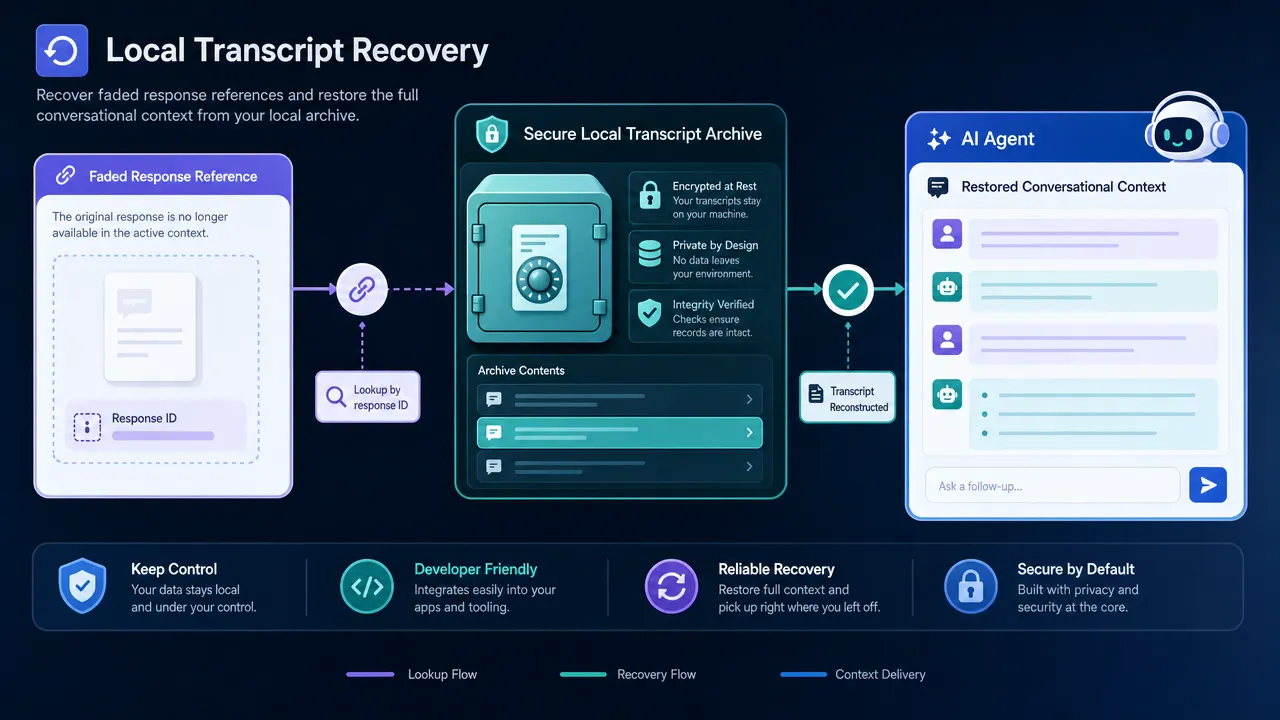
Aiden also addresses a specific state-continuity boundary: an expired previous_response_id. When that reference can no longer be used, a task can rebuild the needed conversation context from its local transcript.

That reduces a concrete source of friction for developers. A task no longer has to treat a previous response reference as the only record available for continuing a conversation. Instead, the local transcript can supply the relevant material needed to restore context for the defined expiration case.

Local transcript recovery

The change is intentionally narrow. It does not eliminate all failure modes, guarantee recovery in every circumstance, or remove network-related issues. It establishes a local context path when the prior response reference has expired, while complete output-item and assistant-phase preservation help the task state remain more coherent around that process.

AI agent context recovery also covers Anthropic streams

The merge includes stream recovery behavior for Aiden’s Anthropic execution path. For teams using an Anthropic streaming API endpoint, this means the firmware now includes recovery-oriented handling for streamed task state.

As with the response-reference work, the scope is precise. The update does not claim uninterrupted streaming or the removal of network failures. It adds stream recovery behavior within the implemented Aiden runtime path, alongside the context-management improvements introduced in the same firmware work.

Follow the Aiden firmware project. Join the Aiden community on Discord.

Aiden Unifies Device Input Across HID, ADB, and HTTP Providers

Major Update: Aiden has unified its input layer so you can keep one set of action semantics for common device interactions while the device type you configure selects the corresponding behavior. This firmware progress brings a clearer approach to cross-platform device input for mobile, desktop, and device-automation development: describe familiar actions consistently, then direct them through the configured HID, ADB, or HTTP path.

How cross-platform device input preserves shared action semantics

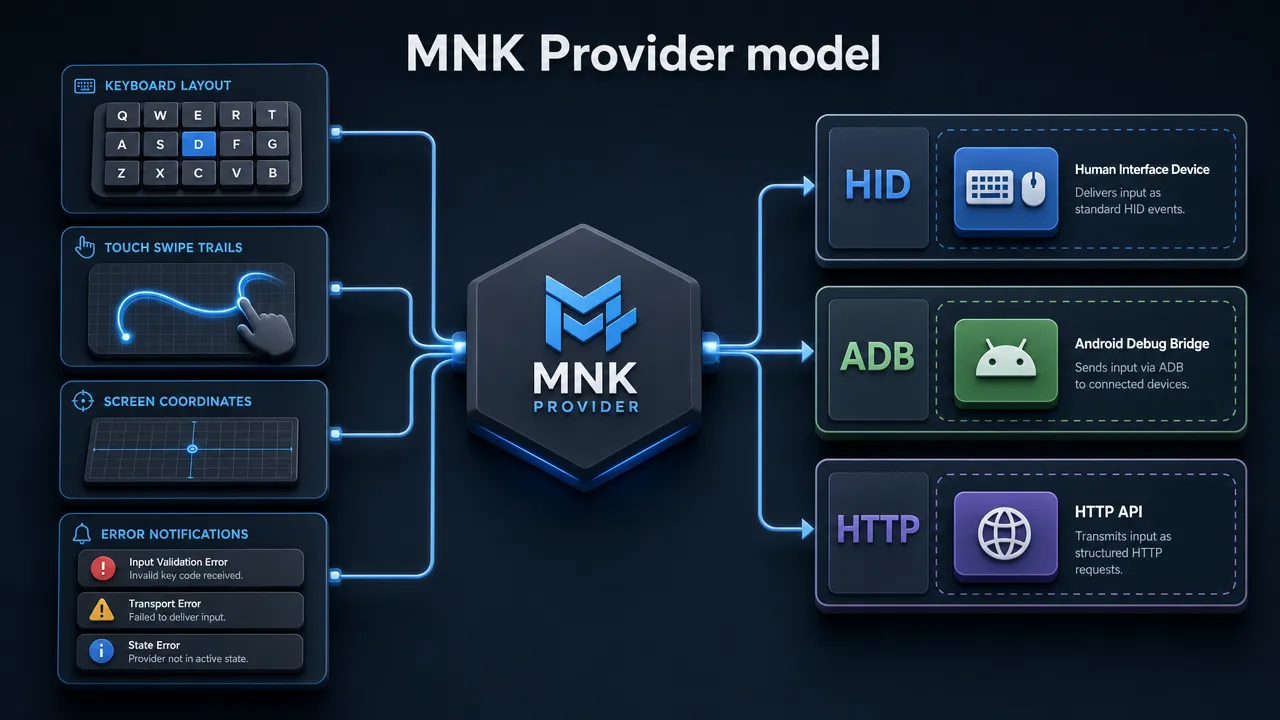
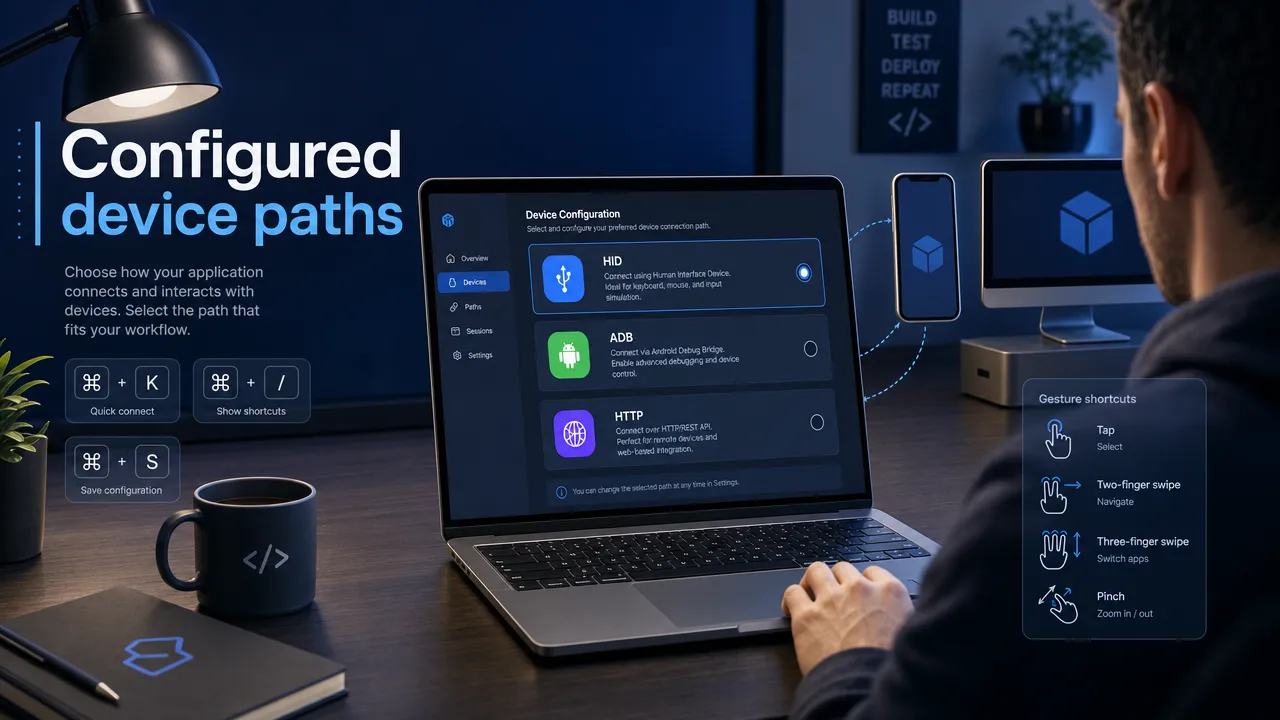
Aiden now abstracts device interaction through an MNK Provider. The provider supplies a shared model for input while retaining three distinct configured input paths: HID, ADB, and HTTP.

That separation is important. HID, ADB, and HTTP are not combined into one transport, and Aiden does not treat their underlying behavior as interchangeable. Instead, the MNK Provider gives the firmware a consistent way to represent common input operations across those configured paths.

For you, the immediate benefit is less friction when describing actions. After you set a device type, the same tool semantics can represent clicks, swipes, keyboard shortcuts, and text input. The configured device type then selects the corresponding behavior for the path in use.

This lets your action vocabulary remain stable as your work moves between supported configurations. A click still represents a click, a swipe still represents a swipe, and text entry remains text entry, even when the configured path changes.

Cross-platform device input unifies the details behind each action

The update extends beyond naming common actions. Aiden now unifies the information needed to make those actions meaningful:

  • Keyboard layouts for keyboard-oriented input.
  • Touch gestures for gesture-oriented interaction.
  • Coordinates for position-based actions.
  • Structured errors for consistent failure reporting.

MNK Provider model

The unified model does not erase the differences between the paths. It provides a common semantic layer above them. You can express an action in familiar terms while the selected device type determines how that action is handled.

This is especially useful for HID and ADB automation work, where the same high-level operation may need different path-specific behavior. Rather than redefining the intent of the operation each time, you can retain the intended action and rely on the configuration to select the applicable behavior.

Device type configuration remains an explicit choice

Aiden does not automatically identify or recognize the target platform. You set the device type yourself, and that choice remains required because it determines the configured input path and the behavior used for an action.

Configured device paths

This distinction keeps the model precise. The MNK Provider offers a shared structure for common device input operations, but it does not replace configuration with target detection. You choose the device type; Aiden applies the behavior associated with that configuration.

For developers maintaining automation across mobile and desktop contexts, that means fewer changes to the way actions are expressed while preserving the reality that different input paths have different implementations. The result is a more coherent firmware layer without implying broad compatibility claims or a single all-purpose connection method.

Aiden firmware changes behind the unified layer

This input-layer progress was merged through PR #539, PR #543, PR #556, and PR #560.

Together, these changes establish the current direction for the Aiden firmware and its MNK Provider: shared semantics for common input actions, with HID, ADB, and HTTP maintained as separate configured paths. That is a practical foundation for developers who need consistent action definitions without losing the configuration choices that make each path meaningful.

Follow the Aiden firmware repository and join the Aiden Discord community.

Aiden Adds Full-Duplex Voice and Interruptible Agent Tasks

Major Update: Aiden firmware now adds a full-duplex AI agent runtime, giving you a more continuous voice interaction path and clearer control when an Agent is active, using tools, or waiting on a person to take an action.

How the full-duplex AI agent reduces interaction friction

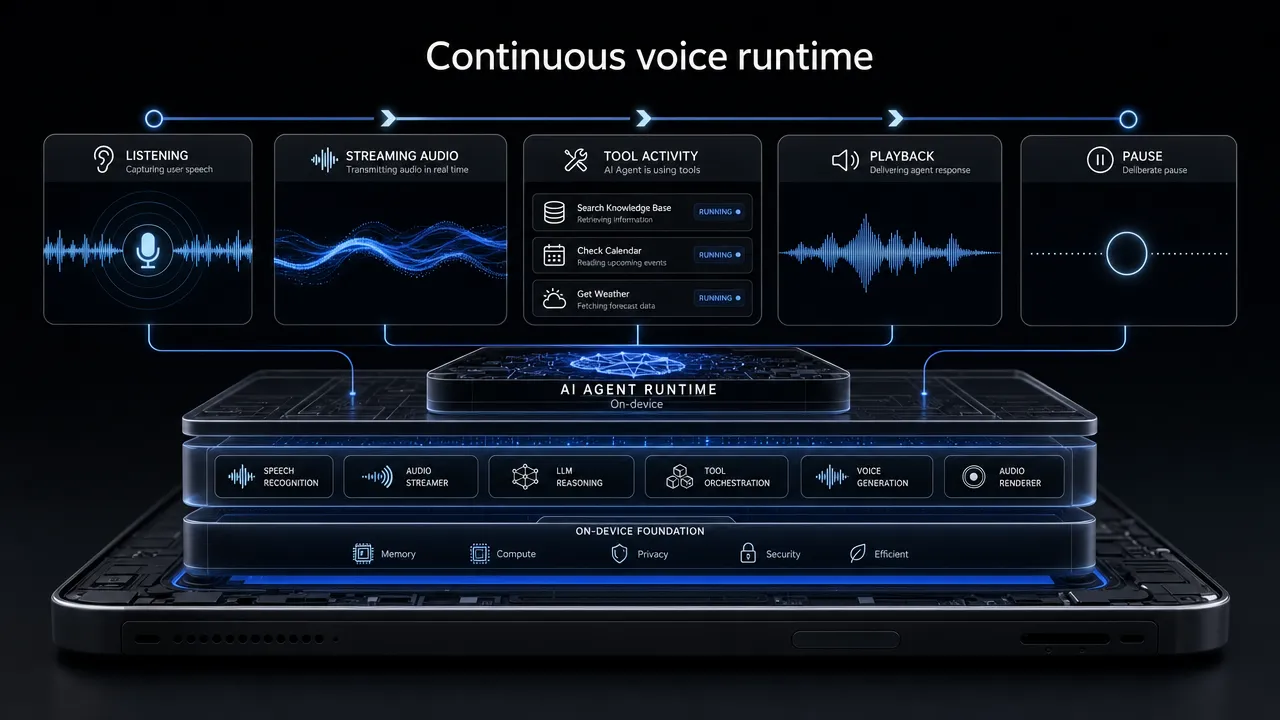
Voice workflows can become awkward when listening, playback, and Agent work behave like separate, fixed turns. This firmware change reduces that friction by supporting an active interaction that can continue through listening, streaming audio, Agent activity, playback, tool calls, and an intentional interruption.

For developers building real-device experiences, that means an interaction no longer needs to be framed as a request that must finish before the user can respond again. The updated runtime provides a control path for deliberate interruption while the Agent is active. It does not imply that every interruption is automatically understood, or that any external action caused by a tool call can be reversed.

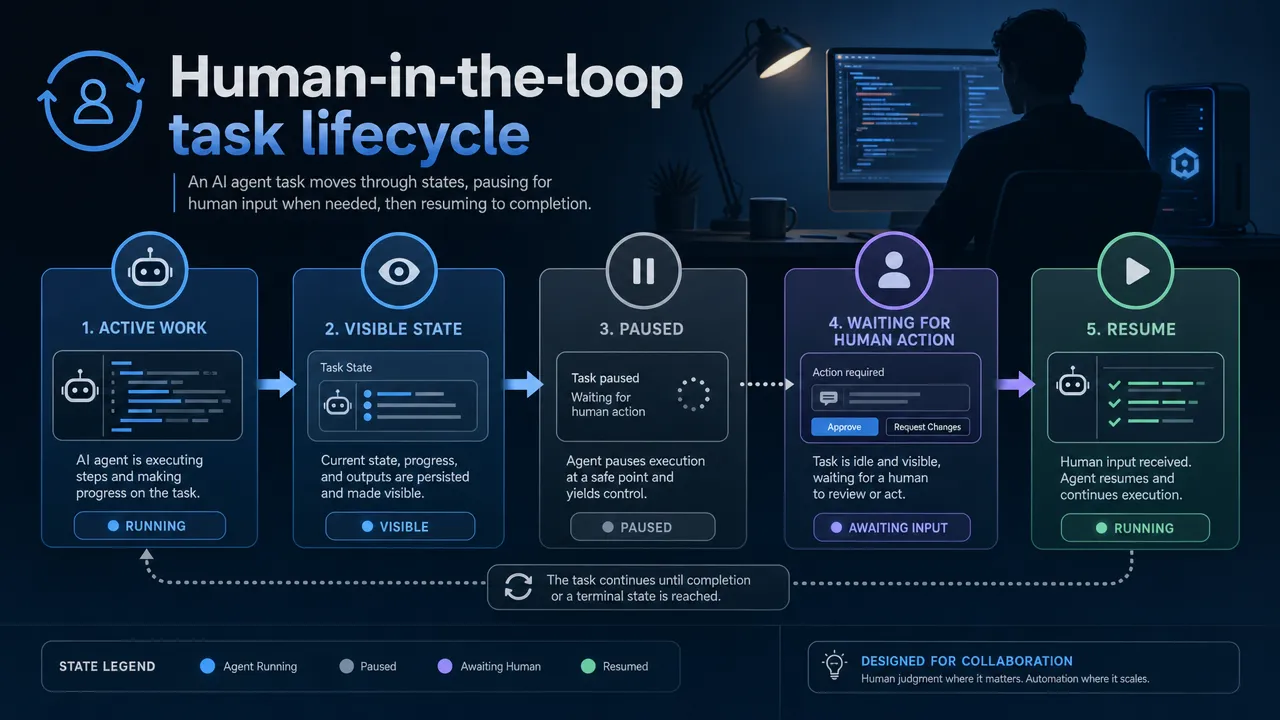
The same improvement applies to longer-running work. Rather than treating a human handoff as an abandoned run, a task can expose its state, pause, wait for a user action, and resume after that action is available. This creates a more practical lifecycle for flows where the Agent needs a person to confirm, provide, or complete something before work can continue.

Continuous voice runtime

What changes in Aiden for a full-duplex AI agent

The merged firmware change set introduces a full-duplex AI agent runtime alongside real-time voice wake, streaming audio, tool-call interruption, background-task cancellation, and pause/resume behavior.

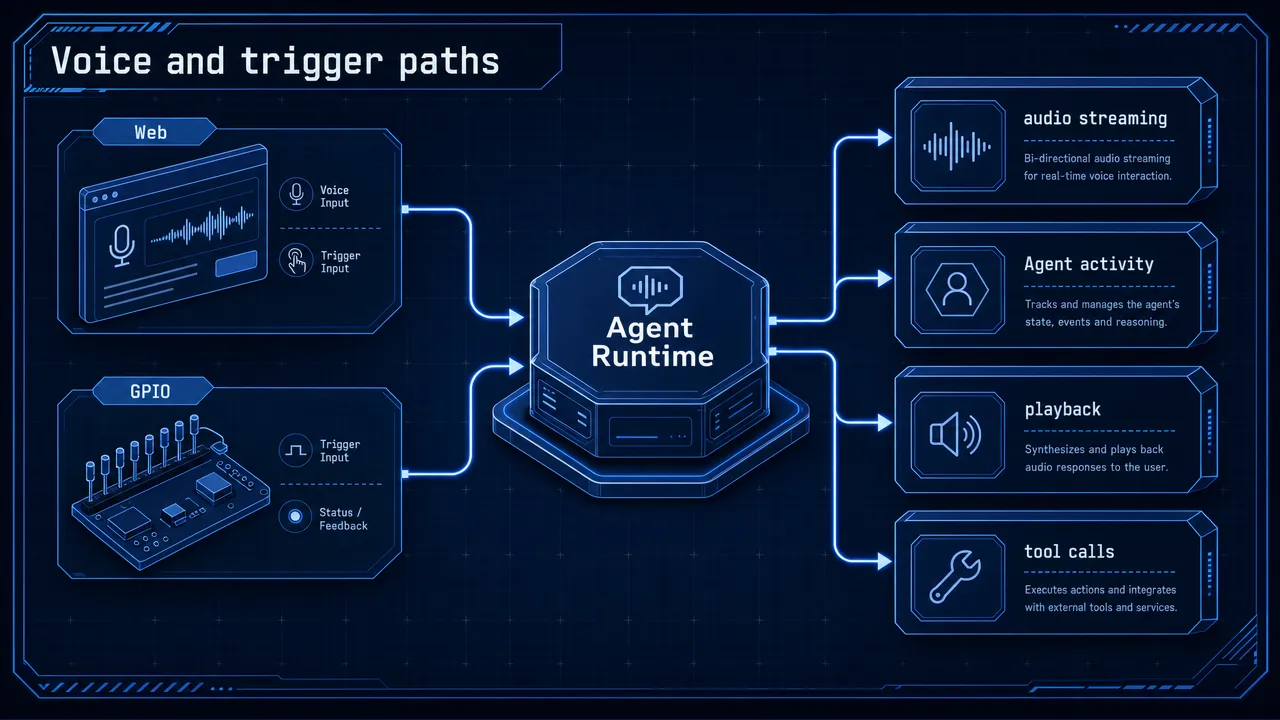
Real-time interaction can begin through either a Web trigger path or a GPIO trigger path. These are distinct entry routes: the Web path provides a Web-originated trigger, while the GPIO path is the device-oriented trigger route. STT now defaults to the GPIO wake path and requires the corresponding hardware conditions.

Together, these capabilities support a real-time voice agent experience in which the Agent can remain active across voice input and output instead of treating an interaction as a single completed exchange. Streaming audio supports the live interaction path, while tool-call interruption gives the runtime a way to stop tool activity during an active interaction.

The combined work is represented by PR #566, PR #555, PR #573, PR #576, and PR #577. These PRs should be read as one merged update set rather than as separate claims that assign a single capability to one PR.

Voice and trigger paths

What you can do now with a full-duplex AI agent

You can design interactions around control states rather than an all-or-nothing voice exchange. A user can intentionally interrupt an active interaction, and the runtime includes a path to interrupt tool calls. Background work can also be canceled through the updated task lifecycle.

These interruptible AI tasks are distinct controls. Interrupting a foreground voice interaction is not the same as stopping a tool call, and neither is identical to canceling background work. The update provides these control paths without promising rollback for work that has already produced an external side effect.

For long-running workflows, Aiden can expose task state, pause when human involvement is needed, wait for a user action, and resume afterward. This is especially relevant when you are building Agent flows that should visibly hand off to a person instead of continuing without the needed action. Resumption is a supported lifecycle behavior, not a guarantee that every task completes under every condition.

Human-in-the-loop task lifecycle

Follow the full-duplex AI agent firmware work

Follow the Aiden firmware repository for ongoing implementation work, and join the Aiden Discord to follow the project with the community.

Aiden Expands Device Workflows Across Phones, Containers, and HDMI

Major Update: Aiden device workflows now connect phone notifications and supported iOS background wake, a Docker Agent sandbox, and dual HDMI bridge support. Together, these changes give you clearer ways to work across a connected phone, a containerized service environment, and supported display-capture paths. The updates preserve important boundaries: wake signaling is separate from task traffic, the sandbox does not replace physical devices, and bridge support remains dependent on the compatible configuration in use.

Phone notifications enter a shared context

Aiden now joins iOS ANCS and Android Notification Access events in a shared notification context through PR #486, PR #499, and PR #501. This creates a common context for notification events coming from supported mobile platforms, so your connected environment can handle those events through a more consistent model.

For supported iOS calendar, contact, and local-notification tasks, the update adds authenticated iOS background wake while the phone remains connected over USB ECM. The design is deliberately narrow. Bluetooth Low Energy carries only a non-sensitive wake hint, not commands, results, or task data. It does not turn BLE into a phone-control or task-transport channel.

Commands and results continue to travel through the USB ECM queue. That distinction helps you evaluate behavior accurately: the wake hint can signal timely awareness of a supported iOS event, while the established wired queue remains responsible for the task communication path. A notification status such as delivered=true should not be read as confirmation that a related tool action has completed.

Android notification events participate in the shared notification context, but this update does not add the equivalent wake capability on Android. The merged work expands supported event awareness while keeping the iOS wake path and the Android notification path distinct.

The service layer can start in Docker

The Docker Agent sandbox introduced in PR #523 adds a Docker Compose environment that starts Config Web and Agent Web without requiring a development board. Configuration and runtime state persist across sandbox use, allowing your service-layer environment to retain its relevant working state.

You can connect MobileGym, ADB, or compatible environment bridges to the sandbox. That makes it practical to separate service development and integration work from setups that depend on a board. It also gives you a repeatable place to inspect web services and bridge connections before moving to a physical configuration.

The Docker Agent sandbox is a development environment, not a replacement for a virtual machine or a complete hardware emulator. It does not reproduce every board-dependent function, and hardware-only capabilities still require a board or compatible bridge. That separation is intentional: you can run the service layer in containers while continuing to use the appropriate connected environment when your workflow depends on physical capture or control capabilities.

This approach gives you a more focused boundary for Aiden device workflows. You can keep Config Web, Agent Web, persisted state, and supported bridge connections together in Docker, then introduce a board or compatible bridge only where the workflow genuinely needs one.

Screenshots follow a common provider path

Aiden’s HDMI bridge support now covers RK628D and TC358743 through PR #506, PR #507, and PR #519. Rather than treating both bridge families as interchangeable, the system selects the matching active bridge path for the supported configuration in use.

The update also sends screenshots from Device, MobileGym, ADB, and VPhone through a common provider path. This shared routing helps align screenshot handling across those environments while retaining the correct active path for the selected bridge.

In the reviewed Luckfox scenario, RK628D reached 1080p60. That result is specific to the reviewed setup, not a universal performance commitment across device combinations. Support for RK628D and TC358743 also does not extend to arbitrary HDMI adapters, imply identical validation for both bridge families, or automatically recognize a target platform.

These merged changes extend Aiden across connected phone context, containerized services, and supported display-capture configurations while keeping the technical boundaries clear. Follow Aiden’s project progress for future implementation updates.

Native Anthropic Support and Unified Provider Management in Aiden

Major Update: Aiden Firmware has merged native Anthropic support and unified Provider management, giving you a dedicated Anthropic integration path while making Provider behavior more consistent across language, text-to-speech, and speech-to-text services. These are merged firmware changes, not a universal rollout, and their availability depends on your configured Provider, endpoint, firmware environment, and supported capabilities.

The runtime path we added

The new native Anthropic support gives Aiden a defined path for the Anthropic Messages API rather than treating Anthropic-format requests solely as a generic compatibility case. You can use Provider-level custom endpoints when your deployment requires one. Endpoints remain explicitly configured, and the update does not verify every third-party service.

The work in PR #504, PR #508, PR #518, and PR #532 adds shared runtime bindings for the native path, along with streaming responses, multimodal content handling, tool calls and tool results, and structured stream diagnostics.

For your Agent workflows, Claude tool use is covered in both directions: the firmware can represent tool-call messages and the results returned to the model. Streaming and structured diagnostics create a clearer foundation for following response events as they arrive, while multimodal content is within the scope of this implementation.

That scope is intentionally specific. These merged changes do not cover every Anthropic or Claude capability, persist thinking signatures across turns, add a non-stream fallback, change retry behavior, or make the update available in every firmware environment. Instead, they give Aiden a more direct way to model the request, response, and streaming lifecycle elements that this integration supports.

What changes in Provider configuration

In parallel, PR #495, PR #496, PR #525, and PR #529 unify Provider metadata and configuration behavior across LLM, TTS, and STT services.

For your AI Provider configuration, Config Web now remembers the last model selected for each LLM Provider. When you return to that Provider, your prior model selection can remain associated with it, reducing repeated selection work across Provider changes.

The same shared foundation also connects TTS HTTP Server and AudioDialog to the same Provider generation during hot switching. In practical terms, those components use coordinated Provider state when the active Provider changes. This update is about consistent configuration and shared generation behavior, not a claim of better model quality, voice quality, retry behavior, or universal device support.

What this means for your Aiden setup

Together, these firmware updates reduce fragmentation across two important areas: a dedicated Anthropic path for supported interaction patterns, and a shared Provider foundation for model and audio configuration. You can maintain Provider-specific model selections with greater continuity while audio-facing components coordinate during Provider changes.

The update gives you a clearer configuration path and more useful stream diagnostics without turning a defined implementation into a claim of complete Claude coverage. Follow Aiden’s project progress for future firmware milestones and community technical updates.

Recoverable Long Tasks and Persistent Python Tools in Aiden

Major Update: Merged Aiden Firmware changes now give your Agent more ways to preserve continuity when a long task reaches a Provider context limit, a tool returns a large saved result, or Python dependencies need to survive beyond one session. Together, these changes reduce avoidable repeated work and help retain useful task state without overstating what recovery can guarantee.

When long tasks reach a Provider context limit

A long-running task can accumulate enough conversation and tool context to exceed a Provider’s context limit. With PR #497 and PR #498, the Agent now has a defined response to that specific interruption.

When a Provider returns a context-limit error, the Agent can compress its working context, move to a new session, and retry the work once. Instead of immediately ending the task at the limit, your Agent has an opportunity to resume with a more manageable context.

This recovery path is intentionally bounded and does not guarantee that every interrupted task will finish. The Provider response, the state of the work, and other errors still determine what happens next. The merged changes simply provide a structured way to attempt continuation after the context-limit case they address.

How large tool result recovery preserves completed work

A tool can finish meaningful work before its output becomes difficult to carry forward in a single context. PR #530 introduces large tool result recovery so the Agent can use saved result details instead of automatically repeating an operation that has already run.

The Agent can recover a saved large tool result’s continuation ID, status, error details, and output tail. These fields give it practical information for deciding what to do next: a continuation identifier where the underlying operation supports one, the prior result state, relevant error context, and the final portion of output that shows the most recent activity.

For your workflows, that can mean a recovery attempt starts from what the tool already accomplished rather than reflexively invoking the same work again. This is particularly useful when repeating an action would be slow, costly, or disruptive.

It also supports more recoverable AI agent tasks by retaining the state your Agent needs to make a better continuation decision. The recovered fields may still be incomplete for a particular Provider or failure mode, but they can help avoid duplicate work when the result supports a continuation path.

Persistent Python dependencies across sessions and restarts

Continuity also depends on whether the working environment remains available after a session ends. PR #505 changes the location for Python packages installed through Aiden’s existing Shell tool. Packages are stored under /userdata/agent/python.

That location allows the Agent service and the login shell to reuse installed packages across Agent sessions and device restarts. You can avoid reinstalling the same dependencies solely because a session closed or the device restarted, making repeat work more consistent when your task depends on Python tooling.

The Shell tool remains the installation path. This merged firmware change does not add a package-install tool, virtual environments, or lock files. It focuses on retaining the user-level Python package base so dependencies can remain usable under normal conditions.

There is an important boundary to plan for: StorageMonitor may clear the Python user base in an emergency. The packages are persistent when storage permits, not immutable. If a workflow relies on particular dependencies, you should account for the possibility that emergency cleanup may require reinstallation.

Three connected improvements to Aiden Firmware continuity

These changes address different points where an otherwise useful task can lose momentum. Context compression and a one-time retry address a defined Provider limit. Saved-result state helps the Agent avoid repeating completed tool work. Persistent Python packages keep more of the task environment available across sessions and restarts.

They are merged Aiden Firmware changes, not a universal production rollout or a guarantee of completion on every device. Their practical value is more measured: when the relevant conditions are present, your Agent has better state to work from and a clearer path to continue.

Follow Aiden’s project progress for future firmware updates and the next set of reliability improvements.