AI Agent Hardware Briefing — 2026-07-13

Summary

  • Terminal manufacturers compete to develop next-generation AI operating systems as new entry points
  • Simular identifies Korea’s hardware capabilities as a competitive advantage in the AI agent era
  • Apple Watch dominates with 90% of AI smartwatch shipments as Edge AI reaches 25% penetration
  • Apple and Broadcom’s $30B partnership aims to strengthen AI chip development strategy
  • Samsung enters AI PC chip market by providing samples to Lenovo and HP
  • Huaqin Technology produces first AI agent phone for Stepfun, disrupting hardware segments
  • Step Stars launches AI agent smartphone today to compete with OpenAI’s offerings
  • Smartphones become the new battleground for large AI models with hardware benefits
  • Apple’s discontinued car project technology lives on in Neural Engine AI chip
  • Edge AI smartwatches deliver on-device intelligence for advanced health monitoring

AI Operating Systems Spark Terminal Competition

Terminal manufacturers are racing to develop next-generation AI operating systems, creating new entry points for AI agent hardware. The concentrated debut of these systems signals a major shift in how devices will interact with users through advanced AI capabilities.

Read Full Article: 36 Kr

Korea’s Hardware Advantage in AI Agent Era

Simular highlights Korea’s strong hardware manufacturing capabilities as a key competitive edge in the emerging AI agent era. The country’s established technology infrastructure positions it well for developing and producing next-generation AI-powered devices.

Read Full Article: The Korea Herald

Apple Watch Dominates AI Smartwatch Market

Apple Watch commands 90% of AI smartwatch shipments while Edge AI technology achieves 25% market penetration in Q1 2026. This dominance demonstrates Apple’s successful integration of on-device AI capabilities in wearable technology.

Read Full Article: MacDailyNews

Apple-Broadcom $30B Deal Advances AI Chips

Apple and Broadcom’s $30 billion partnership strengthens AI chip development strategy for future devices. This massive investment signals both companies’ commitment to advancing custom silicon designed specifically for AI workloads.

Read Full Article: TradingView

Samsung Challenges AMD and Apple with AI PC Chips

Samsung enters the AI PC processor market by sampling chips to major manufacturers Lenovo and HP. This move positions Samsung to compete directly with established players AMD and Apple in the rapidly growing AI-powered computer segment.

Read Full Article: TradingKey

AI Agent Phones Transform Hardware Market

Huaqin Technology manufactures Stepfun’s first AI agent phone model, triggering value reshuffles across five key hardware segments. The flood of AI agent phones entering the market represents a fundamental shift in mobile device capabilities and user expectations.

Read Full Article: finance.biggo.com

Step Stars Launches AI Agent Smartphone Today

Step Stars, a large model AI company, unveils its first AI agent terminal on July 13th to compete with OpenAI. This launch represents the growing trend of AI companies entering the hardware market to control the full user experience.

Read Full Article: AIBase

Smartphones Become AI Model Battleground

Smartphones emerge as the new competitive arena for large AI models, creating opportunities across multiple hardware segments. This transformation positions smartphones as "super platforms" for AI deployment, benefiting component suppliers and manufacturers.

Read Full Article: 富途牛牛

Apple’s Car Project Legacy Lives in Neural Engine

Apple’s discontinued autonomous vehicle project contributed to developing the Neural Engine AI chip, now crucial for on-device AI processing. This technology transfer demonstrates how failed projects can yield valuable innovations for other product lines.

Read Full Article: The Tech Buzz

Edge AI Smartwatches Enable Advanced Health Monitoring

New Edge AI smartwatches deliver on-device intelligence for sophisticated health features without cloud connectivity. These devices process health data locally, ensuring privacy while providing real-time insights and advanced monitoring capabilities.

Read Full Article: chshyd.in

USB HID vs ADB: How AI Agents Actually Control Your Phone

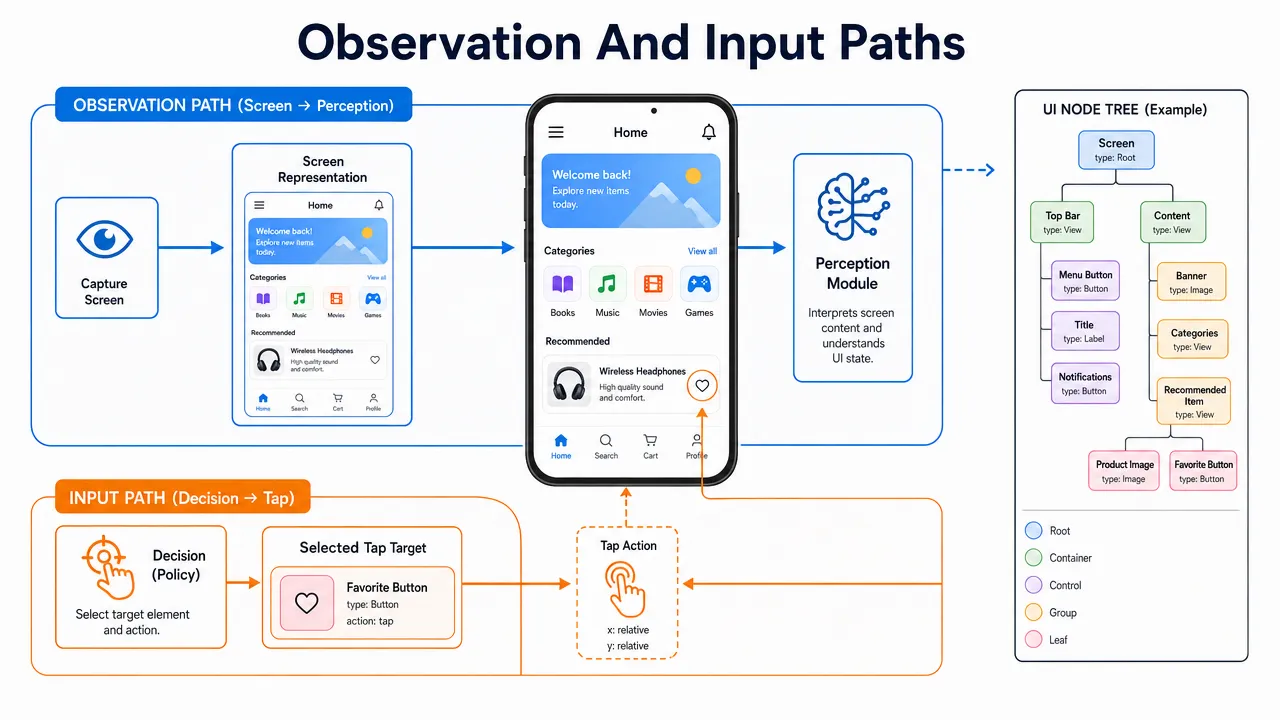
AI agents control phones by combining screen perception, planning, and an authorized input channel, and USB HID and ADB are two very different ways to deliver those actions to a device.

For builders, the distinction matters because "AI phone control" is not magic. An agent needs a way to observe the phone, decide the next step, send input, and verify that the phone responded correctly. USB HID behaves like external human input, such as a keyboard or mouse. ADB, short for Android Debug Bridge, behaves like a developer/debugging interface for Android devices. One is input-device-layer control; the other is Android developer-layer automation.

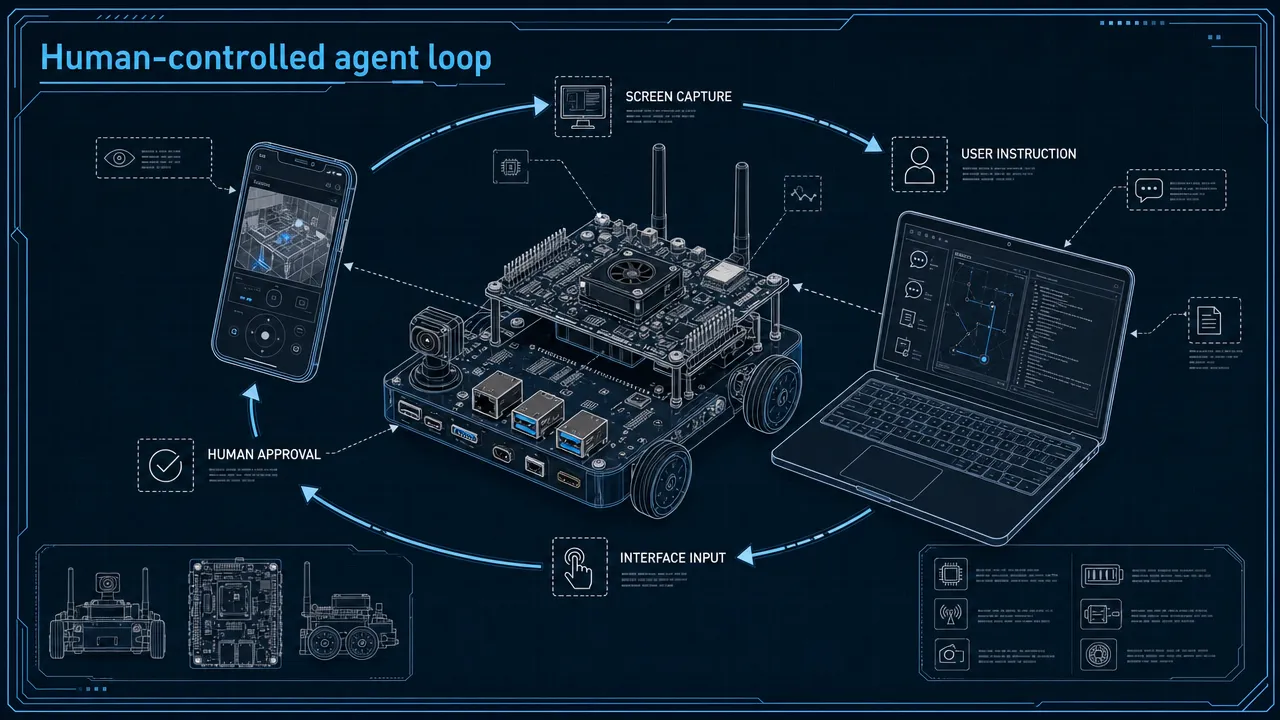
AI phone control loop

How AI phone control turns screen perception into authorized actions

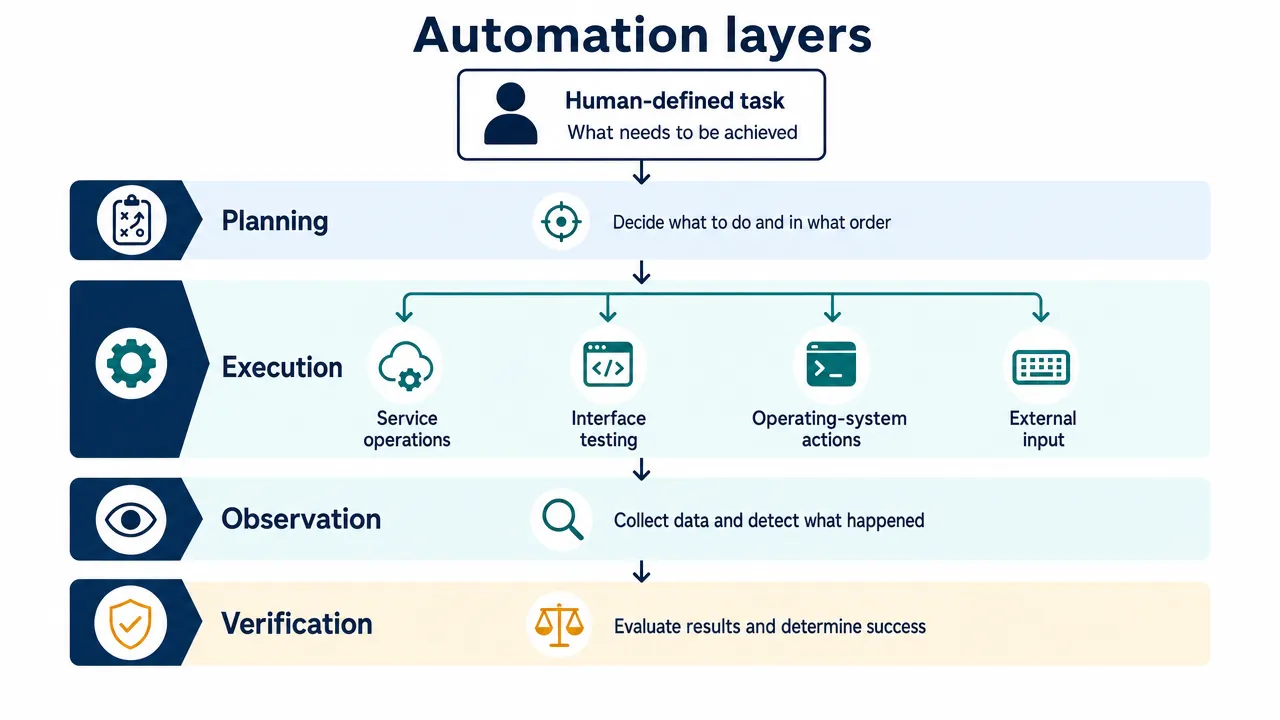
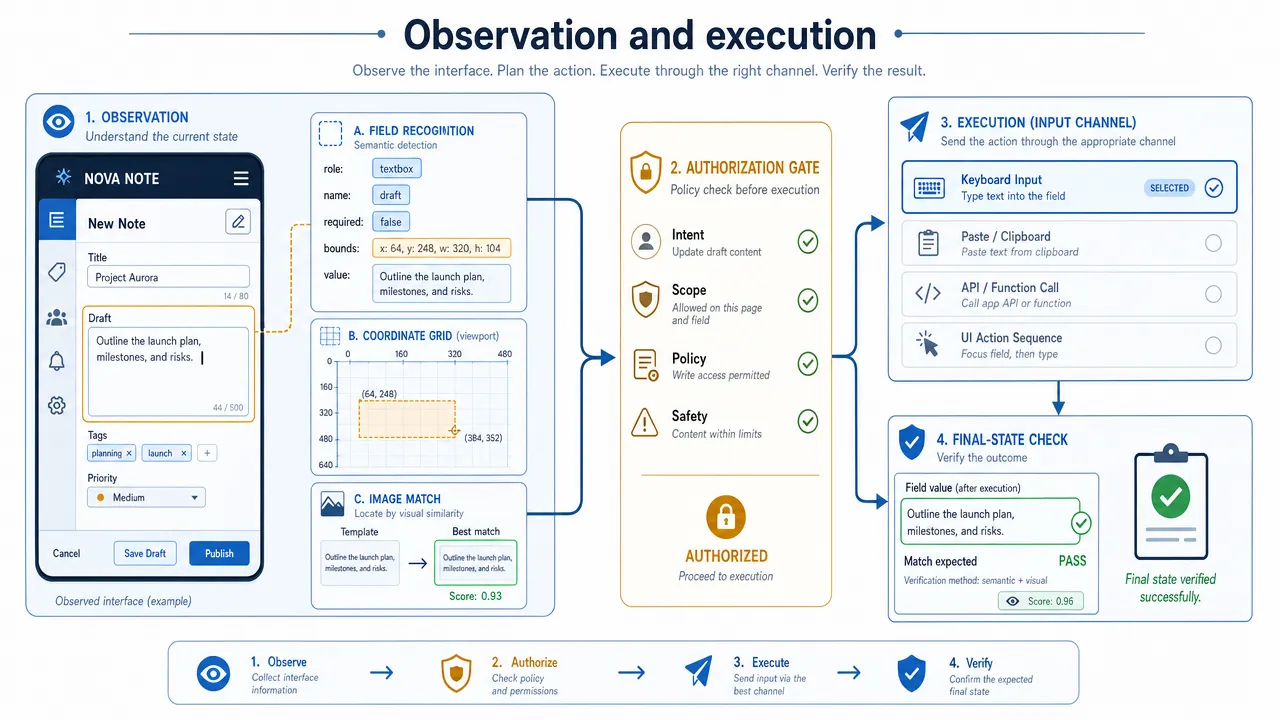
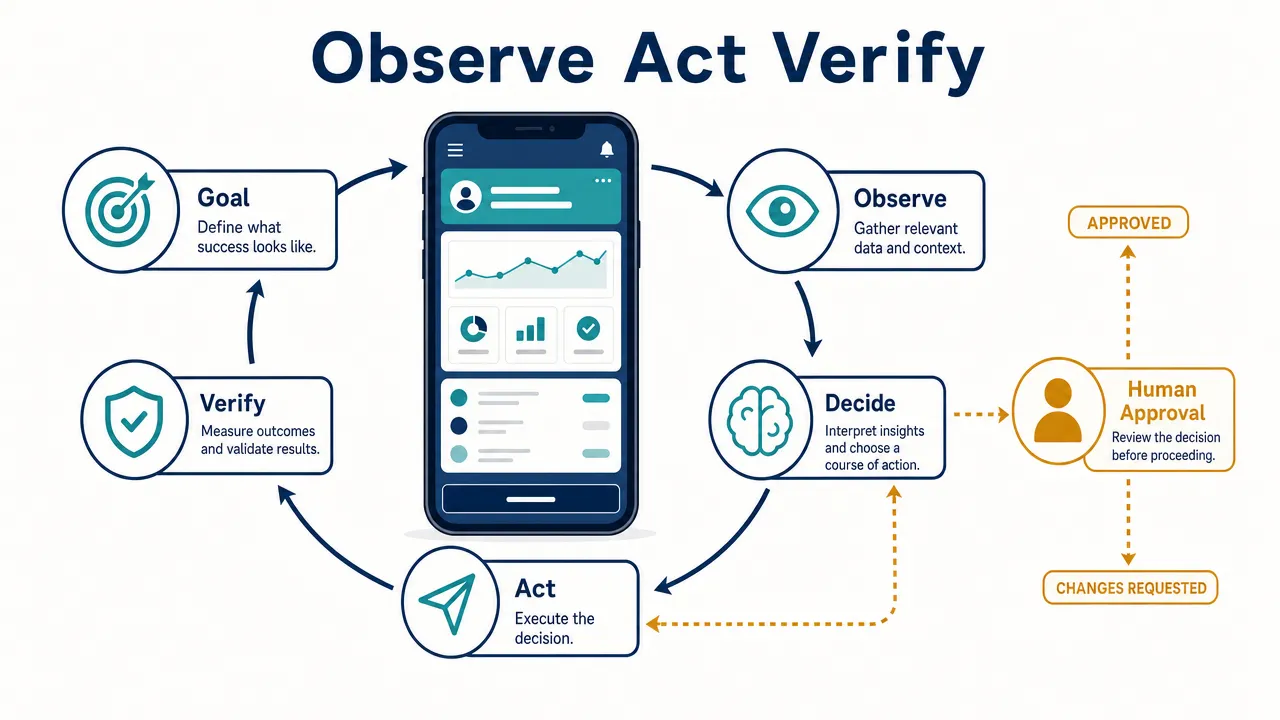
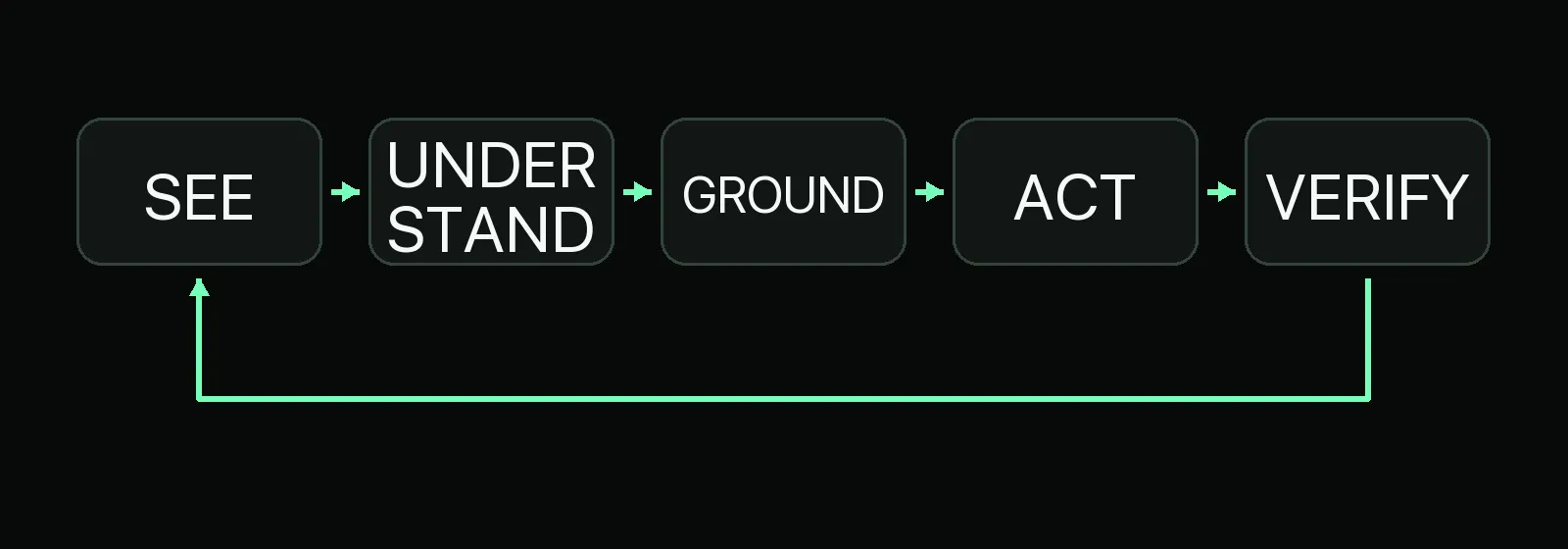
AI phone control means an authorized AI system observes a phone’s current state, reasons about the next action, executes input, and checks whether the action worked. The core loop is:

  1. The user or system gives the AI agent a goal.
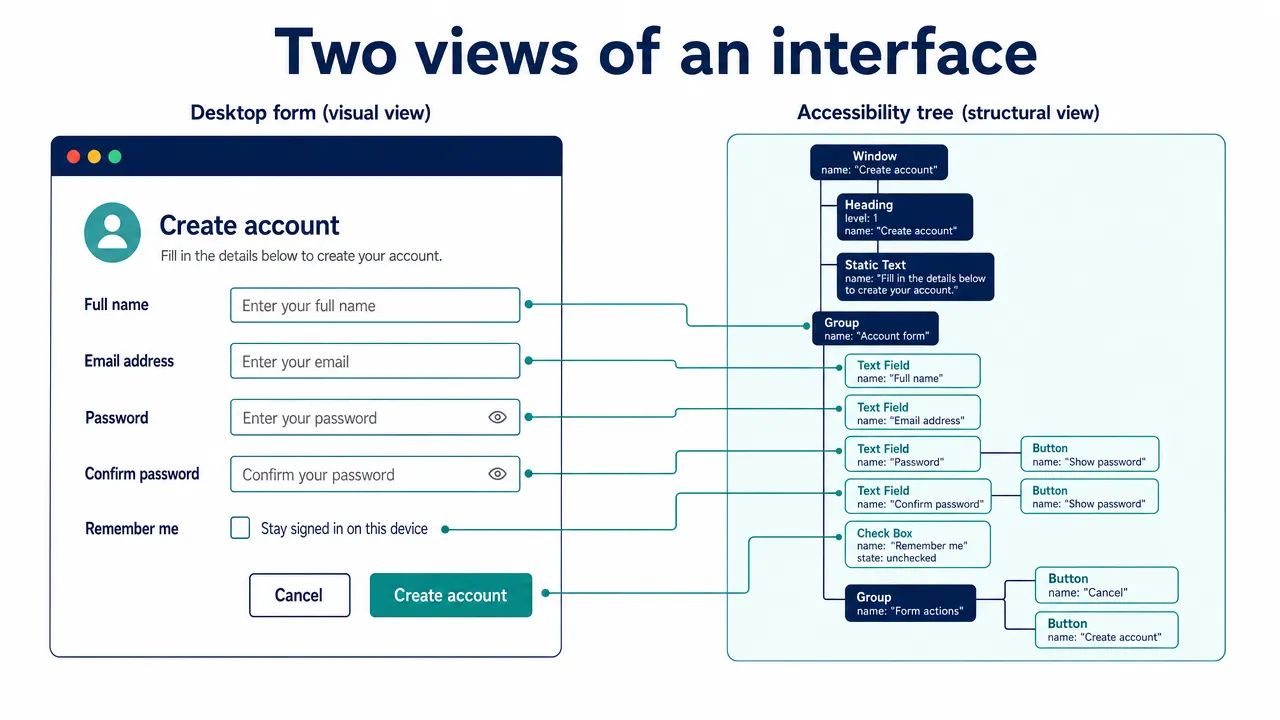
  2. The agent observes the phone screen through a screenshot, camera view, UI hierarchy, accessibility snapshot, or another approved method.
  3. The agent interprets visible state, such as buttons, text fields, menus, pop-ups, and loading screens.
  4. The agent chooses an action, such as tap, swipe, type, press back, or wait.
  5. The action is sent through a control channel.
  6. The agent observes the result and recovers if the UI changes unexpectedly.

That feedback loop is why AI agents phone control is harder than simple API automation. Phone screens are dynamic. A keyboard may appear and resize the layout. A permission prompt may block the next step. A button may move between devices. An app may show a loading spinner, error state, or localized text. Without observation and recovery, phone automation becomes brittle.

flowchart TD

The important safety boundary is authorization. A legitimate AI agent should not be described as secretly taking over a device. It should operate with user consent, visible setup, appropriate permissions, and a clear way to stop or revoke control. That framing is especially important because phones contain messages, accounts, payment apps, personal photos, work data, and private notifications.

Aiden is one concrete example of why this distinction matters in practice. Aiden is a physical mobile AI agent device that plugs into any phone or computer via USB — and it is built specifically around the USB HID approach described above. But it doesn’t stop at input: Aiden pairs USB HID control with its own HDMI-based screen capture, so the same device that types and taps also sees what’s on screen. That closes exactly the observability gap described above — the one weakness that makes standalone USB HID risky for serious automation. No jailbreak, no ADB, and nothing to install on the phone itself.

Why AI phone control with USB HID feels like human input

USB HID, or USB Human Interface Device, is a USB device class for peripherals that interact with humans, including keyboards, mice, game controllers, and similar input devices. The USB Implementers Forum HID page and the USB HID 1.11 specification define the class and its behavior. Technical references such as the Linux HID introduction explain how HID devices use descriptors and reports to describe and exchange input data.

In practical terms, USB HID phone input lets a phone receive input as if a person had connected a keyboard, mouse, trackpad, or compatible controller. A HID keyboard sends key states. A mouse sends pointer movement and button states. A more specialized controller may expose other input patterns depending on its descriptor and the phone’s support.

For AI phone control, a hardware controller could translate an agent’s decision into HID-style input. The phone does not need to know that an AI model selected the action. It receives the event through a familiar external input path.

sequenceDiagram

Android commonly supports hardware keyboard input, and the official Android keyboard input documentation encourages apps to handle hardware keyboards correctly. Google also provides user-facing guidance for using a physical keyboard with Android devices. Material Design guidance recognizes multiple input types, including touch, keyboard, mouse, and stylus-style interaction, in its input foundations.

The strength of USB HID is that it is close to how a human interacts with a device. It can be useful for visible, hardware-assisted demos, simple navigation, typing, and productivity-style actions. It also avoids the Android Developer Options setup required by ADB.

Its weakness is observability. USB HID sends input, but it does not automatically provide screenshots, logs, UI hierarchy, app state, or error diagnostics. If an AI agent presses Tab, types text, or moves a pointer, HID itself does not confirm whether the intended field was focused. The agent needs a separate perception channel to know what happened.

USB HID phone input factor Practical meaning for AI phone control
Control layer External input-device layer
Typical inputs Keyboard events, mouse movement, button clicks, navigation keys
Setup style Often physical connection or pairing, depending on device and accessory
Observability Low by itself; needs camera, screen capture, UI data, or another feedback source
Platform scope Conceptually broad, but phone and app behavior vary
Best fit Hardware-assisted demos, visible user-approved input, simple navigation
Main limitation Not a full phone automation framework

USB HID can be a strong fit when the product experience is intentionally hardware-facing. For example, an AI agent device could sit beside a phone, observe the screen through an approved channel, and issue simple keyboard or pointer actions. The result feels tangible because the phone is being operated like a user would operate it with an accessory.

But HID should not be oversold. It is not the same as system-level automation. It may struggle with multi-touch gestures, app-specific controls, inconsistent keyboard navigation, or complex recovery logic. On iOS and iPadOS, Apple devices support external keyboards and pointing devices for user workflows, as described in Apple’s iPhone keyboard and mouse guide and iPad keyboard and mouse guide, but that should not be generalized into unrestricted phone automation.

USB HID phone input

Why AI phone control with ADB gives Android agents deeper feedback

ADB phone control is different because ADB is not an input accessory standard. It is Android’s developer bridge. The official Android Debug Bridge documentation describes ADB as a versatile command-line tool that lets a development machine communicate with an Android device. ADB uses a client-server-daemon architecture: a client on the host, a server on the host, and the adbd daemon on the Android device.

ADB is Android-only. It is not an iPhone control method.

For authorized Android development, testing, debugging, and research, ADB can do far more than send input. At a high level, it can support actions such as app installation, shell commands, screenshots, screen recording, log collection, device queries, and input events. The AOSP ADB user documentation lists many of these capabilities.

sequenceDiagram

The biggest advantage of ADB for AI agents phone control is feedback. A phone-controlling agent benefits from knowing what happened after each action. ADB can provide screenshots, logs, shell output, and device state in controlled Android environments. That makes recovery easier when an app behaves unexpectedly.

This is why ADB is common in Android testing and device labs. A QA team can use managed test devices, authorize known hosts, install apps, collect logs, run repeatable flows, capture screenshots, and diagnose failures. An AI agent can use the same kind of feedback loop to attempt a task, inspect the result, and replan.

ADB also comes with clear friction and risk. The user must enable Developer Options and USB debugging or wireless debugging. The device must authorize the host. ADB should be treated as a high-trust interface because a trusted host can perform powerful actions. Android’s official documentation emphasizes setup and authorization, and those requirements should be presented as a feature of the trust model, not a nuisance to bypass.

ADB phone control factor Practical meaning for AI phone control
Control layer Android developer/debugging interface
Typical capabilities Shell interaction, app install, screenshots, logs, screen recording, input events
Setup style Enable Developer Options, enable debugging, install tools, authorize host
Observability High in controlled Android environments
Platform scope Android-only
Best fit Android app testing, device labs, AI agent research, debugging
Main limitation Technical setup and security-sensitive authorization

Security matters more with ADB than with ordinary accessory input because the host-device relationship is powerful. Sensible practices include enabling debugging only when needed, authorizing only trusted computers, revoking debugging authorizations when work is complete, avoiding wireless debugging on untrusted networks, and protecting logs or screenshots that may contain sensitive information.

Mobile agent security is an active concern because autonomous systems can increase the number of actions a device might take. Lookout’s article on securing agentic AI on mobile is a useful reminder that mobile agents require careful trust, privacy, and permission design.

ADB phone control architecture

USB HID vs ADB for AI phone control in real deployment decisions

USB HID vs ADB is not a question of which one is universally better. It is a question of what kind of control model the AI agent needs.

USB HID is closer to a human input device. It can send keyboard and mouse-like actions through an external input path. It is hardware-friendly and visible, but it does not provide deep state feedback by itself.

ADB is closer to a developer bridge. It can send commands, collect state, capture screenshots, and support repeatable Android automation. It is more observable and powerful, but it is Android-only and requires debugging setup and authorization.

Dimension USB HID ADB
Core model Human-like external input Android developer/debugging bridge
Main keyword fit USB HID phone input for AI phone control ADB phone control for AI phone control
Platform Broad standard, but phone behavior varies Android-only
Setup friction Often simpler for basic accessories; custom hardware can add complexity More technical because Developer Options and authorization are required
Permission model Treated like external user input in many cases Requires debugging setup and trusted host authorization
Observability Low by itself High in controlled Android workflows
Input fidelity Good for keyboard and pointer patterns; weaker for complex mobile gestures Strong for Android automation and diagnostics
Recovery Depends on separate perception channel Easier because screenshots, logs, and state can help
Best use cases Hardware demos, visible input, simple navigation, hybrid systems Android testing, device labs, debugging, AI agent research
Main risk Unknown input devices can send unintended actions Debugging access is powerful if misused or left enabled

A practical way to decide is to start with platform and feedback needs.

flowchart TD

For Android app testing, ADB is usually the stronger choice because it supports repeatability and diagnostics. For device labs, ADB also tends to fit better because managed devices can be enrolled, authorized, monitored, and reset as part of a controlled workflow.

For hardware-assisted AI demonstrations, USB HID may be the more natural fit. A physical agent device can visibly type, click, and navigate like a keyboard or mouse. That makes the interaction easy for users to understand. The limitation is that the device still needs a reliable way to know what is on the screen.

For consumer productivity workflows, the answer depends on the task. Simple visible actions may work with HID-style input. Android power-user or development workflows may use ADB. App-native integrations, accessibility features, or platform-approved automation may be safer and more reliable for many real-world scenarios.

For AI agent research on Android, a hybrid approach can be especially compelling. ADB can provide screenshots and logs, while USB HID can represent hardware-level input. A camera, screen capture layer, or UI hierarchy source can feed perception. A human-in-the-loop layer can approve sensitive steps.

Qualitatively, USB HID scores strongest for hardware demos and visible input, moderate for mixed-platform input, and weakest for diagnostics-heavy debugging and device labs — it simply wasn’t designed to produce logs or state data on its own.

ADB shows the opposite pattern: it scores highest for Android testing, device labs, and debugging, but it isn’t a fit for iOS or general mixed-platform phone automation at all.

USB HID vs ADB comparison workspace

Security and trust in AI phone control systems

Security is not an optional section in AI phone control. A phone-control agent can open apps, type messages, change settings, interact with accounts, and handle personal information. The safer language is "authorized automation," "user-approved phone control," or "AI agent input execution." Avoid claims that imply control without permission.

USB HID and ADB have different trust models.

With USB HID, the phone treats the connected accessory as an input device. That can be helpful, but it also means an unknown keyboard-like device could send rapid unexpected input. A trustworthy hardware-assisted automation system should make its status visible, allow easy disconnection, provide a stop mechanism, and avoid sensitive actions without confirmation.

With ADB, the device authorizes a host for debugging. That host may be able to perform powerful development and automation tasks. A safe ADB workflow should use trusted computers, dedicated test devices where possible, non-sensitive accounts for QA, protected logs, and clear revocation steps.

Risk area USB HID concern ADB concern Safer practice
Consent User may not understand what a custom input device can do User may not understand the power of debugging access Explain setup plainly and require explicit approval
Visibility Input may happen quickly Commands may run from a host environment Use status indicators, logs, and stop controls
Data exposure Typed content may appear in the wrong field Screenshots and logs may contain private data Use test data and protect captured artifacts
Recovery HID gives little built-in feedback ADB feedback can be powerful but complex Observe after every action and replan safely
Revocation Disconnect or unpair the device Revoke debugging authorizations and disable debugging Make revocation part of the workflow

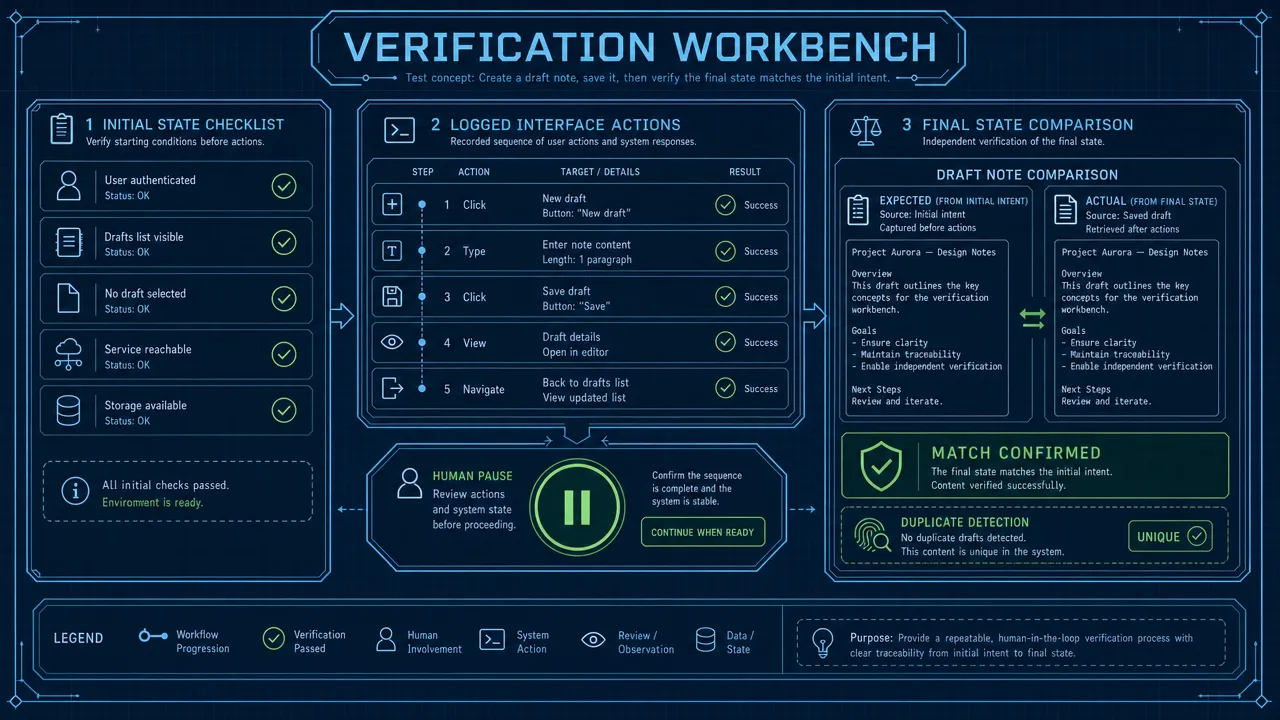
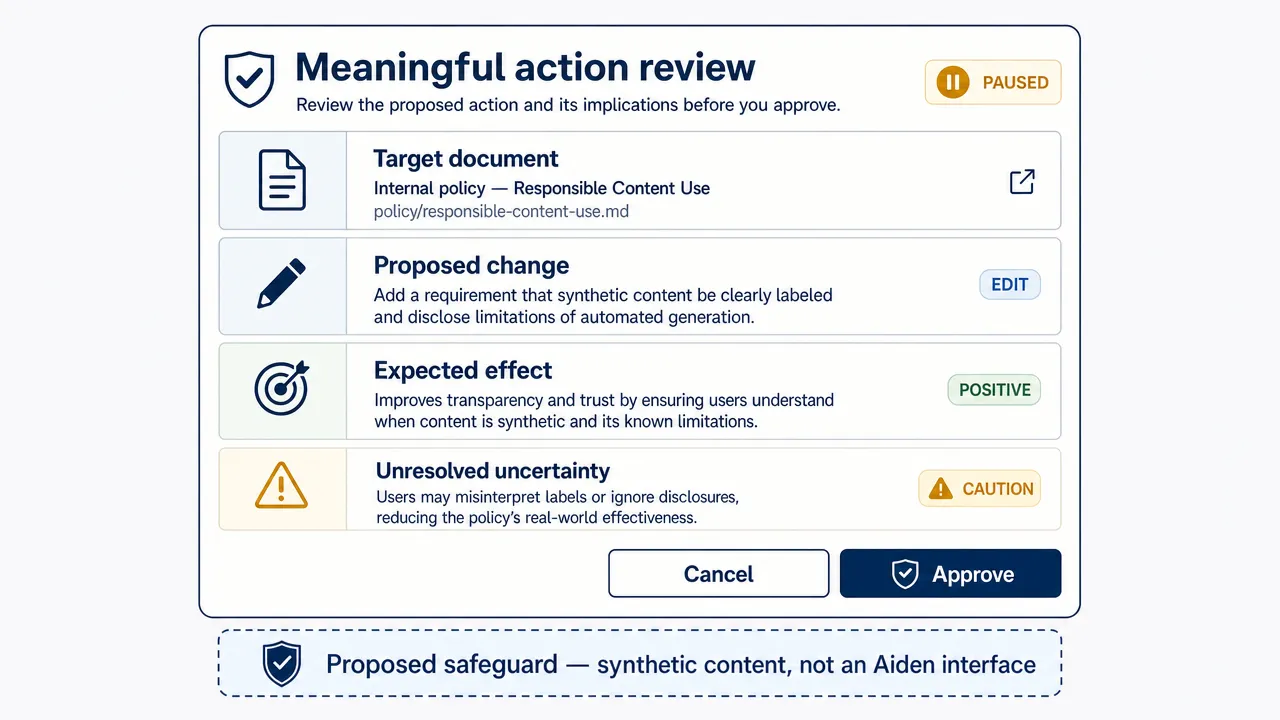
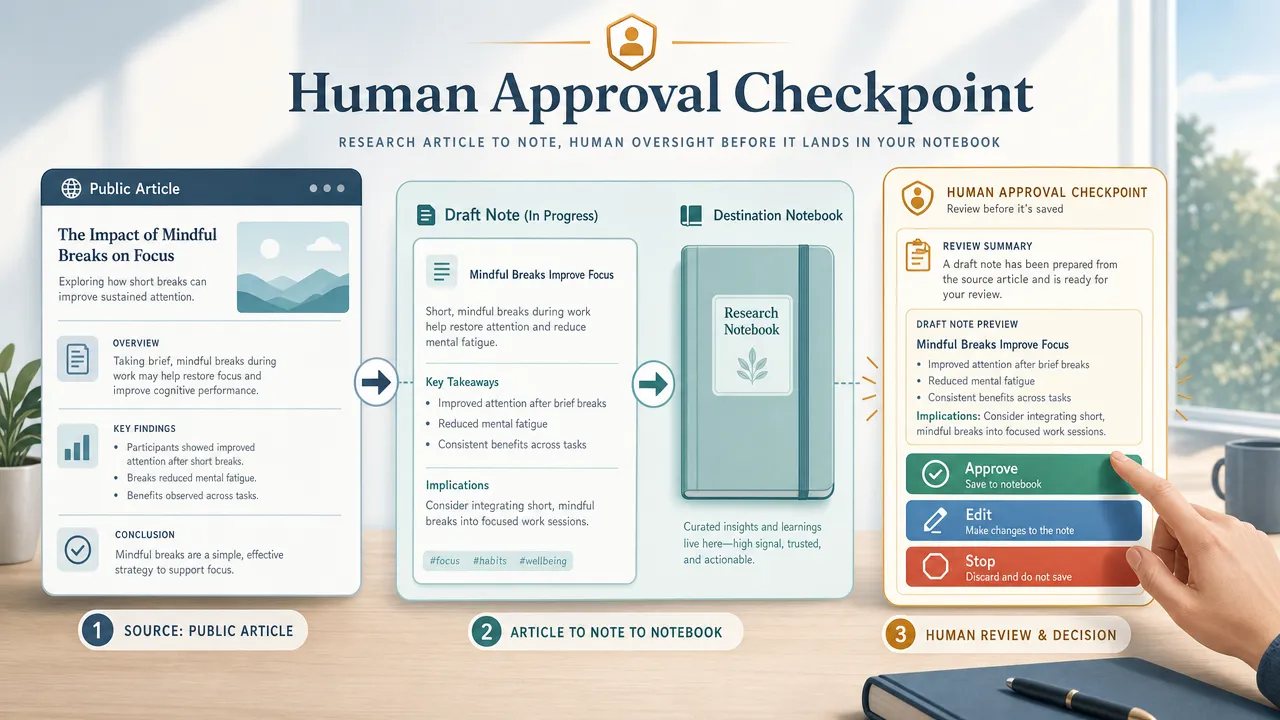
Human-in-the-loop control is especially important for sensitive tasks. An agent may prepare an action, but a person should confirm before sending messages, changing security settings, making purchases, submitting forms, or interacting with private accounts.

A reliable AI phone control architecture should include:

  • Explicit user consent before control starts.
  • A visible indication when the agent is active.
  • Clear scope for what the agent can and cannot do.
  • Per-action confirmation for sensitive workflows.
  • A stop button or immediate disconnect path.
  • Logs or audit trails where appropriate.
  • Privacy controls for screenshots, UI data, and logs.
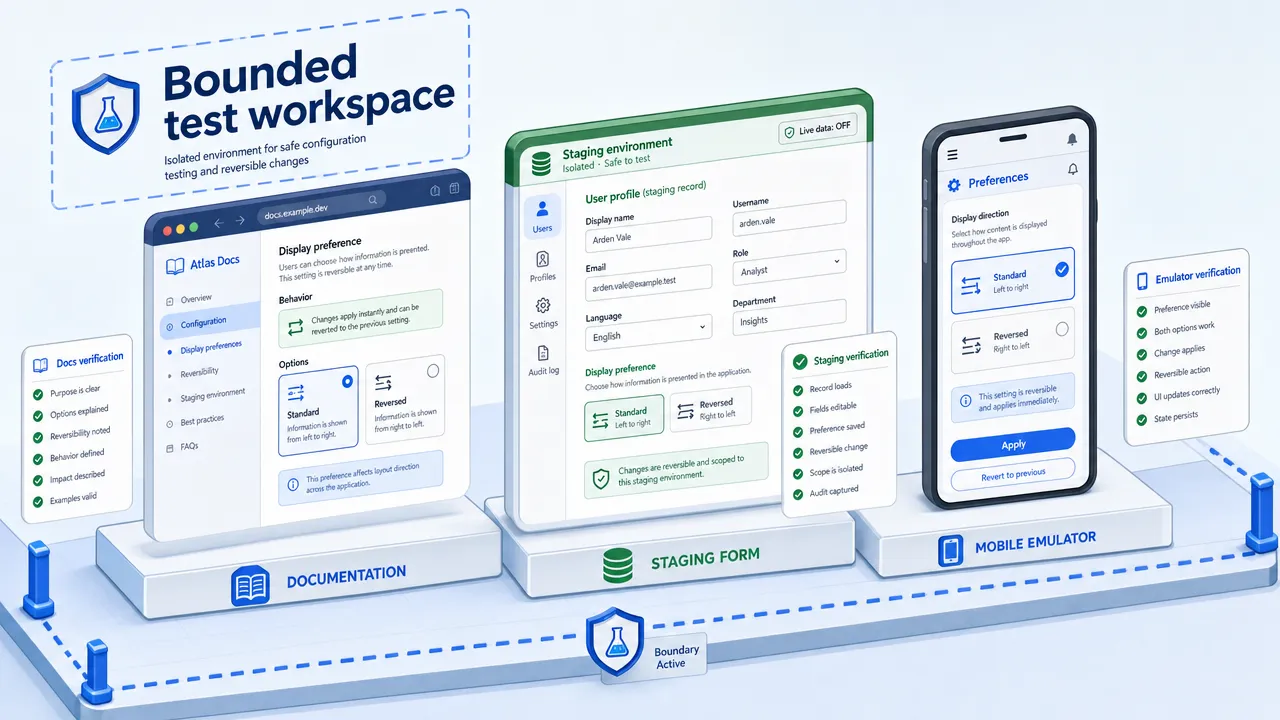
  • Separate test devices and accounts for QA environments.

This is also where product strategy matters. Aiden’s own design choice — pairing USB HID input with HDMI screen capture, rather than requiring ADB or an installed app — is a direct answer to this tradeoff: it keeps the "no jailbreak, no ADB, nothing installed" simplicity of HID while removing HID’s biggest weakness, the lack of built-in observability. Trustworthy phone automation is not just about action success rate. It is about permission, transparency, reversibility, and safe failure behavior.

AI phone control FAQ

What is AI phone control?

AI phone control is the authorized use of an AI agent to observe a phone, decide what action to take, send input, and verify the result. It can involve screenshots, OCR, UI hierarchy data, accessibility snapshots, USB HID phone input, ADB phone control, or other approved automation methods.

Can AI agents control your phone?

AI agents can control your phone only through a permitted control channel and with the right setup. Legitimate systems require user authorization, visible operation, and safeguards. Public explanations should not imply hidden access, permission bypassing, or control of someone else’s device.

Is USB HID the same as ADB?

No. USB HID vs ADB is a comparison between two different layers. USB HID acts like a human input device such as a keyboard or mouse. ADB is Android’s developer/debugging bridge, designed for communication between a host computer and an Android device.

Does ADB phone control work on iPhone?

No. ADB is Android Debug Bridge, so it is Android-only. iPhones and iPads may support external keyboards and pointing devices, but that is not the same as ADB-style phone automation.

Why would an AI agent use USB HID phone input?

An AI agent might use USB HID phone input when the system is hardware-assisted, when the action should look like visible human input, or when the task only needs keyboard or pointer-style interaction. HID is useful for demos, prototypes, and simple user-approved workflows.

Why would an AI agent use ADB phone control?

An AI agent might use ADB phone control for Android testing, debugging, device labs, and research workflows that need screenshots, logs, shell output, app installation, or repeatable automation. ADB gives deeper feedback than HID, but it requires developer setup and device authorization.

Does USB HID provide screen feedback to the AI agent?

No. USB HID is primarily an input path. It can send keyboard or pointer events, but it does not inherently provide screenshots, logs, UI hierarchy, or app state. A serious AI phone control system using HID needs a separate perception channel.

What is the safest way to automate a phone?

The safest approach is authorized phone automation with clear consent, limited scope, visible operation, human approval for sensitive actions, and a reliable stop mechanism. For Android development and testing, ADB can be appropriate when devices are trusted and managed. For hardware-assisted input, USB HID can be appropriate when the device is trusted and the user remains in control.

The practical takeaway is simple: USB HID is human-like input, while ADB is Android developer-level automation. AI phone control works best when builders choose the control channel that matches the platform, observability needs, trust model, and deployment environment.

To see the HID-plus-perception approach in action, visit aidenai.io or explore the open-source firmware at github.com/AidenAI-IO/aiden-hardware-demo.

Mobile AI Agent vs Computer Use Agent: What’s the Difference?

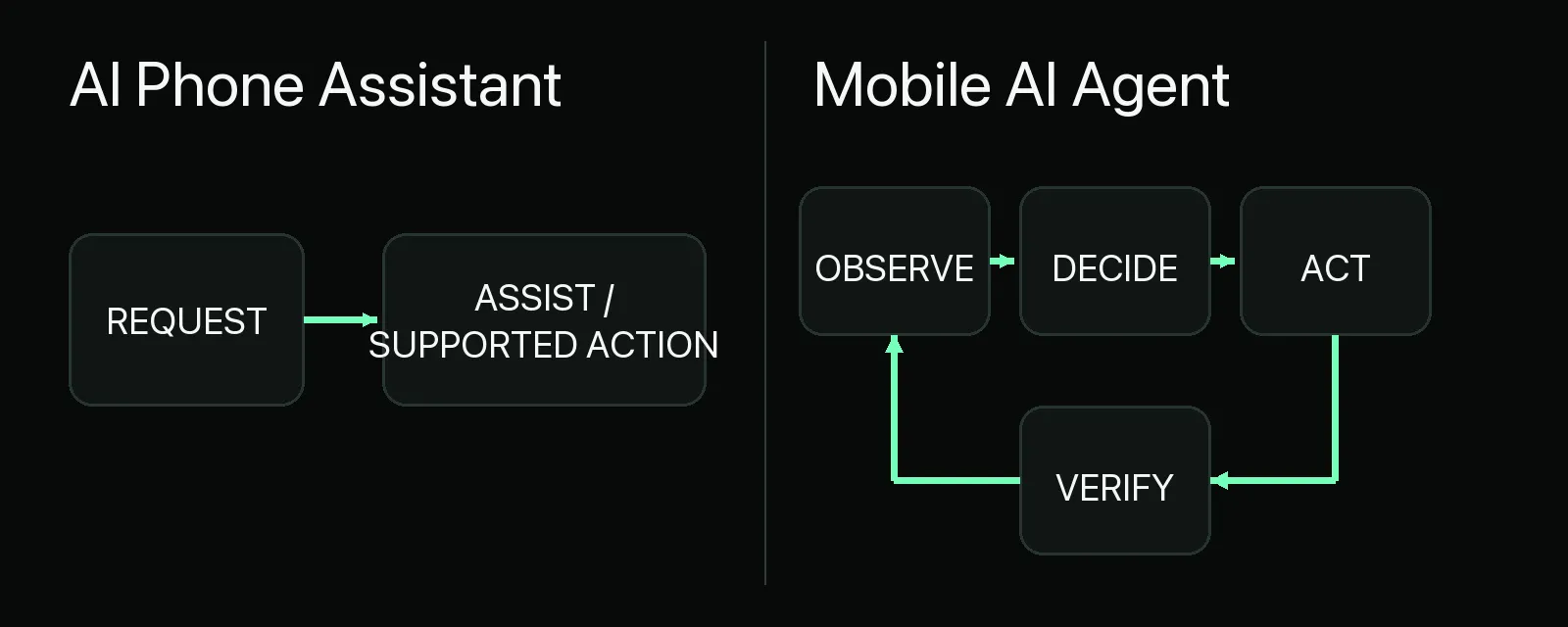
A mobile AI agent controls smartphone or tablet environments, while a computer use agent controls desktop, browser, or virtual computer environments. Both belong to the broader category of GUI agents, but they solve different automation problems because mobile and desktop systems have different interfaces, permissions, security boundaries, context signals, and task patterns.

That distinction matters because a task that looks simple in a browser can be difficult inside a mobile app, and a task that depends on location, camera input, notifications, or app permissions may not belong on a desktop at all. For an AI agent hardware and software technology company such as aidenai.io, the difference points to a larger shift: AI agents are moving from answering questions to operating real interfaces under user supervision.

Mobile and desktop GUI agents

How mobile AI agent vs computer use agent differs at the interface level

The simplest difference in mobile AI agent vs computer use agent is the operating environment. A mobile AI agent is built for smartphones, tablets, emulators, and mobile app workflows. It reads mobile screens, interprets app layouts, and acts through taps, swipes, mobile typing, app switching, notifications, permissions, and sometimes mobile-specific APIs.

A computer use agent is built for desktops, browsers, laptops, cloud workstations, or virtual machines. It observes screens or browser state and acts through mouse movement, clicks, typing, scrolling, file access, browser navigation, and desktop software interaction.

The two systems often use the same high-level loop:

  1. Receive a user goal.
  2. Observe the interface.
  3. Interpret the current state.
  4. Plan the next step.
  5. Take an action.
  6. Check the result.
  7. Repeat until the task is complete or needs human approval.

The reason they are not interchangeable is that mobile and desktop environments represent work differently. A mobile checkout flow may hide options behind bottom sheets, permission prompts, biometric confirmations, and app-specific gestures. A desktop workflow may involve browser tabs, spreadsheets, downloaded files, enterprise dashboards, and keyboard shortcuts.

flowchart TD

A useful shorthand is this: mobile agents are more device-contextual, while computer use agents are more work-contextual. A mobile automation agent may be better for app testing, field service, travel, accessibility, or mobile commerce. A desktop automation agent may be better for research, data entry, spreadsheets, document processing, support operations, and browser-based workflows.

Mobile AI agent vs computer use agent: Definitions and technical boundaries

A mobile AI agent is an AI system designed to understand and operate mobile app or mobile OS environments. It may use screenshots, OCR, vision-language models, Android accessibility data, UI hierarchy trees, app state, or device metadata to understand what is happening on screen.

Mobile agents can act through:

  • Taps.
  • Swipes.
  • Long presses.
  • Text entry.
  • App switching.
  • Menu navigation.
  • Permission handling.
  • Notification interaction.
  • App-exposed functions where available.

The AndroidWorld benchmark is a useful reference point because it evaluates autonomous agents on real Android tasks across multiple apps. It highlights both the promise and the difficulty of mobile GUI automation: mobile agents can navigate real apps, but success depends on UI understanding, task length, app design, and action reliability.

A computer use agent is an AI system that operates a desktop, browser, or virtual computer. Anthropic describes computer use as allowing a model to use a computer by looking at the screen, moving a cursor, clicking buttons, and typing text, as described in Anthropic’s computer use announcement. OpenAI described Operator as an agent that could use its own browser to view webpages and interact through typing, clicking, and scrolling in OpenAI’s Operator announcement.

Computer use agents can act through:

  • Mouse movement.
  • Single and double clicks.
  • Keyboard input.
  • Scrolling.
  • Dragging.
  • Copy and paste.
  • Browser tab navigation.
  • File upload and download.
  • Document editing.
  • Spreadsheet interaction.
  • Terminal or code execution when allowed.

The technical boundary is not intelligence alone. A highly capable model can still fail if the interface layer is unstable, the permission model is restrictive, or the agent cannot reliably verify the result. That is why GUI control is powerful but fragile. It can work where APIs do not exist, but it is more vulnerable to UI changes, loading delays, authentication friction, ambiguous buttons, and malicious content.

Term Meaning Practical scope
AI agent A system that plans, uses tools, acts, observes, and iterates Broad category covering chat, tools, APIs, GUI control, and automation
GUI agent An agent that controls graphical interfaces Includes mobile, browser, desktop, and app automation
Mobile AI agent An agent built for smartphone or tablet environments Best for mobile apps, sensors, notifications, and device workflows
Computer use agent An agent built for desktop, browser, or virtual computer environments Best for knowledge work, SaaS, documents, files, and browser tasks
Mobile automation agent A mobile AI agent focused on repeatable app or device workflows Common in QA, field work, app support, and mobile commerce
Desktop automation agent A computer use agent focused on desktop or browser workflow automation Common in back-office, research, support, and data entry

Mobile AI agent vs computer use agent: Side-by-side AI agent comparison

A strong AI agent comparison starts with environment fit. The same natural-language request can require very different engineering depending on where the agent must act.

Dimension Mobile AI agent Computer use agent Practical implication
Primary environment Smartphone, tablet, emulator, mobile OS Desktop, browser, laptop, virtual computer Choose based on where the workflow actually happens
Main input actions Tap, swipe, long press, mobile typing Click, type, scroll, drag, keyboard shortcuts Action models are not interchangeable
Screen design Small screens, app-specific layouts, bottom sheets, gestures Larger screens, browser tabs, windows, documents Desktop often supports denser workflows
Context Location, camera, microphone, Bluetooth, contacts, calendar, notifications Files, SaaS tools, browser sessions, spreadsheets, internal systems Mobile is stronger for physical context; desktop is stronger for work context
Permissions Mobile app permissions, accessibility permissions, OS sandboxing Browser permissions, file access, OS permissions, VM/container permissions Both need least-privilege access
Best use cases Mobile QA, field service, travel, app troubleshooting, accessibility Research, reporting, document processing, back-office updates, support operations Many businesses need a hybrid approach
Reliability challenge OS restrictions, app UI changes, gesture complexity, device variance Web changes, auth flows, file risk, desktop state complexity APIs are usually more reliable when available
Security risk Personal data, messages, location, payment apps, sensors Enterprise data, email, local files, SaaS sessions, documents Human approval is essential for high-impact actions
Deployment On-device, emulator, device farm, hybrid cloud Local desktop, remote browser, VM, container, cloud workstation Desktop/browser agents can often scale more easily in cloud environments

A mobile AI agent may be the right choice for a technician filling out inspection forms in a field service app. A computer use agent may be the right choice for a support team that needs to read tickets, search internal documentation, update a CRM, and draft customer responses.

The overlap appears in hybrid workflows. A travel planning task might begin in a browser, continue through a mobile airline app, and end with notifications on a phone. Customer support may require reproducing a bug on a mobile emulator while updating records on a desktop dashboard. In these cases, the better design is not mobile-only or desktop-only. It is a controlled agent system that combines mobile control, browser control, APIs, and human review.

Mobile AI agent vs computer use agent architecture and reliability

GUI agent architecture layers

The architecture of mobile AI agent vs computer use agent follows the same conceptual loop, but each layer connects to a different execution environment.

Perception layer

A mobile AI agent may perceive state through screenshots, OCR, visual reasoning, accessibility APIs, Android UI hierarchy data, app metadata, or testing logs. Structured UI information can make automation more reliable than raw pixel coordinates because the agent can identify buttons, text fields, and containers more directly.

A computer use agent may perceive screenshots, browser DOM data, accessibility trees, OCR output, file contents, terminal output, or application state. Anthropic’s computer use tool documentation describes an agent loop in which the model requests computer actions, the application executes them, and observations are returned to the model.

Planning and memory

Both agent types need planning. The agent must translate a goal like "prepare the report" or "complete the app flow" into steps. It must also remember what it has already done, what state it observed, what assumptions it made, and what still requires confirmation.

Useful memory can include:

  • Task state.
  • User preferences.
  • Prior successful workflows.
  • App or website navigation patterns.
  • Temporary credentials or session context, if allowed.
  • Verification notes and final outcomes.

Memory must be governed carefully. A mobile device may contain contacts, messages, photos, location history, and sensitive apps. A desktop may contain enterprise documents, email, internal dashboards, and local files. In both cases, more memory is not automatically better. The safer design stores only what is necessary and makes access visible, revocable, and auditable.

Action layer

The action layer is where the largest practical differences appear.

A mobile AI agent acts through taps, swipes, typing, permission dialogs, app switching, and mobile-specific automation tools. It may run on a real device, emulator, device cloud, or a hybrid on-device plus cloud architecture.

A computer use agent acts through mouse, keyboard, browser, file, and sometimes API actions. It may run inside a local workstation, a cloud browser, a virtual machine, or a container. Anthropic recommends virtualized or containerized environments with minimal privileges for computer use, especially when agents interact with untrusted interfaces.

Tool and API integration

GUI control should not be the default for every task. APIs are usually more stable, easier to audit, and less likely to break when a button moves. The best production systems often combine:

  • GUI control for interfaces without APIs.
  • APIs for structured operations.
  • Retrieval tools for knowledge.
  • Code execution for transformations.
  • Databases for verified state.
  • Browser automation for web-only flows.
  • Human approval for high-impact decisions.

Anthropic’s guidance on building effective agents emphasizes matching agent designs to tasks where open-ended reasoning and tool use are genuinely needed. That is a critical point for both mobile and desktop automation: use an agent when the task requires adaptation, not when a deterministic script or stable API would be safer.

flowchart LR

Reliability remains one of the biggest limitations. GUI agents can misread screens, click the wrong control, fail to notice loading states, or follow malicious instructions embedded in webpages, emails, documents, or app content. Benchmarks such as AndroidWorld, OSWorld, and WebArena help measure progress, but benchmark success does not guarantee safe production behavior in real user accounts.

Mobile AI agent vs computer use agent use cases, risks, and selection criteria

The best AI agent use cases are specific, supervised, and bounded. The wrong use cases are broad, high-stakes, irreversible, or exposed to adversarial content without controls.

Best-fit mobile AI agent use cases

A mobile AI agent is strongest when the workflow depends on mobile apps or device context.

Common examples include:

  • Mobile app QA testing.
  • App onboarding flow validation.
  • Field service form completion.
  • Mobile device troubleshooting.
  • Accessibility support for app navigation.
  • Travel workflows involving mobile boarding passes or ride apps.
  • Mobile commerce comparison and cart preparation.
  • Smart hardware setup through companion apps.
  • Notification summarization and response drafting, with permission controls.

A mobile automation agent is especially useful in QA because it can operate apps on emulators or real devices, reproduce flows, collect screenshots, and test UI behavior across versions. It can also help support teams understand what a user sees on a phone rather than guessing from a desktop dashboard.

Best-fit computer use agent use cases

A computer use agent is strongest when the workflow depends on browsers, files, SaaS tools, and documents.

Common examples include:

  • Browser research.
  • Data entry.
  • CRM updates.
  • Spreadsheet cleanup.
  • Report generation.
  • Invoice processing.
  • Support ticket triage.
  • Document summarization.
  • Web app QA testing.
  • Internal knowledge search.
  • Developer workflows involving IDEs, terminals, logs, and documentation.

A desktop automation agent is often easier to scale in a business setting because it can run in remote browsers, virtual machines, or controlled workspaces. That makes it attractive for back-office tasks where the environment can be locked down and monitored.

Security and privacy risks

Agent security approval gate

Mobile AI agents and computer use agents both create a powerful risk: they can read untrusted content and take actions on behalf of a user. The most important threat is prompt injection, where malicious instructions are hidden in content the agent sees. OWASP maintains a useful reference on prompt injection, and the risk becomes more serious when the agent can access tools, accounts, files, or payment flows.

Key risks include:

  • Prompt injection from webpages, emails, documents, app messages, and UI text.
  • Sensitive information exposure.
  • Unauthorized purchases or account changes.
  • Credential leakage.
  • Overbroad device or file permissions.
  • Malicious UI design that tricks the agent.
  • Ambiguous accountability when an agent acts through a user account.
  • Compliance problems in enterprise or regulated environments.

OpenAI’s Operator announcement described safety controls such as user confirmations and takeover mode for sensitive data. These patterns are useful beyond any single product. Agents should not enter passwords, approve payments, delete files, send sensitive messages, or modify business records without appropriate user confirmation and policy enforcement.

The NIST AI Risk Management Framework is also relevant for organizations building governed AI systems. It emphasizes risk mapping, measurement, management, and governance, which align well with agent deployment requirements.

Risk Mobile AI agent exposure Computer use agent exposure Recommended mitigation
Prompt injection Messages, app content, webpages, notifications Webpages, email, documents, SaaS content Treat external content as untrusted and restrict tool authority
Sensitive data Contacts, photos, location, messages, mobile apps Files, email, SaaS records, browser sessions Use least privilege, redaction, and local processing where appropriate
Unauthorized action Purchases, bookings, permission changes Orders, emails, file changes, enterprise updates Require confirmation gates and spending or action limits
Permission abuse Accessibility access, sensors, notifications File system, browser, OS, network access Use scoped, revocable, logged permissions
UI fragility App updates, device differences, custom UI Website changes, desktop state, popups Use evals, retries, structured UI data, and API fallback
Compliance risk Personal and regulated mobile data Enterprise and regulated business data Add audit logs, policy controls, and review workflows

Selection criteria

Choose a mobile AI agent when:

  • The workflow primarily happens inside mobile apps.
  • The task depends on phone context such as location, camera, notifications, or device state.
  • The use case involves mobile QA, field service, accessibility, travel, app support, or smart hardware setup.
  • The agent must work on real phones, tablets, or emulators.

Choose a computer use agent when:

  • The workflow primarily happens in browsers, desktop apps, files, spreadsheets, or SaaS systems.
  • The task involves research, reporting, data entry, document processing, customer support, or developer workflows.
  • The agent can run safely in a VM, container, remote browser, or controlled desktop.
  • APIs are unavailable, incomplete, or insufficient for the full workflow.

Use a hybrid approach when:

  • The user journey crosses mobile and desktop.
  • A support team needs mobile reproduction and desktop case management.
  • A workflow starts in an app and finishes in a browser, or the reverse.
  • The product strategy requires cross-device AI operation.

Do not use an autonomous GUI agent when:

  • A stable API can complete the task more safely.
  • The action is irreversible or high-stakes.
  • The environment is adversarial and cannot be sandboxed.
  • The agent needs unrestricted access to sensitive accounts.
  • The business cannot provide audit logs, approvals, monitoring, and rollback procedures.

flowchart TD

Mobile AI agent vs computer use agent FAQs

Are mobile AI agents and computer use agents the same?

No. They share agentic architecture, but they operate in different environments. A mobile AI agent is optimized for mobile apps, taps, swipes, permissions, and device context. A computer use agent is optimized for desktops, browsers, files, SaaS tools, and keyboard or mouse actions.

Can a mobile AI agent control any app?

Not reliably. Mobile OS sandboxing, app permissions, custom UI components, app-store restrictions, authentication flows, and anti-abuse protections can limit what a mobile AI agent can do. Android environments may offer more automation pathways than iOS in some contexts, but every deployment still requires careful permissioning and testing.

Can a computer use agent control any website?

A computer use agent can interact with many websites through browser actions, but it cannot guarantee success on every site. CAPTCHA, multifactor authentication, dynamic UI changes, popups, session timeouts, and safety restrictions can interrupt automation.

Which is better for business automation?

A computer use agent is usually better for desktop, browser, and back-office automation. A mobile AI agent is better for mobile app workflows, field operations, mobile QA, device support, and app-first user journeys. Many organizations will eventually need both.

Which is better for mobile app testing?

A mobile AI agent or mobile automation agent is the better fit because it operates directly in mobile environments. It can test app screens, flows, permissions, gestures, and device-specific behavior more naturally than a desktop-focused agent.

Should teams use GUI agents or APIs?

Teams should use APIs when APIs are stable, available, and sufficiently complete. GUI agents are valuable when APIs do not exist, when workflows require visual navigation, or when an agent must operate the same interface a human uses. The strongest architectures combine GUI control with APIs, tools, permissions, and human-in-the-loop safeguards.

What is the future of mobile AI agent vs computer use agent?

The future is hybrid. Real workflows span phones, browsers, desktops, APIs, cloud services, and connected devices. The most useful systems will likely combine mobile control, desktop control, tool access, on-device AI, cloud reasoning, hardware-backed privacy, audit logs, and explicit user approval for sensitive actions.

For companies building AI agent hardware and software, the core challenge is not only making agents more capable. It is making them understandable, permissioned, observable, and trustworthy enough to operate real interfaces safely.

Why Every Startup Needs an AI Agent Strategy in 2026 — Not Just AI Tools

Meta title: AI Agent Strategy for Startups: Why 2026 Requires More Than AI Tools

Meta description: Learn why startups need an AI agent strategy for startups in 2026, how AI agents differ from AI tools, where to automate operations, and how to manage ROI, security, and governance.

Startup AI Agent Operating System

Startups need an AI agent strategy in 2026 because scattered AI tools create isolated pockets of productivity, not a durable operating advantage — turning AI into a real system means deciding which workflows to automate, what data agents can touch, and who approves the results.

Startup AI usage today often lives in scattered chats, browser extensions, meeting tools, writing assistants, coding copilots, and one-off automations. That can feel productive in the moment, but it rarely becomes a durable operating advantage.

In 2026, the better question is not, "Which AI tool should we buy next?" It is, "What is our AI agent strategy for startups, and how will it change how work gets done?"

That distinction matters. AI tools help individuals complete tasks. AI agents can coordinate multi-step work toward a goal, use tools, retrieve context, interact with systems, and escalate to humans when needed. IBM describes AI agents as systems that can work toward tasks on behalf of a user or system, while AWS frames agentic AI as goal-driven systems that reason, act, and adapt in complex environments.

For startups, this is not just a technical shift. It is an operating model shift. A serious startup AI strategy should decide which workflows deserve automation, which systems agents can access, who approves important actions, how results are measured, and how risk is controlled.

Aiden is defined by the provided client context as an AI agent hardware and software technology company. This article therefore discusses AI agent infrastructure and hardware/software-connected workflows in general terms only. It does not make unverified claims about specific products, features, pricing, customers, or geographic coverage.

AI agent strategy for startups starts with workflow design, not tool collection

An AI agent strategy for startups is a practical plan for using AI agents to improve business workflows, not just individual productivity. It defines where agents should operate, what data they can use, what actions they can take, where humans remain in control, and how success is measured.

A simple definition:

An AI agent strategy for startups is a roadmap for turning AI from isolated task assistance into supervised, integrated, measurable workflow execution across the startup’s operations.

That means a founder should not begin with a list of trendy tools. The starting point should be business friction:

  • Where does the team repeat the same work every week?
  • Which workflows depend on copying information between systems?
  • Where do customers wait too long for a response?
  • Which founder decisions are bottlenecked by missing context?
  • Which teams spend time cleaning data instead of acting on it?
  • Which tasks are high-volume, rule-bound, and still require judgment?

This is why startup AI strategy must be broader than experimentation. A chatbot may help a founder draft an investor update. A meeting summarizer may save a few minutes after calls. A coding copilot may accelerate engineering. All of that matters. But the real leverage appears when AI agents for startups are designed into workflows such as support triage, CRM updates, sales follow-up, product feedback synthesis, financial reporting, recruiting coordination, and internal knowledge retrieval.

The shift is similar to the difference between buying apps and designing an operating system. Random AI adoption creates islands of productivity. An AI agent strategy creates a shared system of execution.

Strategic question AI tool mindset AI agent strategy mindset
Starting point "What tool should we try?" "Which workflow is slowing us down?"
Main user Individual contributor Team or function
Primary value Faster task completion Faster business throughput
Data flow Manual copy and paste Integrated systems and APIs
Human role Operator Supervisor, approver, exception handler
Measurement Usage and subjective satisfaction Time saved, cycle time, quality, cost per workflow
Risk control Informal Permissions, logs, approvals, governance

The reason 2026 matters is that agentic AI is moving from demos into mainstream business systems. Small businesses are also experimenting heavily with AI, but production maturity is uneven. JP Morgan Chase Institute notes a gap between survey-reported small-business AI use and more fully integrated or paid AI use. That gap is where strategy becomes decisive.

The strategic direction runs from individual productivity toward integrated execution: chat use gives way to point tools, then workflows, then supervised agents, then a full agent strategy.

AI agent strategy for startups clarifies AI tools vs AI agents

The phrase "AI tools vs AI agents" is not just terminology. It changes how founders budget, govern, measure, and design work.

AI tools are usually task-specific. They help a human write, summarize, code, analyze, search, or brainstorm. The human still knows the goal, triggers the work, moves the output into another system, checks the result, and decides the next step.

AI agents are different. They can be given a goal or trigger, break work into steps, use tools or APIs, retrieve relevant context, update systems, and ask for human approval when a decision crosses a defined threshold. The level of autonomy can vary, but the strategic point is the same: agents are designed around workflows, not isolated prompts.

Dimension AI tools AI agents
Primary role Assist with a task Execute a workflow toward a goal
Interaction model Prompt-by-prompt Trigger-based or goal-based
Autonomy Low Medium to high, depending on permissions
Workflow scope Single task Multi-step process
System access Usually limited Can connect to APIs, databases, apps, or devices
Human role Direct operator Reviewer, approver, escalation owner
Startup example Draft a cold email Research lead, draft email, update CRM, request approval
Main risk Poor output quality Unauthorized or incorrect action
Strategy required Useful Essential

Consider sales. A writing assistant can draft a prospecting email. That helps. But an agentic workflow might identify a target account, research recent company news, compare the account to ideal customer criteria, prepare a personalized message, update the CRM, schedule a reminder, and ask a sales rep for approval before sending. That is not just content generation. It is workflow orchestration.

Consider support. A chatbot can answer a customer question. An agent can classify a ticket, retrieve relevant documentation, check customer history, draft a response, detect urgency, route the case to the right person, and log the outcome. Again, the value is not just speed. It is operational consistency.

flowchart LR

This distinction also explains why buying more tools can create less clarity. A startup may end up with one AI tool for meetings, another for writing, another for support, another for code, another for CRM, and another for analytics. Each one may be useful, but none may share context or accountability.

A real AI implementation strategy asks different questions:

  • Which systems should become sources of truth?
  • Which workflows should agents observe or execute?
  • Which actions require human approval?
  • Which data should never leave approved environments?
  • Which teams own agent performance?
  • Which metrics decide whether a pilot scales or shuts down?

The best early deployments are not fully autonomous. They are supervised. Human-in-the-loop AI gives startups the benefit of automation while keeping accountability clear.

AI Tools vs AI Agents Comparison

AI agent strategy for startups enables startup operations automation

The most useful AI automation for startups usually begins in workflows that are repetitive, data-heavy, time-sensitive, cross-system, and easy to review. The goal is not to replace the team. The goal is to remove avoidable coordination work so the team can focus on judgment, customers, product, and growth.

For lean startups, startup operations automation can be especially valuable because small teams often carry too many functions at once. A founder may act as CEO, head of sales, recruiter, customer support escalation owner, product strategist, and investor relations lead in the same week. AI agents can reduce some of that routing burden.

High-potential areas include:

Startup workflow Agent role Human oversight
Founder daily briefing Summarize calendar, messages, tasks, KPIs, and risks Founder reviews priorities
Sales prospecting Research leads, enrich accounts, draft outreach, update CRM Sales approves outbound messages
CRM hygiene Extract call notes, next steps, and deal status updates Sales manager spot-checks records
Customer support triage Classify tickets, suggest replies, route escalations Support reviews sensitive responses
Marketing research Track market themes, prepare briefs, summarize search trends Marketer validates sources and claims
SEO content operations Convert research into outlines, briefs, FAQs, and metadata Editor approves final content
Product feedback synthesis Cluster support tickets, calls, and survey feedback Product manager validates roadmap signals
Engineering triage Summarize bugs, suggest reproduction steps, generate tests Engineer reviews all code and tests
Recruiting coordination Schedule interviews and summarize candidate materials Hiring manager makes decisions
Finance and admin Categorize expenses and prepare exception reports Finance owner approves records
Knowledge management Retrieve SOPs, decisions, policies, and product docs Owners maintain source documentation
Hardware/software workflows Summarize telemetry, support diagnostics, or edge-to-cloud events Engineer or support lead approves actions

For an AI agent hardware and software technology company, the hardware/software angle is strategically important, but it must be discussed carefully. In general, AI agents may eventually connect physical devices, edge data, cloud software, support systems, and human approval processes. Examples include device telemetry summarization, field diagnostics, anomaly detection, support ticket enrichment, and human-approved device-related actions. These scenarios require stronger safety, reliability, and access-control standards than ordinary office automation.

mindmap

A practical prioritization method is to score each use case across value, risk, complexity, frequency, and data readiness.

Score factor Best early candidate Poor early candidate
Business value Saves time or improves customer speed every week Interesting but rarely used
Risk Low customer, legal, financial, or safety impact High-impact decisions with weak oversight
Complexity Uses a few clean systems Requires many messy integrations
Frequency Repeats often One-off executive task
Reviewability Easy for a human to check Hard to verify before consequences occur
Data readiness Uses maintained docs and structured records Depends on stale, scattered, or restricted data

In other words, do not automate the riskiest workflow first. Start with workflows where the agent can prepare, classify, summarize, retrieve, draft, or recommend, while a person approves the final action. This builds trust and produces measurable startup productivity with AI before moving into more autonomous execution.

AI agent strategy for startups requires governance, data, and an implementation roadmap

An AI agent strategy for startups succeeds or fails on operational foundations. If a startup lacks clean data, clear permissions, workflow owners, and success metrics, agents may simply make messy systems move faster.

The foundation includes six requirements.

Requirement Why it matters Practical startup move
Clean knowledge base Agents need reliable source material Assign owners for docs, SOPs, policies, and product information
System integrations Agents need access to actual workflows Prioritize CRM, helpdesk, email, calendar, docs, analytics, and project tools
Permission controls Agents should not have broad access by default Use least privilege, scoped credentials, and role-based access
Human approval gates Important actions need accountability Require approval for outbound emails, customer-impacting decisions, payments, code changes, and device actions
Logging and observability Teams need to know what agents did and why Track prompts, tool calls, approvals, errors, and costs
Evaluation datasets Quality must be tested repeatedly Build examples of good support replies, CRM updates, reports, and edge cases

Security cannot be an afterthought. OWASP’s Top 10 for LLM Applications identifies risks such as prompt injection, sensitive information disclosure, insecure plugin or tool design, excessive agency, overreliance, and model denial of service. These are especially relevant when agents can access systems, credentials, customer data, or operational tools.

NIST’s AI Risk Management Framework is also useful because it frames AI risk management around governance, mapping, measurement, and management. Even small teams benefit from that discipline. A five-person startup does not need enterprise bureaucracy, but it does need clarity about who owns the agent, what the agent can do, and how incidents are handled.

A practical 2026 AI implementation strategy can follow this sequence:

  1. Identify high-friction workflows.
  2. Audit data sources and permissions.
  3. Prioritize two or three low-risk, high-frequency pilots.
  4. Choose whether to buy, build, or partner.
  5. Define human approval rules and escalation paths.
  6. Launch a limited pilot.
  7. Measure time saved, quality, adoption, and cost per workflow.
  8. Expand only after the pilot proves value.
  9. Add monitoring, security review, and documentation.
  10. Refresh the roadmap quarterly.

flowchart TD

Build, buy, or partner decisions should depend on workflow uniqueness, data sensitivity, time to value, and technical capability.

Option Best fit Tradeoff
Buy AI tools Simple individual productivity tasks Fast, but limited workflow integration
Adopt AI agent platforms Common business workflows with available integrations Faster than custom build, but platform constraints apply
Build internal agents Core IP, sensitive workflows, or unique systems More control, but higher maintenance burden
Partner with an AI hardware/software provider Specialized agent infrastructure, device-connected workflows, or complex integration needs Potentially strategic, but requires careful architecture and governance

AI Agent Governance Architecture

The right choice may change over time. Very early startups may begin with off-the-shelf tools and simple automations. As workflows mature, agent platforms or custom systems may become more appropriate. If hardware, edge data, or physical-world interactions are involved, the bar for safety and oversight should be higher from the beginning.

AI agent strategy for startups is the real 2026 productivity advantage

The most important 2026 startup AI trends point in one direction: AI is moving from isolated assistance to integrated execution. Agentic workflows, multimodal AI, voice agents, vertical agents, model orchestration, human-in-the-loop systems, and hardware/software-connected automation are all part of that shift.

But trend awareness is not enough. Startups need a way to measure whether AI agents actually improve the business.

Usage is not ROI. A team can use AI every day and still fail to improve cycle time, quality, or customer experience. The better metrics are workflow-level outcomes.

KPI category Example metrics
Time saved Hours saved per workflow, manual steps removed
Cycle time Lead response time, ticket routing time, report generation time
Quality Error reduction, completeness of CRM fields, support answer accuracy
Customer impact CSAT, response speed, escalation rate, sentiment
Revenue impact Pipeline created, demo booking rate, win-rate contribution
Team adoption Weekly active workflow users, completion rate, qualitative feedback
Cost control Cost per ticket, lead, report, or workflow run
Governance Approval rate, incident rate, audit completeness

Salesforce’s startup AI implementation guidance emphasizes tying AI efforts to measurable outcomes such as lead conversion, service response time, operational cost, customer satisfaction, and employee productivity. That is the right lens for startup productivity with AI.

A good pilot might not promise dramatic transformation. It might simply save four founder hours per week on market research, reduce support triage time, or improve CRM completeness after sales calls. Those gains compound when they are standardized, measured, and expanded into related workflows.

Here is a practical measurement flow:

journey

The deeper strategic point is that AI agents should not be treated as a novelty layer on top of broken processes. They should force the startup to clarify how work should happen. What is the source of truth? Who approves exceptions? What data is reliable? What actions are safe? What outcomes matter?

That is why AI agent strategy for startups is becoming a leadership issue, not only a technical issue. The founder, CTO, COO, product lead, and functional owners all need a shared plan. Without one, AI becomes another form of tool sprawl. With one, AI becomes operating leverage.

A useful founder checklist for 2026:

  • Do we know our top 10 workflow bottlenecks?
  • Have we separated AI tools vs AI agents in our roadmap?
  • Do we know which systems agents can access?
  • Have we defined read-only, draft-only, and action-taking permissions?
  • Do we require human approval for high-impact actions?
  • Are prompts, tool calls, errors, and approvals logged?
  • Do we measure cost per workflow, not just total AI spend?
  • Do we have a policy for customer data, financial data, code, and device-related actions?
  • Do we know when to buy, build, or partner?
  • Do we review our AI implementation strategy quarterly?

Founder Reviewing AI Agent Roadmap

The final takeaway is simple: startups do not need more disconnected AI tools in 2026. They need an AI agent strategy for startups that connects automation to real operations, measurable productivity, secure data access, and human accountability.

For startups exploring AI automation for startups, the next step is not to automate everything. It is to map the workflows that matter most, choose one or two supervised pilots, measure the results, and build a repeatable operating model.

For teams evaluating the future of AI agent hardware and software, the same principle applies. The value is not in the technology alone. The value is in how agents, software, connected systems, data, and human approvals work together to create faster, safer, and more scalable startup operations.

FAQ: AI agent strategy for startups

What’s the difference between an AI tool and an AI agent?
An AI tool completes a single task when a human prompts it. An AI agent works toward a goal across multiple steps, using tools and systems, retrieving context, and escalating to a human when a decision crosses a defined threshold.

Do early-stage startups really need an AI agent strategy, or is that premature?
Even a five-person team benefits from basic governance — who owns the agent, what it can access, and how incidents are handled — before scaling any agentic workflow.

Where should a startup start with AI agents?
With low-risk, high-frequency workflows an agent can prepare, classify, summarize, or draft while a human approves the final action — not with the highest-risk workflow first.

How should startups measure AI agent ROI?
Usage alone isn’t ROI. Track workflow-level outcomes: time saved, cycle time, quality, customer impact, and cost per workflow — not just how often the tool gets opened.

Should a startup build, buy, or partner for AI agent infrastructure?
It depends on workflow uniqueness, data sensitivity, and technical capability. Simple productivity tasks favor off-the-shelf tools; core IP or sensitive workflows favor building; specialized or device-connected infrastructure often favors a partner.

On-Device AI Briefing — 2026-07-02

Summary

  • Apple enhances creative software with new AI tools for Final Cut Pro, Logic Pro, and Pixelmator Pro
  • Logistics companies struggle with AI adoption despite delivery improvement goals
  • Lenovo makes Yoga Slim 7x Copilot+ more accessible with price reduction
  • Industry experts analyze the emerging AI agent PC competition
  • Former Anker CMO introduces memory products designed for AI hardware
  • SpaceX reportedly develops slim AI device prototype with phone-like characteristics
  • Analysts examine whether AI PCs will reduce enterprise cloud dependence
  • NVIDIA poised for market expansion through edge AI opportunities
  • Meta adds paywall to on-device smart glasses features
  • Elon Musk denies SpaceX showed AI handset prototype
  • SpaceX continues development of slim consumer AI device

Apple Enhances Creative Suite with AI Tools

Apple has integrated new AI-powered features into its professional creative applications, including Final Cut Pro, Logic Pro, and Pixelmator Pro. These enhancements bring advanced AI capabilities to content creators, streamlining workflows and introducing intelligent automation tools for video editing, music production, and image manipulation.

Read Full Article: t2ONLINE

Logistics Industry Faces AI Adoption Gap

Despite ambitious plans to revolutionize delivery services, logistics firms are struggling to implement AI technologies effectively. The industry’s lag in AI adoption highlights the challenges companies face when attempting to modernize operations and meet increasing customer expectations for faster, more efficient delivery solutions.

Read Full Article: IT Brief UK

Lenovo Reduces Yoga Slim 7x Copilot+ Pricing

Lenovo has announced a price cut for its Yoga Slim 7x Copilot+ laptop, making the AI-enhanced device more accessible to consumers. This strategic move aims to accelerate adoption of AI-powered computing devices and strengthen Lenovo’s position in the competitive AI PC market.

Read Full Article: Let’s Data Science

AI Agent PC Race Intensifies

The personal computer industry is witnessing a new wave of competition focused on AI agent capabilities. These next-generation PCs promise autonomous operation and proactive assistance, fundamentally changing how users interact with their devices. Industry analysts predict this shift will reshape the PC market landscape.

Read Full Article: Ynetnews

Former Anker Executive Launches AI-Era Memory Product

The former CMO of Anker has unveiled a new memory product specifically designed for the AI hardware ecosystem. This launch marks a strategic pivot toward specialized hardware components optimized for AI applications, addressing the growing demand for high-performance memory solutions in edge computing devices.

Read Full Article: 36Kr

SpaceX Develops Phone-Like AI Device

SpaceX has reportedly created a prototype for a slim AI device that resembles a smartphone. The device represents SpaceX’s entry into consumer AI hardware, potentially leveraging the company’s satellite network for enhanced connectivity and on-device AI capabilities.

Read Full Article: TechCrunch

AI PCs May Reduce Cloud Dependence

Enterprise organizations are evaluating whether AI-powered PCs could decrease their reliance on cloud computing infrastructure. With enhanced on-device processing capabilities, AI PCs offer potential cost savings and improved data privacy by handling more computational tasks locally rather than in the cloud.

Read Full Article: Spiceworks

Edge AI Creates Growth Opportunities for NVIDIA

Edge AI technology presents significant market expansion potential for NVIDIA, according to industry analysts. The shift toward distributed AI processing at the network edge could substantially increase NVIDIA’s total addressable market as demand grows for specialized AI chips in edge devices.

Read Full Article: 24/7 Wall St.

Meta Introduces Paywall for Smart Glasses Feature

Meta has quietly implemented a paywall for certain features in its smart glasses that appear to run entirely on-device. This monetization strategy marks a shift in how companies approach revenue generation from hardware-based AI features, potentially setting precedents for the industry.

Read Full Article: Firstpost

Musk Refutes SpaceX AI Handset Claims

Elon Musk has publicly denied reports that SpaceX demonstrated an AI handset prototype, contradicting earlier industry speculation. The denial adds confusion to ongoing discussions about SpaceX’s consumer hardware ambitions and its potential entry into the AI device market.

Read Full Article: Let’s Data Science

SpaceX Continues Consumer AI Device Development

Despite denials about specific prototypes, SpaceX is reportedly developing a slim consumer AI device. The project signals the aerospace company’s interest in expanding beyond its core business into consumer technology, potentially leveraging its satellite infrastructure for unique AI applications.

Read Full Article: Let’s Data Science

How Aiden controls a phone with no API, no jailbreak, and no app

Aiden frames phone control with no API no jailbreak no app as an authorized workflow automation problem, not a way to bypass mobile operating system security. The practical answer is not hidden access or unrestricted device takeover. It is a controlled architecture for operating visible phone workflows when APIs are unavailable, jailbreak or root is unacceptable, and installing a control app on the phone is not allowed.

Aiden is an AI agent hardware and software technology company built for the AI-native era. Publicly available Aiden materials state that the company explores, builds, and deploys products that could not exist before the age of AI. For phone control solution buyers, that matters because modern mobile automation is no longer just about scripts. It is about AI agents observing a workflow, understanding state, taking permitted actions, and leaving behind an auditable record.

The key constraint is simple: modern iOS and Android devices are intentionally designed to resist arbitrary control. Apple documents app sandboxing as a way to protect system resources and user data through entitlements, and Android documents application sandboxing as a security boundary that isolates apps. That means legitimate mobile device automation must work with, around, or outside these boundaries rather than pretending they do not exist.

Authorized Phone Workflow Automation

How phone control with no API no jailbreak no app changes the automation architecture

Phone control with no API no jailbreak no app means three common automation paths are unavailable at the same time. Each constraint removes a familiar tool from the automation stack.

Constraint What it blocks Why teams still need a solution
No API Direct integration with an app, backend, or platform service Many mobile workflows exist only inside a consumer or enterprise app UI.
No jailbreak or root Deep OS modification and privileged device access Jailbreak and root can create security, stability, warranty, and compliance problems.
No app Installing a remote support app, automation agent, accessibility tool, or MDM client Customer-owned, locked-down, or regulated devices may not allow new software.

This is why control a phone without API is not the same as ordinary mobile automation. If an official API exists, the cleanest route is usually to integrate with it. If a device can be enrolled, mobile device management may help with policy and configuration. If an automation app can be installed, remote support or accessibility-based tools may become possible. But when all three paths are blocked, the architecture must shift.

The safest interpretation is external or visual smartphone workflow automation. Instead of seeking private internal access to apps or the OS, the system interacts with the same visible interface a permitted human operator would use. In a hardware-assisted model, that may involve a camera or screen stream for observation and an external input method for taps, swipes, text, and button actions. In an AI-agent model, the agent interprets screen state, chooses the next allowed step, and logs the action.

This distinction is important. No app phone control does not mean silent control of an unmanaged personal phone. Legitimate no app phone control means authorized operation of a device or workflow where the organization has permission, the user or owner understands the session, and the system respects platform security boundaries.

A practical no jailbreak phone automation design usually includes:

  • Device or account owner authorization.
  • A defined workflow scope.
  • A visible UI observation path.
  • A permitted input path.
  • Audit logs for actions and decisions.
  • Data minimization and redaction for sensitive screens.
  • Human review for risky or irreversible steps.

That is the foundation for a compliant phone control solution.

Why phone control with no API no jailbreak no app cannot rely on traditional tools

Traditional mobile device automation tools are valuable, but most fail at least one of the three constraints.

Official mobile APIs are the preferred path when an app or platform exposes the needed capability. Apple supports user-facing automation through Shortcuts and app-level actions through App Intents. Android apps can expose capabilities through platform APIs, intents, and permissions. But an official API only helps when the workflow owner or app developer exposes the action you need. If a field team, QA team, or operations team must complete a task inside a closed mobile UI, an API may not exist.

MDM and UEM tools solve a different problem. Apple Device Management and Android Management API support enrolled-device configuration and policy management. They are useful for corporate-owned devices, app deployment, compliance settings, and fleet administration. They are not designed to provide arbitrary UI automation across unmanaged phones. They also require enrollment, profiles, or a management stack, which conflicts with the no app or no-install requirement in many settings.

Remote phone control tools are also constrained. In most legitimate support scenarios, the supported device needs a mobile app, plugin, screen-sharing permission, or user action. That works for customer support when installation is acceptable, but it does not solve no app phone control. It also does not solve the broader problem of AI-driven workflow execution at scale.

Accessibility-based automation is powerful on Android because an AccessibilityService can observe interface events and perform gestures when the user enables it. However, it requires an installed and enabled service, and Google Play policy treats accessibility permissions carefully. That makes it unsuitable for strict no app phone control and risky for use cases that are not genuinely accessibility-related.

Testing frameworks and device farms are excellent for QA. Appium, platform test frameworks, and real-device labs can automate apps on controlled devices. But they are usually built for test environments, connected devices, uploaded apps, or managed labs. They do not generally provide legitimate full control of an arbitrary phone without APIs, jailbreak, enrollment, or software.

Approach Works with no API Works with no jailbreak/root Works with no app on phone Best fit
Official APIs No Yes Sometimes Stable integrations when APIs exist
MDM/UEM Sometimes Yes Usually no Enterprise device management
Remote support apps Yes Yes No Consent-based support sessions
Accessibility automation Yes Yes No Assistive or policy-approved UI control
Device farms and test frameworks Sometimes Yes Sometimes QA labs and app testing
Computer vision plus external input Yes Yes Potentially yes Authorized visual workflow automation
Jailbreak/root tools Sometimes No Sometimes Not suitable for compliance-sensitive use

The conclusion is narrow but critical: full internal control of a modern iOS or Android phone without APIs, jailbreak/root, device enrollment, or installed software is not generally available through legitimate OS-supported methods. The practical category is not hidden device access. It is authorized visual or hardware-assisted mobile device automation.

Where phone control with no API no jailbreak no app is useful

The demand for phone control with no API no jailbreak no app usually comes from teams that are stuck between business need and platform limitations. They are not trying to defeat phone security. They are trying to finish legitimate work in environments where the only interface available is the phone screen.

Mobile Operations Command Center

QA and mobile testing

QA teams often need to verify end-to-end mobile flows across devices, operating systems, and app versions. APIs may not cover the real user journey, and rooted or jailbroken devices may not represent production. A visual or external phone control solution can help test the workflow as a user experiences it, especially when the goal is black-box validation rather than internal instrumentation.

For QA, the value is repeatability. The agent can perform the same flow repeatedly, detect UI changes, capture failures, and produce logs that help engineers reproduce issues. This is a natural fit for mobile device automation when the team owns the devices and has clear permission to test.

Customer support and guided resolution

Customer support teams often need to help users complete mobile workflows. Traditional remote phone control may require an app install, which adds friction and can be impossible in regulated or customer-owned environments. A no-install support model is more difficult, but when the business controls the device environment or has a secure external observation method, AI-assisted guidance can reduce manual effort.

The key boundary is consent. A support use case should be transparent, session-based, and limited to the task the user approved.

Fintech and compliance-sensitive operations

Fintech, banking, payments, and identity workflows often have strict rules around device integrity and data access. Jailbreak or root is usually unacceptable because it undermines the trust assumptions that mobile platforms use to protect apps and user data. A no jailbreak phone automation approach is attractive because it preserves the operating system security model.

However, these workflows also require stronger safeguards. Screens may contain personally identifiable information, financial data, one-time codes, or account details. A compliant phone control solution should avoid credential capture, redact sensitive data where possible, and log actions without storing unnecessary screen content.

Marketplace and logistics workflows

Marketplace, delivery, and field operations teams may depend on mobile-only apps for messages, dispatch, proof-of-delivery, inventory, or account workflows. APIs may be limited or unavailable, and installing an automation app on every device may not scale. Smartphone workflow automation can help standardize repetitive tasks, reduce errors, and support teams that operate across many mobile interfaces.

The practical design question is whether the organization owns the device, account, and workflow. If the answer is yes, visual workflow automation may be appropriate. If the answer is no, the use case should be rejected or redesigned.

Legacy mobile workflows

Some companies have old but mission-critical mobile apps that cannot be easily rebuilt. The app works, but it lacks modern integrations. Replatforming may take months. API access may never arrive. For these teams, mobile UI automation can act as a bridge, allowing operations to continue while longer-term modernization happens.

Aiden’s AI-native positioning is relevant here because legacy workflows often need more than brittle scripts. They need agents that can interpret UI state, handle small layout changes, pause when uncertain, and escalate to a human.

How Aiden approaches phone control with no API no jailbreak no app as authorized visual automation

Aiden should be understood through the lens of AI-agent hardware and software, not as a claim of unrestricted phone access. Publicly available information confirms that Aiden is built for the AI-native era, but specific phone-control capabilities, supported devices, and deployment architecture should be verified directly with the Aiden team before publication or procurement decisions.

The safest product framing is this: Aiden addresses the hard part of phone automation by focusing on authorized workflows where an AI agent can observe, reason, act, and audit within defined boundaries. That model is different from API automation, different from remote support, and different from MDM.

AI Agent Observe Reason Act Audit Loop

A typical authorized visual automation loop can be described as follows:

  1. Observe: The system receives a permitted view of the phone screen or device state.
  2. Interpret: The AI agent identifies visible UI elements, workflow progress, and potential risks.
  3. Decide: The agent chooses the next allowed action based on policy, task goal, and context.
  4. Act: The system sends a permitted input, such as a tap, swipe, or text entry.
  5. Verify: The agent checks whether the screen changed as expected.
  6. Audit: The system records what happened, when it happened, and why the action was taken.
  7. Escalate: If confidence is low or a sensitive step appears, the agent pauses for human review.

This loop avoids the false promise that no API means unlimited control. Instead, it treats the phone as a visual workflow surface. That is why it can be relevant when APIs do not exist, when jailbreak/root is not acceptable, and when installing a phone-side app is not practical.

A strong implementation should also distinguish between automation and authority. The agent should not decide that it is allowed to do something simply because it can see a button. The organization must define what actions are permitted, what data can be processed, what screens require masking, and what events need human approval.

For example:

Workflow event Recommended control
Reading a public status screen Allow automation with normal logging
Entering non-sensitive form data Allow automation with validation
Viewing personal or financial data Mask, minimize, and restrict retention
Submitting a transaction Require policy check or human approval
Encountering authentication, MFA, or biometric prompts Pause and route to authorized user
UI mismatch or low confidence Stop, screenshot only if permitted, and escalate

This is where AI agents need guardrails. The more capable the agent, the more important the policy layer becomes.

Security requirements for phone control with no API no jailbreak no app

Security is not an optional feature in phone control with no API no jailbreak no app. It is the difference between legitimate automation and unacceptable control. Mobile operating systems enforce sandboxing and permissions for a reason: phones contain identities, messages, location data, payment apps, health data, and private communications.

Apple’s App Sandbox documentation explains how sandboxing limits app access to system resources and user data. Android’s Application Sandbox documentation explains how Android isolates apps using unique user IDs and process boundaries. These platform protections are not obstacles to bypass. They are design constraints that a trustworthy automation architecture must respect.

Secure Phone Automation Architecture

A legitimate phone control solution should include the following requirements.

Explicit authorization

The organization, device owner, or user must approve the workflow. Remote phone control without consent should be excluded completely. Authorization should define who can start a session, which device can be operated, which account or app is in scope, and when access ends.

Users should understand what is visible, what actions may be taken, and how control can be stopped. For support or customer-facing workflows, consent should be explicit and session-based.

No jailbreak or root dependency

No jailbreak phone automation is not just a technical preference. It is a trust requirement. Modifying the OS weakens the security assumptions that enterprise teams, app developers, and compliance reviewers rely on.

Least-privilege operation

A phone control solution should do only what the workflow requires. If the task needs one app screen, it should not collect broader device data. If the agent needs to tap a visible button, it should not request unrelated system permissions.

Privacy by design

Phone screens may expose passwords, one-time codes, financial information, personal messages, and regulated data. Sensitive fields should be masked where possible. Screenshots and recordings should be limited, encrypted, and retained only when needed.

Aiden’s public privacy page references data handling for Aiden Services, including purposes such as improving services, preventing misuse, complying with legal obligations, and consent-based sharing. Any product-specific statement about phone control data handling should align with the current Aiden privacy documentation and internal legal review.

Auditability

Every meaningful action should be traceable. A practical audit trail can include:

  • Session start and end time.
  • Device or environment identifier.
  • Task purpose.
  • Agent or operator identity.
  • Screen state summary.
  • Action taken.
  • Confidence level.
  • Policy decision.
  • Human approvals.
  • Error handling and escalation.

Platform policy awareness

Android accessibility permissions, iOS automation restrictions, app store policies, and enterprise device rules all matter. For example, Google’s AccessibilityService guidance explains the technical role of accessibility services, while Google Play policy places restrictions on how those permissions can be used. A trustworthy solution should not rely on policy-sensitive permissions for use cases that do not fit them.

Human review for sensitive actions

AI agents are useful because they reduce repetitive work. They are risky when they act without boundaries. Sensitive actions, such as financial submission, account change, deletion, or identity verification, should have human approval or strict policy gates.

The security principle is straightforward: the system should automate effort, not accountability.

Evaluating a phone control solution for no API no jailbreak no app workflows

Buyers evaluating a phone control solution should separate marketing language from architecture. The phrase no app phone control can mean very different things depending on the deployment model. It may mean no app installed on the target phone, no custom app built by the buyer, no user-facing app, or no app after an initial enrollment step. Those are not equivalent.

Use the following checklist before selecting a mobile device automation platform.

Evaluation question Why it matters
Does the solution require any software, profile, plugin, certificate, or MDM enrollment on the phone? Confirms whether it truly meets the no app constraint.
Does it work through APIs, accessibility, Appium, screen sharing, computer vision, or external hardware? Reveals the actual control architecture.
Does it support iOS, Android, or both? Platform restrictions differ significantly.
Can it operate only unlocked sessions, or does it claim locked-device control? Locked-device claims require especially careful scrutiny.
How does it handle authentication, MFA, and biometrics? These steps often require user participation and should not be bypassed.
What happens when the UI changes? Visual automation needs fallback and escalation logic.
Are all actions logged? Auditability is essential for compliance and trust.
Can sensitive data be redacted? Phone screens often contain private information.
Is there a human-in-the-loop option? Reduces risk for low-confidence or high-impact actions.
What use cases are explicitly prohibited? A responsible vendor should define boundaries.

A credible vendor should be comfortable explaining what the product cannot do. For this category, that honesty is a strength. Any claim that suggests invisible control, undetectable access, bypassing platform protections, or operating a user’s personal phone without permission should be treated as a red flag.

Aiden’s safest positioning is not that AI removes mobile platform constraints. It is that AI agents, combined with appropriate hardware and software architecture, can help authorized teams complete phone workflows while respecting those constraints. That is the difference between a responsible smartphone workflow automation platform and a risky automation shortcut.

The buying decision should also account for operational fit. A QA lab may accept device fixtures, cameras, or controlled hardware. A customer support team may prioritize consent flows and live human escalation. A fintech team may care most about audit logs, data minimization, and no jailbreak phone automation. A logistics team may need scale, reliability, and workflow recovery when mobile apps change.

The best phone control solution is the one that matches the exact constraint profile:

For Aiden, the opportunity is to make the hardest part of mobile automation operationally useful: helping AI agents interact with real-world phone workflows without asking customers to accept jailbreak risk, unsupported API assumptions, or unclear consent.

The final lesson is direct. Phone control with no API no jailbreak no app is feasible only when it is framed as authorized workflow automation under clear technical and ethical limits. The practical path is visual, external, auditable, and consent-based. For teams trying to control a phone without API access, build no jailbreak phone automation, or deploy no app phone control at scale, those constraints are not minor details. They are the architecture.

Why AI Hardware Keeps Failing — and What an AI Agent Device Should Actually Do

AI hardware keeps failing because many devices sell novelty before they solve a frequent, high-value job better than the smartphone users already trust.

That does not mean the AI agent device category is doomed. It means the bar is higher than "put a chatbot in a gadget." A real AI agent device has to understand context, use tools, ask for permission, act reliably, remember only with consent, and make its physical form factor feel necessary rather than decorative.

AI agent device concept

Why an AI agent device must earn its place beside the smartphone

The smartphone is not just another device in the user’s pocket. It is the default remote control for modern life: payments, photos, messaging, maps, authentication, documents, entertainment, work apps, and personal identity all live there. Any AI hardware that asks people to buy, charge, carry, wear, and trust another object has to clear a brutal test: does it remove more friction than it adds?

Recent AI hardware struggled because it often failed that test. The Humane AI Pin review from The Verge highlighted a familiar pattern: ambitious vision, premium hardware, but slow interactions, limited usefulness, awkward interface choices, and a difficult comparison against the phone. TechCrunch later reported that HP acquired Humane’s assets and the AI Pin was being shut down, turning a product-readiness problem into a trust problem for the whole category.

The Rabbit R1 launch announcement described a compelling idea: a pocket companion that moves AI "from words to action." That phrase captured what many people want from an agentic AI device. They do not want another place to ask trivia questions. They want AI that can do things: book, compare, summarize, draft, remember, schedule, search, and follow up. But early hands-on criticism focused on whether the device could execute enough real workflows reliably enough to justify carrying a second screen.

This is the core problem with AI hardware: the hardware is visible, but the job-to-be-done is often vague.

An AI device can be interesting. An AI assistant hardware product can be charming. But an AI agent device has to become useful at the exact moment when a phone is too slow, too distracting, too hands-on, or too removed from context.

Category What it usually does Why it is not enough
AI hardware Runs, supports, senses, or accelerates AI workloads It may not directly help a user complete a task
AI device Adds AI features to a physical product It may only answer questions or summarize content
AI assistant hardware Responds to voice or simple commands It may lack reliable planning, memory, and tool use
Agentic AI device Uses context, tools, and permissions to complete tasks This is the real standard an AI agent device must meet

The phrase "AI agent device" should therefore mean something specific: a physical product that combines sensors, context, memory, reasoning, and tool use to complete user-approved actions. IBM describes AI agents as systems that can autonomously perform tasks on behalf of users or other systems, while Nielsen Norman Group frames an AI agent around goal pursuit, iterative action, progress evaluation, and next-step decisions. Those definitions matter because they separate true agents from voice assistants with better language models.

A chatbot answers. An assistant helps. An agent acts. An AI agent device brings that action into the physical world.

Why recent AI agent device attempts exposed the limits of AI hardware

The first wave of high-profile AI hardware revealed a painful truth: "agentic" language is easier to market than to ship.

Humane AI Pin and Rabbit R1 became shorthand for different versions of the same challenge. Humane leaned into a post-smartphone, screenless wearable future. Rabbit leaned into a lower-cost, AI-native handheld built around action. Both attracted attention because the market was ready for something after chatbots. Both also showed why early AI assistant hardware can disappoint when the real-world experience falls short of the demo.

The common failure pattern is not "AI hardware is impossible." The pattern is "AI hardware without a clear, repeatable job fails."

Several issues keep appearing.

First, many AI hardware products overpromise. Demos make complex tasks look clean: order food, book travel, interpret the world, manage apps, remember everything. Real life is messier. Users need comparison, editing, authentication, judgment, payment confirmation, account permissions, and error recovery. A voice-only workflow is fragile when a user needs to review three options, compare prices, or approve a sensitive action.

Second, latency hurts more on dedicated AI hardware. A phone app can feel acceptable if it takes a few seconds because people expect apps to load, switch, and process. A wearable AI device promises immediacy. If it has to capture audio, send it to the cloud, wait for inference, use a tool, return output, and speak the result, the magic disappears quickly. IBM’s edge AI overview is useful here because it explains why processing closer to the device can matter for speed, privacy, and reliability.

Third, battery and heat are not secondary details. They define the product. A small AI device may need microphones, cameras, radios, screens or projection systems, sensors, local processing, and constant connectivity. If the battery cannot support the promised use case, the AI device becomes another object that demands attention.

Fourth, privacy is a product requirement, not a policy-page afterthought. AI assistant hardware often includes cameras, microphones, memory, or ambient capture. That raises obvious questions: when is it recording, who else is captured, how is data stored, can it be deleted, and what happens if the company shuts down? The NIST AI Risk Management Framework and the OWASP Top 10 for Large Language Model Applications both reinforce a broader point: AI systems need governance, security boundaries, transparency, and risk controls, especially when they can access tools or personal data.

Fifth, pricing has to match maturity. Humane’s reported launch pricing of $699 plus a $24 monthly subscription made sense only if the device delivered extraordinary daily value. When reviewers questioned reliability and utility, the price became part of the critique. Rabbit’s $199, no-subscription positioning lowered the barrier, but affordability alone cannot create daily use.

The strongest contrast is not between failed AI hardware and successful AI hardware. It is between gadget-first hardware and job-first hardware. Ray-Ban Meta smart glasses, covered by The Verge’s first look and Wired’s review, did not initially ask users to abandon the phone. They extended a familiar form factor with hands-free capture, audio, calls, and AI features. That is a more modest and more credible entry point.

AI hardware failure loop

Failure driver How it shows up Why it damages adoption
Weak product-market fit Broad claims without a daily job Users cannot form a habit
Smartphone redundancy Phone is faster and more flexible The device feels unnecessary
Latency Cloud-dependent responses feel slow The promise of immediacy breaks
Battery and heat Charging friction or discomfort Wearability becomes a burden
Privacy uncertainty Cameras, microphones, and memory feel invasive Trust collapses before utility is proven
Incomplete integrations The device cannot act across real apps "Agentic" claims feel hollow
Poor confirmation UX Voice is used for complex decisions Users fear wrong actions

What an AI agent device should do beyond answering questions

An AI agent device should not be judged by how futuristic it looks. It should be judged by what it can do under pressure, in context, with the user’s permission.

The most useful AI agent device will probably not start as a universal phone replacement. It will start by winning specific moments where physical presence matters:

  • During a meeting, when the user needs notes, decisions, action items, and follow-up drafts.
  • During field work, when hands are occupied and a technician needs visual or procedural guidance.
  • During travel, when translation, navigation, reminders, and local context need to happen quickly.
  • During accessibility use cases, when vision, speech, summarization, and navigation can reduce barriers.
  • During focused work, when the user wants help without opening a distracting app.

The difference between an AI assistant and an agentic AI device is controlled action. A useful AI agent device should be able to understand the user’s intent, determine what information is missing, ask clarifying questions, choose tools, prepare an action, request approval when needed, and verify the result.

For example, "remind me to follow up with Jordan" is assistant behavior. "Capture this meeting, identify decisions, draft the follow-up, create tasks, and ask before sending" is agent behavior.

A real AI agent device should do at least five things well.

Capability What it means in practice
Understand context Use voice, vision, location, calendar, device state, and user-approved memory to interpret the moment
Take action across tools Connect to calendars, email, documents, messaging, task systems, knowledge bases, and APIs
Remember with consent Store preferences, facts, and history only with clear controls to view, edit, export, or delete
Work in real time Respond fast enough that the device feels present, not remote
Keep the user in control Use permission gates, previews, confirmations, audit trails, and safe fallback

This is where many AI hardware products lose the thread. They treat voice as the entire interface. Voice is powerful for intent capture, but weak for complex review. If an AI agent device is about to send a message, book a service, change a calendar, delete a file, or make a purchase, the user needs confirmation. That confirmation may happen through a small display, a companion app, a paired phone, a desktop handoff, haptics, or a clear audio summary. The point is not the screen size. The point is control.

An agentic AI device also needs memory, but memory must be permissioned. A device that remembers everything without strong controls will feel invasive. A device that remembers nothing will feel generic. The right model is explicit: "remember this preference," "forget that meeting," "show what you know about this project," "delete my last recording," and "do not use this for future suggestions."

Privacy is especially important for ambient AI hardware. Devices like meeting pendants and smart glasses raise bystander-consent questions because they can capture people who did not buy the device. The Limitless Pendant FAQ and Ray-Ban Meta privacy information illustrate how much explanation users now expect around recording indicators, data handling, and privacy controls.

The strongest AI agent device experience is not "always autonomous." It is bounded autonomy: the agent can act independently only inside user-approved limits.

Action type Appropriate autonomy level
Set a timer or create a draft note Can be automatic
Summarize a meeting for the user Can be automatic if consented
Send an email to a client Should require review
Book travel or make a purchase Should require explicit approval
Delete files or change shared documents Should require strong confirmation
Access sensitive personal data Should require granular permission

The safest principle is simple: no action is better than the wrong action. An AI agent device should ask when uncertain, explain when acting, and recover gracefully when something fails.

AI agent device workflow

A credible AI agent device is not a standalone gadget. It is a layered system. The device is only the visible endpoint; the product experience depends on sensors, models, memory, permissions, integrations, security, and feedback loops working together.

At a high level, the architecture should include:

  1. Sensors and input: microphones, camera where appropriate, touch, buttons, motion, location, and companion app input.
  2. Local context engine: wake detection, speech recognition, simple intent routing, device state, and environmental awareness.
  3. Memory layer: user-approved preferences, projects, relationships, tasks, and interaction history.
  4. Reasoning and planning layer: goal interpretation, task decomposition, clarification, and risk assessment.
  5. Tool and action layer: connectors to calendars, email, documents, messaging, task systems, enterprise systems, and APIs.
  6. Permission and consent layer: access rules, action approvals, memory controls, audit logs, and safety policies.
  7. Feedback interface: voice, display, haptics, lights, companion app, and status notifications.
  8. Hybrid inference layer: on-device AI for private or fast tasks, cloud AI for heavier reasoning when appropriate.

The hard part is not drawing this architecture. The hard part is making it dependable in real use.

An AI agent device needs tool access, but tool access creates security risk. The more an agent can do, the more carefully its permissions must be designed. OWASP’s guidance on LLM application risks is relevant because tool-using agents can be vulnerable to prompt injection, data leakage, excessive agency, and insecure output handling. A malicious document, email, webpage, or message could try to manipulate the agent. A responsible device must separate instructions from untrusted content, limit tool permissions, and require human approval for sensitive actions.

Hybrid AI also matters. Fully cloud-dependent AI hardware risks latency, outages, and privacy concerns. Fully on-device AI can be faster and more private, but small hardware has power, heat, and model-size constraints. The practical path is hybrid: run simple, private, time-sensitive tasks locally; route complex reasoning to cloud systems with clear user consent and status feedback.

A meeting workflow shows how this should work:

This is what "agentic" should mean in hardware: the device is present in the moment, but the agent remains accountable to the user.

For teams building in this space — including Aiden — the opportunity is not to promise magic. The opportunity is to make the contract with users clearer: here is what the device can sense, here is what it can remember, here is what it can do, here is when it asks, and here is how you stay in control. Aiden’s approach pushes this further on the form-factor question: rather than asking people to buy, carry, and charge another standalone gadget that competes with the phone, it plugs into the phone or computer the user already owns and operates it directly — seeing the screen and sending input the way a person does. Its firmware is open-source and self-hostable, which turns the privacy and "what happens if the company shuts down" questions into concrete answers rather than promises. (It currently runs on a development board, built in the open.)

That kind of transparency may not sound as exciting as "replace your phone." It is more credible.

What buyers should demand from the next AI agent device

Buyers should demand proof, not vibes. A polished demo is not enough, because AI hardware often looks best in controlled conditions and worst in daily ambiguity.

Before trusting an AI agent device, users should ask seven questions.

Buyer question Why it matters
What specific job does this AI device solve better than my phone? Prevents novelty purchases
What can it actually do today, not in a future update? Separates shipped capability from roadmap claims
Which actions require my approval? Protects against unsafe autonomy
What data does it capture, store, and remember? Clarifies privacy risk
Can I delete, export, or edit memory? Gives the user control
What happens when the network is poor? Tests cloud dependency
What happens if the company shuts down the service? Tests long-term trust

The best future AI agent device may not be a phone killer. It may be a meeting companion, field-work assistant, accessibility device, smart glasses layer, enterprise badge, desk assistant, or personal memory tool. The winning form factor will depend on the job.

Pendants may fit conversation capture. Glasses may fit visual context. Badges may fit workplace workflows if privacy and labor concerns are handled responsibly. Handheld devices may work for experimentation, but they face the harshest smartphone comparison. Desk devices may work when persistent work context matters more than mobility. And an agent that plugs into and operates the phone a user already carries can sidestep the second-device problem entirely — there is nothing new to buy into, charge, or learn, because the interface is the phone itself.

The chart is qualitative, but the hierarchy is real. Novelty gets attention. Reliability earns habits. Privacy earns trust. Tool access creates usefulness. Latency determines whether the device feels intelligent or remote. Battery determines whether it stays in the user’s life.

The next wave of AI hardware should therefore avoid three traps.

First, it should avoid "phone replacement" language unless it can truly replace core phone workflows. Most AI assistant hardware cannot. A more realistic goal is to reduce phone dependence in specific moments.

Second, it should avoid "do anything" claims. Agents are most useful when their scope is clear. A bounded agent that reliably manages meeting follow-ups is more valuable than a universal agent that fails half the time.

Third, it should avoid hidden data practices. Ambient AI hardware lives in social spaces. Recording indicators, consent flows, memory controls, deletion tools, and audit logs are not compliance decorations. They are part of the user experience.

A useful AI agent device should feel less like a gadget and more like a trusted action layer. It should know when to listen and when not to. It should know when to act and when to ask. It should know when the phone, desktop, or human judgment is the better interface. It should make the user’s life calmer, not more complicated.

Future AI agent hardware ecosystem

This is the position Aiden is built around: an AI agent should be agent-first, not gadget-first — built on context, consent, action, and reliability. Rather than asking users to believe in a post-smartphone future, an agent that operates the phone they already use can earn a place in their routine today, while standalone AI agent phones remain years away.

The future of AI hardware belongs to products that solve real jobs, respect user control, and make agentic AI practical in the moments where a screen is not enough.

Frequently asked questions

Why does AI hardware keep failing?
Most failed AI hardware sold novelty before it solved a frequent, high-value job better than the smartphone. When a device asks people to buy, carry, charge, and trust another object without removing more friction than it adds, it gets compared to the phone and loses.

What makes something a true "AI agent device" rather than an AI assistant?
An assistant answers questions and executes simple commands. An agent device understands context, plans, uses tools, asks for permission, completes user-approved actions, and verifies the result — bringing that action into the physical world reliably, not just in a demo.

Do I need a separate device, or can an AI agent work on the phone I already have?
You do not necessarily need a new gadget. An agent that plugs into and operates the phone or computer you already own avoids the "second device" problem entirely — there is nothing extra to carry or charge, and the interface is the device you already trust.

What should I ask before buying an AI agent device?
What specific job does it do better than my phone; what can it do today versus in a future update; which actions require my approval; what data it captures and stores; whether I can delete or export that memory; how it behaves on a poor network; and what happens if the company shuts the service down.

Are AI agent devices private and safe?
It depends on the design. The safest options are transparent about recording, keep the user in control with permission gates and approvals for sensitive actions, and — at the strongest end — are open-source and self-hostable so their behavior can be audited and your data stays under your control.

Ai agent hardware Briefing — 2026-06-17

Summary

  • Google扩展了其产品和平台上的智能体AI功能
  • Nvidia与LG机器人合作在韩国开发人形机器人
  • Plaud在两年内从100万美元增长到1亿美元年收入,将AI应用扩展到专业人士的屏幕之外
  • iPhone 18将配备12GB内存以充分发挥Siri AI的性能
  • 新技术在有限内存条件下实现高分辨率视觉信息恢复
  • 阿里巴巴推出机器人经济操作系统Qwen-Robot
  • SpaceX以600亿美元收购Cursor,加强智能体编程能力
  • 华为全面投入智能体AI,推出与Nvidia竞争的基础设施栈
  • OpenAI手机传闻浮现,将用AI智能体取代传统应用
  • Coinbase推出工具,允许AI智能体为用户进行加密货币交易和支付

Google全面扩展智能体AI功能

Google正在其全线产品和平台上扩展智能体AI功能,这标志着该公司在AI助手技术上的重大推进。这一举措将使更多用户能够体验到更智能、更自主的AI服务。
Read Full Article: Google Blog

Nvidia携手LG进军人形机器人市场

Nvidia与LG机器人达成合作伙伴关系,将在韩国共同开发人形机器人。这一合作结合了Nvidia在AI计算方面的优势和LG在硬件制造领域的专长,有望推动人形机器人技术的商业化进程。
Read Full Article: Hacker News

Plaud实现爆发式增长,拓展AI硬件应用场景

Plaud在短短两年内实现了从100万美元到1亿美元年收入的惊人增长。该公司专注于将AI技术从屏幕延伸到实体设备,为专业人士提供更多样化的AI交互方式。
Read Full Article: Medianet News Hub

iPhone 18将配备12GB内存优化AI体验

苹果计划为iPhone 18配备12GB内存,以充分发挥Siri AI的潜力。这一硬件升级将显著提升设备端AI处理能力,为用户带来更流畅的智能助手体验。
Read Full Article: AppleInsider

AI视觉技术突破内存限制

研究人员开发出新的AI技术,能够在有限内存条件下恢复高分辨率视觉信息。这项技术对于资源受限的边缘设备具有重要意义,将推动AI视觉应用的普及。
Read Full Article: 아시아경제

阿里巴巴推出机器人操作系统Qwen-Robot

阿里巴巴发布Qwen-Robot,这是一款专为机器人经济设计的操作系统。该系统旨在为各类机器人提供统一的软件平台,加速机器人产业的发展和普及。
Read Full Article: Yahoo Tech

SpaceX斥巨资收购Cursor强化AI编程能力

SpaceX以600亿美元的价格收购Cursor,旨在加强其在智能体编程领域的能力。这一收购将帮助SpaceX在航天技术中更好地应用AI自动化编程技术。
Read Full Article: AI Business

华为推出智能体AI基础设施栈挑战Nvidia

华为全面投入智能体AI领域,推出了一套完整的基础设施栈,旨在与Nvidia竞争。这一举措展示了华为在AI硬件领域的雄心,为全球AI基础设施市场带来新的选择。
Read Full Article: SDxCentral

OpenAI手机概念引发关注

有传闻称OpenAI正在开发一款革命性的手机,将使用AI智能体替代传统应用程序。这一概念如果实现,将彻底改变智能手机的交互方式和用户体验。
Read Full Article: MSN

Coinbase推出AI智能体交易工具

Coinbase发布了一款新工具,允许AI智能体代表用户进行加密货币交易和支付。这一创新将AI技术与金融服务深度结合,为自动化交易开辟了新的可能性。
Read Full Article: Decrypt

Phone AI Agent vs AI Agent Phone: What’s the Difference?

An "AI agent phone" is a new phone built specifically for AI agents — OpenAI’s version, announced with Qualcomm and MediaTek, won’t ship until around 2028. A "phone AI agent" is an AI agent that works on a phone you already own — no new hardware required. Aiden is built in the second category: it works on the phone you have today.

The two phrases use the same three words in a different order, and that order changes everything about what you’re actually buying or building toward.

Software vs AI device comparison

Term What it means When you can use it
AI agent phone A new phone built around AI agents from the ground up ~2028, requires buying new hardware
Phone AI agent An AI agent that operates an existing phone Today, works on the phone you already own
AI phone A smartphone with AI features added (translation, photo editing, summaries) Already shipping, but not a full autonomous agent
On-device AI AI processing that runs locally on a device instead of the cloud Partial — varies by device and task

AI agent phone: the OpenAI announcement that started the confusion

In April 2026, OpenAI announced it is developing an AI agent phone in partnership with Qualcomm and MediaTek, targeting 300-400 million annual shipments. The pitch: a phone where you don’t navigate a grid of apps, you tell an agent what you need and it handles it.

This is a genuinely new device category. It requires new silicon, a new operating system layer, and — most importantly for anyone reading this today — a purchase. OpenAI’s AI agent phone is not expected to ship until approximately 2028.

That timeline matters enormously. Whatever problem you’re trying to solve with a mobile AI agent right now, "wait two years and buy new hardware" usually isn’t the answer.

Mobile-Agent, an academic project from Alibaba, and Phone Agent, built at an OpenAI hackathon, are both software research efforts exploring what an agent-first phone experience could look like — but neither is a shipping consumer product today.

Phone AI agent: what already works on the phone you have

A phone AI agent takes the opposite approach. Instead of waiting for new hardware, it operates the phone you already own.

This category includes two different approaches:

Software-only agents — apps or services that use official iOS/Android APIs (App Intents, Android Intents) to complete tasks within the permissions Apple and Google allow. Limited but reliable for the specific actions developers have exposed.

Hardware-assisted agents — a physical device that connects to your existing phone and controls it directly, without needing the phone’s operating system to cooperate at all.

Aiden Hardware is built in this second category. It connects to any smartphone or computer via USB, captures the screen through HDMI, listens and speaks through full-duplex audio, and controls the connected device autonomously through keyboard, mouse, and touch inputs — using an on-device Go-based LLM agent runtime.

AI agent phone interface

The key difference from a software-only agent: Aiden connects as a standard USB HID peripheral — the same protocol as a keyboard and mouse. The phone has no idea there’s an AI agent on the other end. No app install. No special permissions. No waiting for Apple or Google to expose the right API.

AI phone: a third, often-confused term

A fourth phrase shows up in this conversation too: AI phone. This usually just means a smartphone with AI features bolted on — Apple Intelligence, Samsung Galaxy AI, Google’s Gemini Nano. These add translation, photo editing, summarization, and smart search to phones that already exist.

An AI phone is not the same as an AI agent phone or a phone AI agent. It adds AI-powered features to a normal smartphone experience. It does not turn the phone into an autonomous agent that completes multi-step tasks on your behalf.

Term Autonomy level Requires new hardware Available now
AI phone (Apple Intelligence, Galaxy AI) Low — assists, doesn’t act independently No Yes
Phone AI agent (software-only) Medium — acts within exposed app permissions No Yes, limited
Phone AI agent (hardware-assisted, e.g. Aiden) High — full device control via USB HID No, works with existing phone Yes
AI agent phone (OpenAI, ~2028) High — designed for full agentic control Yes No, future product

The decision that actually matters

If you need an AI agent that controls your phone or computer right now, the AI agent phone is not a real option — it doesn’t exist as a shippable product yet. The realistic choice is between a software-only phone AI agent (limited to official APIs) and a hardware-assisted one like Aiden (full device control, works on any existing device).

If you’re a developer or technologist tracking where the industry is heading long-term, the AI agent phone category is worth watching — but it’s a 2028 conversation, not a 2026 one.

For teams thinking about mobile AI agent architecture more broadly, see What is a Mobile AI Agent? The 2026 Guide and AI Agent for iPhone in 2026: What’s Actually Possible Right Now.


FAQ

Is a phone AI agent the same as an AI agent phone?
No. A phone AI agent is software or hardware that operates a phone you already own. An AI agent phone is a new device — like OpenAI’s announced phone with Qualcomm and MediaTek — built specifically around AI agents, and it isn’t expected to ship until around 2028.

When will OpenAI’s AI agent phone be available?
OpenAI announced the AI agent phone project in April 2026 in partnership with Qualcomm and MediaTek, targeting 300-400 million annual shipments. The expected launch timeline is approximately 2028.

Can I get an AI agent to control my phone today, without waiting for new hardware?
Yes. Phone AI agents that work on existing devices are already available, both as software (limited to official app APIs) and as hardware-assisted solutions like Aiden Hardware, which connects via USB and controls the phone directly without requiring any app installation.

What is the difference between an AI phone and a phone AI agent?
An AI phone (like devices with Apple Intelligence or Samsung Galaxy AI) adds AI-powered features such as translation and photo editing to a normal smartphone. A phone AI agent goes further — it can complete multi-step tasks and operate the device on your behalf, not just assist with individual features.

Why does Aiden work on any phone instead of requiring a new device?
Aiden Hardware connects as a standard USB HID peripheral — the same protocol as a keyboard and mouse — so the host phone or computer doesn’t need to install anything or grant special permissions. This means it works on the phone or computer you already have today, rather than requiring you to wait for or purchase new agent-native hardware.

Explore Aiden — AI agent hardware and software systems →

Mobile Agent Briefing — 2026-06-12

Summary

  • Inno Holdings Inc. enters agreement to develop AI-powered used mobile phone sales agent
  • MWM and Google Cloud launch AI Mobile Squad platform for agentic AI app development
  • Aurora Mobile upgrades its GPTBots.ai AI agent platform with new features
  • OpenAI launches Codex mobile app bringing AI coding agents to iOS and Android
  • Google announces new AI agents and Gemini Omni for Flow and Flow Music mobile apps
  • Analysts report OpenAI may be fast-tracking development of an AI agent phone
  • Seeking Alpha examines how OpenAI’s AI agent phone impacts Qualcomm’s market potential

Inno Holdings Develops AI Mobile Sales Agent

Inno Holdings Inc. has signed a development services agreement to build an AI-powered sales agent specifically for the used mobile phone market. The initiative represents a strategic move into AI-enabled commerce solutions, targeting the growing secondary mobile device market.
Read Full Article: The Manila Times

MWM and Google Cloud Launch AI Mobile Squad

MWM has partnered with Google Cloud to introduce AI Mobile Squad, a new platform enabling developers to create agentic AI applications. The collaboration brings advanced AI app development capabilities to market, leveraging Google Cloud’s infrastructure to streamline the creation of intelligent mobile applications.
Read Full Article: The Fast Mode

Aurora Mobile Enhances GPTBots.ai Platform

Aurora Mobile has announced significant upgrades to its GPTBots.ai AI agent platform. The improvements enhance the platform’s capabilities for building and deploying AI agents, positioning Aurora Mobile as a key player in the expanding mobile AI agent ecosystem.
Read Full Article: Investing.com

OpenAI Codex Arrives on Mobile Platforms

OpenAI has expanded its Codex AI coding agent to mobile devices, launching apps for both iOS and Android through ChatGPT integration. The move democratizes access to AI-powered coding assistance, allowing developers to leverage advanced code generation capabilities directly from their smartphones.
Read Full Article: Memeburn

Google Unveils New Agents for Flow Applications

Google has announced new AI agents and mobile applications, including the introduction of Gemini Omni for Google Flow and Google Flow Music. The updates expand Google’s mobile AI ecosystem, bringing more intelligent agent capabilities to consumer applications across music and productivity domains.
Read Full Article: blog.google

OpenAI Accelerates AI Agent Phone Development

Industry analysts report that OpenAI appears to be fast-tracking the development of an AI agent phone. This strategic move could mark a significant shift in the smartphone industry, potentially introducing devices with deeply integrated AI agent capabilities as core features.
Read Full Article: Seeking Alpha

AI Agent Phone Impact on Qualcomm’s Market Position

Analysis reveals how OpenAI’s AI agent phone development could reshape Qualcomm’s market potential. The emergence of AI-native devices presents both opportunities and challenges for the chip manufacturer, as the industry prepares for a new generation of AI-powered mobile hardware.
Read Full Article: Seeking Alpha