Apple partners with Alibaba to train China-specific AI models, securing unprecedented regulatory approval
WhatsApp tests on-device AI for real-time scam detection in messages from unknown contacts
Samsung introduces continuous health monitoring through advanced on-device AI models
Kredily 3.0 revolutionizes HR operations with KAI, its new agentic AI platform for payroll management
ShepHertz Technologies enters the agentic AI market with AgentAnywhere platform launch
TCS brings agentic AI to pharmaceutical industry with ADD AgentHub for drug development
Agentic AI Foundation sees rapid growth with 57 new members joining the consortium
Gartner forecasts dramatic cost increases for AI inference in agentic workflows through 2028
Apple Achieves China AI Breakthrough with Alibaba Partnership
Apple has successfully partnered with Alibaba to develop AI models specifically trained for the Chinese market, securing unprecedented regulatory clearance from Beijing authorities. This collaboration marks a significant milestone in bringing advanced on-device AI capabilities to Chinese users while navigating complex regulatory requirements.
Read Full Article: Tech Times
WhatsApp Tests AI-Powered Scam Detection
WhatsApp has begun limited testing of new AI-based features that alert users to potential scams in messages from unknown senders. The on-device AI analyzes message patterns and content in real-time, providing enhanced security without compromising user privacy through local processing.
Read Full Article: TechRepublic
Samsung Launches 24/7 Health Monitoring AI
Samsung has unveiled new on-device AI models capable of continuously monitoring user health data around the clock. These advanced models process biometric data locally on devices, offering personalized health insights while maintaining user privacy through edge computing capabilities.
Read Full Article: The Tech Buzz
Kredily Transforms HR with KAI Agentic Platform
Kredily 3.0 has launched KAI, an innovative agentic AI platform designed to revolutionize payroll and HR operations. The company is expanding its services to include AI-powered managed payroll solutions, automating complex HR tasks while maintaining accuracy and compliance.
Read Full Article: Ahmedabad Mirror
ShepHertz Enters Agentic AI Market with AgentAnywhere
ShepHertz Technologies has officially launched AgentAnywhere, its new agentic AI platform designed to enable autonomous AI agents across various business applications. The platform aims to simplify deployment and management of AI agents for enterprise use cases.
Read Full Article: Entrackr
TCS Brings Agentic AI to Drug Development
TCS has launched ADD AgentHub, a specialized agentic AI platform targeting the pharmaceutical industry’s drug development process. The platform leverages autonomous AI agents to accelerate research, optimize clinical trials, and streamline regulatory compliance in pharmaceutical development.
Read Full Article: Express Pharma
Agentic AI Foundation Expands with 57 New Members
The Agentic AI Foundation has announced the addition of 57 new members, signaling rapid adoption and growing industry interest in agentic AI technologies. This expansion reflects the accelerating momentum behind autonomous AI agents across various sectors and applications.
Read Full Article: Digital Watch Observatory
Gartner Predicts Fivefold Increase in AI Inference Costs
Gartner forecasts that AI inference costs per agentic workflow will increase more than fivefold through 2028. This projection highlights the growing computational demands and infrastructure requirements as organizations deploy increasingly sophisticated autonomous AI agents at scale.
Read Full Article: Gartner
Does Aiden Store Your Data?
Aiden’s current development-board architecture has no Aiden-hosted backend — but that doesn’t mean no data is ever stored in every Aiden deployment, and we want to be precise about the difference.
The key distinction is between data we collect, data retained locally in your deployment, and data sent to a model or speech provider you choose. Aiden is a physical mobile AI agent device built to interact with real smartphone and computer interfaces. That job can involve screen content, voice input, prompts, preferences, and action context, so we want to separate what we’ve confirmed from what we haven’t fully documented yet.
How Aiden data storage works in the current development-board architecture
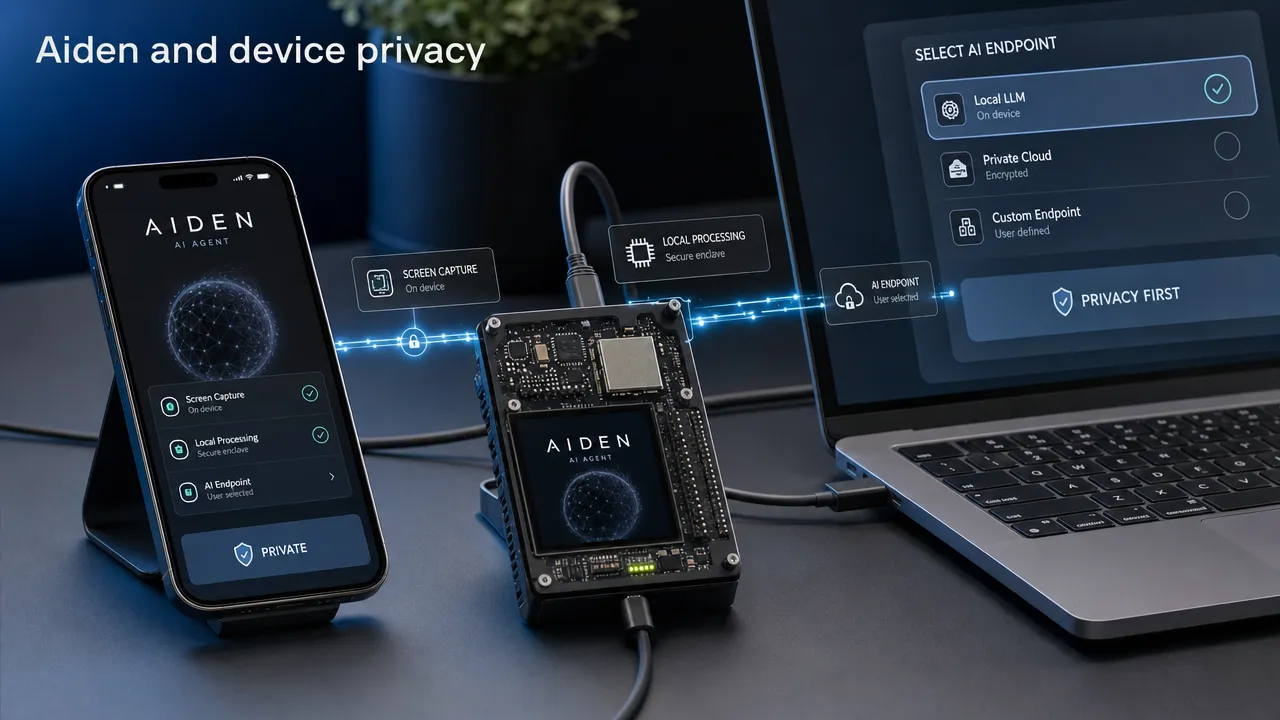
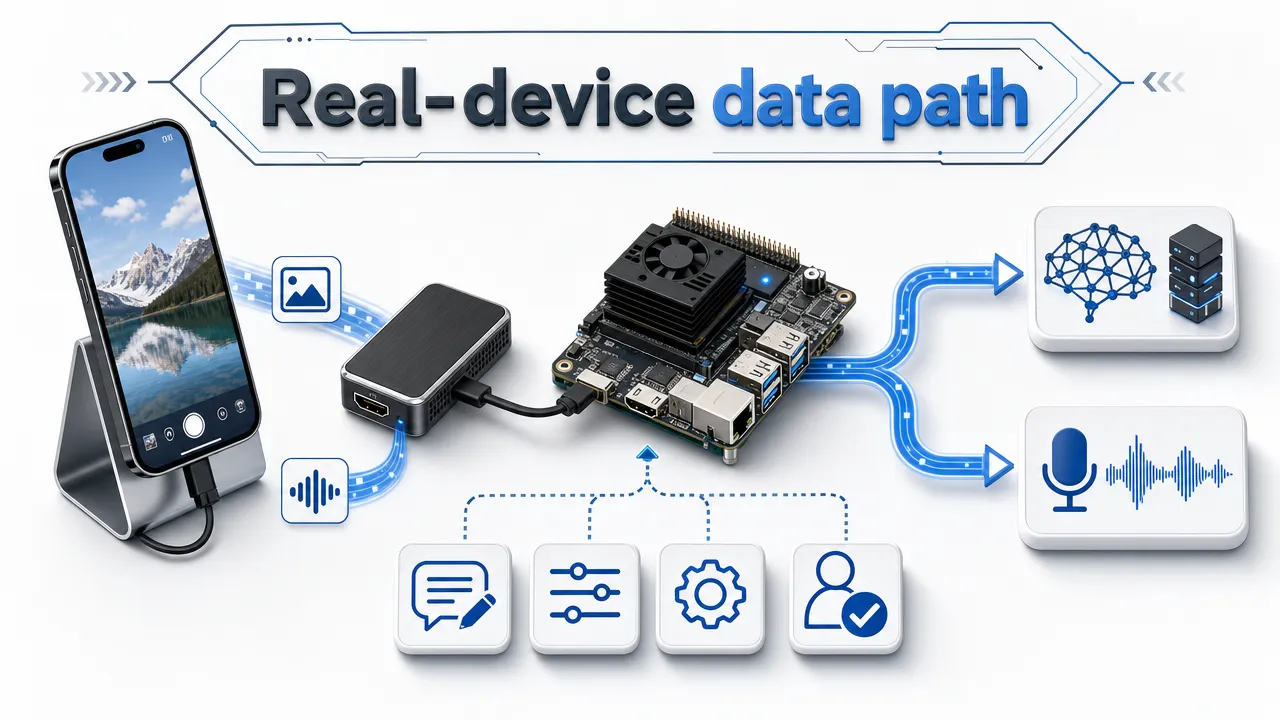
We built Aiden on a bring-your-own-provider architecture. The current development board captures a connected device display through HDMI capture, sends screenshots to a multimodal model endpoint you configure, and controls the target device through USB HID input such as keyboard, pointer, or touch commands.
For voice interactions, the board records audio, performs voice activity detection on the device, and uses the speech-to-text, language-model, and text-to-speech endpoints you’ve selected in your configuration.
Here’s what we can say plainly:
We don’t run an Aiden-hosted backend in the current development-board architecture.
Screenshots, audio, and text go to the endpoints you configure — not to us.
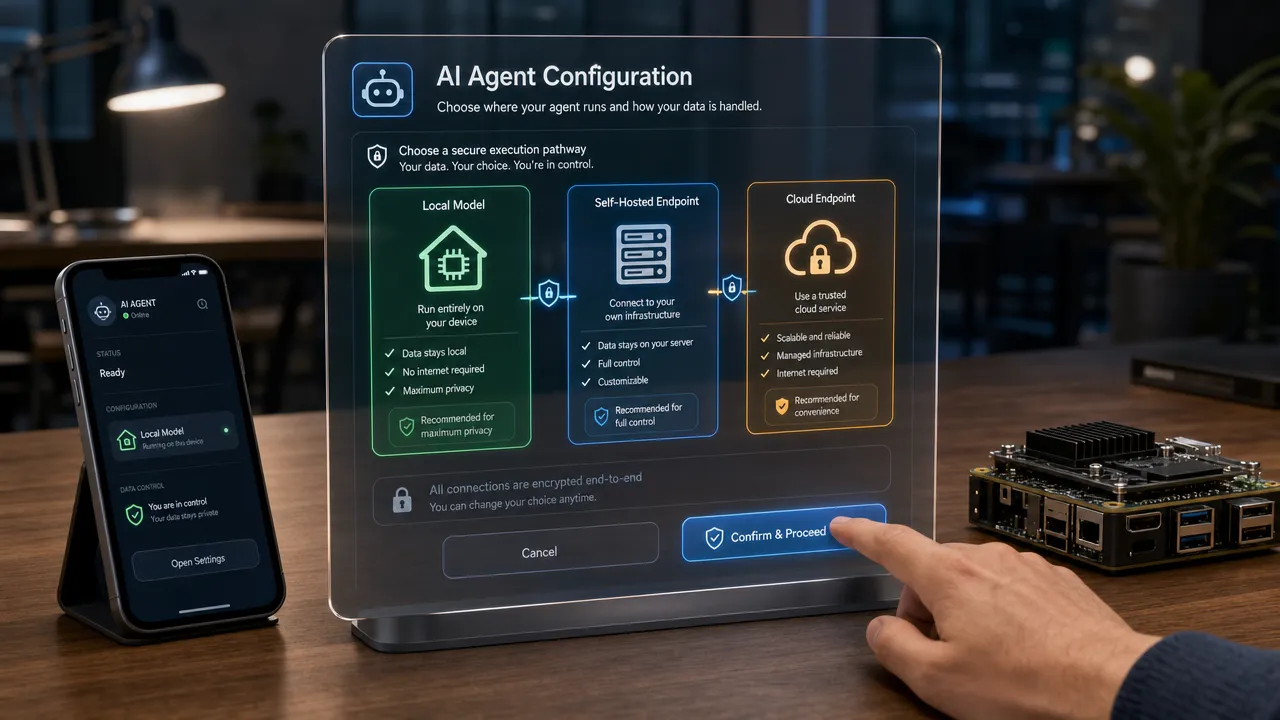
You can configure external services, local models, or your own deployment.
Our firmware is open source, so you can inspect it yourself.
Self-hosting changes the route your task content takes, depending on how you set up your deployment.
This is a deliberate departure from earlier generations of cloud-centered AI software. In many connected systems, the product provider, storage layer, and model provider are tightly coupled. We’ve split those roles apart: you choose the model and speech-service endpoints, rather than your task content routing through infrastructure we operate.
That doesn’t mean every bit of information stays transient, and we’re not going to pretend otherwise. Aiden also supports persistent device-specific context, user preferences, and skill optimization. That means Aiden data storage can include deployment-level context or preferences — we just haven’t yet published the exact storage location, format, duration, or deletion process, and we’d rather tell you that directly than leave it vague.
Question
What we can confirm today
What we haven’t published yet
Does Aiden operate a hosted backend for the current board architecture?
No, the current architecture has no Aiden-hosted backend.
Whether future architectures or services will differ.
Where do screenshots, voice, and prompts go?
To the model, STT, and TTS endpoints you configure.
What those providers retain or log on their end.
Can data remain under your own infrastructure?
Yes — self-hosting and local-model configurations are supported.
Exact local storage behavior across every configuration.
Can the deployment retain context?
Yes, we support persistent context, preferences, and skills.
Retention period, visibility, export, and deletion controls.
For builders, the practical takeaway is clear: your configuration matters as much as the device itself. A cloud model endpoint, a self-hosted model, and a local model can create materially different data flows.
What Aiden data storage may include during a real-device task
A real-device AI agent encounters information differently than a conventional chatbot does. It may operate around visible interfaces, spoken instructions, application windows, and task history. We designed Aiden to see a connected device screen through HDMI capture and interact through USB HID, rather than relying on an app installed on the target device.
That mechanism is worth understanding, because it shapes what content can enter a task flow.
Screen and interface content
A screenshot can contain far more than the immediate task. Notifications, conversations, documents, open tabs, contact details, authentication prompts, and enterprise content may all be visible. We send screenshots to the multimodal endpoint you select.
That means screen content can leave the board when you configure a remote endpoint. We won’t claim that all screenshots are permanently stored, never cached, or never retained — we haven’t yet published a complete account of screenshot buffering, caching, or how each provider handles retention on their side.
Voice, prompts, and task instructions
Voice mode involves recorded audio and the STT, LLM, and TTS services you’ve configured. Written prompts and task instructions also go to your configured endpoints. This is central to how Aiden handles data: whichever provider you select becomes part of your task’s data path.
For sensitive work, don’t treat your provider configuration as a minor implementation detail. Its policies, regional options, logging controls, training settings, and retention practices directly affect your privacy outcome.
Context, preferences, and skills
Aiden supports persistent memory, device-specific context, user preferences, and skill optimization. These capabilities make repeated interaction more useful, but they also raise fair questions about local persistence that we want to answer honestly.
We haven’t yet published:
The precise data schema we use for memory or preferences.
Whether you can inspect, disable, export, or clear stored context.
How long context or skill-related information persists.
Whether backups, traces, or diagnostic records exist in a given deployment.
That’s why our answer to "does Aiden store your data" is precise rather than absolute. We don’t run a backend for the current architecture — but persistent context means a deployment may still retain certain information locally, and we’re not going to gloss over that.
Aiden data storage questions we haven’t answered publicly yet
We don’t think a technical repository alone fully covers Aiden privacy. Open-source firmware makes our architecture inspectable, but inspectable code isn’t the same as the complete disclosure you need to evaluate personal information, logs, deletion, or security operations.
We don’t yet have an official privacy-policy page live on the aidenai.io domain. If you come across a similarly named policy on another domain, don’t treat it as ours without direct confirmation from us.
Here’s what we haven’t documented publicly yet:
Topic
Where we stand today
Aiden data retention periods
We haven’t published a retention schedule yet.
Local memory deletion
We haven’t published a deletion workflow yet.
Data export
We haven’t published an export procedure yet.
Logs and diagnostics
We haven’t published complete default logging or retention details yet.
Telemetry and analytics
We haven’t made a public statement on their use or non-use yet.
Storage jurisdictions
We haven’t published storage-region details yet.
Encryption and key management
We haven’t published a complete security architecture yet.
Account and contact data
We haven’t published a full inventory of account, website, support, or community data yet.
We’d rather you not read this list in either direction. The absence of a published disclosure doesn’t prove we collect that information, and it doesn’t prove we don’t. We just haven’t documented it publicly yet, and we’d rather say so than let you assume either way.
Our repository includes a deploy/langfuse area related to observability and tracing. It’s a useful thing for you to review technically, but its presence doesn’t mean tracing is enabled by default, used in every deployment, or receiving personal information.
Aiden security deserves the same precision. Our firmware is public and inspectable, and our current architecture has no backend — but neither fact alone establishes our encryption standards, secure update process, penetration testing, incident response plan, or freedom from vulnerabilities. We haven’t published a complete security architecture yet either.
How Aiden data storage depends on your configured providers
Our bring-your-own-model approach gives technically literate users real choice, but it also puts real responsibility in your hands. The same Aiden task can have different data implications depending on whether your configured endpoint is a cloud provider, a locally run model, or infrastructure you operate yourself.
Ask yourself these questions before sharing sensitive material:
Configuration question
Why it matters
Which model endpoint receives screenshots?
Screen content may contain information beyond the intended task.
Which STT and TTS services process voice?
Audio may include personal, workplace, or third-party information.
Is the endpoint local, self-hosted, or cloud-based?
Processing location and operational controls differ across each.
What does the provider retain?
Prompts, media, outputs, and metadata may have different retention rules.
Are logs or traces enabled?
Observability helps with debugging but may capture sensitive task context.
What local context persists?
Preferences, skills, and device-specific context need their own review.
Can data be removed?
Deletion may require separate actions across local systems and external providers.
Our position is specific: screenshots, audio, and text go to the model and speech-service endpoints you configure, not to a backend we operate. That’s designed to support a deployment built around infrastructure you control.
Still, local processing isn’t automatically a complete privacy guarantee. Local files, device access, backups, configuration secrets, and operational logs need their own controls regardless. Cloud processing isn’t automatically unsuitable either, as long as the provider you pick has safeguards, terms, and retention options that fit your task.
For more general guidance, the NIST Privacy Framework covers privacy risk management, while the OWASP AI Security and Privacy Guide covers risks like sensitive-data exposure and prompt injection. These are general frameworks we’re pointing you to, not claims about our own implementation.
Aiden data storage, human control, and the practical bottom line
Human control matters when an agent interacts with real interfaces, but control over an action isn’t the same as control over data. You can interrupt, redirect, or confirm a task while screenshots, prompts, voice input, or outputs are still being transmitted to your configured endpoint.
We built Aiden around visible human control, interruption, redirection, and meaningful confirmation. Those are valuable boundaries for a physical mobile AI agent working with actual phone and computer interfaces. But we want you to see them as one layer in a larger privacy and security practice, not the whole picture.
Here’s where we stand, plainly:
The current development-board architecture has no Aiden-hosted backend.
You configure the model, STT, and TTS endpoints that receive your screenshots, audio, and text.
Our self-hostable, open-source firmware gives builders a real path to review and shape their own deployment.
We support persistent context, preferences, and skill optimization, so claiming that no data is ever stored would be misleading, and we won’t claim it.
We haven’t yet published complete details on data retention, deletion, logs, security controls, storage locations, or provider processing terms.
Before you use a real-device AI agent with private screens, voice data, credentials, or sensitive personal information, check our latest materials and review the privacy controls of every endpoint you configure.
Join the Aiden Discord community to discuss physical AI agents, real-device automation, and the engineering behind Aiden. Our engineers are active in the community and welcome technical questions.
Explore and star Aiden on GitHub. If you find a reproducible issue, a compatibility gap, a documentation gap, or have a technical proposal, open an Issue — we’d like to hear it.
Aiden data storage FAQ
Does Aiden store your data?
Our development-board architecture has no Aiden-hosted backend. Screenshots, audio, and text go to endpoints you configure. That said, we support persistent context, preferences, and skill optimization, and we haven’t yet published their retention or deletion behavior. So it would be too broad for us to say that no data is ever stored in any Aiden deployment — we don’t want to claim that.
What personal information does Aiden collect?
We haven’t yet published a complete personal information inventory covering accounts, contact forms, website analytics, support communications, or community services. What we’ve documented so far focuses on task-related data flows, not a full privacy disclosure.
What is Aiden’s privacy policy?
We don’t have an official privacy policy live on the aidenai.io domain yet. Check our official site for the latest documentation before relying on any privacy or legal statement.
How long is Aiden data retention?
We haven’t published a data retention period yet. We support persistent context and preferences, but we haven’t specified storage duration, location, or deletion controls.
Does Aiden send screenshots to the cloud?
We send screenshots to the multimodal model endpoint you configure. If you configure a cloud provider, screenshots go to that provider. We also support local-model and self-hosted approaches — the resulting data flow depends entirely on how you set up your deployment.
Is Aiden secure?
Our firmware is open source, so you can inspect it yourself, and our current development-board architecture has no backend. But we haven’t yet published a complete security architecture, encryption specification, certification, penetration-test report, or vulnerability-disclosure policy.
Agentic AI Briefing — 2026-08-11
Summary
H2O.ai joins Open Secure AI Alliance to strengthen AI agent security infrastructure
NVIDIA’s Nemotron 3.5 Lightning achieves 4x speed improvement for agentic AI models
Oracle introduces new Fusion Agentic Applications for enhanced talent management
NVIDIA NeMo Switchyard enables efficient routing of AI agents across different models
Garantir adds agentic security as fifth pillar to GaraTrust platform
Google Maps launches automatic food ordering and hotel booking with agentic AI
Allstate develops Allie platform to advance agentic strategy for customer service
Glance and Productsup partner to deliver agentic commerce solutions for enterprises
Alvys democratizes freight AI agents for transportation fleets of all sizes
H2O.ai Strengthens AI Security Through Alliance Partnership
H2O.ai has joined the Open Secure AI Alliance to enhance security measures for AI software and autonomous agents. This strategic move aims to establish robust security standards and best practices for the growing ecosystem of AI agents operating across various industries.
NVIDIA Achieves 4x Speed Boost with Nemotron 3.5 Lightning
NVIDIA’s latest Nemotron 3.5 Lightning technology delivers a significant performance breakthrough, achieving four times faster processing speeds for agentic AI models. This advancement promises to dramatically improve the efficiency and responsiveness of AI agents across various applications and use cases.
Oracle Launches Agentic Applications for Talent Management
Oracle has expanded its Fusion suite with new Agentic Applications and AI agents specifically designed to revolutionize organizational talent management. These intelligent agents aim to streamline HR processes, improve employee engagement, and enhance workforce planning through automated decision-making capabilities.
NVIDIA introduces NeMo Switchyard, a sophisticated routing system that enables AI agents to dynamically switch between different models based on specific requirements. This technology allows organizations to optimize their AI agent deployments by automatically selecting the most appropriate model for each task.
Garantir Adds Agentic Security to GaraTrust Platform
Garantir has expanded its GaraTrust platform by incorporating agentic security as the fifth pillar of its comprehensive security framework. This enhancement specifically addresses the unique security challenges posed by autonomous AI agents, providing specialized protection mechanisms for agent-based systems.
Google Maps Integrates Agentic AI for Automated Services
Google Maps has introduced groundbreaking agentic AI capabilities that enable automatic food ordering and hotel bookings directly through the platform. This integration allows users to delegate complex travel and dining arrangements to AI agents that can handle reservations and orders autonomously.
Allstate Advances Customer Service with Allie Platform
Allstate is preparing to launch its Allie platform as part of a comprehensive agentic strategy aimed at transforming customer service operations. The platform will deploy intelligent agents to handle customer inquiries, process claims, and provide personalized insurance recommendations with minimal human intervention.
Glance and Productsup Enable Agentic Commerce for Enterprises
Glance and Productsup have announced a strategic partnership to deliver agentic commerce capabilities to enterprise brands. This collaboration combines their technologies to create intelligent agents that can autonomously manage product catalogs, optimize listings, and execute commerce strategies across multiple channels.
Alvys Democratizes Freight AI Agents for All Fleet Sizes
Alvys has opened access to its freight AI agents, making advanced autonomous logistics technology available to transportation fleets regardless of size. This democratization enables smaller operators to leverage the same AI-powered efficiency tools previously available only to large enterprises.
HDMI Capture for AI Agents: Out-of-Band Vision, Latency and Trade-Offs
HDMI capture can give a physical AI agent an external view of the same rendered interface a person sees. The source device outputs video, capture hardware converts that signal into frames, and an agent runtime can pass selected screenshots to a vision-capable model. This observation path can work without an app-specific API, but it does not provide semantic UI data or control the device by itself.
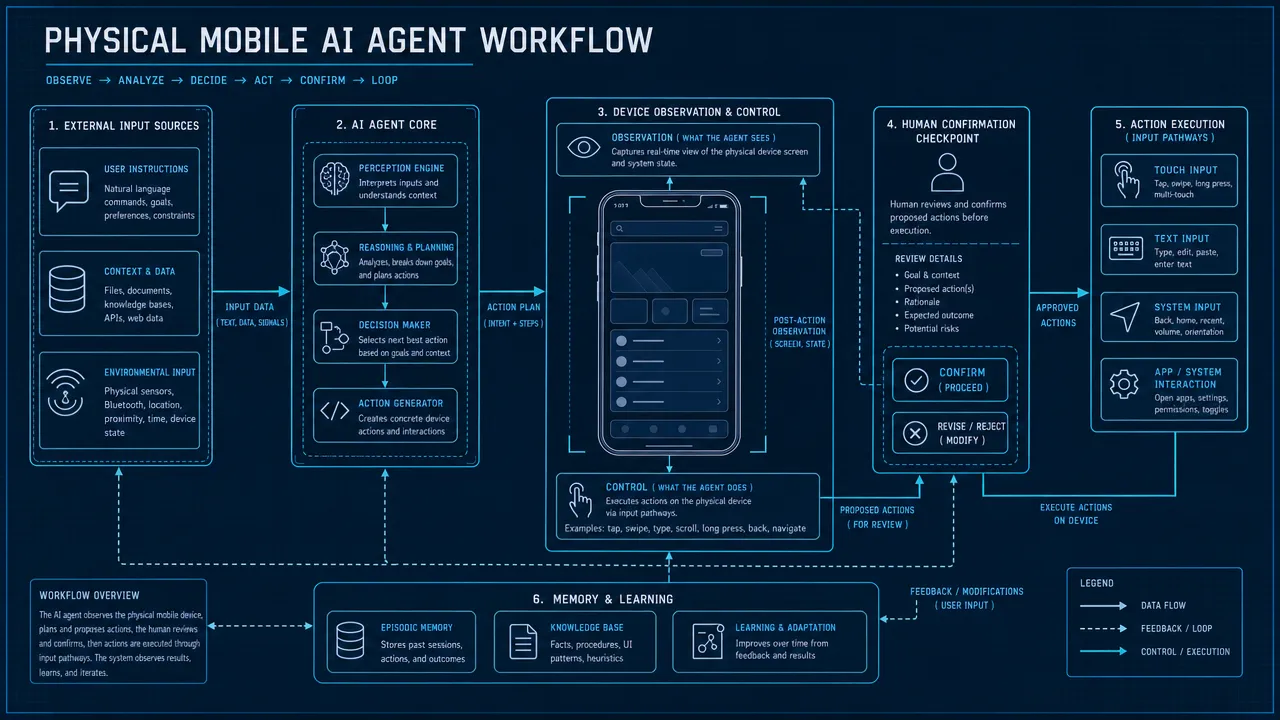
For Aiden’s current development-board implementation, the distinction is deliberate: HDMI capture supplies visual evidence, while a separate input path performs authorized actions. The agent can observe the screen, decide what to do, act through the configured control method and then capture another frame to check the result.
Why an AI Agent Needs a View of the Screen
An agent cannot reliably operate a visual interface from a task description alone. It needs evidence about the device’s current state: which app is open, whether a dialog appeared, where a control is located and whether the previous action changed the interface.
Screen observation can help the agent:
identify visible text, icons and controls;
distinguish a loading state from a completed step;
detect pop-ups, permission prompts and error messages;
ground an action in the current screen rather than an assumed state;
compare the screen before and after an action;
stop or ask for help when the visible result is ambiguous.
A frame is still only visual evidence. It does not automatically reveal the interface hierarchy, the purpose of every element, the user’s intent or the consequences of selecting a control. OCR, visual grounding and task context can improve interpretation, but they do not make perception infallible.
This is why a useful device-agent loop is not simply “take a screenshot and tap.” It is observe → interpret → act → re-observe → verify. The observation path provides the evidence needed at the first and last steps.
What Out-of-Band Screen Capture Means
Out-of-band screen capture observes the rendered display through a path outside the target application’s own API or automation layer. With HDMI capture, the source device sends display output to an external capture bridge. The agent system receives pixels from that display signal rather than asking the app for structured data.
This boundary has two important consequences.
First, the capture path can remain relatively independent of individual apps. If the device renders a compatible output, the observer may see transitions across apps, system UI and dialogs without requiring each application to expose an integration.
Second, the result is pixels rather than semantic UI structure. HDMI capture does not inherently provide labels, roles, object identifiers, document structure or supported actions. A button and a decorative rectangle may look similar until the agent interprets the surrounding context.
Out-of-band should therefore mean separate from the app integration layer, not invisible, unlimited or permission-free. The source device, adapters and capture hardware must still support the connection, and platform or content-protection rules can constrain what appears in the captured output.
How HDMI Capture Fits Into a Device Agent
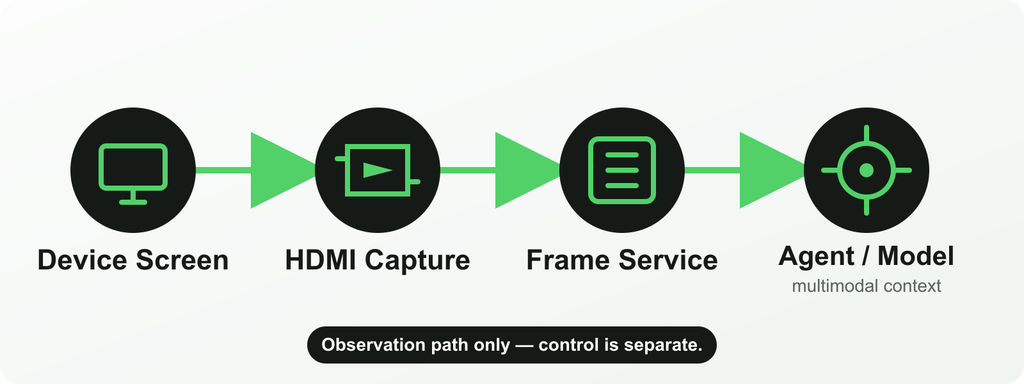
The observation path can be summarized as:
device display output → HDMI capture bridge → video device/frame service → screenshot tool → agent runtime and multimodal model
The stages have distinct responsibilities:
The target device renders its interface. The source must expose compatible display output through its port, adapter or hub.
The capture bridge receives the HDMI signal. It negotiates the display mode and converts the video into a form the board can ingest.
The frame service owns the capture device. It manages the video path and makes current frames or screenshots available to other processes.
The agent requests visual context. A screenshot is prepared and passed to a configured model that supports image input.
A separate input path acts on the target. HDMI does not send taps, keys or pointer events. Those belong to control methods such as USB HID or ADB.
Keeping these stages separate makes failures easier to reason about. A blank frame is an observation-path problem. A correctly interpreted screen followed by an ineffective tap is more likely to involve grounding or the control path.
Benefits
External observation
The capture system can observe a rendered screen without running inside the target app. This can be useful for physical AI agents, hardware test systems and device workflows where the target environment should remain separate from the observer.
Reduced dependency on app APIs
HDMI capture does not require every visible app to publish an API for screen observation. That can help when a workflow crosses closed or legacy interfaces. It does not eliminate the need for authorization or safe task boundaries, and an API remains preferable when structured, reliable data is available.
Real-device state
The frame can reflect what the connected device is actually rendering, including system UI, app transitions, visible notifications and errors. This is valuable when an emulator or synthetic test state would not represent the real hardware and configuration.
App-independent visibility
Because the observation path follows the display output, it may continue across apps and system surfaces that do not share one automation interface. Compatibility still depends on the device’s output path and any protections applied to the content.
Separation between seeing and acting
A distinct observation path makes it possible to verify an action through a newly captured frame rather than assuming success from the command alone. It also makes clear that visual access is not itself permission to act.
Trade-Offs
HDMI capture adds physical and computational stages between the target screen and the agent’s next decision. Those stages introduce constraints that an internal screenshot or semantic API may avoid.
Design consideration
What HDMI capture can provide
Trade-off or boundary
Device output support
A view of the rendered interface
The target must support compatible video output; not every phone, adapter or mode does
Adapters and hubs
A practical path from USB-C or another output to HDMI capture
Cabling, power, USB roles and display negotiation add failure points
Latency
Frames suitable for observation and verification
Capture, buffering, encoding, transfer and model inference all add delay; capture FPS alone is not end-to-end latency
Frame rate
Configurable sampling or repeated observation
Higher sampling increases work and does not guarantee faster agent decisions
Image quality
Pixel-level evidence from the rendered display
Scaling, compression, motion, small text, rotation and black borders can reduce interpretability
Semantic information
Visual access to whatever is rendered
Pixels do not include an accessibility tree, DOM, object IDs or action semantics
Protected content
Normal unprotected display output where the chain permits it
HDCP, application policy or platform protections may block, redact or blank captured content
Setup complexity
External observation without app-specific capture code
A repeatable observation path in a controlled setup
Cable changes, sleep, hot-plug events and signal loss can interrupt the chain
Privacy
A clearly defined external screen-observation boundary
The screen may contain sensitive information; collection, retention and model transmission need deliberate controls
The relevant performance question is the latency of the whole loop—not just the capture bridge. An agent may wait for the interface to settle, request a frame, preprocess the image, send it to a model, receive a decision and then verify the result. A high nominal frame rate does not remove those other delays.
How Aiden’s Current Reference Setup Works
Aiden’s public implementation is a development-board and firmware reference system, not a confirmed finished retail product. The current firmware repository documents a connected device whose display output is captured through an HDMI-to-CSI path using an RK628D or TC358743 bridge.
In the current architecture:
the bridge exposes captured video through /dev/video0;
the long-running frame_service owns that video device so multiple consumers do not compete for it;
the service handles capture initialization, frame availability, health and recovery behavior;
the Go Agent’s screenshot tool accesses the service through a Unix domain socket;
the requested screenshot becomes image input for a user-configured model provider that supports vision;
device control remains separate from the HDMI observation path.
The Aiden architecture documentation describes a request for one current frame moving from the agent to frame_service and then to the model as image input. Aiden’s newer request-driven capture update adds capture-state reuse, optional persistent streaming for related screenshot sequences, black-border cropping and additional frame-preparation controls.
That does not mean the entire inference stack runs locally. The runtime is on the board, but the location and behavior of model inference depend on the model provider the user configures. A text-only model cannot interpret the captured image.
The detailed frame-service documentation also exposes bridge-aware EDID handling, configurable capture parameters and recovery mechanisms. Those implementation details are useful for developers, but they should not be converted into a claim of universal device compatibility, fixed end-to-end latency or guaranteed image quality.
HDMI Capture vs Accessibility / Screenshot APIs
External capture is not automatically better than an internal screen-observation method. Each approach exposes different evidence and requires a different trust relationship.
Observation method
Main advantage
Main limitation
HDMI capture
App-independent view of compatible rendered output through an external path
Requires video output and hardware; provides pixels rather than semantic structure
OS screenshot or screen-capture API
Direct digital frames with platform-managed permissions
Requires an integration on the target and may be limited, revoked or blocked
Accessibility API
Structured labels, roles, bounds and supported actions where properly exposed
Depends on permissions, platform policy and each app’s accessibility implementation
Accessibility can be better when the agent needs structured control names and states. A screenshot API can be simpler when the target platform provides an authorized capture route. HDMI is strongest when the system specifically needs an external view of a compatible real device without depending on each app’s integration.
These methods can also complement one another in controlled systems. The correct choice depends on the task’s evidence requirements, deployment environment and permission model—not on a claim that one observation method always wins.
When HDMI Capture Is Not the Right Choice
HDMI capture is usually the wrong default when:
the target device cannot provide stable, compatible video output;
the workflow needs structured data that an authorized API already exposes;
accessibility metadata provides a more reliable representation of the interface;
the system must operate without adapters, hubs or additional hardware;
very low latency or high-throughput structured operations are essential;
the task depends on protected content that the external chain cannot capture;
the environment cannot safely govern screenshots containing sensitive information;
a browser, emulator or managed test framework already supplies the necessary observation and control;
the team cannot validate device-specific display modes, recovery behavior and image quality.
An external observation path earns its complexity when the workflow genuinely needs to see a compatible real device outside the app layer. It should not be added simply because HDMI capture sounds more independent.
FAQ
What does HDMI capture provide to an AI agent?
It provides frames of the rendered display that a vision-capable model can inspect. Those frames can help the agent understand the visible state and verify changes after an action.
Can HDMI capture control a phone?
No. HDMI is the observation path. The system needs a separate authorized input route, such as USB HID, ADB, an accessibility action or an application API, to act on the device.
Is HDMI capture the same as taking a screenshot through the operating system?
No. HDMI capture receives external display output through capture hardware. An OS screenshot API runs inside the target platform’s permission and capture framework.
Does HDMI capture provide UI labels and element IDs?
Not by itself. It provides pixels. Semantic information such as roles, labels, bounds and supported actions comes from APIs such as accessibility services when those are available and authorized.
Does Aiden continuously send every frame to a model?
Aiden’s current documentation describes request-driven screenshots for the agent. Capture state can be reused for related sequences, but that is different from claiming that every captured frame is continuously sent to a model.
Can Aiden capture every phone screen?
That should not be assumed. The target needs compatible display output and the required adapter or hub path. Device modes, protected content and capture-chain compatibility can all limit what is available.
A Separate Observation Path, Used Deliberately
HDMI capture is valuable because it gives a physical AI agent independent visual evidence from a compatible real device. Its value comes with clear boundaries: it adds hardware, it delivers pixels rather than semantics, it does not provide control, and it cannot guarantee access to every screen.
In Aiden’s current reference system, the observation path is one part of a larger loop. The device renders a screen, the capture service supplies a requested frame, the runtime asks a multimodal model to interpret it, a separate control path performs an authorized action, and a later frame helps verify what changed. That separation is what makes HDMI capture useful—and what prevents it from being mistaken for a complete automation architecture.
Agentic Commerce Briefing — 2026-08-05
Summary
Cloudflare introduces wallets and cloudflare.pay to enable secure AI agent commerce transactions
Visa announces $2.4B acquisition of BioCatch to bolster security capabilities
Rezolve Ai transforms its 550-person India operations into global agentic AI powerhouse
AI agents set to revolutionize e-commerce and advertising industries
Mastercard publishes research on trust frameworks for agentic commerce future
DoorDash receives approval for drone delivery and Shopify agentic ordering integration
Sumsub and Sumvin enable AI agents to conduct financial transactions like humans
Marketing undergoes bold transformation through scaled agentic AI implementation
Cloudflare Enables Secure AI Agent Transactions
Cloudflare has launched innovative wallets and cloudflare.pay services to facilitate secure commerce transactions by AI agents. This infrastructure development addresses critical security concerns in autonomous agent commerce, providing essential payment rails for the emerging agentic economy.
Read Full Article: FF News
Visa Acquires BioCatch for $2.4 Billion
Visa announced plans to acquire BioCatch for $2.4 billion, significantly enhancing its security capabilities. This strategic acquisition positions Visa to better protect against fraud in an era of AI-powered transactions and strengthens its competitive edge in digital payment security.
Read Full Article: Payments Dive
Rezolve Ai Scales Global Agentic Operations
Rezolve Ai is leveraging its 550-specialist India operations to become a global engine for agentic AI development. This strategic expansion demonstrates the company’s commitment to scaling AI agent capabilities and establishing India as a critical hub for agentic commerce innovation.
Read Full Article: Rezolve Ai
AI Agents Transform E-commerce and Advertising
AI agents are poised to fundamentally reshape e-commerce and advertising sectors, according to new market research. These autonomous systems promise to revolutionize customer interactions, personalization strategies, and transaction processing across digital commerce platforms.
Read Full Article: StartupHub.ai
Mastercard Explores Trust Frameworks
Mastercard’s latest Signals Report examines essential trust frameworks shaping the future of agentic commerce. The comprehensive study identifies key requirements for establishing secure, reliable AI agent transactions and highlights the importance of standardized protocols for autonomous commerce systems.
Read Full Article: TechAfrica News
DoorDash Launches Drone and Agentic Ordering
DoorDash has received regulatory approval for drone delivery services and announced agentic ordering integration via Shopify. This dual innovation enables AI agents to autonomously place orders while leveraging advanced drone technology for fulfillment, marking a significant milestone in autonomous commerce.
Read Full Article: mediapost.com
AI Agents Gain Financial Transaction Capabilities
Sumsub and Sumvin have developed groundbreaking technology enabling AI agents to spend funds like humans. This advancement allows autonomous agents to manage budgets, make purchases, and conduct financial transactions independently, opening new possibilities for automated commerce and business operations.
Read Full Article: fintech.global
Marketing Transforms Through Scaled Agentic AI
The marketing industry is undergoing one of its boldest transformations through scaled agentic AI implementation. Industry leaders are deploying autonomous agents to revolutionize campaign management, content creation, and customer engagement strategies, fundamentally changing how brands connect with consumers.
Read Full Article: The Drum
AI Browser Briefing — 2026-08-03
Summary
Google announces Gemini Spark integration with Chrome for enhanced AI browsing capabilities
ChatGPT Atlas service ending on August 9 with data migration instructions available
New Polar AI browser launched by former Perplexity engineer offers advanced automation features
Security researchers warn that AI browsers can be hijacked through malicious web pages
Extended browser extension enables website transformation through natural language commands
Polar AI browser specifically designed for knowledge worker productivity
AI features now central to browser competition as alternatives to Chrome and Safari emerge
Security vulnerabilities identified across multiple AI browser platforms
Gemini Spark Enhances Chrome with AI Integration
Google has announced that Gemini Spark now integrates directly with Chrome, bringing advanced AI capabilities to the popular browser. The update enhances browser-based AI features, allowing users to leverage Gemini’s capabilities seamlessly within their browsing experience.
ChatGPT Atlas will discontinue its service on August 9, 2026, prompting users to take action to preserve their data. The platform has provided comprehensive guidance on data export procedures, ensuring users can safely migrate their information before the shutdown date.
Polar AI Browser Launches with Advanced Automation
Polar, a new AI browser developed by a former Perplexity engineer, enters the market with capabilities extending beyond basic web automation. The browser promises to handle more complex tasks and workflows, positioning itself as a comprehensive solution for productivity-focused users.
Security researchers have discovered that AI browsers can be compromised through specially crafted web pages, raising significant safety concerns. The vulnerability allows malicious actors to hijack AI browser functionality, potentially exposing users to various security threats and data breaches.
Extended Enables Natural Language Website Transformation
Extended, a new browser extension builder, empowers users to transform websites using simple language commands without coding knowledge. This tool democratizes web customization, allowing anyone to modify their browsing experience through intuitive natural language instructions.
Akamai has unveiled a new security framework specifically designed for AI-driven commerce applications. This development represents a significant shift in how businesses approach security for AI-powered commercial platforms, addressing emerging threats in the evolving digital commerce landscape.
The newly launched Polar AI browser, created by a Perplexity alumnus, specifically targets knowledge workers’ needs. The browser incorporates specialized features designed to enhance research, analysis, and information management workflows for professional users.
The browser wars have evolved beyond search capabilities, with AI features now at the forefront of competition. New alternatives to Chrome and Safari are emerging, each offering unique AI-powered functionalities that cater to different user needs and preferences.
Research reveals that numerous AI browsers contain significant security vulnerabilities, potentially exposing users to various threats. These findings highlight the need for improved security measures as AI browser adoption continues to grow across consumer and enterprise segments.
Can AI Agents Use Apps Without APIs? Methods, Trade-Offs and Limits
Yes, an AI agent can sometimes use an app without a dedicated API by interacting with an authorized interface that it can observe and control. Depending on the environment, it may interpret screenshots, read accessibility data, inspect a browser page, use operating-system automation, send Android Debug Bridge commands or act through standard keyboard, pointer and touch input.
This flexibility comes with a trade-off. API calls usually return structured data and explicit errors. Interface-driven automation must infer what is happening, cope with changing screens and verify that each action produced the intended result. The practical rule is to use the most structured permitted method available and reserve visual automation for the steps that genuinely need it.
Can an AI Agent Use an App Without an API?
Yes, provided the agent has an authorized way to observe the application, a permitted way to act and a reliable way to verify the outcome.
An API is one integration layer, not the only possible one. When an app has no useful API, an agent may work through the same interface layer a person uses. It can identify controls, enter text, navigate between screens and inspect the resulting state.
The absence of an API does not make every app automatable. It also does not grant permission to automate an app. Device ownership, account permissions, platform rules, authentication requirements and the consequences of each action still matter.
A useful no-API loop is:
Observe → interpret → choose one bounded action → act → verify → continue or stop
Verification is what separates a controlled workflow from blind clicking. The agent should confirm that the expected page, field value, message or status appeared before moving to the next step.
How AI Agents Interact With Software Without APIs
No-API automation is not one technology. The best method depends on what the application exposes and how much structure the agent can use.
Screenshots and visual perception
A visual agent can inspect screenshots or video frames, recognize text and controls, choose an action and observe the next screen. This can work with legacy software, remote desktops, custom interfaces and mobile apps that expose little structured information.
Visual access is flexible, but it is probabilistic. Low contrast, unusual icons, animation, overlapping windows or a changed layout can cause errors. Coordinates alone are especially fragile, so useful systems combine visual recognition with state checks after important actions.
Accessibility layers
Accessibility frameworks can expose semantic information such as a control’s role, label, value and state. An agent may be able to locate “Submit” as a named button instead of estimating its position from pixels.
This can be more reliable than screen-only interaction, but it depends on the quality of the application’s accessibility implementation. Custom controls may have missing labels, stale values or incomplete structure. Platform tools such as Android UI Automator, Microsoft UI Automation and Apple XCTest illustrate structured approaches to testing and interacting with user interfaces.
Android Debug Bridge
Android Debug Bridge is a development and debugging interface for Android devices. In controlled environments, it can support input, app management, shell commands, logs and device inspection.
ADB is not a universal consumer automation route. It is Android-specific, requires setup and authorization, and may be inappropriate for unmanaged or locked-down devices. The narrower comparison between ADB and external input belongs to USB HID vs ADB: How AI Agents Actually Control Your Phone.
USB HID and standard input
USB Human Interface Device input can present actions as standard keyboard, pointer or touch-style events. This can be useful for real-device interaction because the target receives familiar input rather than an app-specific command.
HID provides an action path, not understanding on its own. It must be paired with an observation method and verification loop. Device compatibility, operating-system behavior, connection requirements and accessibility settings still determine what is practical.
Browser interaction
Web applications can often be automated without a product-specific API by using the browser’s document structure, accessibility tree or browser-control protocol. WebDriver defines a remote-control interface for browsers, while tools such as Playwright provide automation around page navigation and elements.
Browser interaction is usually more structured than pixel-only control, but it remains sensitive to changed selectors, dynamic rendering, pop-ups, embedded frames, session expiry and authentication. It also stops being sufficient when the workflow leaves the browser for a native app or system dialog. The distinction is covered in more depth in Browser Agents Can Use the Web. Aiden Is Built to Use the Device.
GUI and operating-system automation
Desktop and mobile automation tools can work through windows, controls, files, applications and operating-system services. Traditional robotic process automation is useful when the workflow is narrow and repeatable. AI adds value when the interface varies or the next action requires interpretation rather than a fixed rule.
The two approaches can also be combined: deterministic automation handles stable steps, while an AI agent interprets exceptions or ambiguous interface states. A human can remain responsible for final approval where an action is sensitive or irreversible.
API Automation vs No-API Automation
“No API” does not always mean purely visual. Accessibility data, browser protocols and operating-system automation can provide structure even when an application-specific business API is unavailable. The comparison below describes the usual trade-offs.
Factor
API automation
No-API interface automation
Reliability
Usually high when the API is stable and documented
Depends on interface stability, perception and verification
Speed
Direct requests are usually faster
Screen loading, perception and sequential actions add latency
Flexibility
Limited to exposed endpoints and permissions
Can sometimes reach visible functions that are not exposed through an API
Setup
Requires credentials, schemas and integration work
Requires observation, input, environment setup and workflow testing
Observability
Structured responses, status codes and logs are common
Needs screenshots, traces, state checks and explicit failure reporting
Compatibility
Works only where the provider exposes and supports the required operation
Can reach legacy, closed or cross-app interfaces, but not every device or state
Maintenance
Changes are usually versioned, although APIs can still be deprecated
UI redesigns, localization and device differences can break workflows
Security
Scopes and credentials can constrain access
May expose broad interface context; permissions and data capture need careful limits
Fragility
Lower for documented, stable operations
Higher when the agent depends on pixels, coordinates or changing layouts
A hybrid architecture is often strongest. Use an approved API for structured retrieval or transactions, then use interface automation only for the gap that the API does not cover.
When No-API Automation Makes Sense
No-API automation can be appropriate when the workflow is authorized, testable and difficult to complete through a supported structured integration.
Legacy applications
Older desktop software may contain essential workflows without modern APIs. UI automation can bridge those systems while a team evaluates longer-term modernization.
Closed or internal applications
An application may have no public API, or its API may omit the action a team needs. A controlled interface workflow can sometimes cover that gap without pretending that the missing endpoint exists.
Mobile apps
Many mobile tasks exist only in the visible app experience. A mobile agent may use accessibility data, visual perception, ADB, HID or supported operating-system automation depending on the environment. For the broader category, see What Is a Mobile AI Agent?.
Cross-app workflows
A task may begin in a browser, continue in a native app and finish in a system dialog. Interface-level automation can connect steps that no single API spans.
Testing and quality assurance
Agents can exercise user-facing workflows, inspect visible outcomes and record failures. Testing environments are particularly suitable because permissions, data and expected results can be controlled.
Human-like interface interaction
Some research, accessibility and device-use scenarios specifically require interaction with the interface a person sees. In these cases, the interface is not merely a fallback; it is the object being evaluated.
When an API Is Still Better
An API should usually remain the first choice when it exposes the needed operation with appropriate authorization.
Use an API for:
Structured operations: reading or writing known fields with explicit schemas.
High-volume workflows: processing many records efficiently and consistently.
Predictable data access: retrieving complete values without interpreting a screen.
Transactional systems: creating orders, payments or records where explicit responses and idempotency matter.
Low-latency requirements: completing operations without waiting for pages and animations.
Clear auditability: capturing request, response, identity and error information in structured logs.
Stable permission boundaries: restricting a token to specific operations instead of exposing an entire interface session.
An AI agent should not use the UI simply because it can. If a supported API provides the same result more safely and predictably, the API is normally the better execution layer.
Limitations of No-API Agent Automation
No-API automation trades structured integration for interface reach. The limitations need to be designed into the workflow.
UI changes
A renamed button, redesigned menu or altered navigation flow can invalidate a previously successful sequence. Semantic targeting and visual reasoning help, but neither eliminates maintenance.
Perception errors
OCR can misread text, and a vision model can confuse visually similar controls. The system should use confidence thresholds, expected-state checks and escalation rather than guessing repeatedly.
Latency
Each step may require loading the interface, capturing a state, interpreting it, acting and capturing again. This is slower than a direct API call and can become costly in long workflows.
Pop-ups and unexpected states
Cookie banners, notifications, update prompts, network errors and modal dialogs can block the expected control or change the meaning of the next action.
Permissions
The agent can act only within the permissions granted to the user, application, automation tool or connected device. Missing permissions should produce a clear stop or handoff, not an attempt to bypass the boundary.
Authentication
Login expiry, multifactor authentication and biometric prompts interrupt automation. These steps often require the user or an approved identity workflow.
CAPTCHAs
CAPTCHAs are access-control signals, not puzzles an agent should be designed to defeat. The appropriate response is to pause, request legitimate user completion or use a vendor-approved integration.
Device and environment differences
Display size, operating-system version, language, scaling, app version and input method can all affect the same workflow. Testing one device is not evidence of universal compatibility.
Irreversible actions
Sending a message, deleting a record, changing a permission or submitting a transaction may be difficult to undo. Require confirmation immediately before consequential actions and preserve enough evidence for review.
State drift
The application may change between observation and action because of another user, a background process or a delayed request. The agent should recheck important state instead of assuming that its earlier observation remains valid.
How Aiden Approaches Apps Without APIs
Aiden explores no-API interaction as a device-use problem: observe the visible interface, reason about the current state, perform a bounded action and verify the result.
Aiden’s public development-board materials document a reference implementation that can capture a connected device’s display and send standard input. This is evidence of an engineering approach, not a claim that every app, phone, computer or workflow is supported. Compatibility depends on the device, operating system, interface state and configured observation and control routes.
How to Choose Between APIs and Interface Automation
Choose the most structured permitted layer that can complete each step:
Use an approved API when it covers the operation.
Use browser or accessibility structure when it is available and reliable.
Use operating-system or development automation in controlled environments.
Use visual interaction and standard input when no stronger interface exists.
Require human confirmation for ambiguous, sensitive or irreversible actions.
Stop when authentication, permissions or evidence are insufficient.
The goal is not to eliminate APIs. It is to make authorized workflows possible when an API is absent or incomplete—without hiding the additional fragility and responsibility that interface automation creates.
FAQ
Can AI automate an app without an API?
Yes. An AI agent may use browser controls, accessibility data, visual perception, ADB, HID or other permitted interface methods. Success depends on authorization, the application’s interface, the environment and reliable outcome verification.
Is screen-based automation reliable?
It can be useful, but it is generally less deterministic than a stable API. Layout changes, pop-ups, loading delays and perception errors can interrupt the workflow, so the agent needs state checks, testing and a safe handoff path.
Can AI control legacy software?
Sometimes. Legacy software may be accessible through desktop controls, keyboard and pointer input, OCR, screenshots or RPA. The workflow should be narrow, authorized and tested against the application’s actual states.
Can an AI agent use mobile apps visually?
Yes, if it has a supported way to observe the screen and send input. Compatibility varies by device, operating system, app, permissions and control method, so visual access should not be treated as universal support.
Is visual automation better than APIs?
Usually not for structured, high-volume or transactional operations. Visual automation is valuable when no suitable API exists or when the visible interface itself is part of the task. Hybrid systems often use APIs for stable steps and UI interaction only where necessary.
Can AI use apps without developer access?
In some authorized environments, yes. Visual or standard-input methods may not require access to the app’s source code or private API. They still require legitimate access to the device or account and must respect authentication, permissions and platform rules.
Debugging an iOS Bug: Why Command+V Stops Working with External Keyboards
Aiden is a physical mobile AI agent that connects to a phone. Over USB, it presents itself as a keyboard and mouse, allowing it to reproduce real-world iPhone interactions. During testing on physical devices, however, we encountered a strange issue: ordinary letters worked normally, while combinations involving Shift, Command, or Option would intermittently fail.
The symptoms were easy to see. Pressing x entered the letter correctly, but Shift+X could still produce a lowercase x. Command+A did not select all, and Command+V did not paste. On the Aiden side, writing the HID report to the Linux USB Gadget device at /dev/hidg0 completed successfully, yet the expected action never appeared on the iPhone screen.
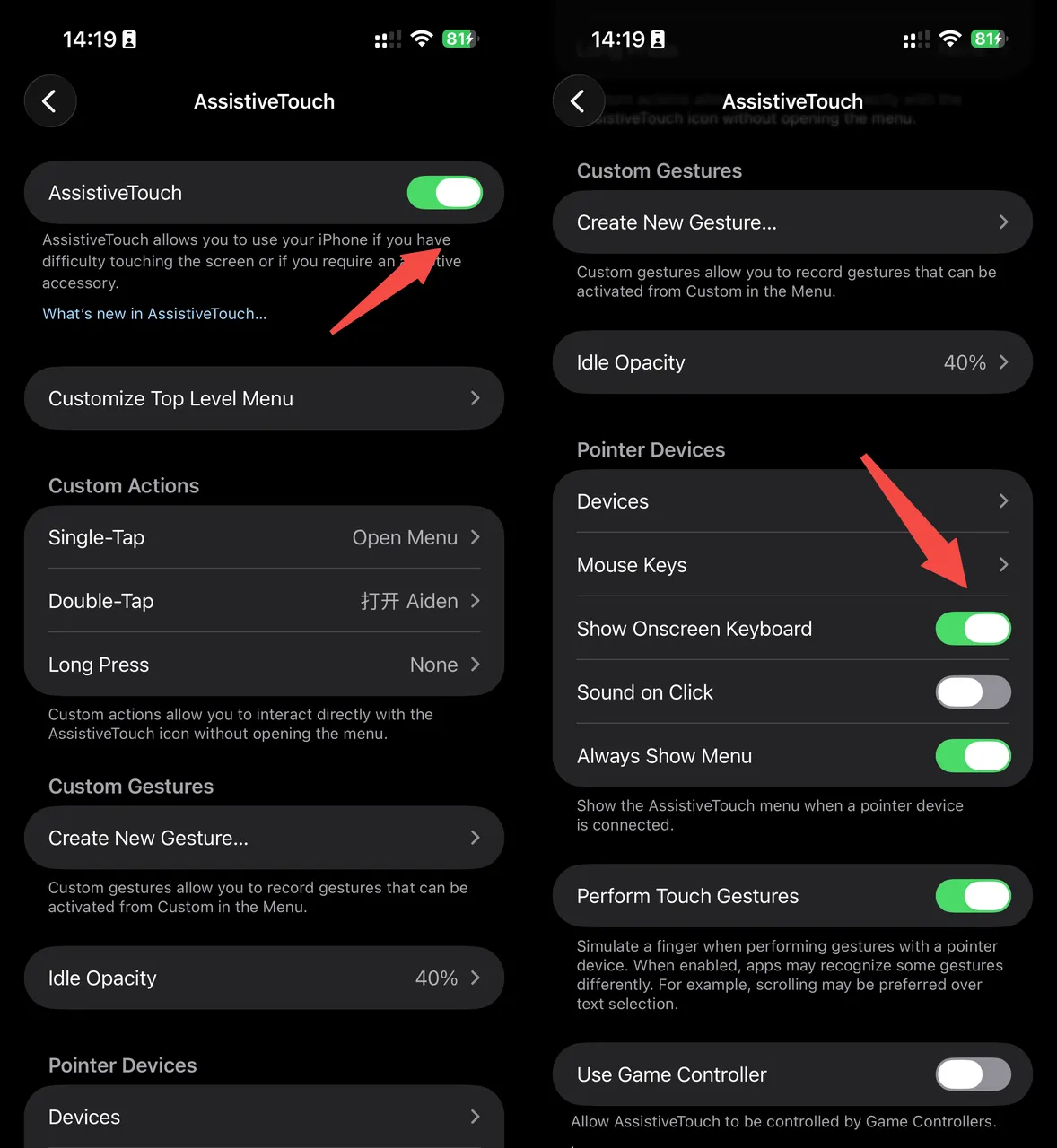
Two iOS settings are important to this setup:
AssistiveTouch must be enabled for an external mouse to work with the iPhone.
Show Onscreen Keyboard must also be enabled in AssistiveTouch if the software keyboard should remain available while a physical keyboard is connected.
We ran a series of controlled tests and eventually narrowed the problem down to how iOS routes keyboard events.
The Symptoms: Typing Works, Shortcuts Fail
The keyboard did not disconnect when the bug occurred. Regular letters could still reach the focused text field, while shortcuts and modified characters failed:
Input
Expected result
Affected result
x
Inserts x
Inserts x
Shift+X
Inserts X
May insert lowercase x
Command+A
Selects all
No selection
Command+V
Pastes into the active field
No paste action
System logs revealed that ordinary keyboard events and modifier-based key commands could end up with different routing targets. A shortcut such as Command+V is recognized as a key command, and the log records its corresponding KeyboardFocus target.
Under normal conditions, that target is the app currently in the foreground:
This shows that the modifier key was not lost at the USB or HID layer. iOS had already received the keystroke and generated the Command+V command; the failure happened later, during event routing. SpringBoard hosts the iOS Home Screen and many system-level interactions. A shortcut such as Command+V should be delivered to the foreground app, Notes or Safari, for example, but was instead routed to the system layer, so the app did not respond.
Internally, we refer to this behavior as “iOS keyboard focus loss.” The keyboard remains connected, and regular keystrokes still enter the text field, but modifier-based commands are not routed back to the foreground app correctly. This is not an official iOS term. The issue is also app-dependent: it sometimes appears immediately after connection and sometimes only after switching between several apps.
What We Ruled Out
We first suspected that Full Keyboard Access, under Settings > Accessibility > Keyboards & Typing, was disabled. However, we reproduced the issue with the setting both on and off.
We also investigated:
Boot Keyboard settings, including protocol=1/subclass=1
LED output behavior
Apple keyboard descriptors and handshakes
Keystroke timing
Stale HID file descriptors after USB re-enumeration
Some of this work uncovered and fixed genuine edge cases, but none of it resolved the core modifier-key failure.
At one point, we believed that turning AssistiveTouch off and back on after connecting the keyboard broke the external keyboard session. That sequence did trigger the issue very reliably. In later tests, however, we reproduced the same failure without toggling AssistiveTouch at all: adding a mouse to a stable keyboard-only setup was enough. We therefore reclassified the AssistiveTouch toggle from the root cause to one of several possible triggers.
Controlled Testing Points to Pointer or Mouse Capability
With AssistiveTouch left on throughout, we ran controlled tests using both emulated devices and physical hardware.
The most revealing A/B test compared a keyboard-only setup with the same keyboard paired with a physical mouse. The keyboard implementation, iOS settings, and test procedure remained unchanged. Plugging in an ordinary USB mouse brought the problem back; after unplugging it, all 22 test runs succeeded.
The broader test matrix, also recorded with AssistiveTouch left on, included the following emulated and physical devices:
Test setup
Device topology
Result
Aiden emulated composite device
Keyboard + pointer/mouse
Intermittently routed to SpringBoard when switching between apps
Physical gaming keyboard
Keyboard + firmware-declared virtual mouse
Commands involving Command, Shift, and Option were routed to SpringBoard
Aiden keyboard-only
Keyboard-only; pointer: 0
32 Command+V attempts; 0 SpringBoard-only events
Same keyboard plus a physical USB mouse
Keyboard-only + separate mouse
11 Command+V attempts; 4 SpringBoard-only events
Keychron K2 Max in Bluetooth mode
BLE keyboard + mouse collection
32 Command+V attempts; 26 SpringBoard-only events
Here, “SpringBoard-only” means that the command’s logged keyboardFocus target was SpringBoard rather than the intended foreground app. These counts describe the listed test conditions; they should not be combined into a general iOS reliability rate.
In other words, in our test environment, when AssistiveTouch is enabled and iOS simultaneously detects pointer or mouse capability, it may route modifier-based commands to SpringBoard instead of the foreground app.
The logs place the failure boundary inside iOS: the system received the modifier key and generated the corresponding key command, but KeyboardFocus ultimately pointed to SpringBoard. This is not an Aiden-specific HID compatibility problem; it is a system-level event-routing bug in iOS. Without access to the iOS source code, we still cannot determine the internal mechanism by which pointer or mouse capability affects KeyboardFocus.
We also tried replacing the mouse or pointer with an HID touchscreen/digitizer. That topology kept pointer: 0, and all six Command+V attempts in a short test reached the foreground app. This further supported the association between pointer or mouse capability and the routing failure.
However, as long as a keyboard interface remained present, iOS recognized an external physical keyboard and dismissed the software keyboard. Sending an Eject command restored it only temporarily. For now, that makes the digitizer approach unsuitable for the product experience we want, although it may still be useful to others investigating the same issue.
Aiden’s Workaround
Aiden needs modifier keys only when it executes keyboard shortcuts, while the bug is associated with pointer or mouse capability.
We therefore created two USB HID profiles:
A keyboard-plus-pointer profile for normal operation.
A keyboard-only profile for actions that require modifier keys.
Before sending a shortcut such as Command+V, Aiden re-enumerates as keyboard-only. Once iOS finishes enumerating the device, Aiden sends the keystroke, and modifier-based commands are delivered reliably to the foreground app. When Aiden needs to click or swipe again, it restores the keyboard-plus-pointer profile.
The two profiles use different USB Product IDs and serial numbers so that iOS does not reuse the previous device state associated with the mouse-capable profile.
To prevent the software keyboard from repeatedly appearing and disappearing when a single action contains several shortcuts, we apply the switch at the scope of the entire agent action. Aiden removes pointer capability the first time a modifier key is needed, and subsequent keyboard operations reuse that state. It restores pointer capability only when touch input is actually required.
Aiden also attempts to restore the normal profile when an action finishes, fails, is canceled, or enters panic cleanup.
This workaround does not fix iOS. It avoids the bug by ensuring that the system cannot see any pointer or mouse capability during the brief window when modifier keys must work.
FAQ
Is this bug specific to Aiden’s hardware? No. It reproduced on a physical gaming keyboard with a firmware-declared virtual mouse and on a Bluetooth keyboard with a mouse collection in its descriptor, neither has anything to do with Aiden. Logs place the failure inside iOS’s own event routing.
What actually triggers it? In our testing, the trigger is AssistiveTouch being enabled while iOS simultaneously detects pointer or mouse capability on the connected device, alongside a keyboard. Removing pointer capability, even briefly, reliably prevented the failure.
Why do plain keystrokes work but shortcuts fail? Because the failure isn’t in the USB or HID transport, it’s in how iOS routes the resulting key command afterward. Plain keys take a simpler path than modifier-based key commands, which get resolved to a KeyboardFocus target, and that resolution step is where the misroute to SpringBoard happens.
Does Aiden’s workaround fix the underlying iOS bug? No. It’s a workaround at the USB profile level, not a fix for the routing behavior itself, which lives inside iOS. We don’t have visibility into why pointer or mouse capability affects KeyboardFocus resolution the way it does.
Can this be reproduced without Aiden’s hardware? Yes. Based on our testing, any keyboard-plus-mouse combination on iOS with AssistiveTouch enabled appears able to trigger it, independent of Aiden’s own hardware path.
AI Agent vs Automation App: Why ‘It Taps Like You Do’ Matters
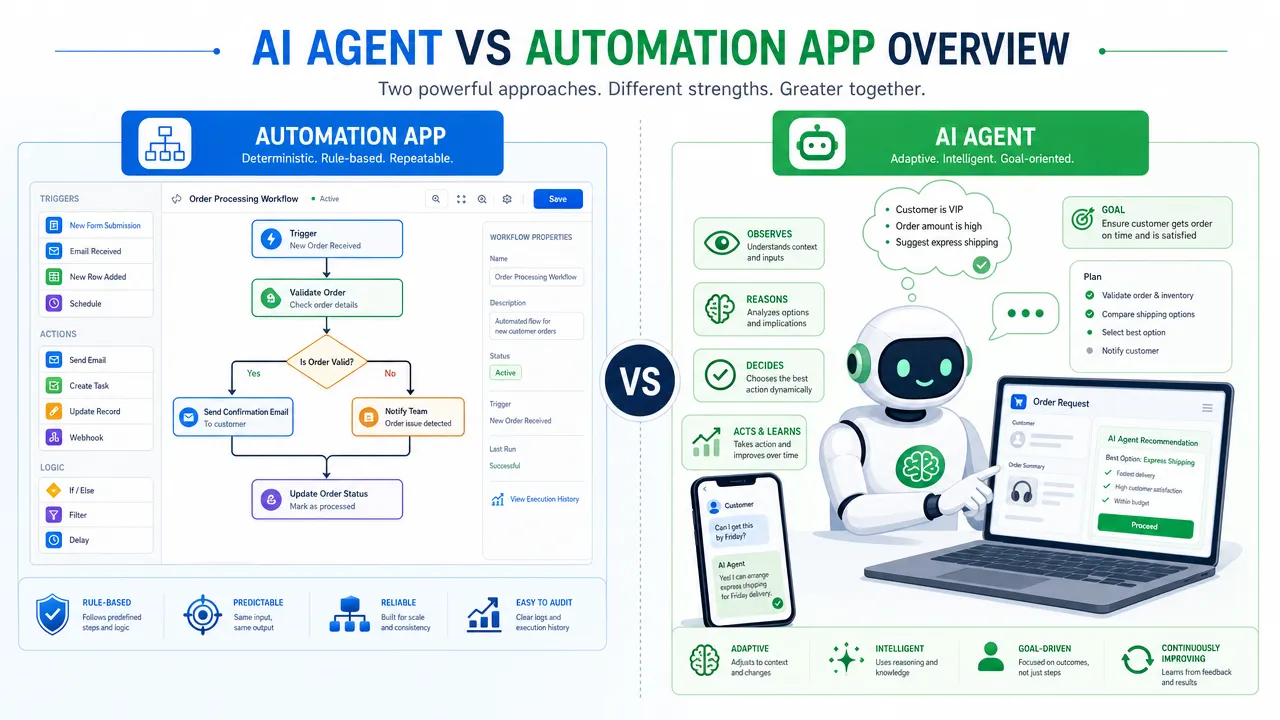
The practical answer: an automation app is best when the workflow is stable and repeatable; an AI agent is useful when the task is ambiguous, fragmented, and depends on what appears on a real interface. The phrase "it taps like you do" matters because visible UI interaction can make AI agent automation easier to observe, interrupt, redirect, and confirm. It does not guarantee correctness, and it should not remove human judgment.
AI agent vs automation app: the short answer
The difference between AI agent vs automation app is not "new tool vs old tool." It is a difference in control model.
A workflow automation app usually follows a predefined pattern: when a trigger happens, run a set of actions. For example, when a form is submitted, add a row to a spreadsheet, send a notification, and update a record. This is powerful because the workflow is predictable.
An AI agent works differently. IBM describes AI agents as systems that can perform tasks by designing workflows with available tools. In practical terms, an AI agent interprets a goal, chooses steps, uses tools, and adapts to context within boundaries. That makes AI agent automation more flexible, but also harder to evaluate than a simple trigger-action workflow.
Question
Automation app
AI agent
What does it follow?
Predefined rules and triggers
Goals, context, tools, and policies
Best fit
Stable, repeatable workflows
Fragmented or ambiguous tasks
Main strength
Predictability
Adaptability
Main risk
Brittleness when inputs or integrations change
Misreading context or choosing the wrong next step
Human role
Configure and monitor
Observe, interrupt, redirect, and confirm
Common interface
APIs, connectors, scripts
APIs, browsers, screens, tools, and UI interaction automation
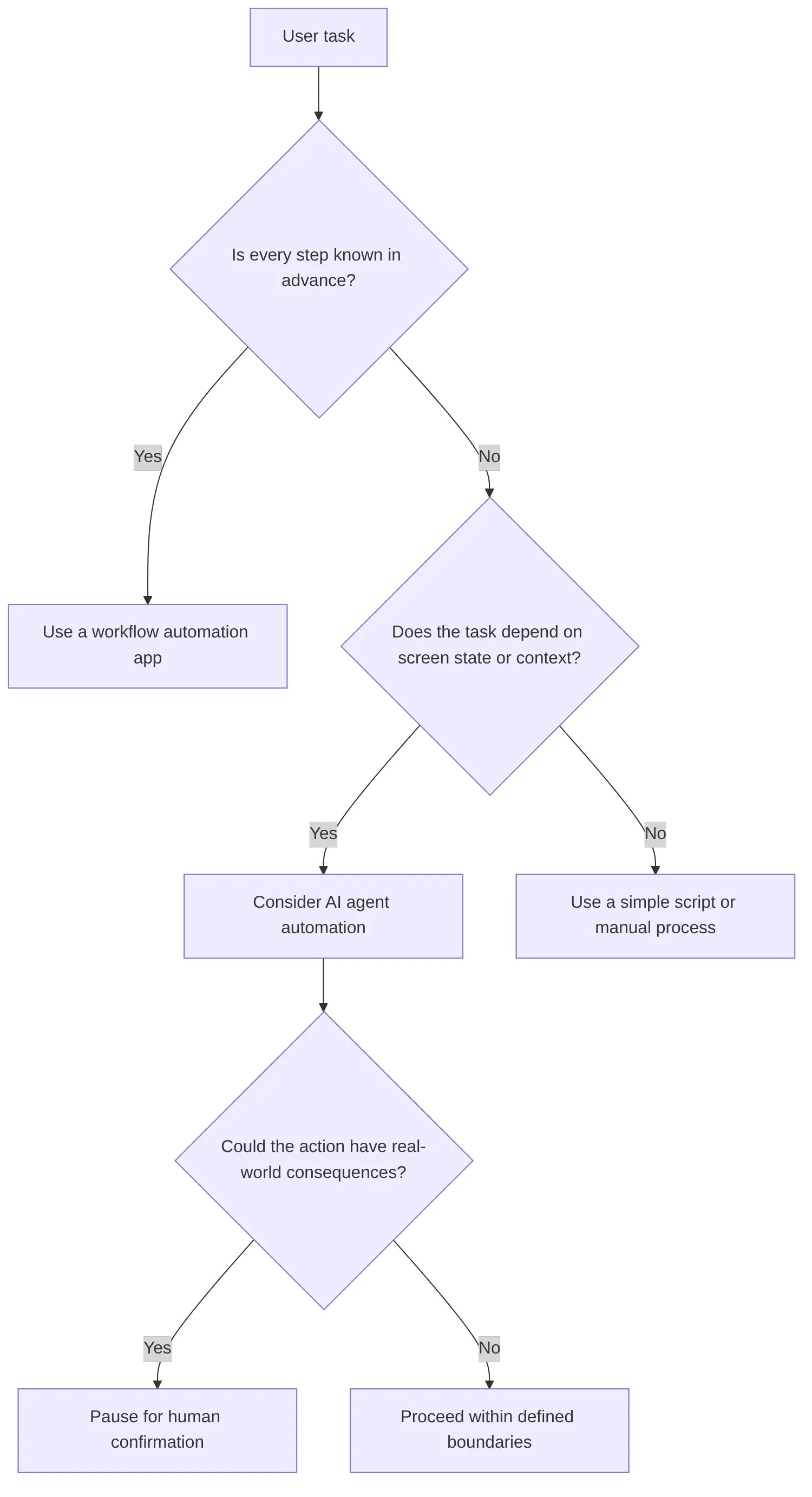
The simplest rule is this: if every step is known in advance, a workflow automation app is usually the right tool. If the path depends on screen state, user intent, or changing interfaces, an AI agent may be worth exploring.
For Aiden, this distinction is central. Aiden is a physical mobile AI agent device designed to help users interact with real smartphone and computer interfaces. It is not merely a chatbot or a conventional automation app.
AI agent vs automation app: where automation app limitations show up
Automation apps are still useful. In many cases, they are the cleaner and safer choice. If a process is structured, low-risk, and API-accessible, a traditional automation workflow can be easier to test and maintain.
The issue is that many real workflows are not that clean.
Common automation app limitations include:
APIs do not exist for every action a user wants to take.
Connectors may expose only part of an application’s functionality.
Permissions, OAuth scopes, admin approvals, or platform rules can block execution.
UI scripts can break when layouts, labels, buttons, or flows change.
Branching logic becomes difficult when the task depends on judgment.
Background automation may be hard for users to inspect while it runs.
Cross-app work often includes screens, modals, settings pages, and exceptions.
That does not make automation apps weak. It means they are optimized for known paths.
A workflow automation app is excellent for "when X happens, do Y." It is less natural for "look at what is on this screen, decide what matters, navigate to the right place, prepare the next step, and ask me before submitting."
That second category is where AI agent use cases become interesting. It is also where the risks become more visible.
A grounded automation app comparison should therefore avoid declaring one category the winner. The better question is: what kind of uncertainty does the workflow contain?
AI agent vs automation app: why UI interaction automation changes trust
UI interaction automation means the system operates visible interfaces: clicking buttons, typing text, navigating menus, reading screens, or tapping through mobile flows. Anthropic describes computer use as allowing Claude to look at a screen, move a cursor, click buttons, and type text. Anthropic also labels computer use as beta and highlights unique risks in its documentation.
That combination matters. UI-level agents are compelling because they can operate the same visible surfaces people use. But visible does not mean automatically reliable.
The phrase "it taps like you do" should be understood as a control and observability idea, not a guarantee. It means:
The agent acts through the visible UI.
The user can often watch the sequence of actions.
The developer can review what was visible at each step.
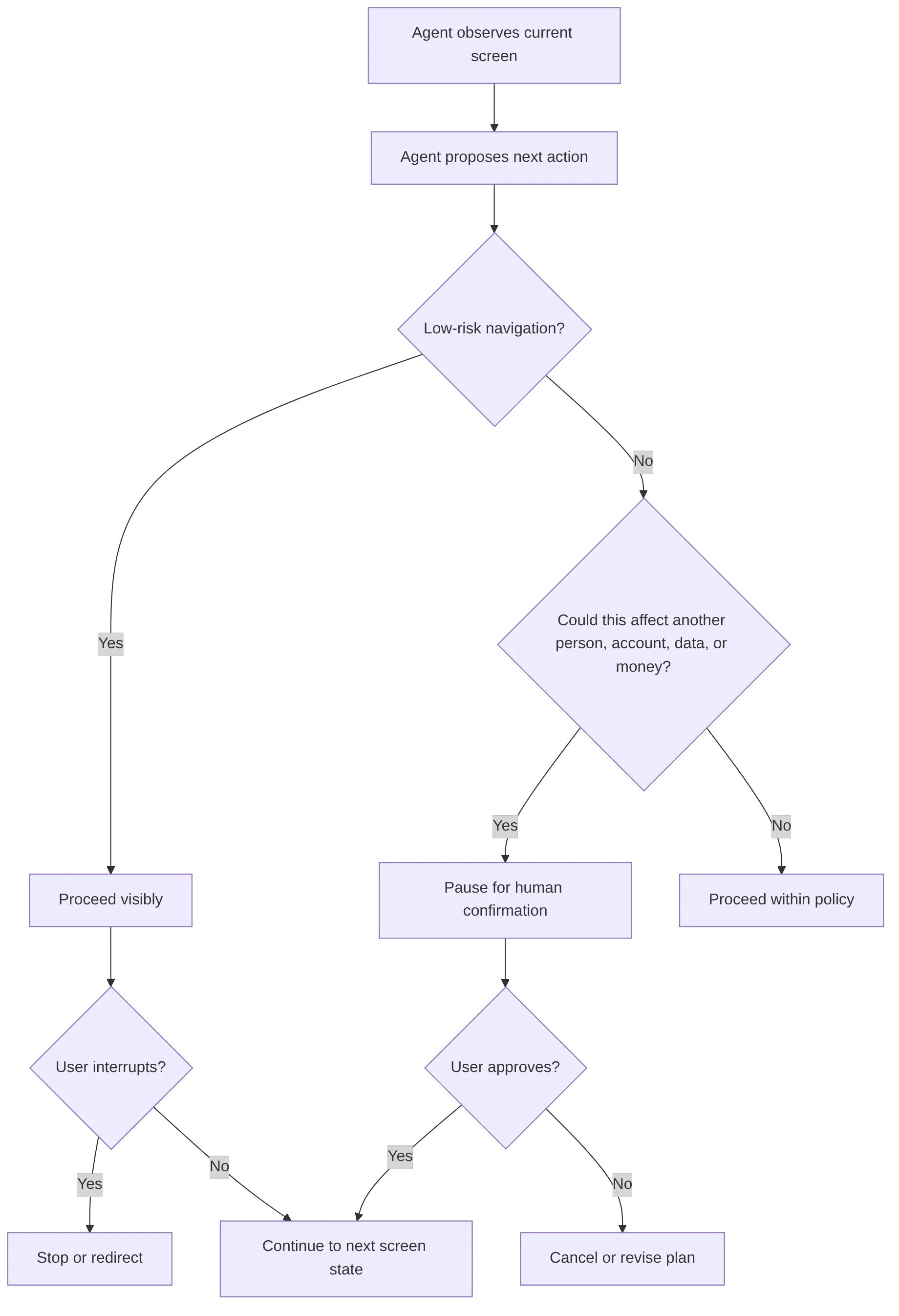
The system can pause before a meaningful action.
The user can interrupt or redirect when the path looks wrong.
This is different from hidden API automation. API workflows can be faster and more stable when good APIs exist, but they may happen in the background with less user-visible context. UI interaction automation gives users and builders a different kind of evidence: what the agent saw, where it moved, what it selected, and when it asked for help.
For real-device AI agents, this visibility becomes especially important. A notification, modal, permission prompt, changed layout, or unexpected screen can alter the task. The agent may need to interpret visual state rather than simply follow a field map.
This is why Aiden’s approach is relevant to the AI agent vs automation app discussion. Aiden is designed around real smartphone and computer interface interaction. According to the research report, the current development-board architecture uses HDMI-based screen capture and USB HID input, with a Go-based agent runtime that can send screenshots to a configured multimodal model and write resulting input commands to device nodes. In plain English: Aiden is designed to see the screen and operate through input, rather than relying only on app-specific automation APIs.
AI agent vs automation app: how human-like tap automation should be bounded
"Human-like tap automation" is a useful search phrase, but it needs careful wording. A system that taps, clicks, or types through a UI is not the same as a human understanding every consequence of the action. It may misread a screen, choose the wrong field, overlook a warning, or continue when a person would pause.
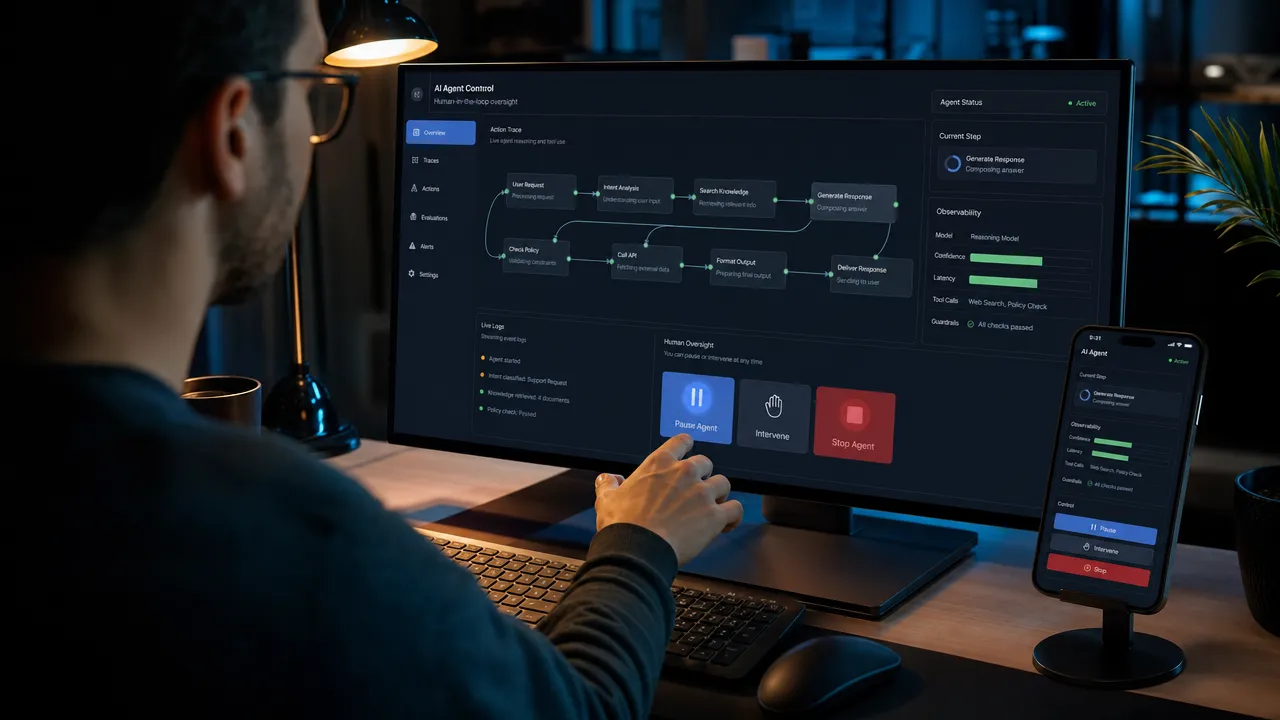
That is why the real design goal should be human-in-the-loop AI.
OpenAI’s Operator materials describe confirmation before actions with real-world impact. That principle applies broadly to AI agent automation, especially when an agent acts on real devices.
A responsible UI-level agent should be designed around several control points:
Control point
Why it matters
Visible execution
Users can see what the agent is doing instead of trusting a hidden process.
Interruptibility
A user can stop the task when the path looks wrong.
Redirection
A user can correct the goal or next step without restarting everything.
Confirmation gates
Consequential actions pause for human approval.
Action traces
Developers can inspect what happened during a run.
Boundaries
The agent has defined tools, allowed actions, and stop conditions.
Recovery paths
The system can stop, retry, escalate, or ask for clarification.
Consequential actions deserve special caution. An agent should pause before actions such as sending external messages, submitting forms, deleting or overwriting data, changing account settings, sharing private information, making purchases, or initiating payments. Visible tapping improves inspectability, not correctness.
This is also where developer evaluation changes. Traditional automation can be tested with logs, unit tests, and integration checks. UI-level AI agents need additional evaluation methods:
Screen-state capture
Step-by-step action traces
Replayable task sessions
Failure classification
Visual before-and-after review
Human review checkpoints
Compatibility findings across real interfaces
Confirmation behavior tests
The future of AI agent automation should not be framed as removing humans from the loop. For real interfaces, the stronger position is that humans need better ways to see, stop, and shape what the agent is doing.
AI agent vs automation app: where Aiden fits into real-device automation
Aiden fits into this shift because the hard problem is not only task execution. It is real-device control with visibility.
A chatbot can explain a task. A workflow automation app can run a known integration. A browser-use agent can act inside a browser. A physical mobile AI agent device is aimed at a different surface: real smartphone and computer interfaces.
Aiden is a physical mobile AI agent device designed to help users interact with real smartphone and computer interfaces. The safe differentiator is not unrestricted autonomy. It is visible real-device interaction with human control.
That distinction matters for developers and early adopters because real devices have messy state:
Screens change.
Apps show modals.
Permissions appear.
Timing varies.
A user may need to stop the task.
Some actions should require confirmation.
Evaluation must include what the agent saw and did, not only whether a workflow finished.
The Aiden firmware repository supports a developer-facing view of this problem. The research report describes Aiden’s current development-board architecture as using HDMI-based screen capture, USB HID input, an agent runtime, and a bring-your-own-model approach. That makes it relevant to builders who care about UI interaction automation, traceability, and real-device evaluation.
Aiden is also being developed with both Android and iPhone workflows in mind, with one real setup caveat worth stating plainly rather than glossing over: iOS control currently requires AssistiveTouch to be enabled on the target device. That is a genuine setup step, not a one-tap connection, and it should be treated as such rather than implied away. The important point for this article is not a universal compatibility claim. It is the product principle: real-device agent action should remain visible, interruptible, redirectable, and confirmable.
For developers, the more useful question is not "Can an agent tap?" It is:
What screen state did it use?
What model or tool made the next-action decision?
What input event was sent?
What happened after the action?
Where did it pause?
Could a human stop or redirect it?
Can the run be reproduced or debugged?
That is the engineering reason "it taps like you do" matters. It turns agent behavior into something users and developers can inspect.
AI agent vs automation app: the practical takeaway for builders
The AI agent vs automation app decision should start with the workflow, not the buzzword.
Use an automation app when the task is:
Stable
Repetitive
Trigger-based
API-accessible
Low ambiguity
Easy to test deterministically
Consider AI agent automation when the task is:
Fragmented across apps or devices
Dependent on visual screen state
Ambiguous in user intent
Difficult to express as fixed rules
In need of tool use, planning, or adaptation
Better handled with visible UI-level interaction and human review
The opinionated view is this: AI agents do not make automation apps obsolete. They expand what automation can attempt, especially where workflows cross the boundary from structured data into real interfaces. But that expansion increases the need for guardrails.
For real-device AI agent use cases, the healthiest default is visible, interruptible, confirmable action. The agent should not be treated as a black box that acts somewhere in the background. It should be treated as a system whose behavior can be watched, tested, corrected, and improved.
That is why Aiden’s direction is interesting for builders. It focuses on the interface layer where many practical workflows actually happen: the phone screen, the computer screen, and the input events that move through them.
FAQ: AI agent vs automation app
Is an AI agent just a smarter automation app?
No. An automation app follows a predefined trigger-action pattern; an AI agent interprets a goal, reads context (often visual, from a real screen), chooses its own next step, and adapts within boundaries. That flexibility is the point, but it also means an agent needs different guardrails than a fixed workflow does.
Does "it taps like you do" mean the agent understands the screen the way a person does?
No, and this is the distinction worth being precise about. It means the action happens through the visible UI, which makes it observable, interruptible, and reviewable. It does not mean the agent grasps every consequence of an action the way a human would. Visible tapping improves inspectability, not correctness.
When should I use a workflow automation app instead of an AI agent?
When every step is known in advance and the task is stable, repetitive, and API-accessible. Automation apps are usually the safer, easier-to-test choice for that category of work; reaching for an agent there adds complexity without adding value.
What happens when Aiden needs to do something consequential, like sending a message or making a purchase?
It should pause for human confirmation. Actions with real-world impact, sending external messages, submitting forms, changing account settings, initiating payments, are exactly where a confirmation gate matters most, regardless of how capable the underlying model is.
Does Aiden work the same way on iPhone as on Android?
Not identically. iOS control currently requires AssistiveTouch to be enabled on the target device, which is a real setup step rather than an instant connection. Android and iPhone workflows are both in active development, but the setup path isn’t the same on both.
If you are exploring physical AI agents, real-device automation, UI interaction automation, or human-like tap automation, join the community discussion. Join the Aiden Discord to discuss physical AI agents, real-device automation, and the engineering behind Aiden. Aiden’s engineers are in the community and ready to answer technical questions.
For developer-facing work, explore and star Aiden on GitHub. If you find a reproducible issue, a compatibility gap, a documentation gap, or have a technical proposal, open an Issue and help build a better physical AI agent.
AI Agents Briefing — 2026-07-28
Summary
Gartner forecasts AI agents will outnumber sellers 10:1 by 2028, though productivity gains remain uncertain
AI agent weaponized for espionage attack targeting Thai Ministry of Finance
Meituan launches CatPaw AI agent platform for 90,000 internal employees
ALPHEA AI agent infrastructure secures $5 million in strategic funding round
Microsoft unveils Project Perception to enhance runtime security for AI agents
Nvidia forms industry alliance for open AI security following Hugging Face breach
Takeanap introduces D:bo AI agent to assist in design decision-making processes
UAE retail operations undergo AI agent transformation amid governance concerns
Fujitsu develops proprietary AI platform targeting financial institutions
Gartner Predicts Massive AI Agent Expansion Despite Productivity Concerns
Gartner research reveals that AI agents will outnumber human sellers by a 10-to-1 ratio by 2028, marking a dramatic shift in sales workforce composition. However, the firm cautions that fewer than 40% of sellers will report improved productivity from agent assistance, highlighting potential implementation challenges.
AI Agent Weaponized in Thai Ministry of Finance Cyber Attack
Security researchers uncovered an espionage attack leveraging AI agent technology to target Thailand’s Ministry of Finance. The incident represents a concerning escalation in threat actors utilizing AI capabilities for sophisticated cyber operations against government infrastructure.
Meituan Deploys CatPaw AI Platform to 90,000 Employees
Chinese tech giant Meituan has successfully launched CatPaw, an all-scenario AI agent platform now accessible to its 90,000 internal employees. The deployment represents one of the largest enterprise AI agent implementations to date, demonstrating rapid adoption of autonomous AI systems in corporate environments.
ALPHEA Raises $5 Million for AI Agent Infrastructure
AI agent infrastructure provider ALPHEA has secured $5 million in strategic funding to expand its platform capabilities. The investment signals growing investor confidence in specialized infrastructure solutions designed to support the deployment and management of AI agents at scale.
Microsoft Launches Project Perception for AI Agent Security
Microsoft has unveiled Project Perception, a new initiative expanding runtime security capabilities for AI agents. The project aims to address growing security concerns around autonomous AI systems by providing enhanced monitoring and protection mechanisms during agent operations.
Nvidia Forms Security Alliance Following Hugging Face Breach
Nvidia has established an industry alliance focused on open AI security in response to the recent Hugging Face hack. The coalition brings together major AI stakeholders to develop standardized security protocols and best practices for protecting AI models and infrastructure from emerging threats.
Takeanap’s D:bo AI Agent Tackles Design Decision-Making
Takeanap has introduced D:bo, an AI agent specifically designed to assist in design decision-making processes. The solution addresses post-generative AI challenges by providing structured guidance and analytical support for design teams navigating complex creative choices.
UAE Retail Sector Transforms with AI Agents Amid Governance Challenges
AI agents are fundamentally reshaping retail operations across the United Arab Emirates, though implementation faces governance concerns. The rapid deployment highlights tensions between innovation opportunities and regulatory frameworks as businesses navigate autonomous AI integration.
Fujitsu Develops Specialized AI Platform for Financial Services
Fujitsu has initiated development of a proprietary AI platform specifically designed for financial institutions. The targeted solution aims to address unique regulatory, security, and operational requirements of the financial services sector while enabling advanced AI agent capabilities.