How to Build an AI Agent for Your Business Without Writing Code in 2026
To build an AI agent for your business without writing code in 2026: pick one repetitive workflow with clear inputs and outputs, choose a no-code agent builder that connects to your existing tools, ground the agent in approved company knowledge, add human approval for any sensitive actions, and measure ROI from day one. Start narrow — one workflow, one measurable outcome — before scaling.
Building an AI agent for your business without writing code in 2026 requires a clear workflow, a no-code AI tool, controlled access to business data, human approval steps, and measurable ROI targets. A business AI agent is not just a chatbot. It is a goal-directed system that can use instructions, knowledge, tools, and connected apps to complete a task with some level of autonomy.
For Aiden, an AI agent platform focused on business automation, the practical opportunity is not hype. It is helping businesses think clearly about where AI agents belong, what infrastructure they need, and how to operationalize AI automation safely.

How build AI agent business no code 2026 starts with one valuable workflow
The best way to build AI agent business no code 2026 is to avoid starting with a broad “AI transformation” project. Start with one painful, repetitive, measurable workflow. No-code AI agents work best when the task has clear inputs, clear outputs, known decision rules, and a defined human owner.
IBM defines AI agents as systems or programs capable of autonomously performing tasks on behalf of a user or another system. That definition is useful, but business teams should make it more operational: a business AI agent is a software system that uses AI models, business instructions, approved data, and connected tools to complete a workflow under defined boundaries. You can read IBM’s broader explanation in its guide to AI agents.
A no code AI agent business does not mean “no thinking.” It means you can configure the agent through visual builders, templates, prompts, forms, connectors, and approval steps instead of writing traditional application code. You may still need to understand fields, permissions, data mapping, API keys, and workflow logic.
Good first workflows usually share four traits:
| Trait | Why it matters | Example |
|---|---|---|
| Repetitive | The agent can create measurable time savings | Classifying support tickets |
| Rule-guided | The agent can follow defined business logic | Checking refund eligibility |
| Data-accessible | The needed information is in documents or apps | Searching policies or CRM records |
| Reviewable | A human can approve or correct outputs | Drafting sales replies before sending |
Strong use cases for build AI agents without coding include customer support triage, lead qualification, appointment booking, CRM updates, internal knowledge search, content operations, and weekly reporting. These are practical because they do not require the agent to make final high-risk decisions without oversight.
Weak first use cases include broad strategy work, legal conclusions, medical advice, autonomous financial transactions, final hiring decisions, or workflows where the underlying process is already unclear. Gartner-related coverage reported that more than 40% of agentic AI projects may be canceled by the end of 2027 because of cost, unclear value, or weak risk controls. That warning matters for any AI agent business 2026 plan. A successful no code automation business starts with value, not novelty. See the reporting from Process Excellence Network on Gartner’s agentic AI forecast.
A practical first agent role might be: “The agent reviews new inbound leads, checks company size and stated need, drafts a CRM summary, assigns a lead score, and alerts a sales rep. It does not send pricing, make promises, or contact the prospect without approval.”
That level of specificity gives the agent a job. It also gives your team a way to test whether the job is being done correctly.
Build AI agent business no code 2026 platform choices for different teams
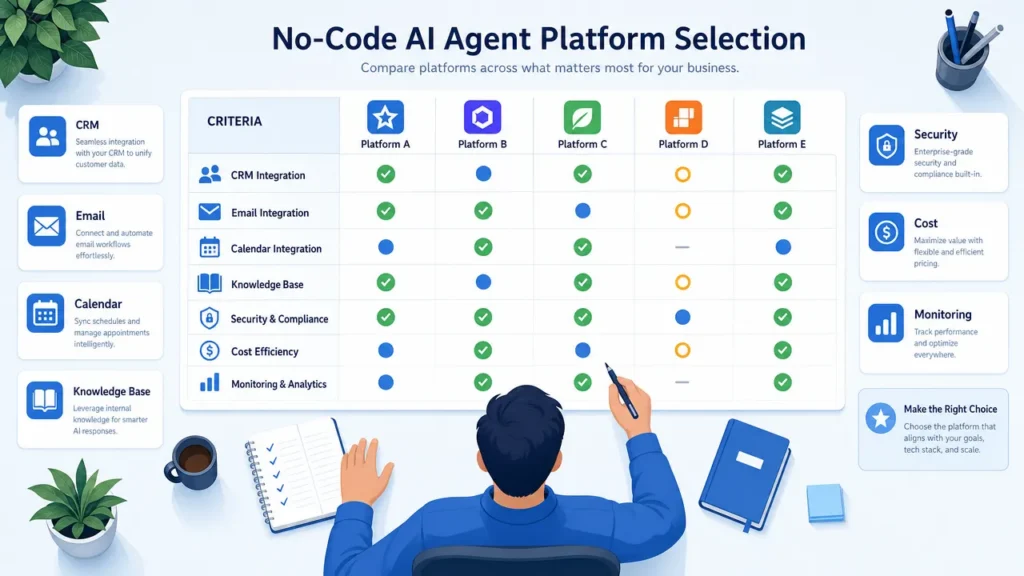
No code AI tools in 2026 generally fall into three groups: dedicated agent builders, visual workflow automation platforms with AI agent features, and open-source or low-code agentic platforms. The right choice depends on who will build the agent, how much control the business needs, and how sensitive the workflow is.
Because competitor websites should not be used as links here, the following table summarizes platform categories without linking to vendor pages.
| Platform type | Best fit | Strengths | Watch-outs |
|---|---|---|---|
| Beginner-friendly no-code agent builders | Small teams, solopreneurs, executive assistants | Fast setup, templates, business-friendly interfaces | Less architectural control, pricing can scale with usage |
| Visual automation platforms | Marketing ops, sales ops, SMB operations | Strong app connectors, visual workflows, quick SaaS automation | Complex flows can become hard to maintain |
| Technical workflow builders | Ops teams, startups, automation specialists | Flexible logic, execution logs, self-hosting options in some ecosystems | More learning curve for nontechnical users |
| Open-source agentic platforms | Technical founders, AI product teams, controlled environments | More control, RAG support, extensibility, deployment options | May require DevOps, security, and engineering judgment |
| Enterprise agent platforms | Larger teams, agencies, multi-workflow programs | Governance, reusable agent patterns, team management | Requires careful cost and scope management |
The biggest mistake is choosing a platform only because it looks easy in a demo. A tool that is simple for a one-step task may become expensive or fragile when the workflow needs memory, conditional logic, human approval, and audit logs. A tool that is powerful may be too technical for the people who must maintain it.
Use this selection checklist before committing:
| Selection question | Why it matters |
|---|---|
| Can the builder connect to your CRM, email, calendar, helpdesk, documents, and databases? | Agents need access to real workflow tools |
| Does it support knowledge bases or retrieval-augmented generation? | Agents need grounded company information |
| Can you add human approval before external actions? | Sensitive workflows need review |
| Can you inspect execution logs? | You need visibility into failures |
| How does pricing scale: users, tasks, actions, credits, or model usage? | AI costs can grow with volume |
| Can permissions be limited by role or workflow? | Least-privilege access reduces risk |
| Can workflows be exported, versioned, or self-hosted? | Control matters as the system matures |
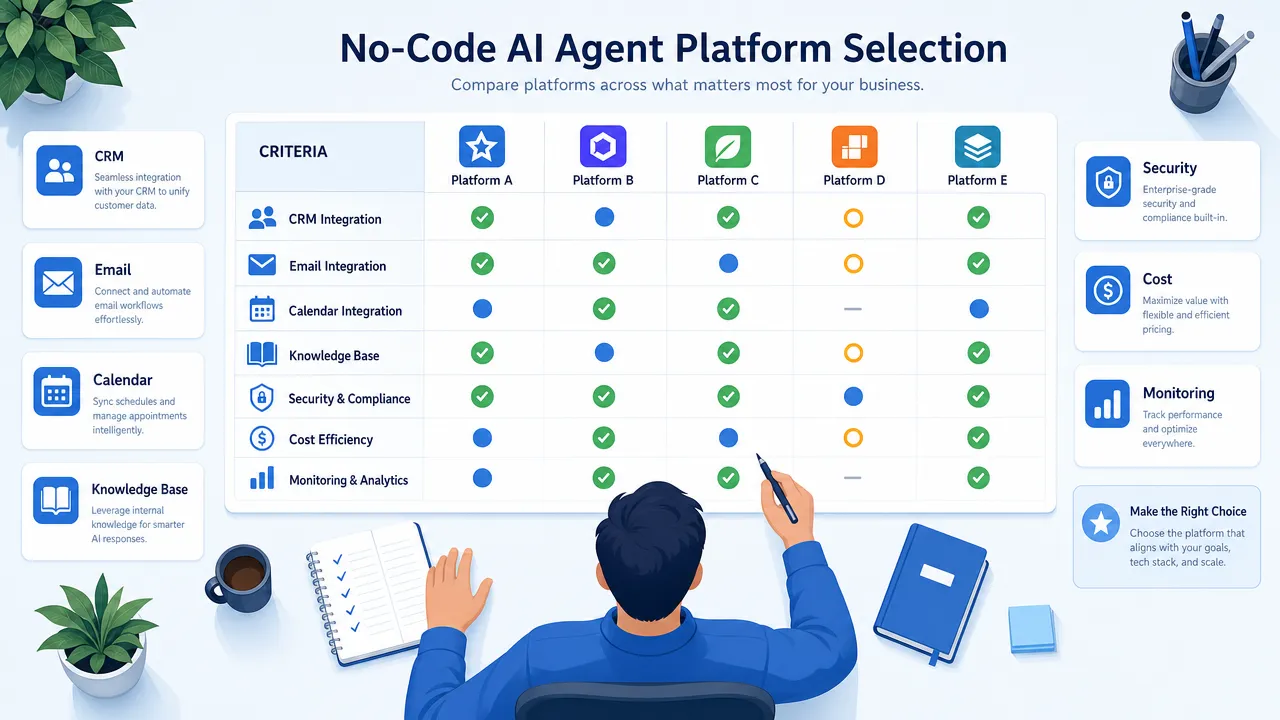
For a simple lead notification workflow, a mainstream visual automation tool may be enough. For an internal knowledge assistant grounded in company documents, prioritize knowledge base quality, document permissions, and retrieval testing. For a startup building AI agent startup guide workflows or an AI-enabled product prototype, technical control and extensibility may matter more than the fastest initial setup.
Aiden should be framed carefully here: Aiden is an AI agent platform focused on business automation workflows, content operations, and social media automation. The most useful positioning is strategic — businesses need to think about both agent software and the operational infrastructure around it: where data lives, how agents are monitored, what systems they can access, and how humans stay accountable.
Build AI agent business no code 2026 step-by-step implementation framework
A reliable way to build AI agent business no code 2026 is to treat the agent like an operational system, not a prompt experiment. The workflow below keeps the project small enough to launch and structured enough to measure.
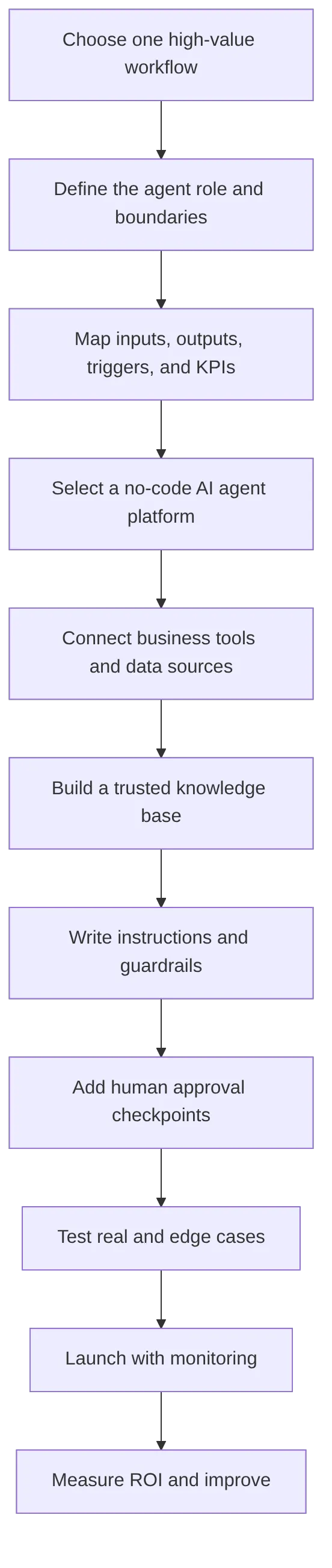
Choose one workflow with measurable value
Pick a workflow where the business already knows the current cost. For example, if a support team handles 1,000 tickets per month and each ticket takes six minutes to classify and route, the baseline effort is clear. If an AI agent can reduce that by three minutes per ticket, the savings can be measured.
Examples of first workflows:
| Workflow | Agent task | Human role |
|---|---|---|
| Inbound lead qualification | Score the lead, enrich record, draft notes | Sales rep reviews and follows up |
| Support triage | Classify ticket, suggest reply, identify urgency | Support agent approves response |
| Appointment booking | Find available slots, draft confirmation | Staff reviews exceptions |
| Internal knowledge search | Answer questions from approved docs | Employee validates important decisions |
| Weekly reporting | Pull metrics, summarize trends | Manager checks interpretation |
Define the agent role and boundaries
A no-code AI agent should have a written operating description. Include its goal, allowed actions, restricted actions, tone, escalation rules, and data sources.
A strong role statement might be:
“The agent qualifies inbound demo requests by reading form submissions, checking CRM history, assigning a lead category, drafting a summary, and notifying the sales team. It must not send contracts, quote pricing, or change deal stages without human approval.”
This prevents the common “do everything” failure mode. Agents work better as narrow specialists than as vague digital employees.
Map inputs, outputs, triggers, and KPIs
Every agent needs a trigger. A trigger might be a form submission, new email, updated CRM field, scheduled time, uploaded document, or support ticket. Then define the inputs, outputs, and success metrics.
| Build element | Example |
|---|---|
| Trigger | New website form submission |
| Inputs | Name, company, message, industry, CRM history |
| Agent reasoning | Determine need, urgency, fit, and missing information |
| Output | Lead score, CRM note, Slack alert, draft email |
| KPI | Response time, qualified meetings, rep time saved |
This is where no-code projects often become more technical than expected. You may need to map fields between apps, authenticate accounts, decide what happens when data is missing, and test whether the agent handles unusual inputs.
Connect only the tools the agent truly needs
Give the agent the minimum access required. If it only drafts CRM notes, it does not need permission to delete records. If it only suggests refund responses, it should not issue refunds automatically. This least-privilege approach is especially important in agentic systems, where tool access can create real business consequences.
OWASP’s work on LLM application risks highlights issues such as prompt injection, insecure output handling, and excessive agency. These risks become more serious when an agent can use tools, send messages, or modify data. Use OWASP’s LLM Top 10 as a practical security reference when building agents that act across business systems.
Build a trusted knowledge base
An AI agent without trusted data is likely to improvise. A knowledge base gives the agent approved information: FAQs, SOPs, product documentation, policies, onboarding materials, pricing rules, or service guidelines.
Before uploading documents, remove outdated information and conflicting versions. Label sources clearly. Test whether the agent cites or retrieves the correct document for realistic questions. A support agent should not answer from an old policy. A sales agent should not invent terms from incomplete context.
Write prompts, instructions, and guardrails
Prompts are not magic scripts. They are operating instructions. Include:
- Role and objective.
- Approved data sources.
- Tone and formatting rules.
- Tool-use rules.
- Escalation rules.
- Prohibited actions.
- Failure behavior, such as “say you do not know” or “ask for human review.”
For example: “If the customer asks for a refund exception not covered by the policy, do not decide. Summarize the case and escalate to a manager.”
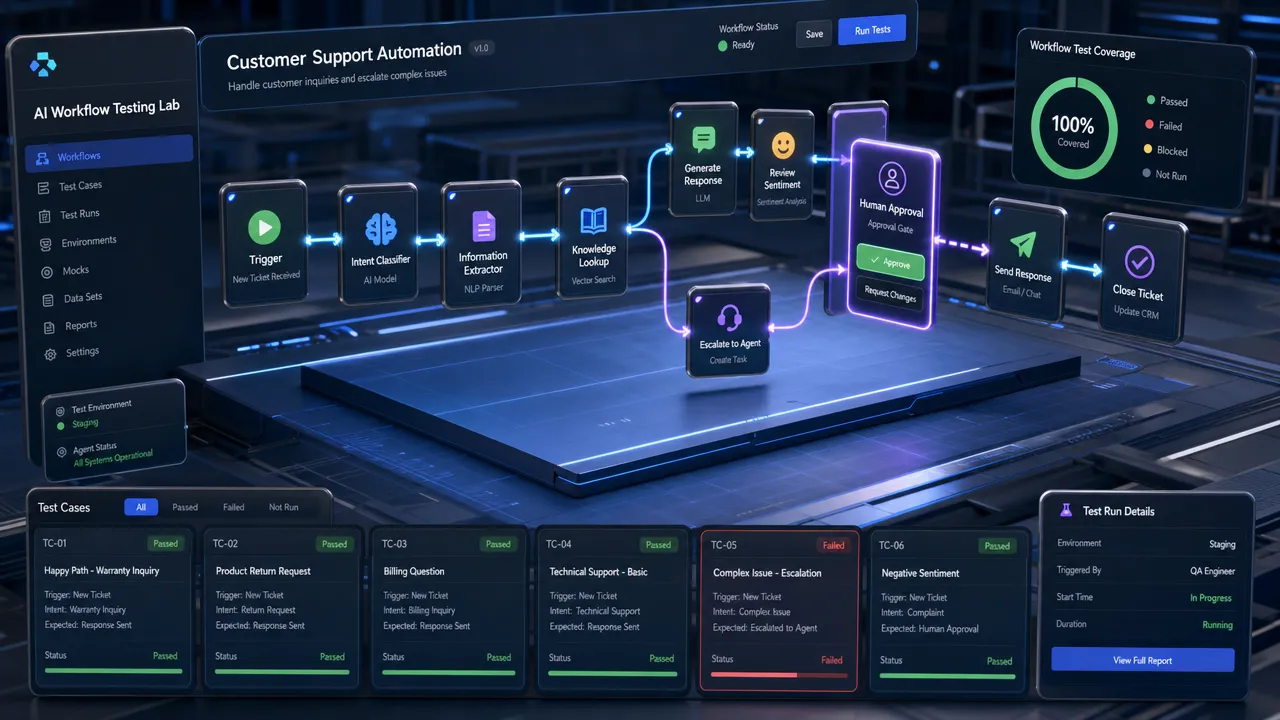
Test with real-world inputs
Test normal cases, messy cases, missing information, angry customers, ambiguous requests, and prompt injection attempts. Review logs. Check whether the agent used the right tools, followed instructions, and escalated when required.
The NIST AI Risk Management Framework is useful here because it organizes AI risk management around governance, mapping, measurement, and management. For business teams, that translates into a simple habit: define the risk, test for it, monitor it, and assign ownership.
Build AI agent business no code 2026 risks, governance, and human approval
The most important lesson for AI agent business 2026 planning is that autonomy must be earned. Start with draft mode, then approval mode, then limited automation only after the agent proves reliable.
The biggest operational risks are not theoretical. They include wrong answers, bad CRM updates, over-permissioned connectors, workflow loops, outdated knowledge, cost overruns, and silent failures. A no code automation business can fail quickly if it sells agents that look impressive but lack monitoring and accountability.
Use this governance checklist before launching any business AI agent:
| Governance control | Practical action |
|---|---|
| Agent owner | Assign one person accountable for performance |
| Approved use case | Document what the agent is allowed to do |
| Data classification | Decide what data the agent can access |
| Least-privilege permissions | Limit app access to the minimum needed |
| Human approval | Require review for customer-facing or high-risk actions |
| Execution logs | Store and review agent actions |
| Prompt injection testing | Test malicious or manipulative inputs |
| Cost monitoring | Track model, task, action, and platform usage |
| Version history | Record prompt and workflow changes |
| Retirement process | Disable unused or unsafe agents |
Human approval should be required for sending external emails, issuing refunds, changing prices, making HR decisions, providing regulated advice, deleting records, processing financial transactions, or responding to legal and compliance issues.
A practical approval ladder looks like this:
| Autonomy level | What the agent can do | Best for |
|---|---|---|
| Level 1: Suggest | Drafts answers and summaries only | Early pilots |
| Level 2: Prepare | Updates internal drafts or queues | Support, sales ops, reporting |
| Level 3: Act with approval | Takes action after a human clicks approve | Email, CRM, refunds, scheduling |
| Level 4: Act within limits | Executes low-risk tasks automatically | Tagging, routing, reminders |
| Level 5: Fully autonomous | Acts without review in defined cases | Mature, low-risk workflows only |
Most businesses should spend more time at Levels 2 and 3 than they expect. That is not a weakness. It is how teams build confidence, collect evidence, and prevent costly mistakes.
For companies planning to start AI agent business services, governance is also a commercial differentiator. Clients may be impressed by a demo, but they will keep paying for reliability, documentation, monitoring, and measurable business outcomes.
Build AI agent business no code 2026 ROI and AI business ideas no code
A no code AI agent business should be measured by outcomes, not by the number of automations built. The simplest ROI model is:
Monthly ROI = estimated labor value saved + revenue lift – platform cost – implementation and maintenance cost.
Because Markdown can treat currency symbols as math formatting, here is the same example with escaped pricing notation: if an agent saves 50 hours per month and the loaded labor value is $35 per hour, the estimated labor value saved is $1,750 per month before platform and maintenance costs.
Track these metrics from the start:
| Category | KPI examples |
|---|---|
| Time savings | Minutes saved per task, hours saved per month |
| Cost savings | Cost per ticket, cost per lead, admin workload reduction |
| Revenue impact | Faster lead response, more booked meetings, improved conversion |
| Quality | Error rate, approval rejection rate, rework rate |
| Customer experience | First response time, resolution time, CSAT |
| Governance | Escalation rate, incident count, audit completeness |
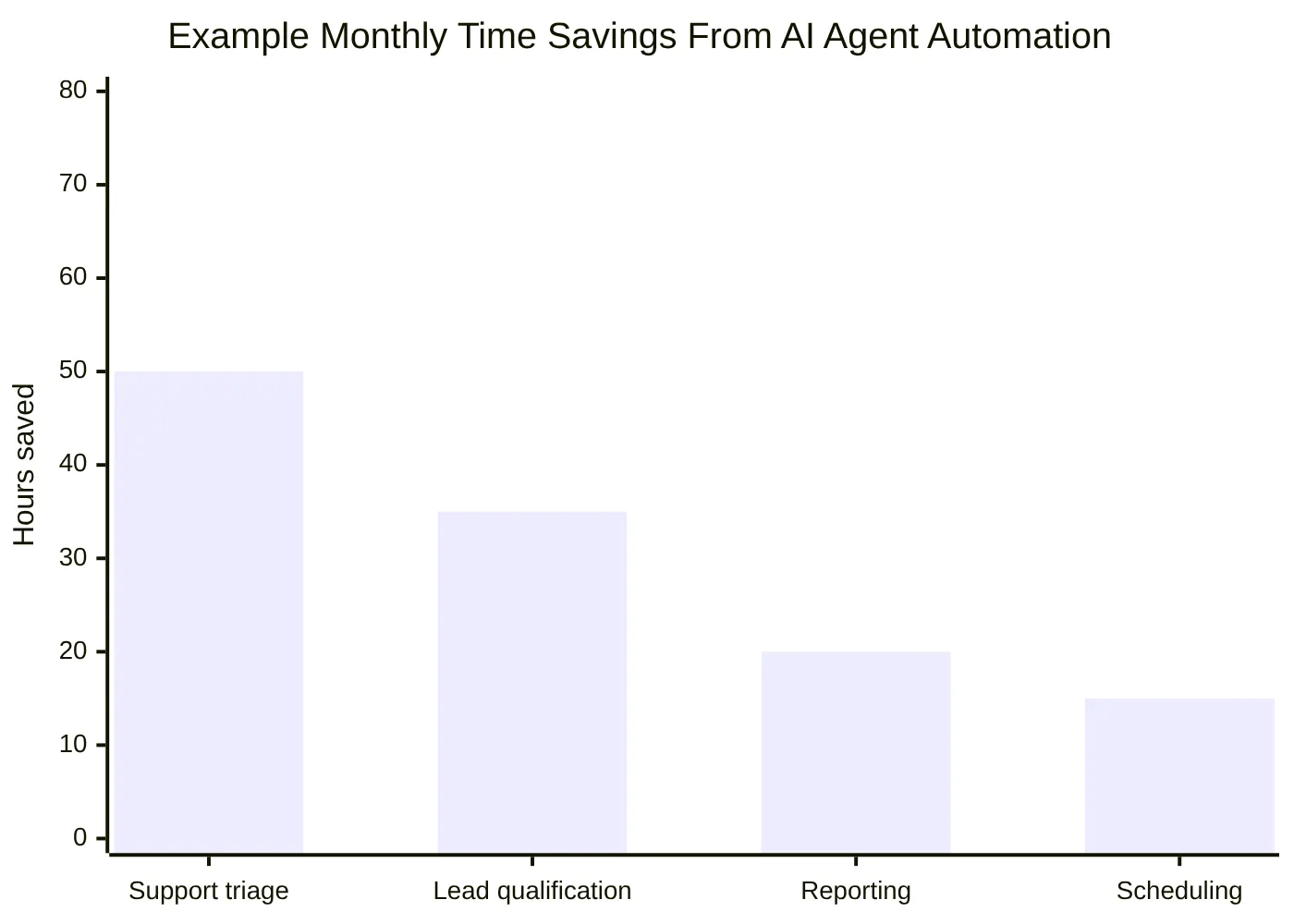
The strongest AI business ideas no code usually package a narrow workflow, a repeatable setup process, and ongoing monitoring. That is especially useful for agencies, consultants, solopreneurs, and founders looking for an AI agent startup guide.
| Business idea | Target customer | Workflow automated | Complexity | Monetization model |
|---|---|---|---|---|
| AI customer support agent | SMBs, SaaS, e-commerce | FAQ answers, ticket triage, reply drafts | Medium | Setup fee plus monthly support |
| AI appointment booking agent | Clinics, salons, consultants | Scheduling, reminders, rescheduling | Low-medium | Monthly automation package |
| AI lead qualification agent | Agencies, local services, B2B teams | Lead scoring, CRM notes, alerts | Medium | Setup plus monthly retainer |
| AI content operations assistant | Marketing teams | Briefs, repurposing, calendar updates | Medium | Monthly service |
| AI internal knowledge assistant | Growing companies | SOP and policy search | Medium | Implementation plus maintenance |
| AI reporting agent | Operations teams | KPI summaries and scheduled reports | Medium | Monthly reporting package |
| AI proposal assistant | Service firms | Draft proposals from intake data | Medium | Per-team or retainer model |
| AI agency services | Consultants and automation builders | Build and manage client agents | Medium-high | Retainers and project fees |
The most durable no code AI agent business opportunities will not be built around generic prompts. They will be built around repeatable operational knowledge: how to map workflows, connect tools, protect data, measure outcomes, and improve agents over time.
For Aiden, the strategic framing is clear. Business-focused AI agent systems need more than a builder interface. They need reliable software workflows, thoughtful data access, operational infrastructure, and practical governance. Companies evaluating AI agents in 2026 should consider not only which no-code tool can create a prototype, but also how the agent will run safely inside real business operations.
For a deeper look at which frameworks power production-grade agents under the hood, see Why Most AI Agents Fail in Production — and the 3 Patterns That Actually Work and LangGraph vs AutoGen: Which AI Agent Framework Handles Complex Workflows in 2026.
A practical final checklist:
- Choose one workflow with measurable business value.
- Define the agent’s role, boundaries, and escalation rules.
- Pick a no-code AI tool that matches your team’s skill level.
- Connect only the tools and data the agent needs.
- Ground answers in approved knowledge sources.
- Add human approval for sensitive actions.
- Test with realistic and adversarial inputs.
- Monitor logs, errors, costs, and outcomes.
- Measure ROI monthly.
- Scale only after the first agent proves value.
Businesses can build AI agents without coding in 2026, but they cannot skip design, governance, and measurement. The winners will be the teams that treat AI agents as operational systems, not shortcuts. To explore how AI agent automation could fit your operations, visit aidenai.io.
FAQ
Can I build an AI agent for my business without coding in 2026?
Yes. No-code platforms like Lindy, Dify, Make.com, Zapier AI, n8n, and Relevance AI let you build and deploy business AI agents through visual builders, templates, and form-based configuration. You still need to understand your workflow logic, data permissions, and approval rules — but you do not need to write application code.
What is the best no-code AI agent platform for small business in 2026?
The best platform depends on your use case. For simple automation connecting SaaS apps (email, CRM, calendar), visual workflow tools like Make.com or Zapier work well. For more complex agents with knowledge bases and multi-step reasoning, Dify or Relevance AI give more control. For business users who want pre-built agent templates, Lindy is one of the most accessible options. Always test whether the platform connects to your existing tools before committing.
What is the difference between an AI chatbot and an AI agent?
A chatbot responds to questions in a conversation. An AI agent takes actions. An agent can use tools, search documents, update CRM records, send notifications, book appointments, and execute multi-step workflows with some autonomy. The key distinction is that agents complete tasks, not just answer messages.
What workflows are best suited for no-code AI agents?
The best first workflows are repetitive, rule-guided, data-accessible, and reviewable. Good examples include inbound lead qualification, support ticket triage, appointment booking, internal knowledge search, CRM updates, and weekly reporting. Avoid giving agents final authority over legal decisions, financial transactions, hiring, or regulated advice.
How do I prevent AI agents from making mistakes in my business?
Use human approval checkpoints for any sensitive or external actions. Apply least-privilege permissions — give the agent access only to the tools it needs. Build a trusted knowledge base with current, verified information. Test with realistic and adversarial inputs before launch. Monitor execution logs regularly. Start at automation Level 2 (prepare drafts for human review) before moving to Level 3 (act with approval) or Level 4 (limited autonomous actions).
How do I measure the ROI of a business AI agent?
Track time saved per task, cost saved per month, revenue impact (faster lead response, more bookings), quality metrics (error rate, rework rate), and customer experience metrics (response time, CSAT). A simple model: hours saved per month × loaded hourly rate − platform and maintenance cost = monthly ROI. Measure from week one, not after months of build time.
What are the risks of using AI agents in business operations?
Key risks include wrong outputs, over-permissioned tool access, outdated knowledge bases, prompt injection attacks, workflow loops, silent failures, and cost overruns. These risks are manageable with governance controls: a named agent owner, documented approved use cases, human approval for sensitive actions, execution logging, regular testing, and clear retirement processes for unused agents.
Written by Natalie Yevtushyna, Business Strategist at Aiden — AI agents, automation, and the infrastructure behind them.
Related posts
What Can an AI Agent Actually Do on Your Phone? 12 Real Tasks
Explore 12 AI agent on your phone tasks for 2026, from scheduling to safe automation—learn what works and try smarter workflows.
Debugging an iOS Bug: Why Command+V Stops Working with External Keyboards
Fix iOS external keyboard modifier keys that fail with AssistiveTouch pointer input. Explore Aiden’s HID workaround—read the case study.
Does Aiden Store Your Data?
Aiden data storage: assess no-backend architecture, provider data flows, local context, and retention gaps before deployment decisions.