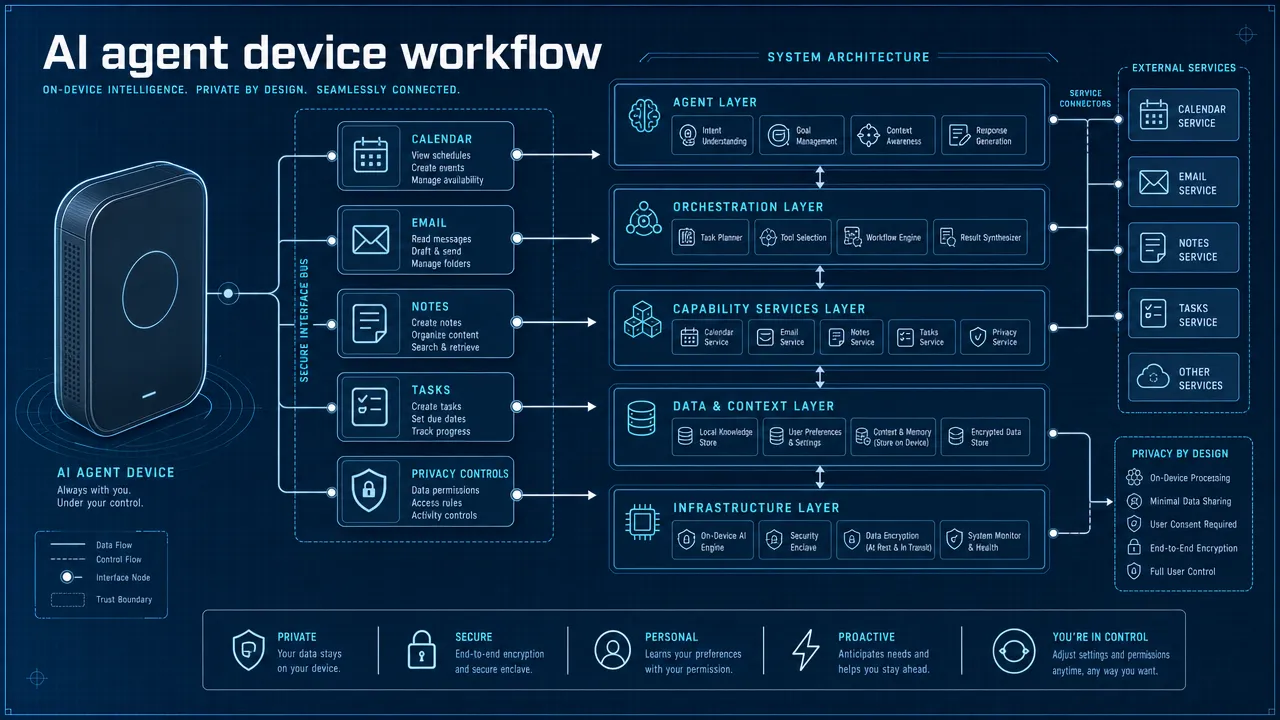
Ai agent hardware Briefing — 2026-06-02

Summary

  • NVIDIA unveils Vera, a revolutionary CPU specifically designed for AI agents
  • Anthropic beats OpenAI to market with confidential IPO filing
  • Asus expands AI strategy with servers, AI PCs, and robotics investments
  • Chinese robotics companies prepare IPO wave to advance next-generation AI
  • NVIDIA launches comprehensive agentic PC ecosystem with Vera CPU and partnerships
  • Gradient Labs secures $26M funding to develop fintech-focused AI agents
  • Saris raises $28M to bring agentic AI solutions to banking sector
  • Google introduces Gemini Spark as personal AI agent platform
  • NVIDIA enhances DGX Spark with faster models and multi-node clustering for local AI agents
  • NVIDIA targets $200B CPU market with new AI agent PC offerings
  • Gradient Labs attracts additional investment for finance-specific AI agent development
  • Florida lawsuit challenges OpenAI over child safety concerns
  • Anthropic files for massive IPO in major industry milestone

NVIDIA Vera: Revolutionary CPU for AI Agents

NVIDIA has introduced Vera, a groundbreaking CPU custom-designed for AI agents, marking a significant advancement in specialized AI hardware. The new processor represents NVIDIA’s strategic move into the agentic computing space with purpose-built silicon optimized for autonomous AI workloads.
Read Full Article: Android Headlines

Anthropic Beats OpenAI to IPO Filing

Anthropic has filed confidential IPO plans with the SEC, beating rival OpenAI to this major milestone. The move signals growing investor confidence in the AI sector and positions Anthropic as a leading player in the competitive AI market.
Read Full Article: Mashable

Asus Expands AI Strategy Across Hardware

Asus is broadening its artificial intelligence initiatives by making strategic investments in AI servers, AI PCs, and robotics. The company’s expanded focus reflects the growing demand for AI-capable hardware across multiple computing segments.
Read Full Article: digitimes

Chinese Robotics Firms Queue for IPOs

Multiple Chinese robotics companies are preparing IPO filings to capitalize on the next phase of AI development. This wave of public offerings demonstrates China’s push to advance its position in the global AI and robotics markets.
Read Full Article: Bloomberg.com

NVIDIA Launches Comprehensive Agentic PC Ecosystem

NVIDIA has debuted its agentic PC platform featuring the Vera CPU and strategic ecosystem partnerships. This comprehensive approach aims to establish NVIDIA as a dominant force in the emerging AI agent hardware market.
Read Full Article: Let’s Data Science

Gradient Labs Secures $26M for Fintech AI Agents

Gradient Labs has raised $26 million in funding to develop specialized AI agents for the financial technology sector. The investment will accelerate development of autonomous systems designed to transform banking and financial services operations.
Read Full Article: Finovate

Saris Raises $28M for Banking AI Solutions

Saris has secured $28 million in funding to bring agentic AI capabilities to the banking industry. The company aims to deploy autonomous AI systems that can revolutionize how banks operate and serve customers.
Read Full Article: PYMNTS.com

Google Launches Gemini Spark Personal AI Agent

Google has unveiled Gemini Spark, its new personal AI agent platform designed for consumer use. The launch represents Google’s entry into the personal AI assistant market with advanced agentic capabilities.
Read Full Article: Let’s Data Science

NVIDIA Enhances DGX Spark for Local AI Agents

NVIDIA has announced significant improvements to DGX Spark, including faster models and multi-node clustering support for running local AI agents. These enhancements enable more powerful and scalable deployment of autonomous AI systems in enterprise environments.
Read Full Article: NVIDIA Developer

NVIDIA Targets $200B CPU Market

NVIDIA is making a bold move to capture share in the $200 billion CPU market with its new AI agent PCs. This strategic expansion leverages NVIDIA’s AI expertise to challenge traditional CPU manufacturers in the rapidly evolving PC market.
Read Full Article: The Tech Buzz

Gradient Labs Attracts Additional Finance AI Funding

Gradient Labs has secured additional funding to further develop specialist AI agents for the finance industry. The fresh capital injection will support the company’s mission to transform financial services through autonomous AI technology.
Read Full Article: Finextra Research

Florida Lawsuit Challenges OpenAI on Safety

A Florida lawsuit has accused OpenAI of ignoring safety warnings and putting children at risk. The legal action raises important questions about AI safety protocols and responsible development practices in the industry.
Read Full Article: The Guardian

Anthropic Files for Major IPO

Anthropic has initiated a massive IPO filing, marking a significant milestone for the AI industry. The company’s move to go public reflects the maturation of the AI sector and growing investor appetite for AI-focused companies.
Read Full Article: Bloomberg.com

Claude vs GPT-5 for Business Automation

Claude and GPT-5 solve different sides of business automation: Claude is usually stronger for governed document-heavy knowledge work, while GPT-5 is usually stronger for broad, tool-heavy, multimodal, and coding-centered automation.

For a practical business automation AI comparison, the right question is not simply "Which model is smarter?" The better question is: "Which model fits the workflow, data sensitivity, integration stack, and approval process?" In business automation 2026, companies are moving beyond chat prompts toward AI agents that retrieve information, use tools, execute multi-step tasks, and escalate work to humans when risk is high. That shift makes Claude vs GPT-5 an architecture decision, not just an AI model comparison for business.

Business automation AI comparison: Why Claude vs GPT-5 depends on workflow design

The strongest business automation AI comparison starts with workflow design because enterprise value comes from repeatable execution, not one-off answers. Claude and GPT-5 can both summarize, draft, reason, code, and analyze information, but they tend to shine in different automation patterns.

Claude is often the better starting point when work depends on careful reading, long-context reasoning, sensitive documents, and structured interpretation. That makes it a strong candidate for legal, HR, compliance, research, policy review, SOP analysis, and executive briefing workflows. Anthropic’s enterprise positioning emphasizes governance, identity management, audit tooling, data controls, configurable retention, and not using customer prompts and responses for training by default.

GPT-5 is often the better starting point when automation needs broad tool use, multimodal inputs, coding, data analysis, file work, workspace agents, and API-driven execution. OpenAI positions GPT-5 as a unified system with routing, deeper reasoning modes, improved coding, writing, visual perception, and agentic tool use. For teams building an AI assistant for business tasks across sales, marketing, support, engineering, operations, and admin work, GPT-5 has a strong general-purpose advantage.

A modern enterprise may need both. Claude can act as the careful reasoning layer for sensitive knowledge workflows, while GPT-5 can power dynamic automation across apps, data, code, and multimodal business tasks.

Decision area Claude is usually stronger when… GPT-5 is usually stronger when… Practical recommendation
Document analysis The workflow uses contracts, policies, research, SOPs, or long internal documents Documents are part of a broader tool-based workflow Test both on real company files
Agentic execution The workflow needs careful interpretation and governed knowledge work The workflow needs app actions, tools, scheduling, files, Slack-style collaboration, or API execution Choose based on integrations and controls
Coding The work involves code review, architecture explanation, and technical documentation The work involves end-to-end coding, debugging, and developer tooling Benchmark on your own repositories
Multimodal work Text-heavy analysis is the priority Images, files, voice, data, and visual perception matter GPT-5 is likely the better first test
Governance Sensitive document reasoning is central Broad productivity agents need workspace controls Verify enterprise security documentation directly
Scalability The company wants controlled knowledge workflows The company wants cross-functional AI productivity Use a model portfolio when stakes are high

The biggest mistake is treating "best AI for business automation" as a universal ranking. A support team, legal team, and engineering team may all need different automation behavior. A procurement leader should therefore evaluate models against actual workflows, not generic benchmark headlines.

Business automation AI comparison: What business automation 2026 requires from AI models

Business automation 2026 is increasingly agentic. The market has moved from "AI writes a response" to "AI plans, retrieves, checks, drafts, routes, escalates, and records the result." That evolution changes the role of AI models. Claude and GPT-5 are reasoning engines, but enterprise automation also needs orchestration, permissions, monitoring, approvals, and rollback options.

Vendor and analyst research points in the same direction: enterprises are prioritizing AI agents, governance, lifecycle management, workflow orchestration, and human oversight. UiPath’s 2026 automation trends report, for example, emphasizes agentic automation, governance, and operating-model reinvention. SAP has also announced plans to bring Claude into SAP Business AI Platform through Joule and Joule agents, showing how model capabilities are being embedded into enterprise systems rather than used only through standalone chat interfaces.

A strong enterprise AI automation architecture typically includes five layers:

  1. Model layer: Claude, GPT-5, or another model handles reasoning, language, classification, extraction, and planning.
  2. Agent layer: The agent defines goals, retrieves context, selects tools, and manages task steps.
  3. Integration layer: Connectors link the agent to CRM, ERP, ticketing, files, email, chat, code repositories, or internal databases.
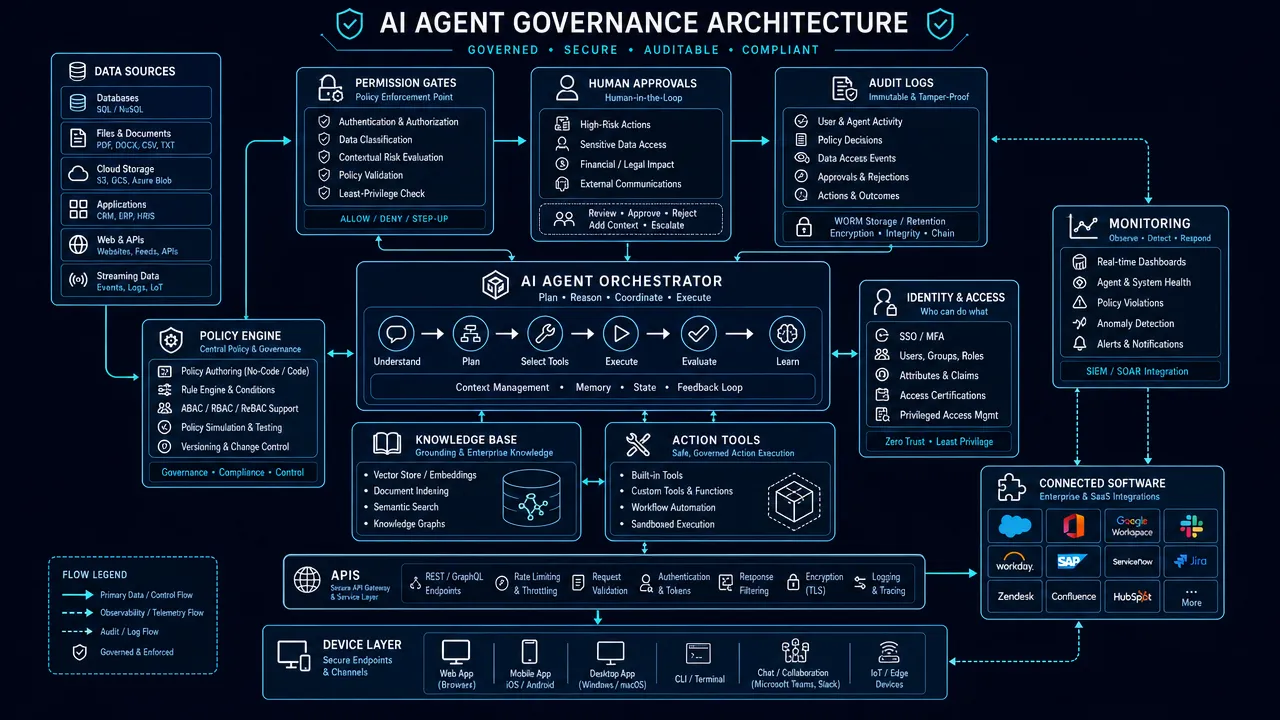
  4. Governance layer: Identity, role-based access, retention, audit logs, human approvals, and data boundaries control risk.
  5. Monitoring layer: Evaluations, analytics, feedback loops, incident review, and version history keep automation reliable.

flowchart TD

This structure matters because workflow automation AI can fail in ways that simple chat does not. A bad answer in a chat window is a quality issue. A bad answer connected to a CRM, payment system, HR database, code repository, or customer support tool can become an operational, legal, financial, or reputational problem.

Claude and GPT-5 both need guardrails. The model should not be allowed to approve refunds, change employee records, send regulated communications, merge code, or update financial systems without clear permissions and human-in-the-loop review. The more powerful the AI assistant becomes, the more important governance becomes.

For an AI agent platform like Aiden, the strategic takeaway is especially important: the model is not the full automation product. Business value comes when models are embedded into agents that can operate across software systems, devices, local environments, and human approval loops. That does not require claiming any specific Aiden product capability. It simply reflects the direction of enterprise AI automation: model choice must connect to where and how agents execute work.

Business automation AI comparison: Claude strengths, limitations, and best-fit workflows

Claude is strongest in a business automation AI comparison when the work requires careful interpretation, long-context reasoning, structured writing, and governance-sensitive knowledge work. It is not only a chatbot for drafting text. In enterprise settings, Claude is often evaluated as a controlled reasoning assistant for documents, policies, technical material, and internal knowledge.

Claude advantages for enterprise AI automation

Claude is a strong candidate for document-heavy automation because many business tasks depend on understanding long, dense, and nuanced material. Examples include:

  • Contract review and clause extraction.
  • HR policy Q&A and handbook comparison.
  • Compliance memo drafting.
  • SOP analysis and process documentation.
  • Research synthesis.
  • Board briefing preparation.
  • Engineering documentation review.
  • Customer escalation summaries that require policy interpretation.

This makes Claude especially useful when accuracy, caution, and structured reasoning matter more than speed or creative variety. In legal, HR, finance, and policy workflows, conservative behavior can be a feature rather than a flaw.

Claude Enterprise is also positioned around enterprise controls, including admin management, identity provider sign-in, audit infrastructure, data controls, and configurable retention. Those details matter because sensitive departments need more than output quality. They need procurement confidence, access control, offboarding, retention policies, and auditability.

Claude limitations for workflow automation AI

Claude is not automatically the best AI for every business automation workflow. Public enterprise pricing can be less transparent. Exact model availability and context-window details should be verified directly before procurement. Claude may also feel more cautious in fast-moving creative, multimodal, or tool-heavy workflows where teams want speed, experimentation, image work, data actions, and broad app connectivity.

Claude also still needs orchestration. It may reason well over documents, but production automation requires connectors, permissions, retrieval systems, monitoring, test sets, fallback behavior, and human approvals. No model removes the need for workflow design.

Best Claude use cases by department

Department Claude fit Example automation
Legal High Contract review, clause comparison, legal memo drafting, policy Q&A
HR High Handbook Q&A, onboarding SOPs, policy interpretation, review summaries
Operations High SOP cleanup, process analysis, risk review, internal documentation
Finance Medium-high Expense policy checks, financial narrative review, invoice explanation
Engineering High Code review, architecture summaries, documentation, technical analysis
Customer support Medium-high Policy-based response drafting, escalation summaries, knowledge-base interpretation
Marketing Medium Long-form thought leadership, research summaries, structured editing

Claude is often the better first test when the automation is document-heavy, regulated, or sensitive. That does not mean Claude is always more accurate than GPT-5. It means Claude’s product positioning and typical strengths align well with workflows where controlled reasoning over internal knowledge is the main job.

Business automation AI comparison: GPT-5 strengths, limitations, and best-fit workflows

GPT-5 is strongest in a business automation AI comparison when teams need broad productivity, coding, data work, multimodal inputs, and agentic task execution. OpenAI presents GPT-5 as a unified system that can route between faster responses and deeper reasoning depending on the task. For business users, that means GPT-5 is designed less like a narrow document assistant and more like a flexible AI operating layer.

GPT-5 advantages for AI assistant for business tasks

GPT-5 is a strong fit for cross-functional teams because business automation often involves more than text. A sales workflow may require account research, CRM notes, proposal drafting, email personalization, and follow-up scheduling. A support workflow may involve ticket history, attachments, policy lookup, response drafting, and escalation. An engineering workflow may require code generation, debugging, test writing, documentation, and repository analysis.

GPT-5 is particularly attractive where automation includes:

  • Coding and debugging.
  • Data analysis and spreadsheet interpretation.
  • File uploads and document work.
  • Image and visual understanding.
  • Voice and multimodal interactions.
  • Workspace agents.
  • API-driven workflow automation.
  • Tool use across apps and internal systems.

OpenAI’s enterprise help materials also describe workspace agents that can use tools, apps, files, custom MCP servers, scheduled recurring runs, Slack-style channels, version history, and analytics. Those capabilities are important for teams that want automation to move from chat assistance into repeatable agentic work.

GPT-5 limitations for enterprise AI automation

GPT-5’s breadth is also a management challenge. A powerful assistant connected to files, tools, chat channels, and APIs needs clear boundaries. Enterprises must handle data access, prompt injection, tool misuse, hallucinated actions, cost escalation, and unclear accountability.

Model naming and availability can also change quickly across product surfaces, tiers, and APIs. Enterprise teams should verify current model names, defaults, usage limits, and admin settings before finalizing an AI model comparison for business.

Router-based behavior can be useful, but it may make outcomes feel less transparent than choosing a single fixed model. Procurement and technical teams should test GPT-5 on repeatable evaluation sets, not just ad hoc prompts.

Best GPT-5 use cases by department

Department GPT-5 fit Example automation
Operations High Reporting, workflow planning, app-assisted task execution
Customer support High Response drafting, ticket summaries, multimodal case review
Sales High Account research, personalized outreach, CRM note summaries
Marketing High Campaign concepts, content repurposing, creative drafts
Finance Medium-high Spreadsheet analysis, variance explanations, report drafting
HR Medium-high Onboarding drafts, employee communications, scheduling support
Engineering High Code generation, debugging, tests, documentation
Executive admin High Meeting summaries, research briefs, calendar and email assistance

GPT-5 is often the better first test when the workflow is tool-heavy, cross-functional, coding-heavy, data-rich, or multimodal. It is also a strong choice when the company wants one AI assistant for business tasks across many teams.

Claude vs GPT-5 business automation fit

The chart above uses a qualitative analyst assessment based on public product positioning, not a benchmark dataset. Claude scores highest where business automation depends on long documents and governance-sensitive reasoning. That is why many enterprises should test Claude first for policy, legal, HR, compliance, and structured internal knowledge workflows.

GPT-5 business automation fit

GPT-5 scores highest where business automation requires broad execution across data, tools, code, multimodal inputs, and workspace agents. The practical lesson is not that GPT-5 replaces Claude. It is that GPT-5 often fits broader automation patterns, while Claude often fits deeper governed reasoning patterns.

Business automation AI comparison: How to choose the best AI for business automation

The best AI for business automation is the one that passes real workflow tests under real constraints. A polished demo is not enough. Enterprises should test Claude and GPT-5 with internal documents, representative prompts, business tools, data boundaries, human approval points, and measurable outcomes.

Step 1: Define the workflow before choosing the model

Start by naming the workflow in operational terms. Avoid vague goals such as "use AI for productivity." Define the exact process:

  • "Summarize customer support tickets and draft approved responses."
  • "Extract renewal risks from enterprise contracts."
  • "Generate weekly sales account briefs from CRM notes."
  • "Review pull requests for security and documentation issues."
  • "Draft onboarding plans from role descriptions and internal policies."

Once the workflow is clear, classify it by complexity and risk.

Workflow type Better first test Reason
Long legal or policy document review Claude Strong fit for dense, sensitive knowledge work
Sales outreach and CRM productivity GPT-5 Strong fit for fast drafting and tool-connected workflows
Code generation and debugging GPT-5 and Claude Both are strong; test on your repositories
HR handbook Q&A Claude Strong fit for structured policy interpretation
Marketing campaign ideation GPT-5 Strong fit for broad creative and multimodal work
Executive research briefs Claude and GPT-5 Claude for long synthesis, GPT-5 for broad research and presentation support
Support ticket automation GPT-5 and Claude GPT-5 for speed and tools, Claude for policy-heavy cases

Step 2: Classify data sensitivity

Data sensitivity determines governance requirements. A low-risk marketing outline and a high-risk employee relations summary should not use the same automation rules.

Sensitive workflows should require enterprise-grade controls such as SSO, role-based access, retention settings, admin management, audit logs, and human review. Claude’s enterprise positioning is strong in this area. GPT-5’s enterprise ecosystem also includes workspace controls and agent management capabilities, but buyers should verify current security and privacy details directly.

Step 3: Map integrations and execution points

Workflow automation AI becomes useful when it connects to business systems. List every system the AI needs to read from or write to:

  • CRM.
  • ERP.
  • Ticketing system.
  • File storage.
  • Email.
  • Calendar.
  • Chat.
  • Data warehouse.
  • Code repository.
  • HRIS.
  • Finance tools.
  • Internal knowledge base.
  • Device, kiosk, desktop, or edge environment.

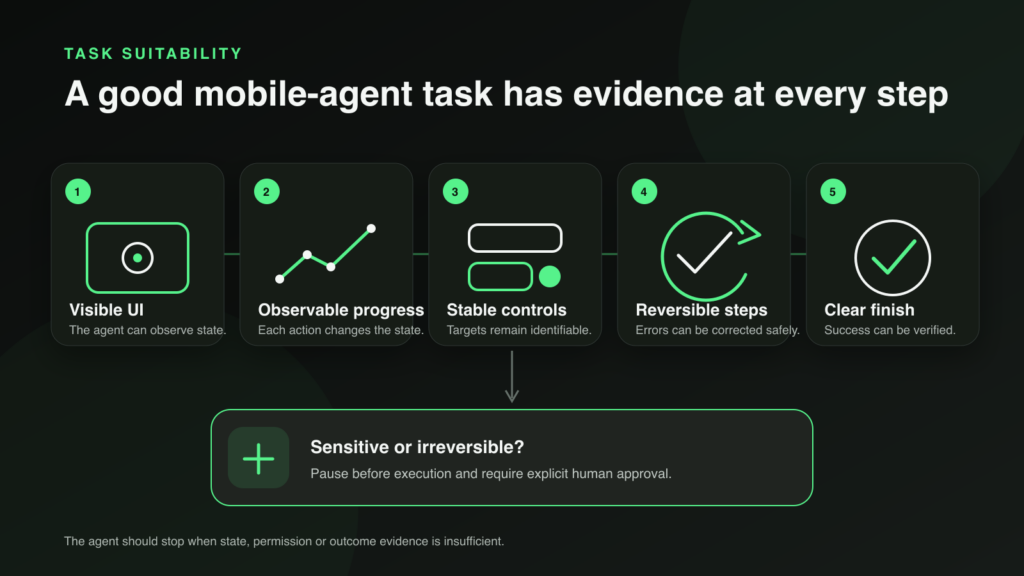
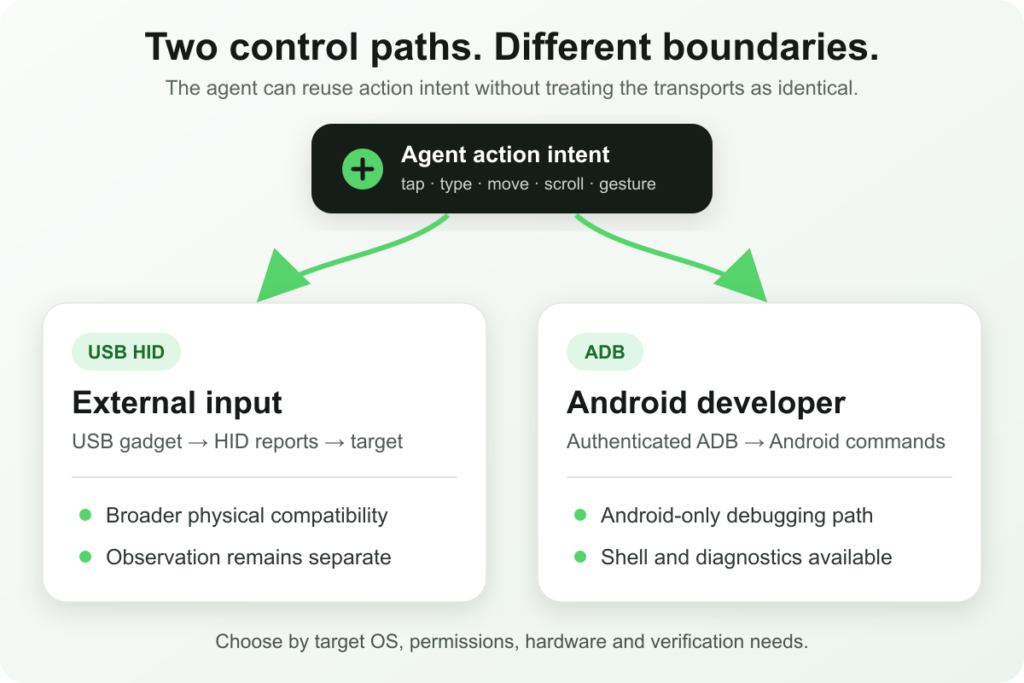
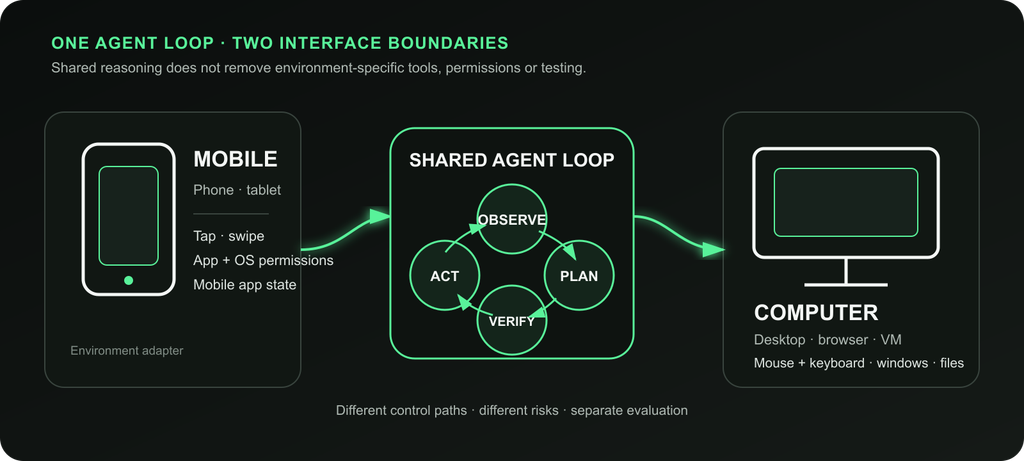
This is where the model-to-agent distinction matters. Claude and GPT-5 may answer questions, but agents execute workflows. If the business needs software actions, local task execution, or hardware-adjacent automation, the surrounding agent architecture matters as much as the model.

Step 4: Add human approval where risk is high

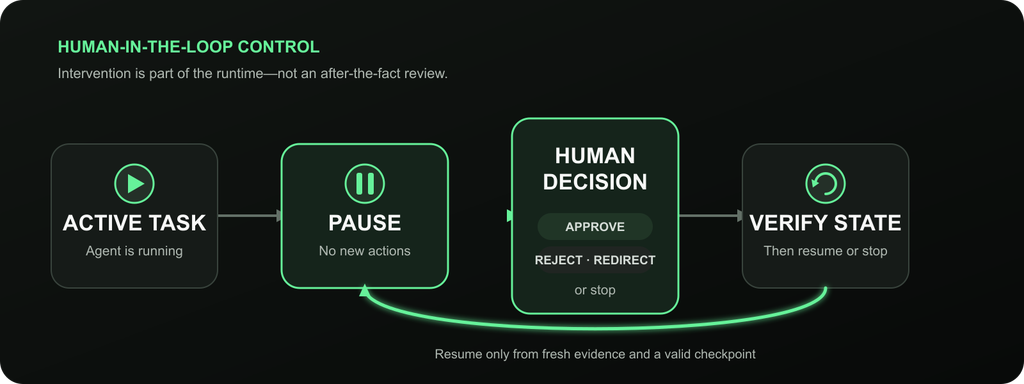
Human-in-the-loop design is not a sign that AI failed. It is how enterprises make automation safe. The AI can draft, summarize, classify, and recommend. Humans should approve high-impact actions such as:

  • Sending legal or regulated communications.
  • Updating financial records.
  • Changing employee data.
  • Issuing refunds or credits.
  • Publishing customer-facing claims.
  • Merging production code.
  • Modifying access permissions.
  • Executing physical or device-level actions.

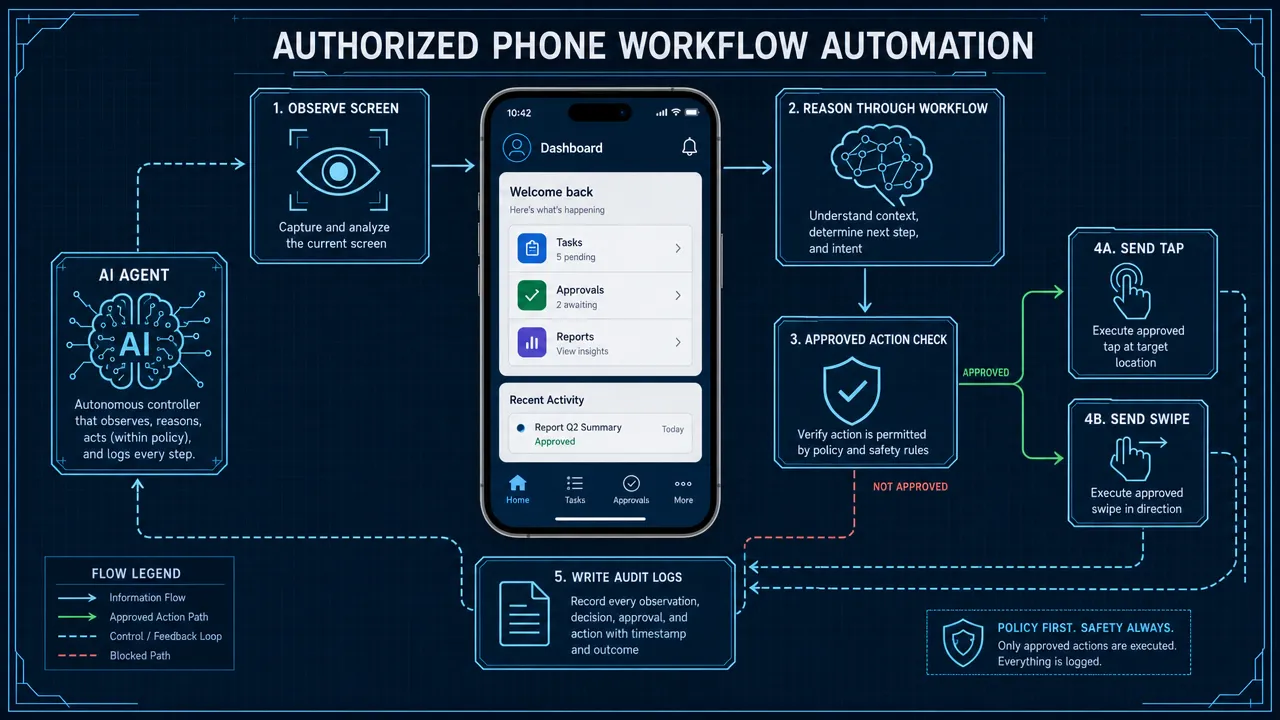
This is especially important for AI agent hardware and software environments. When agents can interact with devices, local systems, or operational workflows, approval logic must be explicit.

Step 5: Evaluate outputs with a scorecard

A reliable AI model comparison for business should include more than subjective preference. Use a scorecard with clear criteria.

Evaluation criterion What to measure
Accuracy Did the answer match trusted internal references?
Completeness Did the model include all required details?
Hallucination rate Did it invent facts, citations, policies, or actions?
Latency Was the response fast enough for the workflow?
Cost What is the expected subscription, API, and review cost?
Tool reliability Did the agent use the right system in the right order?
Security Did it respect permissions and data boundaries?
Auditability Can the company trace inputs, outputs, approvals, and actions?
User adoption Did employees trust and use the output?
Maintainability Can prompts, connectors, and evaluations be updated easily?

The winning model is the one that performs well under your workflow conditions. For some companies, that will be Claude. For others, GPT-5. For many enterprises, it will be a model-flexible architecture that uses multiple AI systems with clear routing rules.

Business automation AI comparison: Final recommendation for enterprise AI automation

A balanced business automation AI comparison gives Claude the advantage for governed knowledge work and gives GPT-5 the advantage for broad agentic automation. Claude is the better first candidate for long-context documents, legal and HR policies, compliance-sensitive summaries, structured research, and careful internal knowledge workflows. GPT-5 is the better first candidate for coding, data analysis, multimodal productivity, workspace agents, sales and marketing workflows, customer support acceleration, and cross-tool business execution.

The most mature answer is often not "Claude or GPT-5." It is "Claude where careful reasoning is needed, GPT-5 where broad execution is needed, and a governed automation layer around both."

Use Claude when the task is document-heavy, policy-sensitive, or risk-aware. Use GPT-5 when the task is dynamic, multimodal, coding-heavy, data-rich, or tool-connected. Use both when different departments have different automation needs.

For business automation 2026, the model is only one layer. The durable advantage comes from workflow design, agent orchestration, access control, human approval, monitoring, and the ability to adapt as models change. Companies that build model-flexible automation strategies will be better prepared than companies that bet everything on one assistant.

For organizations exploring AI agent automation strategies, the practical next step is to map where AI agents can reduce repetitive work, where humans must stay in control, and where model choice should remain flexible. That workflow-first approach is the safest path to enterprise AI automation that actually scales.

For a deeper look at how AI agents fail in production and what patterns actually work, see Why Most AI Agents Fail in Production. For teams evaluating agent frameworks to build on top of these models, see How to Compare AI Agent Frameworks in 2026.

Learn more about AI agent automation at Aiden →

Microsoft Build Briefing — 2026-06-01

Summary

  • Microsoft and NVIDIA announce next-generation Windows PCs featuring the revolutionary RTX Spark Superchip
  • Nvidia-powered Windows PCs set to launch next week, marking a major hardware milestone
  • RTX Spark unveiled as "the most efficient PC chip ever built" for desktop and laptop systems
  • Microsoft and Nvidia reveal new Arm-based Windows computers, expanding the ecosystem
  • Microsoft Build 2026 conference to showcase AI agents and enhanced Copilot capabilities
  • Microsoft’s "AI Independence Day" initiative signals strategic shift in artificial intelligence approach
  • New AI models and unified "One Copilot" app to be unveiled at Build 2026
  • Microsoft developing a comprehensive super app integrating coding, chat, and AI tools

Microsoft and NVIDIA Launch RTX Spark Superchip PCs

Microsoft and NVIDIA have announced next-generation Windows PCs powered by the groundbreaking RTX Spark Superchip. This collaboration represents a significant leap in PC performance and efficiency, combining advanced GPU and CPU capabilities in a single chip architecture designed for AI workloads.

Read Full Article: FoneArena.com

First Nvidia-Powered Windows PCs Debut Next Week

The first Windows PCs featuring Nvidia chips will debut next week, marking a historic shift in the PC ecosystem. Major manufacturers including Dell and Microsoft’s Surface division are expected to showcase systems utilizing Nvidia’s new processor technology, expanding beyond traditional Intel and AMD offerings.

Read Full Article: Axios

RTX Spark Named "Most Efficient PC Chip Ever Built"

Nvidia has unveiled the RTX Spark as "the most efficient PC chip ever built," featuring the N1 and N1X variants for desktop and laptop systems. The chip combines CPU, GPU, and AI acceleration capabilities while delivering unprecedented power efficiency, positioning it as a game-changer for both consumer and professional computing.

Read Full Article: The Verge

Microsoft and Nvidia Introduce Arm-Based Windows Computers

Microsoft and Nvidia are set to unveil Arm-based Windows computers, expanding the Windows on Arm ecosystem with powerful new hardware options. This move represents a significant step toward diversifying the Windows platform beyond traditional x86 architecture, promising improved battery life and AI performance.

Read Full Article: irishsun.com

Build 2026 to Spotlight AI Agents and Copilot Upgrades

Microsoft Build 2026 will showcase significant advancements in AI agents and Copilot capabilities. The conference will highlight new autonomous AI agent frameworks and enhanced Copilot features designed to transform productivity across development, business, and creative workflows.

Read Full Article: MSN

Microsoft’s AI Independence Day Initiative

Microsoft is pursuing an "AI Independence Day" strategy aimed at reducing dependencies and establishing greater autonomy in artificial intelligence development. This initiative encompasses new proprietary AI models, enhanced infrastructure, and strategic partnerships designed to strengthen Microsoft’s position in the competitive AI landscape.

Read Full Article: The Information

New AI Models and "One Copilot" App Coming to Build

Microsoft will unveil new AI models and the unified "One Copilot" application at Build 2026. This consolidated app will streamline access to various Copilot services across platforms, providing a single interface for AI-powered assistance in coding, writing, analysis, and creative tasks.

Read Full Article: MSN

Microsoft Developing Comprehensive AI Super App

Microsoft is building an ambitious super app that combines coding tools, chat interfaces, and various Copilot AI capabilities into a unified platform. This integrated solution aims to provide developers and professionals with a seamless environment for AI-enhanced productivity, consolidating multiple tools and services into a single, powerful application.

Read Full Article: Fortune

Anthropic Briefing — 2026-06-01

Summary

  • Anthropic raises $65 billion in funding, becoming the most valuable AI startup with a valuation reaching $965 billion
  • OpenAI launches Rosalind Biodefense, offering federal agencies early access to its life-sciences AI model
  • Anthropic reports strong financials with $4.8B revenue and expects $10.9B in the June quarter
  • OpenAI introduces ChatGPT agent with web task execution capabilities
  • Anthropic launches Claude Opus 4.8 with dynamic workflows and agent swarms
  • MISUMI Group invests $1B in Americas for AI and digital manufacturing expansion
  • Salesforce demonstrates AI agents reducing migration time from 231 days to 13 days
  • Replit partners with Visa to add identity layer for AI agents enabling commerce capabilities
  • Apollo and Blackstone arrange $36 billion to fund Anthropic’s AI chip development
  • OpenAI discusses adding Citigroup and JPMorgan to its IPO underwriting team

Anthropic Becomes Most Valuable AI Startup with $65B Funding

Anthropic has secured $65 billion in funding, establishing itself as the most valuable AI startup. The massive funding round pushes the company’s valuation to $965 billion, surpassing OpenAI and marking a historic milestone in the AI industry.
Read Full Article: Mexico Business News

Anthropic Confirms Record-Breaking Valuation

Yahoo Finance reports that Anthropic has officially become the most valuable AI firm following its $65 billion funding round. The unprecedented investment underscores growing confidence in Anthropic’s technology and market position.
Read Full Article: Yahoo Finance

OpenAI Launches Biodefense AI for Federal Agencies

OpenAI has unveiled Rosalind Biodefense, providing federal agencies with early access to its specialized life-sciences AI model. This strategic move positions OpenAI in the government sector for critical biodefense applications.
Read Full Article: R&D World

Anthropic Posts Strong Revenue Growth

Anthropic reports $4.8 billion in revenue and projects $10.9 billion for the June quarter, demonstrating rapid commercial growth. The financial performance reflects strong market adoption of its AI technologies.
Read Full Article: Crypto Briefing

OpenAI Unveils ChatGPT Agent for Web Tasks

OpenAI has launched a ChatGPT agent capable of executing web tasks autonomously. This development represents a significant advancement in AI agent capabilities and practical applications.
Read Full Article: OpenAI

Anthropic Valuation Reaches $965 Billion

Crypto Briefing confirms Anthropic’s valuation has hit $965 billion following the $65 billion funding round. This positions the company as a dominant force in the global AI market.
Read Full Article: Crypto Briefing

AI Infrastructure Boom Drives Anthropic Funding

The $65 billion Anthropic funding reflects the broader AI infrastructure boom as companies race to build advanced AI capabilities. The investment will fuel expansion of computing resources and model development.
Read Full Article: Crypto Briefing

Claude Opus 4.8 Features Dynamic Workflows

Anthropic launches Claude Opus 4.8, its most capable AI model featuring dynamic workflows and agent swarms. The new model represents a significant leap in AI capabilities and functionality.
Read Full Article: Memeburn

MISUMI Invests $1B in AI Manufacturing

MISUMI Group announces a $1 billion investment in the Americas for AI and digital manufacturing expansion. The investment signals growing integration of AI in industrial and manufacturing sectors.
Read Full Article: The Robot Report

Salesforce AI Agents Slash Migration Time

Salesforce demonstrates AI agents reducing a 231-day migration to just 13 days with fewer incidents. This showcases the transformative potential of AI in enterprise IT operations.
Read Full Article: the-decoder.com

Replit Partners with Visa for AI Agent Commerce

Replit’s coding platform adds a Visa-backed identity layer for AI agents, enabling new commerce capabilities. This partnership changes how AI agents can conduct financial transactions autonomously.
Read Full Article: The New Stack

Visa Invests in AI Agent Commerce Future

Visa’s investment in Replit links AI agents to future commerce growth opportunities. The partnership represents a strategic move to position Visa in the emerging AI agent economy.
Read Full Article: Yahoo Finance

Anthropic Surpasses OpenAI in Valuation

Law360 reports Anthropic’s $965 billion valuation officially surpasses OpenAI, marking a shift in AI industry leadership. The milestone reflects Anthropic’s rapid growth and market confidence.
Read Full Article: Law360

Anthropic Dominates Weekly Funding Rounds

Anthropic leads the week’s biggest funding rounds in an otherwise slower period for mega-rounds. The $65 billion raise stands out as an exceptional achievement in current market conditions.
Read Full Article: Crunchbase News

Apollo and Blackstone Fund Anthropic’s AI Chips

Apollo and Blackstone arrange $36 billion in funding specifically for Anthropic’s AI chip initiatives. This targeted investment will accelerate development of custom silicon for AI workloads.
Read Full Article: Benzinga

Anthropic Approaches $1 Trillion Valuation

Anthropic nears a $1 trillion valuation as the company considers potential IPO plans. The unprecedented valuation would establish new benchmarks for AI company valuations.
Read Full Article: The American Bazaar

Anthropic Confirmed as Top AI Startup

WANDTV confirms Anthropic’s position as the most valuable AI startup company globally. The achievement caps a remarkable period of growth and investment for the AI leader.
Read Full Article: WANDTV.com

OpenAI Considers Major Banks for IPO

Bloomberg reports OpenAI has discussed adding Citigroup and JPMorgan to its bank lineup for a potential IPO. The move signals OpenAI’s serious preparations for going public.
Read Full Article: Bloomberg.com

OpenAI IPO Team Expands with Top Banks

OpenAI is reportedly in talks to add Citigroup and JPMorgan to its IPO underwriting team. The addition of major banks strengthens OpenAI’s position for a successful public offering.
Read Full Article: Crypto Briefing

OpenAI Engages Leading Banks for IPO

OpenAI formally engages Citigroup and JPMorgan for IPO discussions, signaling momentum toward a public listing. The engagement of top-tier banks indicates advanced IPO preparations.
Read Full Article: Crypto Briefing

How to Build an AI Agent for Your Business Without Writing Code in 2026

To build an AI agent for your business without writing code in 2026: pick one repetitive workflow with clear inputs and outputs, choose a no-code agent builder that connects to your existing tools, ground the agent in approved company knowledge, add human approval for any sensitive actions, and measure ROI from day one. Start narrow — one workflow, one measurable outcome — before scaling.

Building an AI agent for your business without writing code in 2026 requires a clear workflow, a no-code AI tool, controlled access to business data, human approval steps, and measurable ROI targets. A business AI agent is not just a chatbot. It is a goal-directed system that can use instructions, knowledge, tools, and connected apps to complete a task with some level of autonomy.

For Aiden, an AI agent platform focused on business automation, the practical opportunity is not hype. It is helping businesses think clearly about where AI agents belong, what infrastructure they need, and how to operationalize AI automation safely.

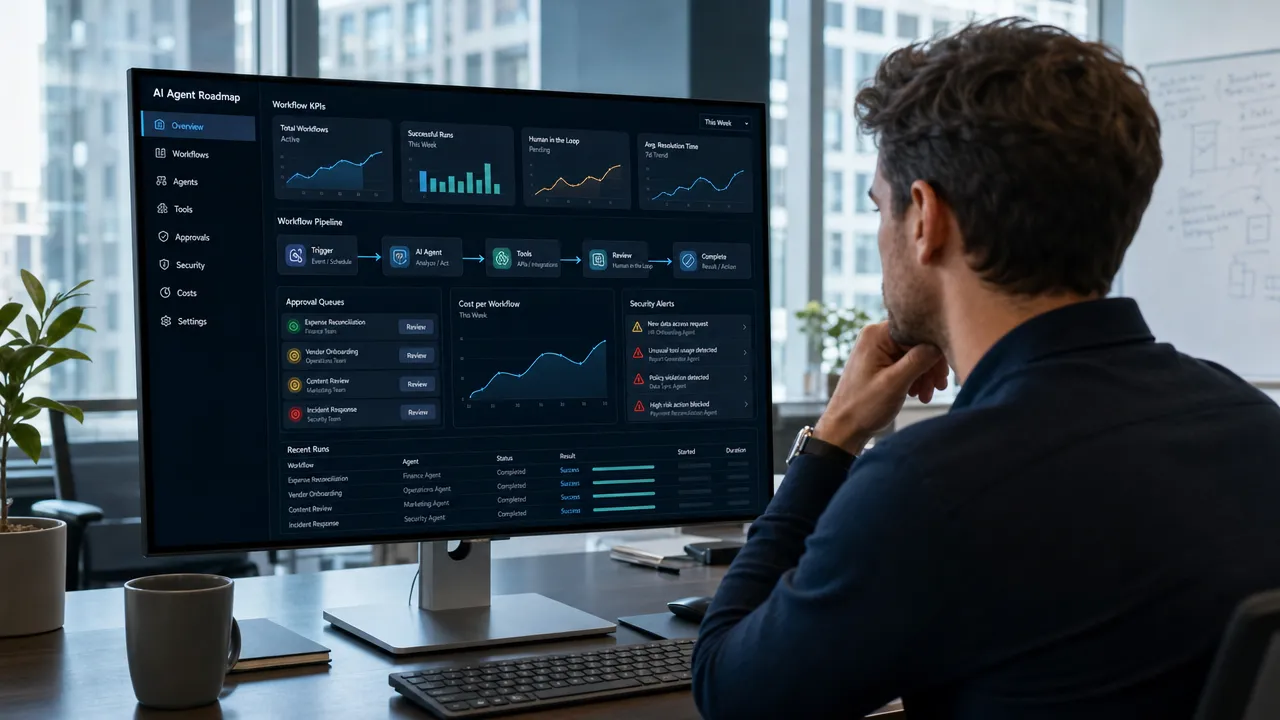
Business AI Agent Control Center

How build AI agent business no code 2026 starts with one valuable workflow

The best way to build AI agent business no code 2026 is to avoid starting with a broad “AI transformation” project. Start with one painful, repetitive, measurable workflow. No-code AI agents work best when the task has clear inputs, clear outputs, known decision rules, and a defined human owner.

IBM defines AI agents as systems or programs capable of autonomously performing tasks on behalf of a user or another system. That definition is useful, but business teams should make it more operational: a business AI agent is a software system that uses AI models, business instructions, approved data, and connected tools to complete a workflow under defined boundaries. You can read IBM’s broader explanation in its guide to AI agents.

A no code AI agent business does not mean “no thinking.” It means you can configure the agent through visual builders, templates, prompts, forms, connectors, and approval steps instead of writing traditional application code. You may still need to understand fields, permissions, data mapping, API keys, and workflow logic.

Good first workflows usually share four traits:

Trait Why it matters Example
Repetitive The agent can create measurable time savings Classifying support tickets
Rule-guided The agent can follow defined business logic Checking refund eligibility
Data-accessible The needed information is in documents or apps Searching policies or CRM records
Reviewable A human can approve or correct outputs Drafting sales replies before sending

Strong use cases for build AI agents without coding include customer support triage, lead qualification, appointment booking, CRM updates, internal knowledge search, content operations, and weekly reporting. These are practical because they do not require the agent to make final high-risk decisions without oversight.

Weak first use cases include broad strategy work, legal conclusions, medical advice, autonomous financial transactions, final hiring decisions, or workflows where the underlying process is already unclear. Gartner-related coverage reported that more than 40% of agentic AI projects may be canceled by the end of 2027 because of cost, unclear value, or weak risk controls. That warning matters for any AI agent business 2026 plan. A successful no code automation business starts with value, not novelty. See the reporting from Process Excellence Network on Gartner’s agentic AI forecast.

A practical first agent role might be: “The agent reviews new inbound leads, checks company size and stated need, drafts a CRM summary, assigns a lead score, and alerts a sales rep. It does not send pricing, make promises, or contact the prospect without approval.”

That level of specificity gives the agent a job. It also gives your team a way to test whether the job is being done correctly.

Build AI agent business no code 2026 platform choices for different teams

No code AI tools in 2026 generally fall into three groups: dedicated agent builders, visual workflow automation platforms with AI agent features, and open-source or low-code agentic platforms. The right choice depends on who will build the agent, how much control the business needs, and how sensitive the workflow is.

Because competitor websites should not be used as links here, the following table summarizes platform categories without linking to vendor pages.

Platform type Best fit Strengths Watch-outs
Beginner-friendly no-code agent builders Small teams, solopreneurs, executive assistants Fast setup, templates, business-friendly interfaces Less architectural control, pricing can scale with usage
Visual automation platforms Marketing ops, sales ops, SMB operations Strong app connectors, visual workflows, quick SaaS automation Complex flows can become hard to maintain
Technical workflow builders Ops teams, startups, automation specialists Flexible logic, execution logs, self-hosting options in some ecosystems More learning curve for nontechnical users
Open-source agentic platforms Technical founders, AI product teams, controlled environments More control, RAG support, extensibility, deployment options May require DevOps, security, and engineering judgment
Enterprise agent platforms Larger teams, agencies, multi-workflow programs Governance, reusable agent patterns, team management Requires careful cost and scope management

The biggest mistake is choosing a platform only because it looks easy in a demo. A tool that is simple for a one-step task may become expensive or fragile when the workflow needs memory, conditional logic, human approval, and audit logs. A tool that is powerful may be too technical for the people who must maintain it.

Use this selection checklist before committing:

Selection question Why it matters
Can the builder connect to your CRM, email, calendar, helpdesk, documents, and databases? Agents need access to real workflow tools
Does it support knowledge bases or retrieval-augmented generation? Agents need grounded company information
Can you add human approval before external actions? Sensitive workflows need review
Can you inspect execution logs? You need visibility into failures
How does pricing scale: users, tasks, actions, credits, or model usage? AI costs can grow with volume
Can permissions be limited by role or workflow? Least-privilege access reduces risk
Can workflows be exported, versioned, or self-hosted? Control matters as the system matures

No-Code AI Agent Platform Selection

For a simple lead notification workflow, a mainstream visual automation tool may be enough. For an internal knowledge assistant grounded in company documents, prioritize knowledge base quality, document permissions, and retrieval testing. For a startup building AI agent startup guide workflows or an AI-enabled product prototype, technical control and extensibility may matter more than the fastest initial setup.

Aiden should be framed carefully here: Aiden is an AI agent platform focused on business automation workflows, content operations, and social media automation. The most useful positioning is strategic — businesses need to think about both agent software and the operational infrastructure around it: where data lives, how agents are monitored, what systems they can access, and how humans stay accountable.

Build AI agent business no code 2026 step-by-step implementation framework

A reliable way to build AI agent business no code 2026 is to treat the agent like an operational system, not a prompt experiment. The workflow below keeps the project small enough to launch and structured enough to measure.

flowchart TD

Choose one workflow with measurable value

Pick a workflow where the business already knows the current cost. For example, if a support team handles 1,000 tickets per month and each ticket takes six minutes to classify and route, the baseline effort is clear. If an AI agent can reduce that by three minutes per ticket, the savings can be measured.

Examples of first workflows:

Workflow Agent task Human role
Inbound lead qualification Score the lead, enrich record, draft notes Sales rep reviews and follows up
Support triage Classify ticket, suggest reply, identify urgency Support agent approves response
Appointment booking Find available slots, draft confirmation Staff reviews exceptions
Internal knowledge search Answer questions from approved docs Employee validates important decisions
Weekly reporting Pull metrics, summarize trends Manager checks interpretation

Define the agent role and boundaries

A no-code AI agent should have a written operating description. Include its goal, allowed actions, restricted actions, tone, escalation rules, and data sources.

A strong role statement might be:

“The agent qualifies inbound demo requests by reading form submissions, checking CRM history, assigning a lead category, drafting a summary, and notifying the sales team. It must not send contracts, quote pricing, or change deal stages without human approval.”

This prevents the common “do everything” failure mode. Agents work better as narrow specialists than as vague digital employees.

Map inputs, outputs, triggers, and KPIs

Every agent needs a trigger. A trigger might be a form submission, new email, updated CRM field, scheduled time, uploaded document, or support ticket. Then define the inputs, outputs, and success metrics.

Build element Example
Trigger New website form submission
Inputs Name, company, message, industry, CRM history
Agent reasoning Determine need, urgency, fit, and missing information
Output Lead score, CRM note, Slack alert, draft email
KPI Response time, qualified meetings, rep time saved

This is where no-code projects often become more technical than expected. You may need to map fields between apps, authenticate accounts, decide what happens when data is missing, and test whether the agent handles unusual inputs.

Connect only the tools the agent truly needs

Give the agent the minimum access required. If it only drafts CRM notes, it does not need permission to delete records. If it only suggests refund responses, it should not issue refunds automatically. This least-privilege approach is especially important in agentic systems, where tool access can create real business consequences.

OWASP’s work on LLM application risks highlights issues such as prompt injection, insecure output handling, and excessive agency. These risks become more serious when an agent can use tools, send messages, or modify data. Use OWASP’s LLM Top 10 as a practical security reference when building agents that act across business systems.

Build a trusted knowledge base

An AI agent without trusted data is likely to improvise. A knowledge base gives the agent approved information: FAQs, SOPs, product documentation, policies, onboarding materials, pricing rules, or service guidelines.

Before uploading documents, remove outdated information and conflicting versions. Label sources clearly. Test whether the agent cites or retrieves the correct document for realistic questions. A support agent should not answer from an old policy. A sales agent should not invent terms from incomplete context.

Write prompts, instructions, and guardrails

Prompts are not magic scripts. They are operating instructions. Include:

  • Role and objective.
  • Approved data sources.
  • Tone and formatting rules.
  • Tool-use rules.
  • Escalation rules.
  • Prohibited actions.
  • Failure behavior, such as “say you do not know” or “ask for human review.”

For example: “If the customer asks for a refund exception not covered by the policy, do not decide. Summarize the case and escalate to a manager.”

Test with real-world inputs

Test normal cases, messy cases, missing information, angry customers, ambiguous requests, and prompt injection attempts. Review logs. Check whether the agent used the right tools, followed instructions, and escalated when required.

The NIST AI Risk Management Framework is useful here because it organizes AI risk management around governance, mapping, measurement, and management. For business teams, that translates into a simple habit: define the risk, test for it, monitor it, and assign ownership.

AI Agent Workflow Testing Lab

Build AI agent business no code 2026 risks, governance, and human approval

The most important lesson for AI agent business 2026 planning is that autonomy must be earned. Start with draft mode, then approval mode, then limited automation only after the agent proves reliable.

The biggest operational risks are not theoretical. They include wrong answers, bad CRM updates, over-permissioned connectors, workflow loops, outdated knowledge, cost overruns, and silent failures. A no code automation business can fail quickly if it sells agents that look impressive but lack monitoring and accountability.

Use this governance checklist before launching any business AI agent:

Governance control Practical action
Agent owner Assign one person accountable for performance
Approved use case Document what the agent is allowed to do
Data classification Decide what data the agent can access
Least-privilege permissions Limit app access to the minimum needed
Human approval Require review for customer-facing or high-risk actions
Execution logs Store and review agent actions
Prompt injection testing Test malicious or manipulative inputs
Cost monitoring Track model, task, action, and platform usage
Version history Record prompt and workflow changes
Retirement process Disable unused or unsafe agents

Human approval should be required for sending external emails, issuing refunds, changing prices, making HR decisions, providing regulated advice, deleting records, processing financial transactions, or responding to legal and compliance issues.

A practical approval ladder looks like this:

Autonomy level What the agent can do Best for
Level 1: Suggest Drafts answers and summaries only Early pilots
Level 2: Prepare Updates internal drafts or queues Support, sales ops, reporting
Level 3: Act with approval Takes action after a human clicks approve Email, CRM, refunds, scheduling
Level 4: Act within limits Executes low-risk tasks automatically Tagging, routing, reminders
Level 5: Fully autonomous Acts without review in defined cases Mature, low-risk workflows only

Most businesses should spend more time at Levels 2 and 3 than they expect. That is not a weakness. It is how teams build confidence, collect evidence, and prevent costly mistakes.

For companies planning to start AI agent business services, governance is also a commercial differentiator. Clients may be impressed by a demo, but they will keep paying for reliability, documentation, monitoring, and measurable business outcomes.

Build AI agent business no code 2026 ROI and AI business ideas no code

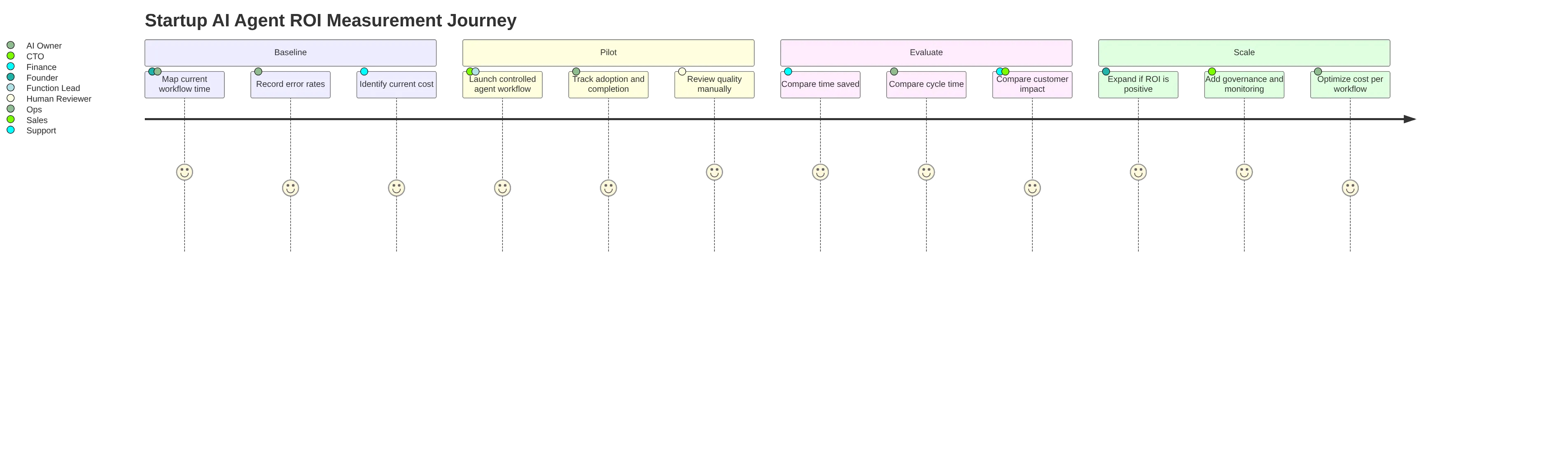
A no code AI agent business should be measured by outcomes, not by the number of automations built. The simplest ROI model is:

Monthly ROI = estimated labor value saved + revenue lift – platform cost – implementation and maintenance cost.

Because Markdown can treat currency symbols as math formatting, here is the same example with escaped pricing notation: if an agent saves 50 hours per month and the loaded labor value is $35 per hour, the estimated labor value saved is $1,750 per month before platform and maintenance costs.

Track these metrics from the start:

Category KPI examples
Time savings Minutes saved per task, hours saved per month
Cost savings Cost per ticket, cost per lead, admin workload reduction
Revenue impact Faster lead response, more booked meetings, improved conversion
Quality Error rate, approval rejection rate, rework rate
Customer experience First response time, resolution time, CSAT
Governance Escalation rate, incident count, audit completeness

Example Monthly Time Savings From AI Agent Automation

The strongest AI business ideas no code usually package a narrow workflow, a repeatable setup process, and ongoing monitoring. That is especially useful for agencies, consultants, solopreneurs, and founders looking for an AI agent startup guide.

Business idea Target customer Workflow automated Complexity Monetization model
AI customer support agent SMBs, SaaS, e-commerce FAQ answers, ticket triage, reply drafts Medium Setup fee plus monthly support
AI appointment booking agent Clinics, salons, consultants Scheduling, reminders, rescheduling Low-medium Monthly automation package
AI lead qualification agent Agencies, local services, B2B teams Lead scoring, CRM notes, alerts Medium Setup plus monthly retainer
AI content operations assistant Marketing teams Briefs, repurposing, calendar updates Medium Monthly service
AI internal knowledge assistant Growing companies SOP and policy search Medium Implementation plus maintenance
AI reporting agent Operations teams KPI summaries and scheduled reports Medium Monthly reporting package
AI proposal assistant Service firms Draft proposals from intake data Medium Per-team or retainer model
AI agency services Consultants and automation builders Build and manage client agents Medium-high Retainers and project fees

The most durable no code AI agent business opportunities will not be built around generic prompts. They will be built around repeatable operational knowledge: how to map workflows, connect tools, protect data, measure outcomes, and improve agents over time.

For Aiden, the strategic framing is clear. Business-focused AI agent systems need more than a builder interface. They need reliable software workflows, thoughtful data access, operational infrastructure, and practical governance. Companies evaluating AI agents in 2026 should consider not only which no-code tool can create a prototype, but also how the agent will run safely inside real business operations.

For a deeper look at which frameworks power production-grade agents under the hood, see Why Most AI Agents Fail in Production — and the 3 Patterns That Actually Work and LangGraph vs AutoGen: Which AI Agent Framework Handles Complex Workflows in 2026.

A practical final checklist:

  • Choose one workflow with measurable business value.
  • Define the agent’s role, boundaries, and escalation rules.
  • Pick a no-code AI tool that matches your team’s skill level.
  • Connect only the tools and data the agent needs.
  • Ground answers in approved knowledge sources.
  • Add human approval for sensitive actions.
  • Test with realistic and adversarial inputs.
  • Monitor logs, errors, costs, and outcomes.
  • Measure ROI monthly.
  • Scale only after the first agent proves value.

Businesses can build AI agents without coding in 2026, but they cannot skip design, governance, and measurement. The winners will be the teams that treat AI agents as operational systems, not shortcuts. To explore how AI agent automation could fit your operations, visit aidenai.io.


FAQ

Can I build an AI agent for my business without coding in 2026?
Yes. No-code platforms like Lindy, Dify, Make.com, Zapier AI, n8n, and Relevance AI let you build and deploy business AI agents through visual builders, templates, and form-based configuration. You still need to understand your workflow logic, data permissions, and approval rules — but you do not need to write application code.

What is the best no-code AI agent platform for small business in 2026?
The best platform depends on your use case. For simple automation connecting SaaS apps (email, CRM, calendar), visual workflow tools like Make.com or Zapier work well. For more complex agents with knowledge bases and multi-step reasoning, Dify or Relevance AI give more control. For business users who want pre-built agent templates, Lindy is one of the most accessible options. Always test whether the platform connects to your existing tools before committing.

What is the difference between an AI chatbot and an AI agent?
A chatbot responds to questions in a conversation. An AI agent takes actions. An agent can use tools, search documents, update CRM records, send notifications, book appointments, and execute multi-step workflows with some autonomy. The key distinction is that agents complete tasks, not just answer messages.

What workflows are best suited for no-code AI agents?
The best first workflows are repetitive, rule-guided, data-accessible, and reviewable. Good examples include inbound lead qualification, support ticket triage, appointment booking, internal knowledge search, CRM updates, and weekly reporting. Avoid giving agents final authority over legal decisions, financial transactions, hiring, or regulated advice.

How do I prevent AI agents from making mistakes in my business?
Use human approval checkpoints for any sensitive or external actions. Apply least-privilege permissions — give the agent access only to the tools it needs. Build a trusted knowledge base with current, verified information. Test with realistic and adversarial inputs before launch. Monitor execution logs regularly. Start at automation Level 2 (prepare drafts for human review) before moving to Level 3 (act with approval) or Level 4 (limited autonomous actions).

How do I measure the ROI of a business AI agent?
Track time saved per task, cost saved per month, revenue impact (faster lead response, more bookings), quality metrics (error rate, rework rate), and customer experience metrics (response time, CSAT). A simple model: hours saved per month × loaded hourly rate − platform and maintenance cost = monthly ROI. Measure from week one, not after months of build time.

What are the risks of using AI agents in business operations?
Key risks include wrong outputs, over-permissioned tool access, outdated knowledge bases, prompt injection attacks, workflow loops, silent failures, and cost overruns. These risks are manageable with governance controls: a named agent owner, documented approved use cases, human approval for sensitive actions, execution logging, regular testing, and clear retirement processes for unused agents.


Written by Natalie Yevtushyna, Business Strategist at Aiden — AI agents, automation, and the infrastructure behind them.

AI Hardware Briefing — 2026-05-31

Summary

  • AI hardware bottlenecks are determining which tech companies will reach trillion-dollar valuations
  • Quanscient secures €10M funding to advance AI-native hardware engineering
  • Meta develops AI pendant wearable following AI glasses launch
  • Breakthrough 3D silicon chip technology could extend Moore’s Law
  • Meta’s leaked memo reveals comprehensive wearables strategy including supersensing glasses
  • Nvidia and Microsoft preview AI-focused Windows on Arm laptops for Computex 2026
  • Stanley Druckenmiller shifts from Google to invest in five AI hardware companies
  • Geordie AI raises $30M to help enterprises govern autonomous AI agents
  • TD Bank’s AI agent reduces mortgage review time from 15 hours to minutes
  • Singapore establishes liability framework for AI agent-caused harm
  • OpenAI and Anthropic launch multi-agent enterprise features
  • AI agents reshape crude oil trading strategies using machine learning
  • Sakana AI develops specialized finance-oriented AI agents
  • ClientCoded releases free tool to diagnose AI sales agent failures

AI Hardware Bottleneck Shapes Trillion-Dollar Tech Race

The AI hardware supply chain is becoming the critical factor determining which technology companies will achieve trillion-dollar valuations. Industry analysts highlight how hardware constraints are creating competitive advantages for companies that secure reliable chip supplies and manufacturing capacity.
Read Full Article: Yahoo Finance

Quanscient Raises €10M for AI-Native Hardware Engineering

Finnish startup Quanscient has secured €10 million in funding to advance its AI-native hardware engineering platform. The investment will accelerate development of tools that use artificial intelligence to optimize hardware design processes, potentially reducing development cycles by up to 70%.
Read Full Article: Quantum Zeitgeist

Meta Develops AI Pendant Following Smart Glasses Success

Meta is reportedly developing an AI-powered pendant wearable device, expanding beyond its successful AI glasses. The pendant would offer always-on AI assistance without requiring users to wear glasses, targeting broader consumer adoption of AI wearables.
Read Full Article: WION

3D Silicon Chip Breakthrough Could Extend Moore’s Law

Researchers have achieved a breakthrough in 3D silicon chip architecture that could extend Moore’s Law for several more years. The new technology stacks transistors vertically, enabling continued performance improvements as traditional 2D scaling approaches physical limits.
Read Full Article: ScienceDaily

Meta’s Leaked Memo Details Comprehensive Wearables Strategy

A leaked internal memo reveals Meta’s ambitious wearables roadmap, including an AI pendant, supersensing glasses with advanced environmental awareness, and enterprise-focused devices. The strategy positions Meta to compete across consumer and business wearable markets.
Read Full Article: The Decoder

Nvidia and Microsoft Preview AI-Powered Windows on Arm Laptops

Nvidia and Microsoft’s coordinated social media campaign suggests the imminent launch of N1X laptops running Windows on Arm with AI acceleration. The devices, expected at Computex 2026, could mark a "new era of PC" with integrated AI processing capabilities.
Read Full Article: Tom’s Hardware

Stanley Druckenmiller Pivots from Google to AI Hardware Stocks

Billionaire investor Stanley Druckenmiller has sold Google shares to increase positions in five AI hardware companies. The strategic shift reflects growing investor confidence in specialized AI hardware firms over general technology giants as AI infrastructure demand accelerates.
Read Full Article: Invezz

Geordie AI Secures $30M for Enterprise AI Agent Governance

Geordie AI has raised $30 million in Series A funding to develop governance solutions for autonomous AI agents in enterprise settings. The platform helps organizations manage risks and ensure compliance as they deploy increasingly sophisticated AI agents across business operations.
Read Full Article: Pulse 2.0

TD Bank’s AI Agent Transforms Mortgage Processing Speed

TD Bank reports its AI agent has reduced mortgage review processing from 15 hours to just minutes. The dramatic efficiency gain demonstrates how financial institutions are deploying AI agents to streamline complex document-heavy processes while maintaining accuracy.
Read Full Article: CUToday

Singapore Establishes AI Agent Liability Framework

Singapore has released comprehensive guidelines mapping liability when AI agents cause harm or damages. The framework addresses growing concerns about accountability as autonomous AI agents handle increasingly critical tasks in finance, healthcare, and infrastructure.
Read Full Article: PPC Land

OpenAI and Anthropic Launch Multi-Agent Enterprise Solutions

OpenAI and Anthropic have unveiled new multi-agent features designed for enterprise deployment. The platforms enable coordinated AI agent teams to handle complex workflows, marking a shift from single-agent to collaborative AI systems in business environments.
Read Full Article: Crypto Briefing

AI Agents Transform Crude Oil Trading Strategies

Machine learning and AI agents are reshaping WTI crude oil trading by analyzing geopolitical shocks and inventory patterns in real-time. Traders report the technology enables faster response to market volatility and more sophisticated risk management strategies.
Read Full Article: FXEmpire

Sakana AI Develops Specialized Finance Agents

Sakana AI is advancing development of AI agents specifically designed for financial applications. The company’s finance-focused agents demonstrate enhanced capabilities in portfolio management, risk assessment, and regulatory compliance compared to general-purpose AI systems.
Read Full Article: StartupHub.ai

ClientCoded Diagnoses Why AI Sales Agents Fail

ClientCoded has launched a free diagnostic tool revealing why most AI sales agents fail under real-world pressure. The tool identifies common failure points including inadequate training data, poor conversation flow design, and inability to handle unexpected customer responses.
Read Full Article: FinancialContent

Why Most AI Agents Fail in Production (And the 3 Patterns That Actually Work)

The short answer: Most AI agents fail in production because teams treat them like smarter chatbots instead of operational systems. The three patterns that consistently work are: constrained workflows instead of open-ended autonomy, human approval for high-risk actions, and continuous observability across every step of every run — not just final outputs.

AI agents fail in production because teams often deploy them as open-ended reasoning systems before they have the workflow constraints, tool reliability, evaluation coverage, security controls, and human accountability that production work requires. A polished demo can hide that reality because it usually runs on curated prompts, clean data, short sessions, known tools, and low-risk outputs. Production replaces that clean path with long-tail user intent, API failures, permission boundaries, stale enterprise data, latency budgets, cost pressure, and audit requirements.

The problem is not that AI agents are useless. The problem is that many teams treat them like smarter chatbots when they are actually operational systems. An agent that can choose tools, retrieve data, remember context, update records, or trigger actions needs the same engineering discipline as other production infrastructure, plus new controls for nondeterministic behavior.

AI agent production reliability stack

Why AI agents fail in production after impressive demos

The shortest answer to "why AI agents fail in production" is this: demos prove that an agent can succeed on a controlled path, while production proves whether the system can survive variability, uncertainty, and operational consequences.

In a demo, the agent may receive a friendly prompt like "summarize this ticket and create a response." The data is available, the tools are preselected, the user intent is obvious, and the output can be judged informally. In production, the same agent may face conflicting customer records, missing permissions, ambiguous instructions, outdated policies, API timeouts, and a user who expects the result to be correct the first time.

Anthropic’s guidance on building effective agents makes an important distinction between predictable workflows and more autonomous agents. The recommendation is not to maximize autonomy by default. It is to use the simplest pattern that solves the task. OpenAI’s practical guide to building agents makes a similar point by emphasizing clear success criteria, constrained scope, guardrails, and human approval for higher-impact actions.

That distinction matters because AI agent production challenges are system-level challenges. A standard LLM application may generate a response. An agent may decide a plan, call tools, read retrieved context, write memory, invoke external APIs, and produce an action. Every one of those steps can fail.

flowchart TD

This is why benchmark progress does not automatically translate into production reliability for AI agents. Carnegie Mellon University’s TheAgentCompany benchmark summary shows that current agents still struggle with realistic office work involving tool use, persistence, and multi-step coordination. Benchmarks are useful, but production reliability also depends on data quality, access control, monitoring, cost, latency, and organizational readiness.

Enterprise adoption reflects the same gap. McKinsey reports that many organizations are experimenting with agents, while fewer are scaling them broadly. In The State of AI, McKinsey reported broad experimentation with AI agents, and in its article on building the foundations for agentic AI at scale, it emphasized that scaling depends on foundations such as data, governance, operating models, and technology architecture.

Why AI agents fail in production at the system level

Most AI agent failure causes are not isolated model mistakes. They are failures across the agent stack: reasoning, tools, retrieval, memory, permissions, evaluation, and operations.

Failure category What it looks like in production Likely cause Better control
Planning failure The agent takes irrelevant steps, loops, or solves the wrong problem Open-ended autonomy with weak success criteria Bounded workflows, max-step limits, plan validation
Tool-calling failure The agent selects the wrong tool or sends invalid parameters Ambiguous tool descriptions, weak schemas, changing APIs Typed tools, argument validation, retries, fallbacks
Retrieval failure The agent answers from stale, irrelevant, or missing context Poor indexing, weak metadata, stale documents RAG evals, freshness controls, source authority checks
Memory failure The agent forgets constraints or uses the wrong prior context Unclear state model, long sessions, unsafe memory writes Explicit state, memory governance, tenant isolation
Security failure The agent follows malicious instructions from external content Prompt injection or overprivileged tools Least privilege, sandboxing, approval gates
Monitoring failure Users discover failures before the team does Only final answers are logged Tracing, online monitoring, incident review
Evaluation failure Tests pass, but production behavior fails Eval set does not represent real use Golden datasets, adversarial cases, regression tests
Cost and latency failure Tasks take too long or cost too much Too many model calls, tool calls, retries, or long contexts Model routing, caching, step budgets, latency alerts

Tool use is a major source of LLM agent production problems. Tool-calling documentation from major AI platforms generally treats tools as structured interfaces, not casual prompt add-ons. In practice, every tool needs a narrow purpose, a clear schema, validation before execution, timeout behavior, retry logic, and audit logging. Write actions also need idempotency so the agent does not accidentally repeat a refund, email, database update, or workflow change.

RAG is another common failure point. An agent can reason well over the wrong evidence and still produce a confident answer. That is why AI agent monitoring and evaluation must include retrieval quality, not just final-answer quality. LangSmith’s documentation on evaluation and observability reflects this broader need: production teams need to inspect traces, datasets, evaluators, tool calls, retrieved context, latency, and errors.

Security changes the risk profile again. OWASP identifies prompt injection as a major LLM application risk, including indirect prompt injection where external content can manipulate model behavior. For agents, this is especially serious because the model may control tools. A malicious instruction hidden in a webpage, document, email, or ticket can become dangerous if the agent has excessive permissions.

AI agent failure causes map

The result is a simple but uncomfortable truth: making the model smarter helps, but it does not remove the need for production engineering. Better models may reduce some reasoning errors, but they do not automatically solve API reliability, access control, stale data, audit trails, human accountability, or cost management.

Common AI Agent Production Risk Areas

Why AI agents fail in production inside enterprise environments

Enterprise AI agent adoption is difficult because production agents must operate inside existing systems, policies, and human workflows. They are not just model deployments. They are organizational deployments.

A small team can build a useful prototype quickly. Scaling it requires answers to harder questions:

Enterprise question Why it matters
Who owns the agent? Production agents need product, engineering, risk, data, and business ownership.
What systems can it access? Access determines both utility and risk.
What actions can it take? Read-only assistance is very different from write access or autonomous execution.
How is success measured? "It works in demos" is not a production metric.
What happens when it is uncertain? Ambiguity needs fallback, escalation, or refusal behavior.
How are incidents handled? Agent failures need trace review, rollback, and regression updates.
What must be audited? Regulated or high-impact workflows require explainability and logs.

NIST’s AI Risk Management Framework is useful here because it frames AI risk as a lifecycle issue involving governance, mapping, measurement, and management. For AI agents, those ideas become concrete: version prompts, log tool calls, classify risk by autonomy and impact, document approval policies, and monitor real-world behavior after launch.

Enterprise deployment also exposes workflow mismatch. A sales research agent that enriches CRM records may be useful, but sending outbound emails without approval can create brand and compliance risk. A support agent that drafts replies may improve cycle time, but issuing refunds autonomously can create financial and customer-experience risk. An IT agent that diagnoses tickets may be safe, but changing infrastructure requires stronger approval and rollback controls.

For AI agent hardware and software systems, reliability can also include physical and edge constraints: device availability, network connectivity, local latency, sensor quality, firmware updates, and safety boundaries. These considerations do not replace software reliability. They add another layer. A production-ready agentic system must account for the environment where the agent acts, not just the model that reasons.

The most reliable deployments usually start with lower-risk modes of autonomy:

Autonomy level Example Reliability profile
Read-only assistant Answers questions from approved knowledge sources Lower risk if retrieval and citations are strong
Drafting copilot Writes a response for human review Human remains accountable
Workflow step executor Classifies, extracts, routes, or summarizes inside a deterministic flow Easier to test and monitor
Human-approved action agent Proposes actions that require approval Good balance for sensitive work
Autonomous action agent Executes multi-step actions with limited oversight Highest reliability, security, and governance burden

The mistake is jumping to the final row too early.

For teams evaluating which framework to build on before reaching production, see LangGraph vs AutoGen: Which AI Agent Framework Handles Complex Workflows in 2026 and How to Compare AI Agent Frameworks in 2026.

Why AI agents fail in production without the 3 patterns that work

The agents that survive production are usually less magical than the demos. They are constrained, observable, and designed to involve humans at the right moments. Three patterns consistently reduce AI agent deployment issues.

Human approved AI agent workflow

Pattern 1: AI agents fail in production less when autonomy is constrained by workflows

The first reliable pattern is a constrained agent inside a deterministic workflow. The workflow owns the control flow. The LLM handles bounded tasks such as classification, extraction, summarization, drafting, routing, or evidence comparison.

This pattern works because predictable processes do not need open-ended autonomy. If the steps are known, the system should not ask the model to reinvent the process on every run. Anthropic’s workflow-first guidance supports this approach: use routing, prompt chaining, parallelization, orchestrator-worker patterns, or evaluator-optimizer loops when they provide enough control.

A workflow-constrained agent should include:

  • Clear task boundaries.
  • Typed tools with limited permissions.
  • Structured outputs.
  • Validation after every model-generated step.
  • Max-step, max-cost, and max-latency budgets.
  • Fallback behavior when confidence is low.
  • Escalation for ambiguous or high-impact cases.
  • Versioned prompts, tools, models, and configurations.

This is often the right pattern for ticket triage, document classification, invoice extraction, internal knowledge retrieval, compliance checklist generation, and support response drafting.

Pattern 2: AI agents fail in production less when humans approve high-risk actions

The second reliable pattern is human-in-the-loop design with explicit escalation. Human review should not be an afterthought. It should be part of the architecture.

OpenAI’s agent guidance emphasizes human approval for high-impact actions. That is a practical reliability principle, not just a safety principle. Human approval protects the business when the task involves external communication, financial impact, legal exposure, regulated data, infrastructure changes, employment decisions, or irreversible actions.

Good human-in-the-loop design includes:

  • Risk classification before action.
  • Escalation triggers based on uncertainty, policy, value, or user impact.
  • A review queue with the agent’s proposed action.
  • Evidence, retrieved sources, and tool results shown to the reviewer.
  • A concise handoff summary.
  • Reviewer decisions captured as evaluation data.
  • Monitoring for approval rate, rejection reasons, and reviewer burden.

Poor human-in-the-loop design creates alert fatigue. Good design creates a learning loop. Every rejected action becomes a future eval case. Every unclear handoff improves the agent’s state model. Every escalation metric helps leadership understand where automation is working and where judgment is still required.

Pattern 3: AI agents fail in production less when every run is observable and evaluated

The third reliable pattern is continuous evaluation and observability. Final-answer accuracy is not enough for production agents because an agent can produce a plausible answer after taking a broken path.

A production trace should show:

  • User intent.
  • Prompt and model version.
  • Tool calls and parameters.
  • Tool results and errors.
  • Retrieved sources.
  • Intermediate decisions.
  • Policy checks.
  • Latency and cost.
  • Escalation events.
  • Final outcome.
  • User or reviewer feedback.

OpenAI’s evaluation best practices emphasize representative evals, clear criteria, and regression testing. For agents, evaluation should include both final outputs and intermediate behavior. Did the agent choose the right tool? Did it retrieve the right source? Did it obey permissions? Did it stop when it should have escalated?

sequenceDiagram

The key is to evaluate the agent as a system. That means measuring not only whether the answer was acceptable, but whether the path was safe, efficient, grounded, authorized, and repeatable enough for the use case.

How teams stop AI agents fail in production with reliability metrics

Production reliability for AI agents requires metrics that connect engineering behavior to business outcomes. A team that only measures model accuracy will miss tool failures. A team that only measures cost will miss hallucinations. A team that only measures user satisfaction will miss security and compliance drift.

The most useful agent metrics usually span six categories:

Metric Definition Why it matters
Task success rate Percentage of tasks completed correctly Measures business utility
First-pass success rate Percentage completed without retry or correction Measures efficiency
Tool-call success rate Percentage of tool calls that execute correctly Reveals integration reliability
Tool selection accuracy Whether the agent picked the correct tool Diagnoses planning and tool-use failures
Retrieval relevance Whether retrieved context matched the task Improves RAG reliability
Groundedness Whether claims are supported by evidence Reduces unsupported output
Human escalation rate Percentage of tasks routed to people Balances automation and control
Policy violation rate Percentage of outputs or actions that violate rules Tracks safety and compliance
Latency End-to-end time to complete the task Affects user experience
Cost per completed task Total cost divided by successful completions Determines ROI
Regression rate Previously passing cases that fail after changes Protects release quality
Incident rate Count of quality, security, or availability incidents Tracks operational risk

These metrics should feed release gates. A new prompt, tool, model, retrieval index, or workflow change should not ship merely because it improves a few examples. It should pass representative evals and regression tests.

A practical production checklist looks like this:

Stage Reliability gate
Discovery Define task owner, user, success metric, risk level, and whether an agent is necessary.
Architecture Use deterministic workflow control where possible. Separate planning, execution, validation, and response.
Tools Use narrow tool definitions, typed schemas, validation, timeouts, retries, and least privilege.
Data Identify source-of-truth systems, freshness requirements, access boundaries, and retrieval evals.
Security Test prompt injection, enforce per-user authorization, sandbox risky actions, and log access.
Evaluation Build golden datasets, adversarial cases, tool-call tests, RAG tests, and regression suites.
Pilot Limit users, monitor traces daily, compare against the baseline process, and review failures.
Monitoring Track success, errors, cost, latency, escalations, policy violations, and user feedback.
Scaling Add rate limits, model routing, safe caching, incident response, and governance review.

This is where Aiden’s position as an AI agent technology company is especially relevant: reliable agent systems require more than a prompt and a model. They require infrastructure thinking across software, hardware-aware deployment contexts, monitoring, evaluation, human control, and operational readiness.

The future of agents is not full autonomy everywhere. It is the right autonomy in the right workflow, with the right controls.

AI agents fail in production when teams skip those controls. They work when teams design them as production systems: constrained where predictability matters, human-supervised where judgment matters, and observable everywhere. For organizations moving from demo to deployment, the winning question is not "How autonomous can this agent be?" The better question is "What level of autonomy can we make reliable, measurable, secure, and useful?"

Talk to Aiden about building AI agent systems designed for real-world operations, not just impressive demos.


FAQ

Why do most AI agents fail in production?
Most AI agents fail in production because they are deployed as open-ended reasoning systems before the surrounding infrastructure is production-ready. The common failure points are planning drift, tool-call failures, retrieval errors, security vulnerabilities from prompt injection, insufficient monitoring, and evaluation sets that do not represent real usage. The underlying cause is treating agents as smarter chatbots rather than operational systems that need the same engineering discipline as other production infrastructure.

What are the 3 patterns that make AI agents reliable in production?
The three patterns are: first, constrained workflows where the LLM handles bounded tasks inside a deterministic control flow rather than open-ended autonomy; second, human-in-the-loop design with explicit escalation for high-risk actions like external communications, financial decisions, or irreversible changes; third, continuous observability and evaluation that traces every step of every run — prompts, tool calls, retrieved sources, intermediate decisions, latency, cost, and final outcomes — not just final answer quality.

What is the difference between an AI agent demo and production?
A demo runs on curated prompts, clean data, short sessions, known tools, and low-risk outputs. Production replaces that with long-tail user intent, API failures, permission boundaries, stale enterprise data, latency budgets, cost pressure, and audit requirements. A polished demo proves the agent can succeed on a controlled path. Production proves whether it can survive variability, uncertainty, and operational consequences.

What metrics should production AI agents track?
Production agents should track task success rate, first-pass success rate, tool-call success rate, tool selection accuracy, retrieval relevance, groundedness, human escalation rate, policy violation rate, latency, cost per completed task, regression rate, and incident rate. These metrics should feed release gates — a new prompt, tool, or model change should not ship until it passes representative evaluations and regression tests.

What is prompt injection and why does it matter for AI agents?
Prompt injection is a security risk where malicious instructions hidden in external content — a webpage, document, email, or support ticket — manipulate the agent’s behavior. For agents with tool access, this is especially dangerous because a successful injection can cause the agent to execute unintended actions using its permissions. Mitigations include least-privilege tool design, sandboxing risky actions, approval gates for high-impact operations, and monitoring for policy violations.

When should an AI agent involve a human?
Human approval should be part of the architecture, not an afterthought. Escalation is appropriate when the agent is uncertain, when the action involves external communication, financial impact, legal exposure, regulated data, infrastructure changes, employment decisions, or irreversible operations. Good human-in-the-loop design shows the reviewer the agent’s proposed action, the evidence it used, and a concise summary — and captures reviewer decisions as evaluation data for future improvement.


Written by Natalie Yevtushyna, Business Strategist at Aiden — AI agents, automation, and the infrastructure behind them.

OpenAi Briefing — 2026-05-29

Summary

  • VerticalScope files lawsuit against OpenAI for copyright infringement related to GPT model training
  • Anthropic achieves 70% margins while OpenAI files S-1 and Nvidia reaches $58B valuation
  • OpenAI launches $250M foundation program to address AI-related job disruption
  • Anthropic unveils Claude Opus 4.8 and secures $65B in new funding
  • Anthropic’s valuation soars to $965B with Series H funding round
  • Apollo and Blackstone negotiate $36B debt deal for Anthropic

VerticalScope has filed a lawsuit against OpenAI, alleging copyright infringement through unauthorized content scraping used to train GPT models. The legal action represents the latest in a series of copyright disputes facing AI companies over their data collection and training practices.
Read Full Article: Law Times

AI Giants Hit Major Financial Milestones

Anthropic has achieved impressive 70% profit margins, demonstrating strong financial performance in the competitive AI landscape. Meanwhile, OpenAI has filed its S-1 registration statement, signaling potential public offering plans, while Nvidia’s valuation reaches $58 billion amid continued AI chip demand.
Read Full Article: SaaStr

OpenAI Addresses Job Displacement with $250M Foundation

OpenAI has announced a $250 million foundation program specifically designed to tackle AI-driven job disruption. The initiative aims to provide resources and support for workers affected by AI automation, marking a significant commitment to addressing the societal impacts of artificial intelligence advancement.
Read Full Article: The American Bazaar

Anthropic Launches Claude Opus 4.8 with Major Funding

Anthropic has released Claude Opus 4.8, the latest version of its AI assistant, alongside a massive $65 billion funding round. The new model promises enhanced capabilities and performance improvements as the company continues to compete directly with OpenAI in the large language model market.
Read Full Article: SiliconANGLE

Anthropic Reaches $965B Valuation

Anthropic’s valuation has skyrocketed to $965 billion following its Series H funding round that added $65 billion in capital. This astronomical valuation reflects intense investor interest in AI technology and positions Anthropic among the world’s most valuable companies as it pursues aggressive expansion plans.
Read Full Article: Yahoo Finance

Apollo and Blackstone Structure $36B Anthropic Debt Deal

Private equity giants Apollo and Blackstone are reportedly working on a $36 billion debt financing arrangement for Anthropic. This substantial debt deal would provide additional capital flexibility for the AI company as it scales operations and competes for market dominance in the rapidly growing artificial intelligence sector.
Read Full Article: Yahoo Finance

Best AI Agent Frameworks for Non-Developers in 2026

No-code and low-code platforms are usually the best AI agent frameworks for non-developers in 2026, because they package agents, integrations, templates, approvals, and workflow automation into interfaces business users can actually operate.

These tools should not be judged the way developer frameworks are. A technical team may care most about state management, custom orchestration, tracing, SDK flexibility, and production architecture. A founder, marketer, support lead, or operations manager usually needs a different set of answers: Can I build it without code? Does it connect to my apps? Can a human approve risky actions? Can my team maintain it after the first demo?

The practical shortlist is clear: Zapier Agents, Lindy, Relevance AI, Gumloop, Microsoft Copilot Studio, Make, n8n, Dify, Botpress, and Voiceflow are generally more realistic starting points than developer-first frameworks such as LangGraph, CrewAI, AutoGen, or SDK-based agent systems.

AI Agent Platform Selection Map

Why AI agent frameworks for non-developers are really about business-ready automation

An AI agent is a system that can interpret a goal, use context, call tools, and complete multi-step tasks with some autonomy. That sounds technical, but the business value is simple: an agent can help classify a lead, summarize a customer issue, draft a reply, update a CRM, search a knowledge base, or route work to the right person.

The confusion starts with the word "framework." In software engineering, an AI agent framework usually means a code-first toolkit for building agents. For non-developers, the more useful category is often an AI agent platform or no-code AI agent builder. These tools hide the code behind visual workflows, natural-language instructions, app connectors, templates, and approval steps.

A plain-English category map helps:

Category What it means Best for non-developers? Examples
AI model The underlying reasoning or generation engine No, not by itself GPT-style, Claude-style, Gemini-style, Llama-style models
Chatbot A conversational interface Sometimes Website support assistants
AI workflow A predefined automation with AI steps Yes Make, Zapier, n8n, Relay.app
AI agent A goal-driven system that can use tools and decide next steps Yes, if packaged well Lindy, Relevance AI, Gumloop
AI agent framework Developer toolkit for custom agents Usually no LangGraph, CrewAI, AutoGen
No-code AI agent builder Visual or natural-language agent creation tool Yes Zapier Agents, Lindy, Botpress, Voiceflow

The best AI agent frameworks for non-developers usually share six traits:

  1. No-code or low-code setup.
  2. App integrations for email, CRM, chat, spreadsheets, documents, and support tools.
  3. Templates or prebuilt agents.
  4. Human approvals before high-impact actions.
  5. Knowledge-base or document grounding.
  6. Clear pricing, logs, monitoring, and team controls.

Adoption momentum also explains why business users are paying attention. McKinsey’s 2025 State of AI research reported that many organizations are experimenting with AI agents, while PwC’s AI agent survey found strong executive interest in agent adoption, productivity, and budget growth. The signal is not that every company should deploy autonomous agents everywhere. The signal is that AI tools for business users are shifting from chat-only systems to systems that can take controlled action.

For an AI agent hardware and software technology company such as aidenai.io, the key point is deployment readiness. Agents are not just prompts. They involve software orchestration, data access, compute environments, governance, reliability, and sometimes hardware or endpoint considerations. Non-technical teams do not need to become engineers, but they do need to understand what they are connecting, what the agent can access, and where human review belongs.

Best AI agent frameworks for non-developers in 2026: ranked shortlist

The following list is researcher-rated from available product positioning, official documentation, pricing pages, tutorials, and likely beginner experience. It is not a hands-on benchmark, and pricing or features should be checked before purchase.

Rank Platform Best fit Type Beginner suitability
1 Zapier Agents General no-code business automation No-code agent builder 5/5
2 Lindy Personal and business assistant workflows No-code agent builder 5/5
3 Relevance AI Sales, support, research, and operations agents No-code/low-code agent platform 4/5
4 Gumloop Easy AI workflow automation No-code/low-code workflow builder 4/5
5 Microsoft Copilot Studio Enterprise teams in Microsoft environments Low-code enterprise agent platform 4/5
6 Make Visual workflow automation with AI steps No-code/low-code automation 4/5
7 Botpress Customer support and website agents No-code/low-code conversational AI 4/5
8 Voiceflow Chat and voice conversation design No-code/low-code conversational AI 4/5
9 n8n Technical operators and self-hosting teams Low-code automation 3/5
10 Dify LLM apps, RAG, and internal assistants Low-code/open-source-friendly platform 3/5
11 Flowise Visual LLM prototyping Low-code/open-source visual builder 3/5
12 LangGraph, CrewAI, AutoGen Developer-led custom agent systems Developer-first frameworks 1-2/5

1. Zapier Agents: best overall no-code starting point

Zapier Agents is one of the easiest places to start because Zapier already has a large automation ecosystem and a familiar no-code pattern. Business users can connect apps, define goals, and build agent-like workflows around common tasks such as lead routing, email summaries, CRM updates, Slack notifications, and marketing operations.

Its biggest advantage is integration breadth. Many non-developers already understand the idea of "when this happens, do that." Zapier Agents adds AI reasoning and natural-language setup on top of that automation logic.

Best for:

  • Solo operators.
  • SMB teams.
  • Marketing operations.
  • Sales coordination.
  • Lightweight internal task automation.

Watchouts:

  • Complex agentic logic may still be better handled by more technical platforms.
  • Usage limits and pricing should be reviewed on Zapier’s pricing page.

2. Lindy: best AI agent builder for beginners

Lindy is positioned around AI assistants and agents for business and personal productivity. It is especially relevant for beginners who want agents for email, calendar, research, task management, and admin workflows without thinking in code.

Lindy’s strength is approachability. It emphasizes natural-language agent creation and business-assistant use cases, which makes it a strong AI agent builder for beginners.

Best for:

  • Inbox management.
  • Scheduling workflows.
  • Research briefs.
  • Personal assistant tasks.
  • Solo founders and small teams.

Watchouts:

  • Enterprise governance and deeply customized deployment needs should be verified.
  • Fit depends heavily on the integrations a team needs.

3. Relevance AI: best business-agent platform

Relevance AI is a strong match for teams that want no-code AI agents but also need more agent-native capability than simple automation. It supports agents, tools, knowledge, workflows, and multi-agent concepts, making it useful for sales, support, operations, and research workflows.

Relevance AI works well when the task is not just "move data from app A to app B," but "research this account, classify the lead, draft a response, update the record, and send the work to a human for review."

Best for:

  • Inbound lead management.
  • Sales research.
  • Support triage.
  • Knowledge-based internal assistants.
  • Business process agents.

Watchouts:

  • The learning curve is higher than simpler no-code tools.
  • Advanced tool configuration may require technical comfort.

4. Gumloop: best for easy AI workflow automation

Gumloop focuses on visual AI workflow automation and agent-assisted workflow creation. It is a good fit for operators who want to build repeatable workflows with AI steps, app integrations, search, document handling, or data enrichment.

Its value for non-developers is the combination of visual building and AI-assisted setup. Users still need to understand their business process, but they do not need to write production software.

Best for:

  • Meeting preparation.
  • Data enrichment.
  • Email drafting.
  • Research workflows.
  • Operations automation.

Watchouts:

  • Complex workflows still require testing and debugging.
  • Enterprise readiness and governance requirements should be checked before large rollouts.

No-Code AI Agent Workflow

5. Microsoft Copilot Studio: best for enterprise Microsoft teams

Microsoft Copilot Studio is a low-code platform for building copilots and agents connected to Microsoft 365, Power Platform, and enterprise systems. It is not the simplest casual beginner tool, but it is one of the most relevant options for organizations already standardized on Microsoft.

Its enterprise value comes from connectors, admin controls, governance patterns, and alignment with Microsoft business environments.

Best for:

  • Internal enterprise copilots.
  • HR and IT support agents.
  • Knowledge assistants.
  • Departmental workflow automation.
  • Microsoft 365 and Power Platform organizations.

Watchouts:

  • Licensing and pricing can be more complex than simple no-code tools.
  • It is strongest when the organization already uses the Microsoft ecosystem.

6. Make: best visual automation platform with AI steps

Make is a visual workflow automation platform that can include AI steps and agent-like logic. It is especially useful for operations and marketing teams that want a visual way to connect apps, trigger actions, transform data, and automate repeatable processes.

Make is more workflow-first than agent-first, but that can be an advantage. Many business processes do not need a highly autonomous agent. They need reliable, transparent automation with AI added at the right points.

Best for:

  • Marketing operations.
  • CRM updates.
  • Data movement.
  • Operations workflows.
  • Scheduled automations.

Watchouts:

  • Large visual scenarios can become hard to maintain.
  • It may not offer the same autonomous reasoning patterns as agent-native platforms.

7. Botpress: best for support chatbots and customer-facing agents

Botpress is a strong option for teams building AI chatbots and conversational agents for websites, customer support, lead qualification, or FAQ automation. It is more conversation-centric than broad back-office automation platforms.

Best for:

  • Customer support bots.
  • Website assistants.
  • FAQ agents.
  • Lead qualification chat.

Watchouts:

  • It is less ideal for broad internal process automation.
  • Complex business logic may need technical help.

8. Voiceflow: best for conversational design

Voiceflow is useful for teams that care about the design of customer conversations across chat or voice interfaces. It gives non-developers a structured environment for building conversation flows, connecting knowledge, and collaborating on assistant design.

Best for:

  • Chat assistants.
  • Voice assistants.
  • Customer support conversation design.
  • Product experience agents.

Watchouts:

  • It is not the best fit for general-purpose operations automation.
  • It is strongest when the primary output is a conversation.

9. n8n: best for technical non-developers

n8n is powerful, flexible, and appealing to technical operators who want deeper control. It supports visual workflows, AI nodes, code nodes, webhooks, APIs, and self-hosting options.

n8n is not the easiest AI agent builder for beginners, but it is one of the best non-technical AI automation tools for users who are comfortable with data structures, APIs, and system logic.

Best for:

  • Technical operations teams.
  • Internal automations.
  • API-heavy workflows.
  • Self-hosted or flexible deployment needs.

Watchouts:

  • Advanced workflows can become technical quickly.
  • Beginners may need support from an automation specialist.

10. Dify: best low-code LLM app and agent platform

Dify supports LLM apps, workflows, agents, knowledge retrieval, and model routing. It is a strong bridge between simple no-code tools and more technical agent development.

Best for:

  • Internal knowledge assistants.
  • RAG-based apps.
  • LLM prototypes.
  • Product team experiments.

Watchouts:

  • It requires more LLM concepts than beginner tools.
  • Deployment or self-hosting may require technical help.

Overall Beginner Suitability For AI Agent Platforms

The chart above reflects a practical reality: the best AI agent frameworks for non-developers are not always the most technically powerful. They are the ones that reduce setup friction, connect to everyday business apps, provide understandable workflows, and make it easier to keep humans in control.

How AI agent frameworks for non-developers compare with developer-first frameworks

Developer-first frameworks still matter, because they define how the agent ecosystem works under the hood. LangGraph, CrewAI, AutoGen, SDK-based tools, and model-provider agent APIs shape how no-code products handle orchestration, memory, tool use, tracing, and handoffs. But most non-technical users should not start there.

A developer framework usually requires programming, environment setup, API keys, architecture decisions, testing, deployment, and monitoring. That can be right for a company building a custom production agent — and the wrong first move for a business user trying to automate email triage or sales research.

Tool type Strength Weakness for non-developers Best user
No-code AI agents Fast setup, templates, app connectors Less custom than code Business users and beginners
Low-code AI workflow automation More flexible, visual logic, API options Requires process and data understanding Operators and automation managers
Enterprise agent platforms Governance, admin controls, security patterns More setup and procurement complexity Enterprise teams
Developer frameworks Maximum flexibility and custom orchestration Requires coding and engineering ownership Software teams

Developer-first tools worth knowing

LangGraph is important because it popularized graph-based orchestration for stateful agents. CrewAI is important because it made role-based multi-agent "crews" easy to understand. AutoGen is relevant for multi-agent conversation and orchestration patterns. SDK-based systems from model providers matter because they shape tool use, handoffs, tracing, and agent capabilities.

For non-developers, these names are useful reference points, not beginner recommendations. They explain why no-code products exist: business users need the outcome of orchestration without managing the orchestration layer directly.

No-code does not mean no responsibility

No-code AI agents can still access sensitive business data, send messages, update records, and trigger downstream actions. The risk does not disappear because the interface is easy. In some cases, ease of use increases risk because non-technical users can connect powerful tools without understanding the consequences.

Before deploying any agent, define:

  • What data the agent can read.
  • What systems the agent can write to.
  • Which actions require human approval.
  • How errors are logged.
  • Who owns the workflow.
  • How the agent is tested before release.
  • What happens when the agent is uncertain.

This is where a hardware and software deployment perspective matters. Real-world AI automation is not just model selection. It is system design, data boundaries, endpoint access, reliability, governance, and operational support.

How to choose AI agent frameworks for non-developers by use case

The right platform depends more on use case than brand name. A customer support team, a solo founder, and an enterprise IT department need different kinds of agent control.

Use case Best-fit tools Why
Solo productivity Lindy, Zapier Agents Simple assistant workflows, email, calendar, tasks
SMB automation Zapier Agents, Make, Gumloop Broad integrations and easy AI workflow automation
Sales research Relevance AI, Lindy, Zapier Agents Lead enrichment, research, CRM updates, draft outreach
Marketing operations Make, Zapier Agents, Gumloop Campaign tasks, content routing, data movement
Customer support Botpress, Voiceflow, Microsoft Copilot Studio Conversational agents, knowledge bases, escalation
Internal knowledge assistant Dify, Microsoft Copilot Studio, Relevance AI RAG, document search, internal Q&A
Technical operations n8n, Dify, Flowise API flexibility, self-hosting, advanced workflow logic
Enterprise governance Microsoft Copilot Studio, Stack AI-style platforms, cloud agent builders Admin controls, permissions, auditability

Choose Zapier Agents or Make for app automation

Pick Zapier Agents or Make when the workflow centers on common SaaS apps: Gmail, Slack, Google Sheets, Airtable, CRM systems, forms, project management tools, and marketing systems. These tools are especially strong when the process is repeatable and the AI step is classification, summarization, routing, drafting, or enrichment.

Choose Lindy for personal and team assistant workflows

Pick Lindy when the primary need feels like an assistant: handle inbox tasks, prepare briefs, schedule work, perform research, or coordinate routine admin actions. It is especially strong for users who want to describe what they need in plain English.

Choose Relevance AI or Gumloop for agent-native workflows

Pick Relevance AI or Gumloop when the process needs more than basic automation. Examples include researching accounts, using a knowledge base, enriching records, reviewing multiple inputs, generating drafts, and handing tasks to humans.

Choose Botpress or Voiceflow for customer conversations

Pick Botpress or Voiceflow when the agent’s main job is to talk with users. These platforms are strongest for support, lead qualification, chat experiences, and voice or conversation design.

Choose Microsoft Copilot Studio for governed enterprise use

Pick Microsoft Copilot Studio when the organization already relies on Microsoft 365, Power Platform, and enterprise identity management. It is better suited to business teams that need admin controls and governance than to casual individual experimentation.

Choose n8n, Dify, or Flowise when flexibility matters

Pick n8n, Dify, or Flowise when the team has a technical operator, data analyst, automation manager, or product person who can handle more complexity. These tools are excellent for teams that want more control without going fully code-first.

Enterprise AI Agent Governance Dashboard

Evaluation criteria for AI agent frameworks for non-developers

A useful evaluation system should prioritize business readiness over technical novelty. The best AI agent frameworks for non-developers need to be easy enough to start, safe enough to deploy, and flexible enough to survive real workflows.

1. Ease of setup

A beginner-friendly platform should let a user create a simple agent in minutes or hours, not weeks. Look for natural-language setup, templates, guided onboarding, and clear examples.

Score higher when:

  • The interface is visual.
  • The first workflow is easy to publish.
  • Templates match real business processes.
  • Setup does not require APIs or code.

2. Integration breadth

Agents become useful when they connect to the tools people already use. For business users, integrations often matter more than model choice.

Common integration needs include:

  • Email.
  • Calendar.
  • CRM.
  • Slack or Teams.
  • Google Workspace or Microsoft 365.
  • Spreadsheets.
  • Notion or knowledge bases.
  • Help desk systems.
  • Forms and databases.

3. Workflow depth

Simple automations are easy. Real workflows need branching, conditions, retries, approvals, fallback paths, and error handling. A good platform should make the workflow understandable after it grows.

4. Human-in-the-loop controls

Human approval is essential when agents can send emails, update customer records, make purchases, execute transactions, or change business-critical data. The best no-code AI agents make approval steps easy to add.

5. Knowledge grounding

Business agents often need company context. Look for knowledge-base features, document ingestion, search, retrieval, source references, and ways to keep information updated.

6. Governance and security

Non-developers should not ignore security. Agents may touch customer data, financial information, internal documents, or private communications.

Check for:

  • Role-based access.
  • Single sign-on where needed.
  • Audit logs.
  • Data retention policies.
  • Admin controls.
  • Permission boundaries.
  • Environment separation for testing and production.
  • Compliance documentation where relevant.

7. Pricing clarity

Pricing varies widely across AI agent platforms. Some charge by seat, task, credit, run, message, token, automation operation, or enterprise contract. Avoid choosing a platform before estimating real usage volume.

Because pricing changes frequently, review official pricing pages before committing:

Platform Pricing page
Zapier Zapier pricing
Lindy Lindy pricing
Relevance AI Relevance AI pricing
Gumloop Gumloop pricing
Make Make pricing
n8n n8n pricing
Dify Dify pricing
Botpress Botpress pricing
Voiceflow Voiceflow pricing
Microsoft Copilot Studio Copilot Studio pricing

Recommended Priority Weights For Non-Developer Agent Selection

A practical scoring matrix

Use this simple scoring approach before adopting any 2026 AI agent platform:

Criterion Weight What a 5/5 looks like
Ease of setup 20% A non-developer can launch a basic workflow quickly
Integrations 20% Connects to the team’s core business apps
Approval controls 15% Humans can review high-impact actions
Workflow depth 15% Supports branching, retries, and maintainable logic
Governance 15% Offers permissions, logs, and admin controls
Cost predictability 10% Usage and scaling costs are understandable
Learning resources 5% Strong docs, examples, templates, and tutorials

A tool with a lower technical ceiling can still be the best choice if it scores high on usability, integrations, and governance. A powerful framework is not useful to a non-technical team if no one can maintain it.

Final recommendations on AI agent frameworks for non-developers

The best agent tools for non-technical users in 2026 are the no-code and low-code platforms that turn agent concepts into usable business workflows. Zapier Agents and Lindy are the easiest starting points for most beginners. Relevance AI and Gumloop are stronger when you need more agent-native workflow depth. Make remains excellent for visual automation. Microsoft Copilot Studio is the strongest choice for many Microsoft-centered enterprises. Botpress and Voiceflow are best when the agent is mainly conversational. n8n, Dify, and Flowise fit technical non-developers who want more control.

Developer-first frameworks are worth understanding but not usually worth starting with unless a technical team owns the project. LangGraph, CrewAI, AutoGen, and SDK-based systems are powerful, but they solve engineering problems. Most business users just need reliable outcomes: fewer manual handoffs, faster research, better routing, cleaner records, and safer automation.

A safe rollout starts small. Choose one workflow with clear value, limited risk, and a human approval step. Connect only the data the agent needs. Test with real examples. Track errors. Expand only after the team trusts the process.

For organizations planning beyond a single workflow, the strategic question isn’t "Which tool is easiest?" It’s "Which platform can support responsible AI automation as usage grows?" — which comes down to orchestration, data access, governance, reliability, and deployment readiness. To discuss how to build a responsible AI automation roadmap, visit aidenai.io.

Ai agent hardware, AI Agent Briefing — 2026-05-28

Summary

  • Goldman Sachs report reveals AI agents could dramatically increase token demand by 24x, impacting major tech companies’ operational costs
  • Animoca Brands invests $1 million in Superior.Trade to develop AI-powered trading agents on the Minds platform
  • Oracle and Classiq collaborate to integrate quantum AI agents with Oracle Cloud Infrastructure for advanced portfolio optimization
  • Alibaba pivots AI chip design strategy to focus on agent-specific architectures, reshaping the competitive landscape
  • Security researchers warn about potential vulnerabilities in AI agents, particularly for cryptocurrency applications
  • MIT Media Lab showcases AI Studio platform for developing AI agents and agentic web applications

AI Token Costs Surge as Agent Adoption Accelerates

Goldman Sachs has released a report warning that AI agents may increase token demand by 24 times, creating significant cost pressures for companies like Uber and Microsoft. The surge in tokenized billing is beginning to impact operational budgets as businesses scale their AI implementations.
Read Full Article: Tom’s Hardware

Animoca Brands Backs AI Trading Agents Platform

Animoca Brands has announced a $1 million investment in Superior.Trade to develop AI trading agents through the Minds platform. This strategic investment aims to advance automated trading capabilities and expand the ecosystem of AI-powered financial services.
Read Full Article: Crypto Briefing

Oracle and Classiq Launch Quantum AI Agent Integration

Oracle and Classiq have successfully integrated Quantum AI Agents with Oracle Cloud Infrastructure to perform 36-qubit portfolio optimization simulations. This collaboration represents a significant advancement in combining quantum computing with AI agent technology for complex financial calculations.
Read Full Article: Quantum Computing Report

Alibaba Reshapes AI Chip Strategy Around Agents

Alibaba is revolutionizing its approach to AI chip design by focusing specifically on agent architectures, fundamentally changing the competitive dynamics of the AI hardware race. This strategic pivot could influence how other chipmakers approach AI-specific silicon development in the coming years.
Read Full Article: AI News

Security Experts Warn of AI Agent Vulnerabilities

Researchers are urging the industry to treat AI agents as untrusted systems, highlighting significant security risks particularly in cryptocurrency applications. The warning emphasizes the need for robust security frameworks as AI agents increasingly handle sensitive financial operations and transactions.
Read Full Article: Crypto Briefing

MIT Media Lab Demonstrates AI Agent Development Platform

MIT Media Lab hosted a Demo Day featuring AI Studio for AI Agents and the agentic web, showcasing new tools and frameworks for agent development. The platform aims to simplify the creation and deployment of AI agents across various web applications and services.
Read Full Article: MIT Media Lab