websocket-api
The Qwen-Audio Realtime API provides real-time voice conversations over WebSocket. Clients interact with the server by sending and receiving JSON events, with support for audio input, text input, voice activity detection (VAD), and streaming audio and text output.
User guide: Real-time voice conversations (Qwen-Audio-Realtime). For details about client and server events, see Client events and Server events.
Important
Alibaba Cloud Model Studio provides workspace-specific domains in the China (Beijing) and Singapore regions for improved inference performance and stability. Migration to the new domains is recommended:
-
China (Beijing) region: Migrate from
dashscope.aliyuncs.comto{WorkspaceId}.cn-beijing.maas.aliyuncs.com -
Singapore region: Migrate from
dashscope-intl.aliyuncs.comto{WorkspaceId}.ap-southeast-1.maas.aliyuncs.com
Replace {WorkspaceId} with your actual Workspace ID. Existing domains remain available.
API endpoints
Use the following WebSocket URLs, specifying the model with the model query parameter (replace <model_name> with the actual model):
China (Beijing)
wss://{WorkspaceId}.cn-beijing.maas.aliyuncs.com/api-ws/v1/realtime?model=<model_name>
Replace {WorkspaceId} with your actual Workspace ID when making requests.
Singapore
wss://{WorkspaceId}.ap-southeast-1.maas.aliyuncs.com/api-ws/v1/realtime?model=<model_name>
Replace {WorkspaceId} with your actual Workspace ID when making requests.
Important
The URL must use wss://. Set Authorization in the request headers and specify the model with the URL query parameter model.
Request headers
Include the following information in the request headers:
| Parameter | Type | Required | Description |
|---|---|---|---|
| Authorization | string | Yes | Authentication token in the format Bearer <your_api_key>. Replace <your_api_key> with your actual API key. |
| user-agent | string | No | Client identifier for server-side source tracking. |
| X-DashScope-WorkSpace | string | No | Alibaba Cloud Model Studio workspace ID. |
Important
Authorization is validated during the WebSocket handshake. If the API key is invalid or missing, the handshake fails with an HTTP 401/403 error.
Core concepts
-
Session: Each WebSocket connection corresponds to one session, which maintains configuration and conversation context.
-
Conversation Item: A message in the conversation, organized in linked-list order.
-
Response: Output produced by one model inference, containing one or more output items. Items can be assistant messages or function calls.
-
Function Call: An output item requesting that the client execute a tool function. After execution, the client submits the result with
function_call_output, then triggers the next inference withresponse.create. -
Turn Detection: Controls when inference is triggered.
Interaction modes
The Qwen-Audio Realtime API supports three interaction modes, configured through the turn_detection.type parameter in the session.update event:
| Mode | turn\_detection.type | Description | Use cases |
|---|---|---|---|
| server\_vad | server_vad | Server-side VAD detects speech boundaries and automatically triggers inference. | Hands-free conversations, voice assistants |
| smart\_turn | smart_turn | Combines acoustic perception and semantic understanding to identify turn boundaries rather than relying solely on voice signals. Sounds without semantic meaning (such as "um" or "ah") do not trigger a conversation turn or interrupt model speech. | Low-latency natural conversations, high-quality interruption handling |
| push-to-talk | null | The client manually submits audio and triggers inference. | Push-to-talk, precise control |
Interaction flows
For details about client and server events, see Client events and Server events.
server_vad mode
The server performs voice activity detection on incoming audio and automatically triggers inference when speech ends.
To enable: Set turn_detection.type to server_vad in the session.update event.
A complete conversation turn
The following diagram shows a typical interaction sequence in server_vad mode:
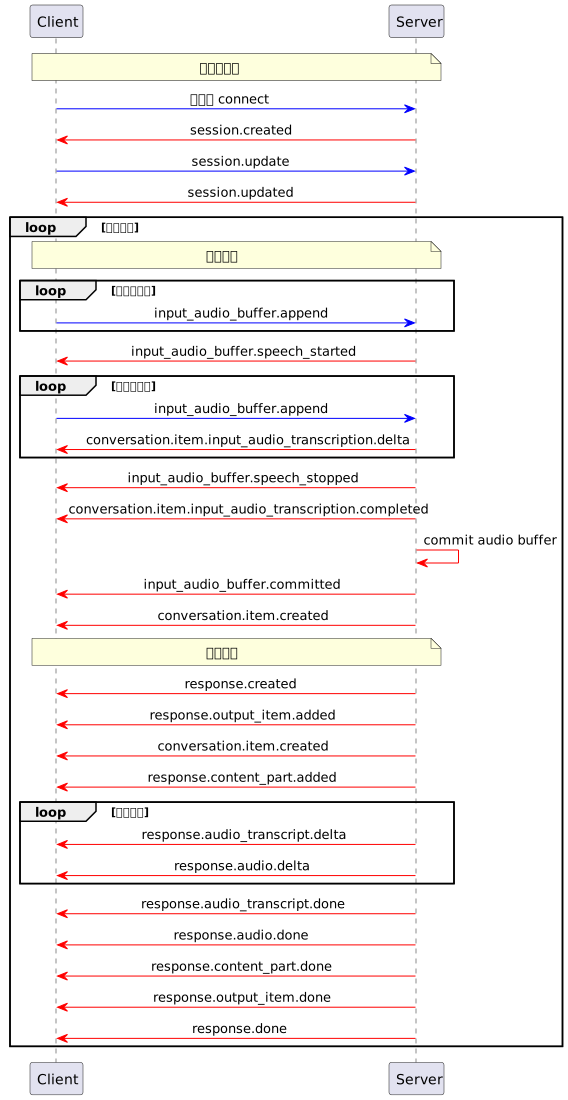
The client and server interact in the following order:
-
The client establishes a WebSocket connection, and the server returns a
session.createdevent. -
The client sends
session.updateto configure session parameters, and the server returnssession.updated. -
The client continuously sends
input_audio_buffer.appendto append audio data. -
The server detects speech start, returns
input_audio_buffer.speech_started, and streams ASR transcription deltas throughconversation.item.input_audio_transcription.delta. -
The server detects speech end and returns
input_audio_buffer.speech_stopped,input_audio_buffer.committed, andconversation.item.created. -
The server automatically generates a response, streams text and audio deltas (
response.audio_transcript.delta,response.audio.delta), and finally returnsresponse.done.
User interruption
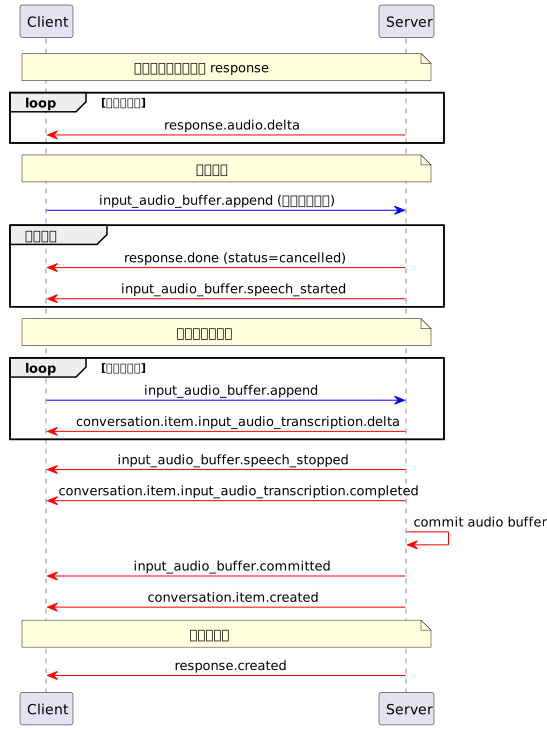
If VAD detects the user speaking during model audio playback, the server cancels the current response (returning response.done with status cancelled), then starts a new turn of audio input and response. The following diagram shows the user interruption sequence:
smart_turn mode
Combines acoustic perception and semantic understanding to detect speech end, filtering out non-semantic sounds such as backchannels and background audio. Sounds without semantic meaning are passed through in conversation.item.ambient_audio_transcription.delta events without triggering a conversation turn.
To enable: Set turn_detection.type to smart_turn in the session.update event.
A complete conversation turn
The following diagram shows a typical interaction sequence in smart_turn mode:
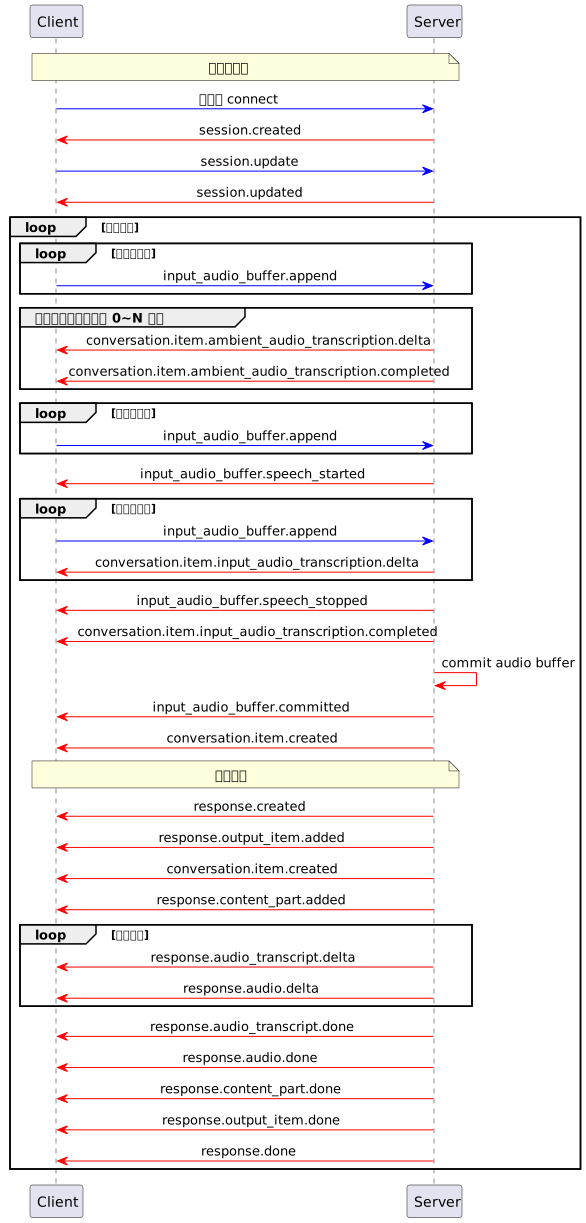
Key differences from server_vad mode:
-
Sounds without semantic meaning ("um", "ah", etc.) do not trigger inference; they are returned through
ambient_audio_transcriptionevents instead. -
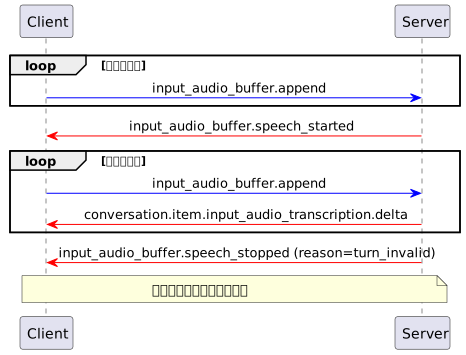
Speech initially deemed valid may be invalidated (
input_audio_buffer.speech_stoppedreturnsreason=turn_invalid), in which case inference is not triggered. -
While waiting for the user's next input, the client can explicitly send
response.createto trigger inference.
User interruption
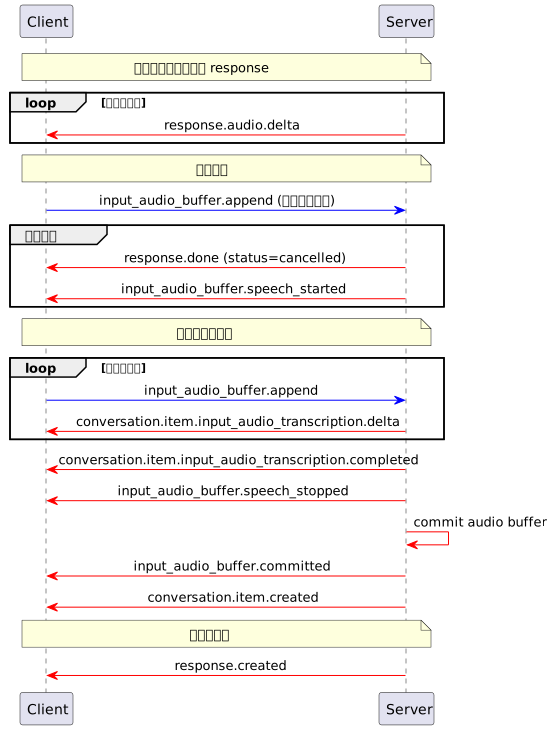
Interruption handling is essentially the same as in server_vad mode. The following diagram shows the user interruption sequence:
Invalid turns
Speech initially deemed valid may be invalidated (input_audio_buffer.speech_stopped returns reason=turn_invalid). Inference is not triggered, and the client should continue sending audio while waiting for the next valid speech turn. The following diagram shows the sequence for an invalid turn:
Speaker enhancement configuration flow
In smart_turn mode, providing voiceprint_audio_urls in the first session.update causes the server to register voiceprints asynchronously (loading the target speaker's audio features) and report progress through events. Voiceprint registration failure does not block normal conversations.
Voiceprint registration proceeds in the following order:
-
After the WebSocket connection opens, the server returns
session.created. The client then sendssession.updatewith voiceprint audio URLs inturn_detection.voiceprint_audio_urls, which starts registration. -
The server immediately starts asynchronous voiceprint registration and sends a
voiceprint_audio_list.in_progressevent before returningsession.updated. The event containsitem_id, the unique identifier of this registration task. -
The server returns
session.updated, confirming that the session configuration has taken effect. -
When voiceprint registration finishes, the server sends a terminal event (with the same
item_idas in step 2):-
Registration successful:
voiceprint_audio_list.completed. -
Registration failed:
voiceprint_audio_list.failed, with areasonfield explaining the failure (for example, the audio URL could not be downloaded).
-
Note
voiceprint_audio_urls only takes effect in the first session.update; subsequent values are ignored.
push-to-talk mode
The client manually controls audio submission and inference triggering, suitable for push-to-talk scenarios.
To enable: Set turn_detection to null in the session.update event.
A complete conversation turn
The following diagram shows a typical interaction sequence in push-to-talk mode:

The client and server interact in the following order:
-
The client continuously sends
input_audio_buffer.appendto append audio data. -
When the user finishes speaking, the client sends
input_audio_buffer.committo commit the buffer. -
The client sends
response.createto trigger inference manually. -
The server generates a response and streams text and audio.
User interruption
The client sends response.cancel to cancel the current response, and the server returns response.done (with status cancelled and reason client_cancelled). The following diagram shows the user interruption sequence:
Operation constraints by mode
| Operation | push-to-talk | server\_vad | smart\_turn |
|---|---|---|---|
| session.update | All fields editable in IDLE; some restricted outside IDLE | All fields editable in IDLE; some restricted outside IDLE | All fields editable in IDLE; some restricted outside IDLE |
| input\_audio\_buffer.append | Allowed | Allowed | Allowed |
| input\_audio\_buffer.commit | Allowed | Ignored | Ignored |
| input\_audio\_buffer.clear | Allowed | Ignored | Ignored |
| response.create | Allowed (first commit buffered audio with input_audio_buffer.commit; cannot retrigger while a response is being generated) | Allowed when no response is being generated; cannot retrigger while a response is being generated | Allowed while waiting for the user's next input; cannot retrigger during an active turn (between receiving input_audio_buffer.speech_started and response.done) |
| response.cancel | Allowed (during inference) | Allowed (during inference) | Allowed (during inference) |
| conversation.item.create/delete/retrieve | Allowed | Allowed | Allowed |
Note
turn_detection and input_audio_format can only be changed before audio is first sent (in the IDLE state).
Error handling
| Type | Behavior | Examples |
|---|---|---|
Client error (invalid_request_error) | Connection remains open; notification only | Invalid parameters, disallowed state, duplicate item\_id |
Server error (server_error) | Connection terminated | LLM connection failure, storage failure |