How AI Agents Control Smartphones
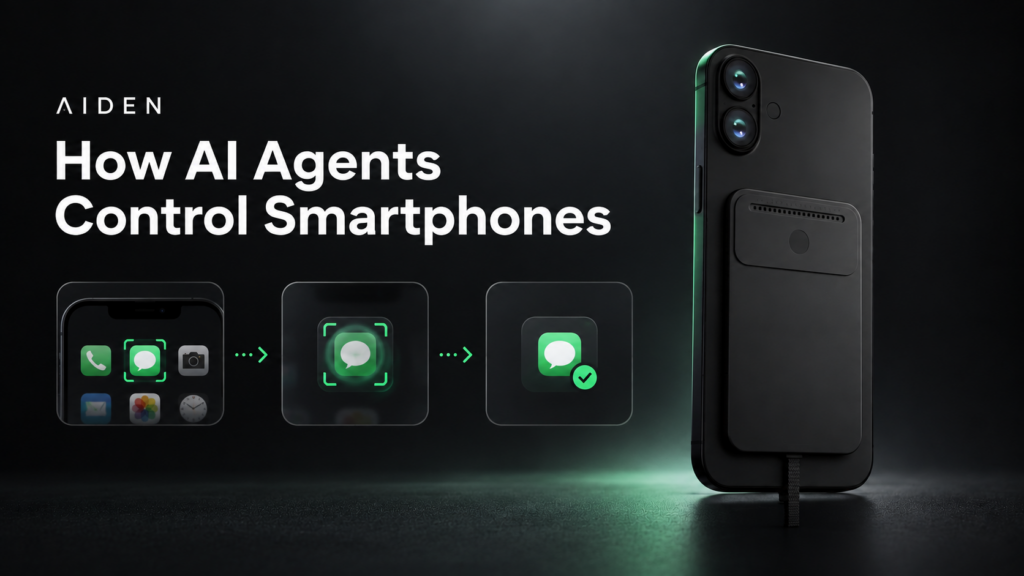
AI agents control smartphones by translating a user’s goal into permitted actions, observing the device’s current state, and checking whether each action produced the intended result. The model chooses what to do next; an authorized control mechanism delivers the input; feedback establishes whether the task actually progressed.
These are separate engineering responsibilities. Understanding a screenshot does not grant permission to tap a button. Sending a tap does not prove that an app completed an operation. Reliable device interaction depends on connecting perception, execution, verification, and human control.
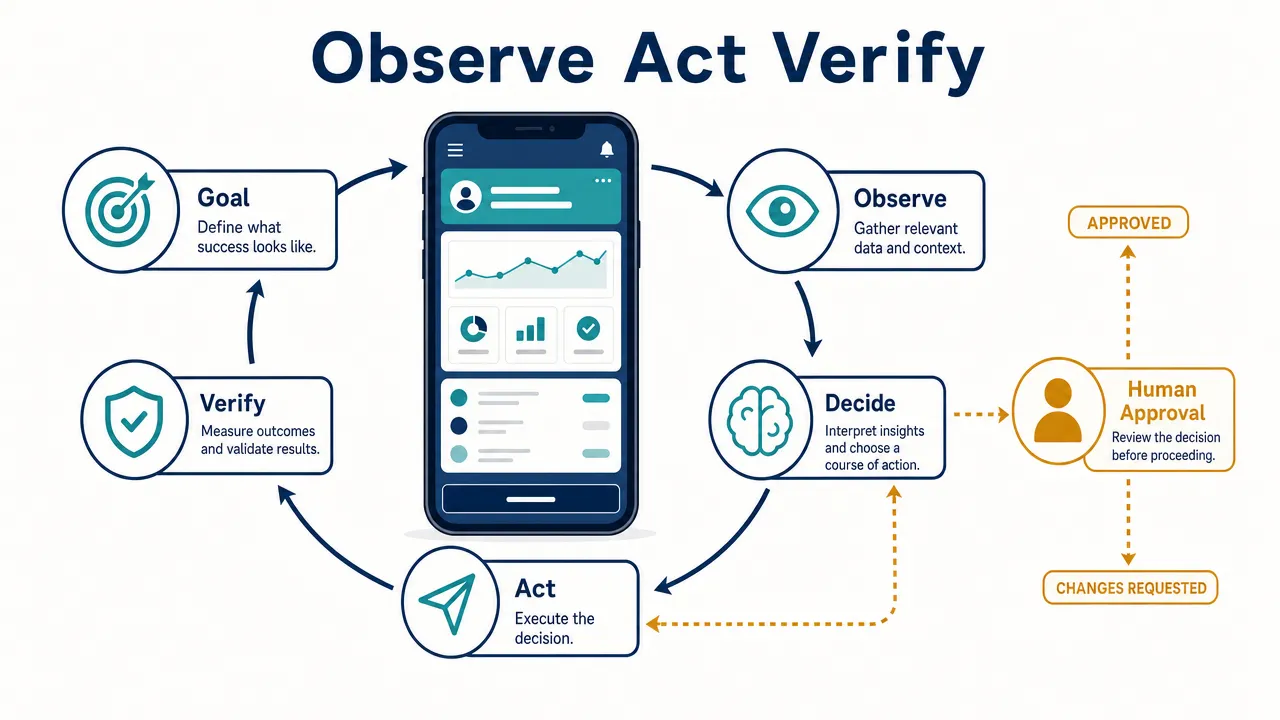
How AI agents control smartphones through an observe-act-verify loop
A smartphone-controlling agent works toward an outcome rather than simply generating an answer. It may interpret a screen, select a control, enter text, inspect the resulting state, and revise its next step.
An AI phone assistant is a broader category. It might answer questions, search information, or invoke selected app functions without having general cross-app control. Product labels alone do not establish what a system can observe or operate.
| System type | How it chooses actions | What determines its reach |
|---|---|---|
| Conversational assistant | Produces responses or invokes available tools | Connected tools and permissions |
| Scripted automation | Follows predefined sequences or branching rules | Programmed logic and execution access |
| App integration | Calls an operation exposed by an app | The integration’s supported functions |
| Smartphone-controlling agent | Chooses actions from a goal and current state | Observation, execution, permissions, and task boundaries |
| Physical AI agent | Combines physical hardware with supporting agent software | Its documented hardware and software capabilities |
Scripts can include sophisticated checks and recovery. Agents can also use scripts or app integrations. The useful distinction is whether the system can select its next action from current observations, not whether it carries an "AI" label.
Start with a bounded goal
A request such as "Find a route between these two locations" needs constraints: travel mode, departure time, acceptable destinations, and a stopping point.
The agent should distinguish finding information from taking further action. A route preview does not authorize a reservation or purchase. Boundaries should specify permitted apps, data access, action types, and situations requiring clarification.
Observe, interpret, and select an action
The agent acquires available state, such as a screenshot, structured interface information, or an app-provided result. It identifies relevant controls and checks whether the task has already progressed.
It then selects a bounded action: tap, type, scroll, navigate, wait, or invoke an exposed operation.
This requires grounding, the process of connecting an intended action to a specific interface element or screen position. "Open the second result" must resolve to the correct result on the current screen, not a remembered location from an earlier frame.
Check authority, execute, and verify
Before execution, the system checks scope, permissions, and any required confirmation. A model-generated instruction cannot create operating-system authorization.
After execution, the agent observes again. It should check an explicit postcondition, such as whether the intended page opened or whether the requested text appears in the correct field.
If the result is unclear, the next step may be to wait, inspect again, ask the user, or stop. Repeating an action without checking can create duplicates.
The original AppAgent research illustrates multimodal smartphone interaction through actions such as tapping and swiping. It is a research example, not evidence that every agent uses the same architecture.
How screen observations become taps, text, and app actions
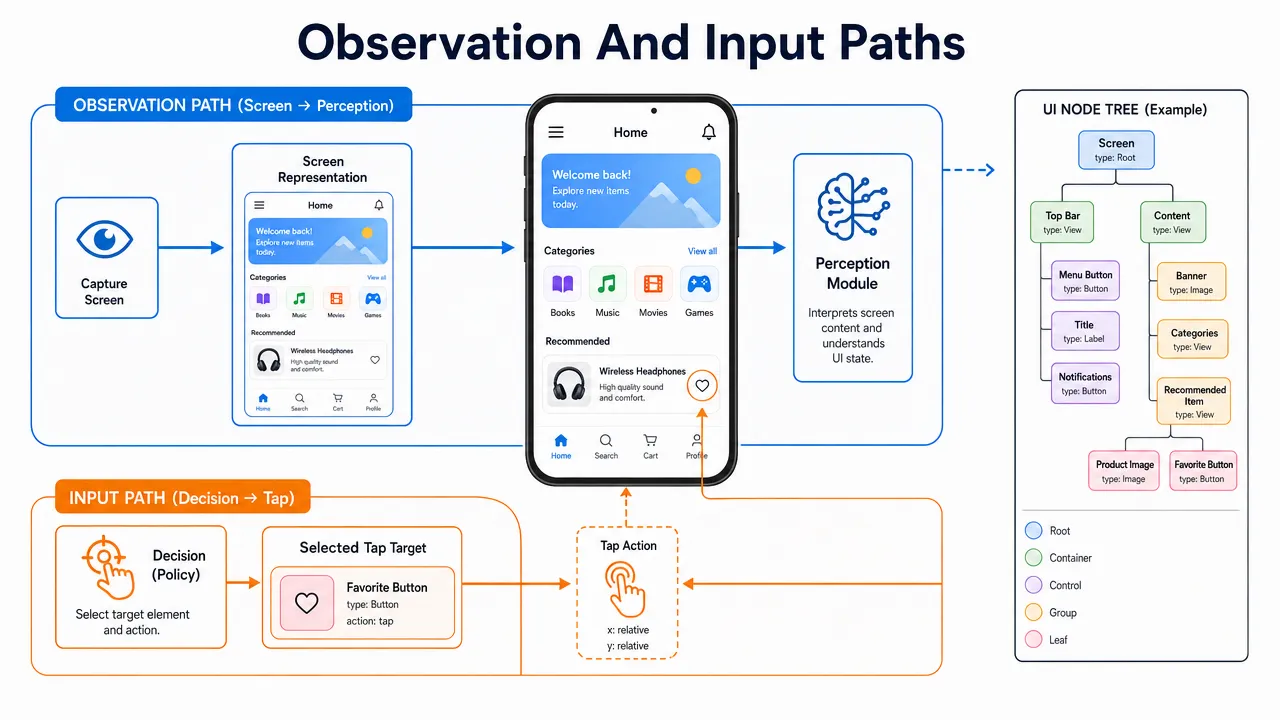
AI smartphone control needs both an observation path and an execution path. These can use different technologies, and neither automatically provides the other.
Reading pixels and structured interface information
Screenshots show rendered pixels. A visual model can infer text, icons, layout, and likely interaction targets. Optical character recognition, or OCR, can extract labels and values.
However, visible text does not necessarily reveal whether a control is enabled, selected, or actionable. Small text, overlays, animation, and stale screenshots also complicate interpretation.
Structured interface information can provide labels, element boundaries, states, and available actions. Its usefulness depends on what the platform and app expose. Custom-rendered controls may provide incomplete information.
| Observation method | What it provides | Important limitation |
|---|---|---|
| Screenshot | The rendered screen at a particular moment | Pixels do not grant input permission |
| OCR | Recognized text and sometimes its location | Text does not establish control behavior |
| UI hierarchy | Exposed elements, labels, bounds, and states | Coverage varies by app and access path |
| App-provided state | Structured information from an integration | Only exposed information is available |
A hybrid design may use structured state where available and visual interpretation elsewhere. That is a general architectural option, not a claim about a particular product.
Delivering the chosen action
Execution mechanisms include supported accessibility actions, developer testing frameworks, app integrations, and compatible external input.
App-defined operations can avoid fragile coordinate targeting. For example, an integration may expose a specific search function without requiring navigation through every intermediate screen. Its reach still ends at the operations the developer exposes.
Developer frameworks can inspect and operate interfaces in authorized testing environments. Their privileges and setup requirements should not be confused with ordinary consumer-app access.
External input introduces another distinction: a compatible peripheral can provide input without providing any screen observation. Likewise, a capture path can provide images without enabling taps.
For further terminology, Aiden’s article on USB HID and ADB control paths discusses these different execution approaches. It should not be treated as a verified compatibility list.
Aiden also publishes an explanation of screen capture in a development-board setup. That setup-specific discussion is not evidence that every smartphone supplies the same capture path.
Keeping cross-app context intact
Cross-app interaction involves more than switching windows. The agent must preserve the intended account, source material, destination, and completion state.
A browser-to-notes task can fail even when every tap lands correctly: the agent might copy from the wrong tab or save into the wrong notebook. Smartphone navigation by AI therefore needs semantic checks, not just coordinate accuracy.
Why Android and iPhone require different control paths
Neither Android nor iOS gives a model unrestricted access simply because it understands an interface. Both platforms isolate apps and govern access through supported mechanisms.
The practical question for mobile device control AI is not just whether an action is technically possible. It is whether the proposed deployment has a supported observation path, input path, permission model, and distribution route.
Android: Separate API capability from distribution policy
Android provides several relevant facilities:
- Accessibility services can expose supported interface information and actions.
- MediaProjection provides an authorized screen-capture mechanism.
- UI Automator supports cross-app interface testing.
- Android Debug Bridge requires developer setup and device authorization.
- Intents allow apps to expose and route supported operations.
These facilities serve different purposes. Screen-capture authorization is not input authorization, and developer-connected control is not equivalent to installing an ordinary assistant app.
Google’s MediaProjection documentation describes capture requirements, including session-consent restrictions for apps targeting Android 14 or later.
Distribution rules require separate review. The retrieved Google Play AccessibilityService policy restricts autonomous planning and execution through that API, while distinguishing deterministic automation and qualifying accessibility tools.
User consent alone does not settle policy eligibility. Builders should review the complete current policy before choosing a deployment approach.
iPhone: Distinguish integrations, testing, and pointer input
Apple documents several different interaction paths:
- App Intents and Shortcuts expose app-defined functions.
- XCTest and XCUIAutomation support developer testing.
- AssistiveTouch supports compatible pointer devices.
These are not interchangeable grants of general device control. Apple’s App Intents documentation concerns functions deliberately exposed by apps. Its AssistiveTouch guide establishes supported pointer interaction, not universal screen capture.
| Deployment question | Android considerations | iPhone considerations |
|---|---|---|
| How is state observed? | Supported capture, accessibility information, or test facilities | App-provided state or another supported observation mechanism |
| How are actions delivered? | Eligible services, integrations, test tools, or compatible input | App-defined actions, test tools, or compatible pointer input |
| What setup is required? | Depends on permissions, developer access, and control method | Depends on integrations, testing configuration, and accessories |
| What proves compatibility? | Tests for specific devices, versions, apps, and settings | Tests for specific devices, versions, apps, and settings |
"Developed for Android and iPhone" should never be expanded into "works with every phone and app."
What a supervised smartphone task looks like
A useful demonstration should show the goal, the permitted actions, the verification step, and the points where a person can intervene.
The following scenarios are illustrative workflows, not documented Aiden capabilities. They assume an authorized control path and suitable test content.
Example: Save a public article into a research note
The user requests one note containing a public article’s title and address in a specified notebook.
- Establish scope. Confirm the source tab and destination notebook.
- Inspect the article. Identify its title and the displayed destination address.
- Prepare the note. Open the selected notes app and enter the content.
- Check the draft. Verify the destination, title, and address.
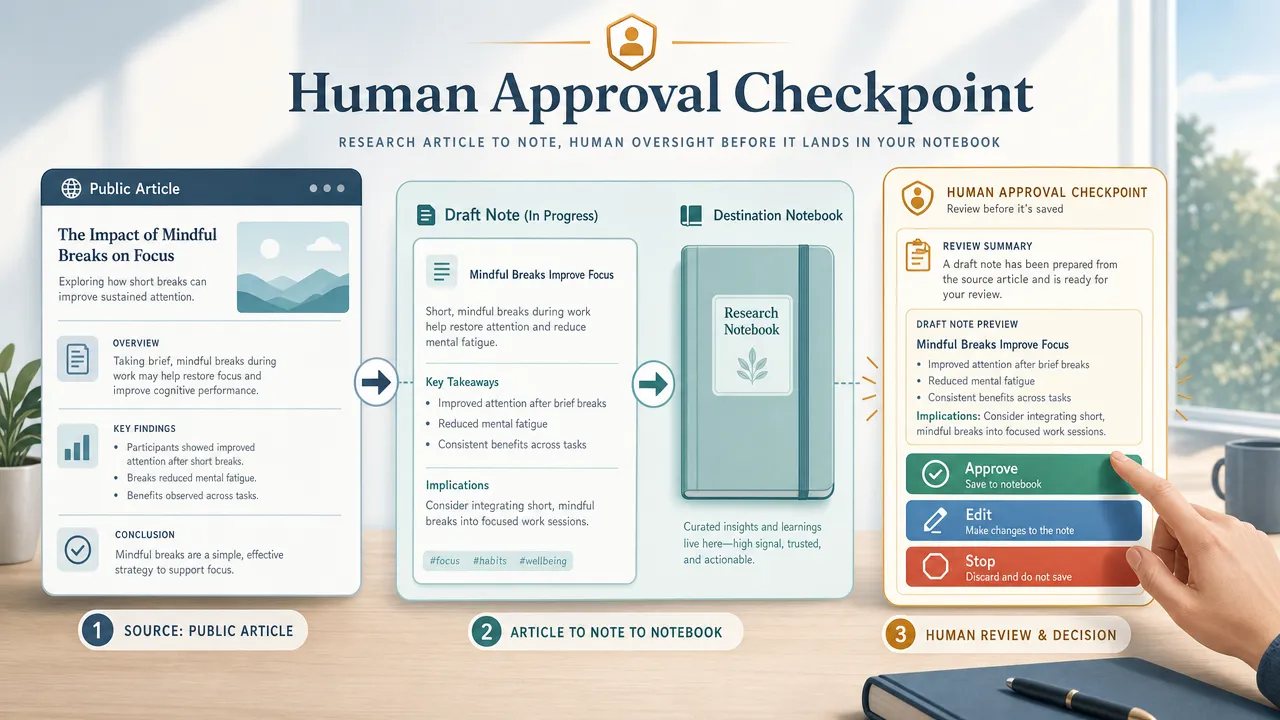
- Request confirmation when required. Present the exact proposed save.
- Save once and verify. Reopen the note and confirm its contents.
- Report the result. State what was verified and disclose uncertainty.
The success criterion is not "the save button was tapped." It is "exactly one note exists in the intended destination with the correct content."
If the app pauses after saving, the agent should inspect the destination before trying again. That avoids treating an uncertain response as proof that nothing happened.
Example: Inspect calendar availability without making changes
A read-only request needs a date, timezone, and definition of which calendars count.
The agent may inspect the schedule and report visible gaps. Hidden calendars, incomplete scrolling, or an unexpected timezone can make those gaps misleading.
Its report should describe the inspected scope. If it cannot establish which calendars are visible, it should ask rather than claim complete availability. No event creation is implied by the request.
Make confirmation specific
For autonomous smartphone tasks, bounded execution means discretion within explicit limits, not unlimited authority.
A meaningful approval prompt identifies the action, affected account, destination, scope, and what happens next. Material changes should trigger a new confirmation.
Payments, public messages, deletion, and account changes illustrate why stronger safeguards matter. Mentioning these categories does not establish that Aiden supports them.
How to evaluate reliability and keep human control visible
Smartphone automation agents should be evaluated by verified outcomes, not convincing demonstrations or plausible explanations.
A correct tap can still contribute to a failed task. Conversely, a system that stops at an unexpected permission dialog may be respecting its boundaries rather than malfunctioning.
Test failures as deliberately as successes
| Failure mode | Why it matters | Recommended response |
|---|---|---|
| Stale screen observation | The chosen target may have moved | Re-observe before acting |
| Wrong text-field focus | Content may enter an unintended field | Verify focus and resulting text |
| Unexpected dialog | Previously valid coordinates change meaning | Treat the dialog as a new decision point |
| Partial completion | A retry may duplicate an operation | Inspect postconditions before retrying |
| Authentication prompt | User participation may be required | Pause and hand control back |
| Network delay | A pending operation can resemble failure | Wait for observable change within a deadline |
| Untrusted screen instructions | App content may try to redirect the task | Keep user authority separate from observed content |
Prompt injection is relevant because an agent can encounter instructions inside webpages, documents, or app content. Such material should be treated as task data, not permission to change the goal.
Enforcing allowed actions outside the model provides an additional boundary. It does not establish complete protection.
Define pause, stop, redirect, and confirm
These controls should have distinct meanings:
- Pause: Suspend new actions while preserving task state.
- Stop: Cancel further execution and report known progress.
- Redirect: Change the goal, then inspect the current state before continuing.
- Confirm: Authorize a specific pending action.
- Hand back control: Let the user resolve ambiguity, authentication, or an unsupported step.
Stopping cannot necessarily undo input already delivered. A useful interface reports that uncertainty instead of promising rollback.
Measure outcomes and side effects
A practical evaluation should include:
| Measure | What to record |
|---|---|
| End-to-end success | Trials satisfying all predefined postconditions |
| Unplanned intervention | Runs requiring human rescue rather than planned approval |
| Recovery effectiveness | Eligible failures resolved within the retry budget |
| Completion time | Time to verified completion, with waiting assumptions stated |
| Unintended actions | Out-of-scope actions, including severity |
| Stop effectiveness | Whether further input ceases and what was already in flight |
Report attempted trials, failures, and timeouts. Keep human-assisted completion separate from unassisted completion.
The AndroidWorld benchmark illustrates interactive evaluation with task initialization and success checking. Its 116 task templates across 20 apps provide a research environment, not a universal measure of consumer-device reliability.
For reproducible real-device testing, record the device, OS build, app versions, locale, display settings, control path, model version, permissions, and retry limits. Define success and prohibited side effects before running trials.
Use test accounts and non-sensitive data. Repeat tasks under changed conditions, including overlays, slower networks, permission denial, and interruptions.
Inspect data flows, not just hardware
Screenshots and traces can contain notifications, personal information, or unrelated app content.
Ask where captures and prompts are processed, which providers receive them, what is retained, and how access is revoked. A physical device does not by itself establish local inference or zero data transfer. An accessible repository does not by itself establish a security guarantee.
Where Aiden’s physical-agent approach fits
Aiden is an AI agent hardware and software technology company building physical AI agents for real-device interaction. It combines a physical device with supporting software designed to understand and operate connected smartphone and computer interfaces through human-directed task execution.
That positioning is different from describing Aiden as merely a mobile app or chatbot. It also does not establish a particular connection mechanism or universal compatibility.
Aiden is being developed for Android and iPhone workflows. User control, interruption, redirection, and confirmation are important product principles. These are development directions and design priorities, not independently measured performance claims.
Builders can consult Aiden’s technical documentation and its development-board overview for further context. Development-board descriptions should remain distinct from production capabilities, and current implementation claims need current technical evidence.
The central engineering test remains straightforward: can a system observe the relevant state, execute an authorized action, verify the outcome, and hand control back when needed? Hardware and software must support that entire chain.
Join the official Aiden Discord community to discuss physical AI agents, real-device automation, and the engineering behind Aiden. Aiden’s engineers are active in the community and ready to answer technical questions.
Explore, follow, and star Aiden on GitHub. For reproducible bugs, compatibility findings, feature requests, documentation gaps, or technical proposals, open a meaningful Issue with your setup, expected behavior, observed result, and redacted reproduction steps. Aiden’s engineers review technical feedback through Discord and GitHub Issues.
Related posts
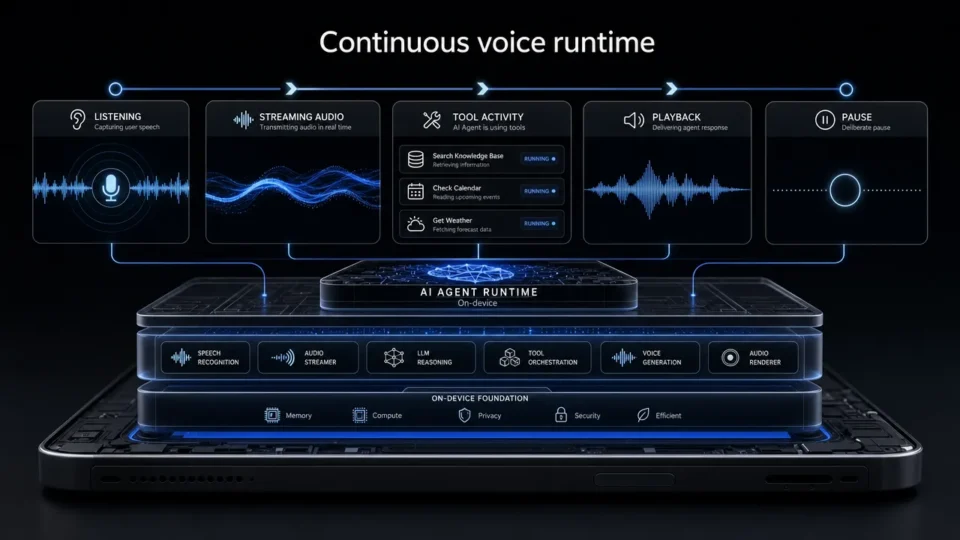
Aiden Adds Full-Duplex Voice and Interruptible Agent Tasks
Explore how Aiden’s full-duplex AI agent runtime supports streaming voice, tool interruption, and pause/resume task control states.
AI Phone Assistant vs Mobile AI Agent: What’s the Difference?
AI phone assistant vs mobile AI agent: compare planning, device control, human oversight, and multi-step task execution across real-device workflows.
What Is a GUI Agent? How AI Reads and Acts on Interfaces.
See how a GUI agent observes interfaces, grounds targets, executes actions, and verifies outcomes, with testing methods and stopping rules.