Mobile Device Automation Methods Compared
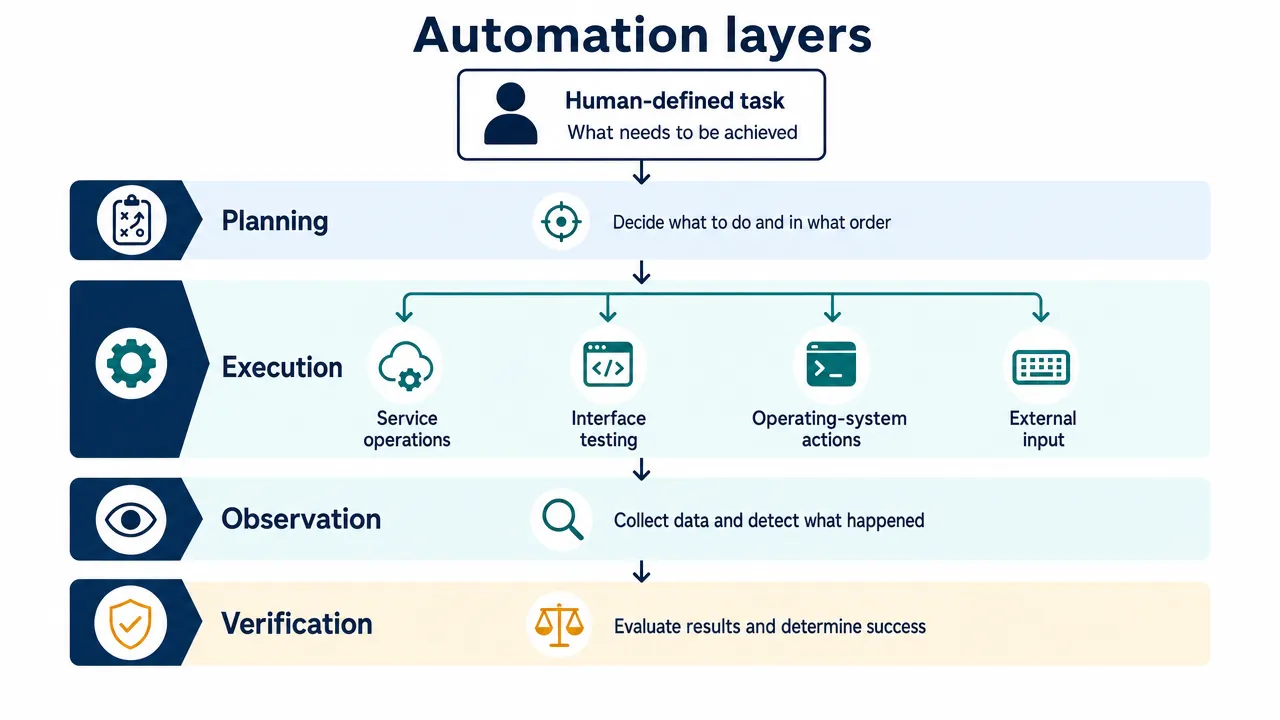
Mobile device automation methods differ in what they control, how they observe results, and which permissions they require. APIs operate service functions, testing frameworks exercise interfaces, workflow integrations execute exposed actions, and AI agents choose actions through an underlying execution method.
The practical choice is the narrowest authorized method that can complete the task and verify its outcome. Testing an app, repeating a personal workflow, and supervising an adaptive agent are different requirements. Treating them as interchangeable leads to unnecessary complexity and misleading compatibility claims.
How to choose mobile device automation methods by the outcome you need
Start with the result you must demonstrate, not a tool’s feature list.
A service test might need to prove that a draft was saved correctly. An interface test must also establish that the app displays and edits that draft correctly. A real-device workflow might need to include a system dialog, another application, or an attached peripheral.
Those requirements belong to different automation layers.
Compare methods before comparing tools
This mobile automation comparison summarizes the main options. The trade-offs are qualitative selection guidance, not measured performance rankings.
| Method | Best starting point for | Required access or setup | Main limitation |
|---|---|---|---|
| API and service automation | Service operations, test fixtures, persisted-state checks | Authorized API access and documented operations | Does not establish correct phone-screen behavior |
| Native testing frameworks | App regression and platform-specific integration tests | Test runner, development tooling, configured devices | Platform-specific implementation and maintenance |
| Cross-platform frameworks | Shared test orchestration across platforms | Framework plus platform drivers or supported runtimes | Common authoring does not mean identical platform support |
| OS actions and workflows | Bounded tasks using exposed integrations | Available actions, permissions, user configuration | Cannot operate arbitrary unsupported functionality |
| Hierarchy, image, and coordinate targeting | Finding interface targets | Observation plus a separate authorized input channel | Target recognition alone cannot verify completion |
| AI-agent architectures | Tasks with meaningful route uncertainty | Planner, executor, limits, logging, evaluator | Inherits executor restrictions and introduces planning uncertainty |
| Hardware-mediated interaction | Physical-device or peripheral requirements | Compatible hardware, observation, configuration | Physical input does not provide understanding or verification |
These categories overlap. An agent can call an API, use a testing framework, or issue input through external hardware. A cross-platform framework can use a platform-native automation mechanism underneath.
A framework supplies reusable execution conventions. A targeting technique identifies where to act. An agent architecture decides what to do next. Comparing them as mutually exclusive products obscures the actual engineering decision.
Use APIs when the interface is not the requirement
API automation calls documented operations rather than navigating screens. The OpenAPI specification describes HTTP service interfaces, but it does not establish that a particular mobile app exposes one.
Authorized APIs are useful for preparing test data, checking persisted state, and completing supported integrations. They offer explicit requests and responses, but still require handling authentication, contract changes, delayed consistency, and operation-specific retry behavior.
A successful API request does not prove that the mobile interface rendered the result correctly. Conversely, a successful tap does not prove that the service saved the requested change.
For an owned notes app, a sensible combination is API-based fixture creation, UI-based editing, and an independent persistence check. Each layer answers a different correctness question.
Native and cross-platform mobile testing automation compared
Mobile testing automation requires expected outcomes, not just repeatable interactions. A script that taps several buttons without checking the result is an execution sequence, not a meaningful regression test.
An automation framework comparison should therefore examine assertions, synchronization, device setup, debugging evidence, and maintenance alongside platform coverage.
Espresso and UI Automator serve different Android scopes
Espresso supports app-oriented Android UI testing, including element matching, actions, assertions, and synchronization.
It is a strong starting point when you control the app and can integrate tests with its development process. Custom background work may need explicit synchronization through mechanisms such as idling resources. Built-in synchronization does not eliminate every timing problem.
UI Automator supports cross-app functional testing across installed applications and system interfaces. That makes it relevant when a scenario crosses an app boundary or involves system UI.
Its reach still depends on exposed elements, device state, permissions, and platform restrictions. Cross-app testing is not unrestricted device authority.
Source-code access also needs careful qualification. Installing an instrumentation runner does not always mean modifying the target application. However, black-box testing still requires a supported execution environment and suitable access to the interface.
XCTest and XCUIAutomation operate within Apple’s testing environment
XCTest with XCUIAutomation provides element queries, actions, and assertions for Apple UI tests.
Apple documents recording workflows involving multiple apps. It would therefore be inaccurate to say that iPhone UI testing is categorically limited to one app.
The important boundary is context. These are developer-testing capabilities, not a general entitlement allowing an ordinary iPhone app to operate other apps.
Physical-device testing requires appropriate development deployment, signing or provisioning, device trust, and Developer Mode where applicable. Test maintenance includes element queries, starting state, synchronization, and the relationship between Xcode and the target OS.
Appium shares orchestration, not identical platform behavior
Appium uses platform drivers, including the UiAutomator2 driver for Android and the XCUITest driver for Apple environments.
This supports a common client ecosystem while retaining platform-specific execution. Selectors, system dialogs, native and web contexts, and device preparation can still differ.
Android setup includes SDK tooling and a configured emulator or authorized physical device. Apple real-device setup includes WebDriverAgent and the appropriate development configuration.
Version compatibility must be checked as a complete combination. The supplied research identifies these documented requirements:
- UiAutomator2 driver 5 and later require Appium 3.
- UiAutomator2 driver 6 and later require Android 8, API 26, or later.
- XCUITest driver 10 and later require Appium 3.
These are version-scoped requirements, not permanent platform minimums. Pin the server, driver, SDK, and device configuration rather than relying on an old compatibility page.
Maestro favors concise flows within documented environments
Maestro uses YAML-based flows that can make smoke tests concise and readable.
Its environment support needs qualification. The Android platform documentation covers emulators and physical devices. The iOS platform documentation describes Xcode-managed Simulator support. The supplied research identifies local physical-iPhone testing as unsupported.
That local limitation should not be expanded into an unverified statement about every hosted offering.
| Framework | Appropriate starting point | Important maintenance concern |
|---|---|---|
| Espresso | Owned Android app regression | Synchronization and stable element identifiers |
| UI Automator | Android cross-app and system integration tests | Device state, selectors, and exposed elements |
| XCTest/XCUIAutomation | Apple UI regression and scoped integration tests | Development setup, queries, and OS/tooling compatibility |
| Appium | Shared orchestration with platform-specific drivers | Driver versions, device setup, contexts, and locators |
| Maestro | Readable smoke-test flows in supported environments | Assertions, state reset, and environment scope |
Readable syntax reduces authoring friction. It does not remove the need for correct assertions or representative device coverage.
OS workflows and interface targeting solve different problems
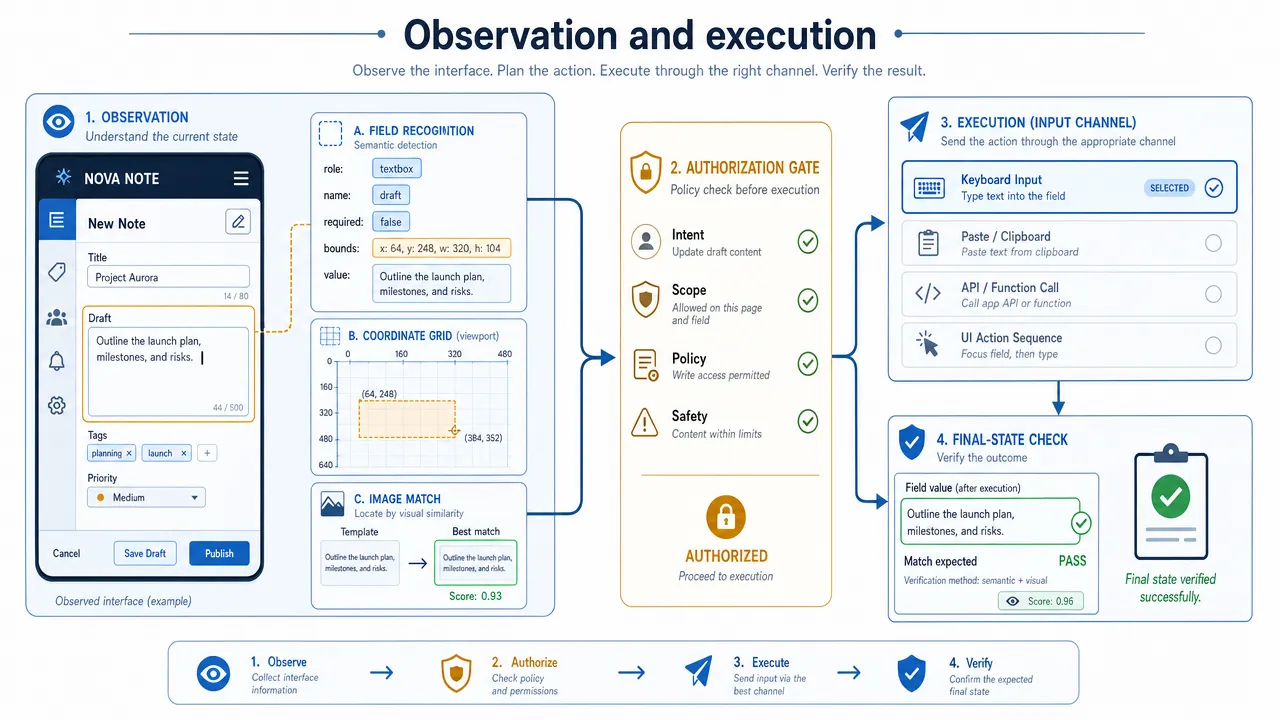
App automation tools often combine several device automation techniques. Understanding the distinction between an exposed action, a target locator, and an input channel makes their capabilities easier to evaluate.
Prefer exposed actions for bounded workflows
Android intents provide supported hand-offs to application capabilities. The common intents documentation describes these entry points.
An intent can request an operation or open a supported screen, but the receiving application, permissions, user choices, and subsequent interface determine what happens next. Dispatching the intent is not proof of completion.
On Apple platforms, App Intents lets developers expose actions to Shortcuts and other system experiences. The required action must exist, and its permissions, confirmation behavior, and availability must match the intended workflow.
Some personal automations can run without asking each time. That does not mean every iPhone workflow can run unattended or that Shortcuts provides arbitrary tapping across applications.
For a bounded task, an exposed action is often a more direct starting point than reconstructing the same operation through screen coordinates.
Separate finding a target from permission to act
Interface automation can identify controls through structured element information, coordinates, image matching, or optical character recognition, usually called OCR.
| Targeting mechanism | What it provides | Common failure mode |
|---|---|---|
| UI hierarchy | Labels, properties, bounds, and exposed actions | Missing custom controls or duplicate labels |
| Coordinates | A position in a known display layout | Rotation, keyboard appearance, or layout movement |
| Image matching | Similarity to a visual reference | Theme changes, scaling, animation, or occlusion |
| OCR | Recognized visible text and its location | Ambiguous wording, font differences, or recognition errors |
A hierarchy can provide useful semantic information, but custom-rendered content may be absent. Coordinates can be practical in controlled layouts, but become brittle when the screen changes. Visual targeting can locate content unavailable through structured elements, but adds interpretation uncertainty.
None of these mechanisms grants input authority. A screenshot can reveal a button without providing any permitted way to press it.
Accessibility capability and distribution permission are separate
Android’s accessibility service documentation describes declared service capabilities, including gesture support. This is not equivalent to an ordinary permission toggle granting unlimited control.
Distribution introduces another constraint. Google Play’s AccessibilityService policy distinguishes narrow deterministic automation from applications that autonomously initiate, plan, and execute actions through the Accessibility API.
Developers must review the full policy and applicable exceptions. Adding a confirmation prompt does not, by itself, establish compliance.
On iPhone, UI-test element access and user-facing accessibility features do not establish an equivalent general-purpose third-party automation service.
Similarly, Android Debug Bridge is a development communication tool. It supports authorized device communication and operations such as screenshot capture, but is not itself a planner or an outcome evaluator.
AI agents and physical interaction add layers, not unrestricted control
An AI agent adds task interpretation and feedback-based action selection. Hardware-mediated interaction adds an external input or observation path. These are separate dimensions.
An agent chooses actions through an existing executor
A typical agent loop observes the environment, proposes an action, executes it through an authorized tool, and checks the resulting state.
The executor might be an API client, a testing framework, an OS integration, or supported external hardware. Adding a model does not expand that executor’s permissions or compatibility.
AndroidWorld provides a concrete research reference for building and evaluating Android agents. Its documented environment uses an emulator, so its existence does not establish physical-device or iPhone performance.
Adaptive planning is relevant when the route genuinely varies. For example, an agent may need to distinguish between a normal draft screen and a harmless modal before proceeding.
It also introduces failure modes:
- Misreading a screen or selecting an ambiguous target.
- Acting on an observation that is no longer current.
- Repeating an operation before its result becomes visible.
- Treating text inside an app as an instruction.
- Declaring completion without checking the final state.
A supervised agent needs allowed-action boundaries, timeouts, action budgets, uncertainty handling, and independent verification. Prompt changes alone are not a complete maintenance strategy.
Hardware changes the connection to the device
Hardware-mediated automation can involve electronic peripherals or mechanical contact with controls. Both require configuration-specific validation.
Apple’s pointer-device guidance for AssistiveTouch establishes a supported input mechanism under stated conditions. It does not establish screen capture, interface understanding, task planning, or universal app compatibility.
A complete hardware-based system still needs an observation path and an outcome evaluator. It also introduces physical dependencies such as connections, power, mounting, calibration, and unobstructed observation.
A hardware label alone says nothing about processing location, privacy, security, or reliability.
Human control belongs at the execution boundary
A useful control design lets the user authorize, interrupt, and redirect execution. Those behaviors need implementation and testing rather than inference from an agent label.
For consequential actions, confirmation should identify the exact proposed operation and relevant current state. A changed target or redirected task should invalidate stale approval.
Stopping also requires precise language. Blocking new actions is different from canceling an action already in progress, and neither necessarily reverses a completed change.
The executor should report uncertainty and in-flight activity instead of presenting a stopped planner as proof that all device effects have stopped.
How to evaluate Android and iOS automation on representative devices
Evaluate mobile automation against explicit tasks, controlled starting conditions, and independently checked outcomes. A result only establishes behavior in the tested configuration.
Match the environment to the claim
| Environment | Useful evidence | What it does not establish |
|---|---|---|
| Android Emulator | Functional behavior in controlled virtual configurations | Complete physical peripheral or device behavior |
| Apple Simulator | UI behavior in supported simulated configurations | Real iPhone performance or all physical-device features |
| Physical device | Behavior on the tested model, OS, apps, and accessories | Compatibility across every device configuration |
| Hosted physical device | Results on remotely provided hardware | Access to every local accessory, sensor, or permission |
The Android Emulator documentation describes configurable virtual-device capabilities, while its advanced guidance documents hardware omissions. Apple likewise distinguishes simulated environments from physical devices.
Record the device or simulator, OS and app versions, runner or driver, permissions, and relevant accessories. Keep the description concise but specific enough to reproduce the claim. Changing any of those conditions can change the result, especially when system dialogs, sensors, peripherals, or signing requirements are involved.
Define completion before execution
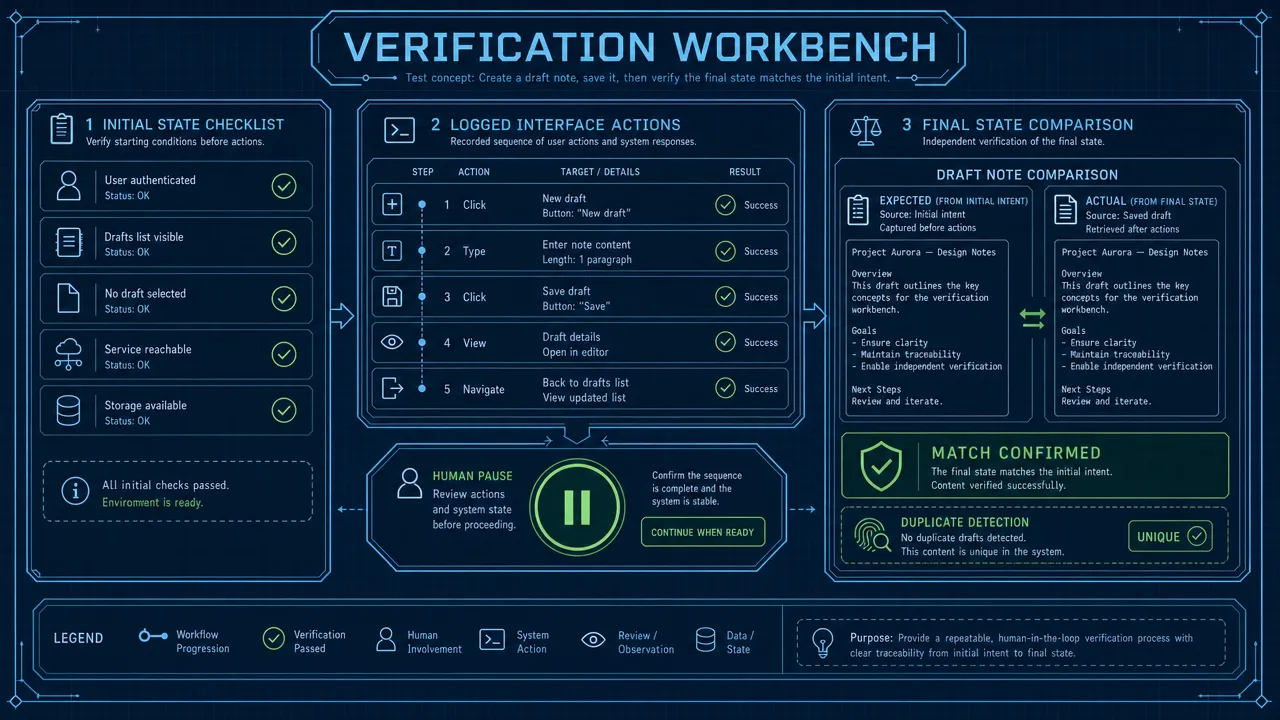
For a task such as creating and reopening a uniquely named draft, define success before the run. The correct draft must exist, its contents must match, it must persist after reopening, and no duplicate or out-of-scope action may occur.
Use an independent state check where one is available. For a black-box app, document what the available evidence cannot establish. Planned approval is part of the procedure; unexpected human rescue should be reported separately from autonomous completion.
Test interruption and recovery deliberately
Introduce a small set of controlled disruptions, such as a harmless dialog, delayed response, restart, or interrupted connection. Check whether the executor stops dispatching new actions, identifies in-flight work, re-observes after redirection, avoids duplicates, and asks for help when state is ambiguous.
The broader control pattern is covered in Human-in-the-Loop AI Agents. Here, the key distinction is between required approval and unplanned intervention.
Record outcomes that expose failure
| Outcome | What to record |
|---|---|
| Task success | Runs satisfying every predeclared completion condition |
| Final-state correctness | Expected state, persistence, and absence of duplicates |
| Unintended actions | Actions outside the allowed task specification |
| Control and recovery | Approval compliance, post-stop actions, and recovery after disruption |
| Human intervention | Unplanned rescue, separate from required confirmation |
Keep first-attempt results separate from retries or human rescue, and report the number of runs and timeouts. Latency, cost, and maintenance effort can be useful secondary measures, but they should not replace verified task completion. Collect only the logs or screenshots needed to support the result, with defined access and retention.
Where Aiden fits in supervised real-device automation
Aiden is an AI agent hardware and software technology company building a physical AI agent for human-directed interaction with connected smartphones and computers. It is not merely a mobile app or chatbot.
Aiden is being developed for Android and iPhone workflows. User control, interruption, redirection, and confirmation are product principles, not a substitute for configuration-specific evidence about implementation or compatibility.
Its public development-board firmware repository describes development-board firmware and a device-side runtime, not a final integrated hardware product. That distinction matters when interpreting technical updates.
Aiden belongs in the physical-agent discussion, not in an unsupported leaderboard against testing frameworks. The relevant engineering questions remain the same: what can the executor do, what can the system observe, how is completion verified, and how does the user retain control?
Choose mobile device automation methods by the outcome they can prove. Use APIs for service operations, testing frameworks for interface regression, exposed OS actions for bounded workflows, and supervised agents where adaptation is necessary. Add physical hardware when the actual device or input path is part of the requirement.
Join the Aiden Discord to discuss physical AI agents, real-device automation, and the engineering behind Aiden. Aiden’s engineers are active in the community and ready to answer technical questions.
Explore and star Aiden on GitHub. For reproducible bugs, compatibility findings, feature requests, documentation gaps, or technical proposals, open a meaningful Issue with the configuration, reproduction steps, and expected behavior. Aiden’s engineers review technical feedback through Discord and GitHub Issues.
Related posts
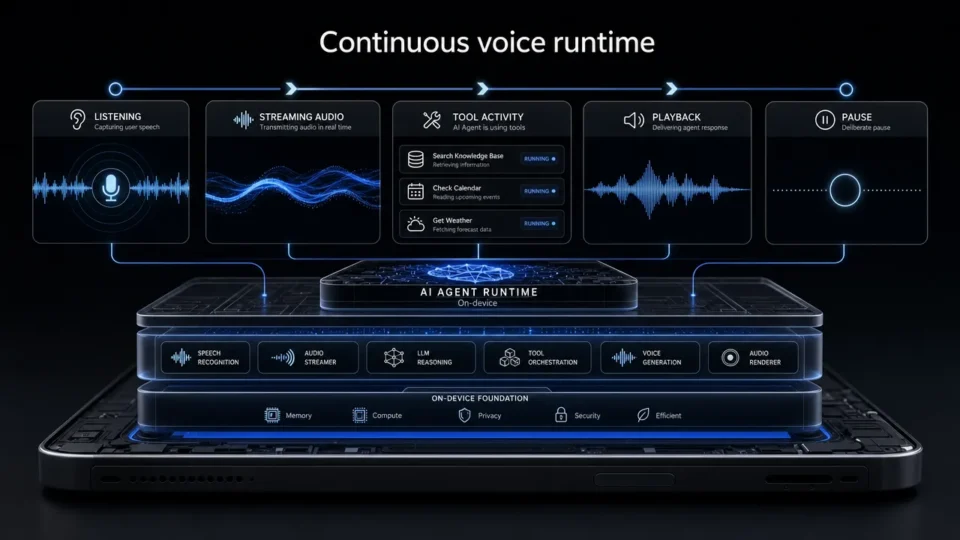
Aiden Adds Full-Duplex Voice and Interruptible Agent Tasks
Explore how Aiden’s full-duplex AI agent runtime supports streaming voice, tool interruption, and pause/resume task control states.
AI Phone Assistant vs Mobile AI Agent: What’s the Difference?
AI phone assistant vs mobile AI agent: compare planning, device control, human oversight, and multi-step task execution across real-device workflows.
What Is a GUI Agent? How AI Reads and Acts on Interfaces.
See how a GUI agent observes interfaces, grounds targets, executes actions, and verifies outcomes, with testing methods and stopping rules.