Can AI Agents Use Apps Without APIs? Methods, Trade-Offs and Limits
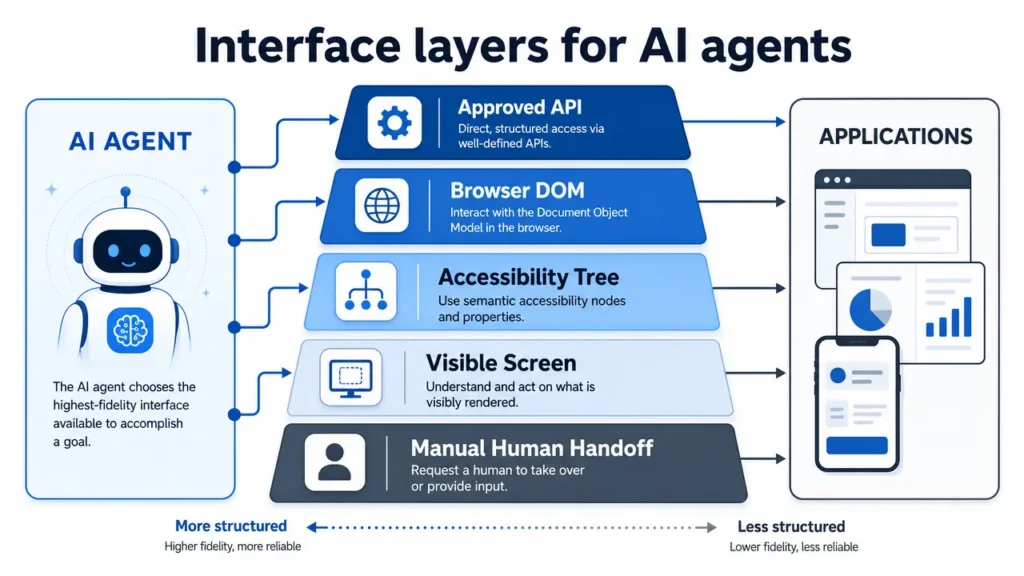
Yes, an AI agent can sometimes use an app without a dedicated API by interacting with an authorized interface that it can observe and control. Depending on the environment, it may interpret screenshots, read accessibility data, inspect a browser page, use operating-system automation, send Android Debug Bridge commands or act through standard keyboard, pointer and touch input.
This flexibility comes with a trade-off. API calls usually return structured data and explicit errors. Interface-driven automation must infer what is happening, cope with changing screens and verify that each action produced the intended result. The practical rule is to use the most structured permitted method available and reserve visual automation for the steps that genuinely need it.
Can an AI Agent Use an App Without an API?
Yes, provided the agent has an authorized way to observe the application, a permitted way to act and a reliable way to verify the outcome.
An API is one integration layer, not the only possible one. When an app has no useful API, an agent may work through the same interface layer a person uses. It can identify controls, enter text, navigate between screens and inspect the resulting state.
The absence of an API does not make every app automatable. It also does not grant permission to automate an app. Device ownership, account permissions, platform rules, authentication requirements and the consequences of each action still matter.
A useful no-API loop is:
Observe → interpret → choose one bounded action → act → verify → continue or stop
Verification is what separates a controlled workflow from blind clicking. The agent should confirm that the expected page, field value, message or status appeared before moving to the next step.
How AI Agents Interact With Software Without APIs
No-API automation is not one technology. The best method depends on what the application exposes and how much structure the agent can use.
Screenshots and visual perception
A visual agent can inspect screenshots or video frames, recognize text and controls, choose an action and observe the next screen. This can work with legacy software, remote desktops, custom interfaces and mobile apps that expose little structured information.
Visual access is flexible, but it is probabilistic. Low contrast, unusual icons, animation, overlapping windows or a changed layout can cause errors. Coordinates alone are especially fragile, so useful systems combine visual recognition with state checks after important actions.
Accessibility layers
Accessibility frameworks can expose semantic information such as a control’s role, label, value and state. An agent may be able to locate “Submit” as a named button instead of estimating its position from pixels.
This can be more reliable than screen-only interaction, but it depends on the quality of the application’s accessibility implementation. Custom controls may have missing labels, stale values or incomplete structure. Platform tools such as Android UI Automator, Microsoft UI Automation and Apple XCTest illustrate structured approaches to testing and interacting with user interfaces.
Android Debug Bridge
Android Debug Bridge is a development and debugging interface for Android devices. In controlled environments, it can support input, app management, shell commands, logs and device inspection.
ADB is not a universal consumer automation route. It is Android-specific, requires setup and authorization, and may be inappropriate for unmanaged or locked-down devices. The narrower comparison between ADB and external input belongs to USB HID vs ADB: How AI Agents Actually Control Your Phone.
USB HID and standard input
USB Human Interface Device input can present actions as standard keyboard, pointer or touch-style events. This can be useful for real-device interaction because the target receives familiar input rather than an app-specific command.
HID provides an action path, not understanding on its own. It must be paired with an observation method and verification loop. Device compatibility, operating-system behavior, connection requirements and accessibility settings still determine what is practical.
Browser interaction
Web applications can often be automated without a product-specific API by using the browser’s document structure, accessibility tree or browser-control protocol. WebDriver defines a remote-control interface for browsers, while tools such as Playwright provide automation around page navigation and elements.
Browser interaction is usually more structured than pixel-only control, but it remains sensitive to changed selectors, dynamic rendering, pop-ups, embedded frames, session expiry and authentication. It also stops being sufficient when the workflow leaves the browser for a native app or system dialog. The distinction is covered in more depth in Browser Agents Can Use the Web. Aiden Is Built to Use the Device.
GUI and operating-system automation
Desktop and mobile automation tools can work through windows, controls, files, applications and operating-system services. Traditional robotic process automation is useful when the workflow is narrow and repeatable. AI adds value when the interface varies or the next action requires interpretation rather than a fixed rule.
The two approaches can also be combined: deterministic automation handles stable steps, while an AI agent interprets exceptions or ambiguous interface states. A human can remain responsible for final approval where an action is sensitive or irreversible.
API Automation vs No-API Automation
“No API” does not always mean purely visual. Accessibility data, browser protocols and operating-system automation can provide structure even when an application-specific business API is unavailable. The comparison below describes the usual trade-offs.
| Factor | API automation | No-API interface automation |
|---|---|---|
| Reliability | Usually high when the API is stable and documented | Depends on interface stability, perception and verification |
| Speed | Direct requests are usually faster | Screen loading, perception and sequential actions add latency |
| Flexibility | Limited to exposed endpoints and permissions | Can sometimes reach visible functions that are not exposed through an API |
| Setup | Requires credentials, schemas and integration work | Requires observation, input, environment setup and workflow testing |
| Observability | Structured responses, status codes and logs are common | Needs screenshots, traces, state checks and explicit failure reporting |
| Compatibility | Works only where the provider exposes and supports the required operation | Can reach legacy, closed or cross-app interfaces, but not every device or state |
| Maintenance | Changes are usually versioned, although APIs can still be deprecated | UI redesigns, localization and device differences can break workflows |
| Security | Scopes and credentials can constrain access | May expose broad interface context; permissions and data capture need careful limits |
| Fragility | Lower for documented, stable operations | Higher when the agent depends on pixels, coordinates or changing layouts |
A hybrid architecture is often strongest. Use an approved API for structured retrieval or transactions, then use interface automation only for the gap that the API does not cover.
When No-API Automation Makes Sense
No-API automation can be appropriate when the workflow is authorized, testable and difficult to complete through a supported structured integration.
Legacy applications
Older desktop software may contain essential workflows without modern APIs. UI automation can bridge those systems while a team evaluates longer-term modernization.
Closed or internal applications
An application may have no public API, or its API may omit the action a team needs. A controlled interface workflow can sometimes cover that gap without pretending that the missing endpoint exists.
Mobile apps
Many mobile tasks exist only in the visible app experience. A mobile agent may use accessibility data, visual perception, ADB, HID or supported operating-system automation depending on the environment. For the broader category, see What Is a Mobile AI Agent?.
Cross-app workflows
A task may begin in a browser, continue in a native app and finish in a system dialog. Interface-level automation can connect steps that no single API spans.
Testing and quality assurance
Agents can exercise user-facing workflows, inspect visible outcomes and record failures. Testing environments are particularly suitable because permissions, data and expected results can be controlled.
Human-like interface interaction
Some research, accessibility and device-use scenarios specifically require interaction with the interface a person sees. In these cases, the interface is not merely a fallback; it is the object being evaluated.
When an API Is Still Better
An API should usually remain the first choice when it exposes the needed operation with appropriate authorization.
Use an API for:
- Structured operations: reading or writing known fields with explicit schemas.
- High-volume workflows: processing many records efficiently and consistently.
- Predictable data access: retrieving complete values without interpreting a screen.
- Transactional systems: creating orders, payments or records where explicit responses and idempotency matter.
- Low-latency requirements: completing operations without waiting for pages and animations.
- Clear auditability: capturing request, response, identity and error information in structured logs.
- Stable permission boundaries: restricting a token to specific operations instead of exposing an entire interface session.
An AI agent should not use the UI simply because it can. If a supported API provides the same result more safely and predictably, the API is normally the better execution layer.
Limitations of No-API Agent Automation
No-API automation trades structured integration for interface reach. The limitations need to be designed into the workflow.
UI changes
A renamed button, redesigned menu or altered navigation flow can invalidate a previously successful sequence. Semantic targeting and visual reasoning help, but neither eliminates maintenance.
Perception errors
OCR can misread text, and a vision model can confuse visually similar controls. The system should use confidence thresholds, expected-state checks and escalation rather than guessing repeatedly.
Latency
Each step may require loading the interface, capturing a state, interpreting it, acting and capturing again. This is slower than a direct API call and can become costly in long workflows.
Pop-ups and unexpected states
Cookie banners, notifications, update prompts, network errors and modal dialogs can block the expected control or change the meaning of the next action.
Permissions
The agent can act only within the permissions granted to the user, application, automation tool or connected device. Missing permissions should produce a clear stop or handoff, not an attempt to bypass the boundary.
Authentication
Login expiry, multifactor authentication and biometric prompts interrupt automation. These steps often require the user or an approved identity workflow.
CAPTCHAs
CAPTCHAs are access-control signals, not puzzles an agent should be designed to defeat. The appropriate response is to pause, request legitimate user completion or use a vendor-approved integration.
Device and environment differences
Display size, operating-system version, language, scaling, app version and input method can all affect the same workflow. Testing one device is not evidence of universal compatibility.
Irreversible actions
Sending a message, deleting a record, changing a permission or submitting a transaction may be difficult to undo. Require confirmation immediately before consequential actions and preserve enough evidence for review.
State drift
The application may change between observation and action because of another user, a background process or a delayed request. The agent should recheck important state instead of assuming that its earlier observation remains valid.
How Aiden Approaches Apps Without APIs
Aiden explores no-API interaction as a device-use problem: observe the visible interface, reason about the current state, perform a bounded action and verify the result.
Aiden’s public development-board materials document a reference implementation that can capture a connected device’s display and send standard input. This is evidence of an engineering approach, not a claim that every app, phone, computer or workflow is supported. Compatibility depends on the device, operating system, interface state and configured observation and control routes.
This general article intentionally stops at that architectural level. For the implementation constraints, authorization model and current Aiden setup, read How Aiden Controls a Phone With No API, No Jailbreak, and No App. The public Aiden firmware repository provides the current developer-facing reference.
How to Choose Between APIs and Interface Automation
Choose the most structured permitted layer that can complete each step:
- Use an approved API when it covers the operation.
- Use browser or accessibility structure when it is available and reliable.
- Use operating-system or development automation in controlled environments.
- Use visual interaction and standard input when no stronger interface exists.
- Require human confirmation for ambiguous, sensitive or irreversible actions.
- Stop when authentication, permissions or evidence are insufficient.
The goal is not to eliminate APIs. It is to make authorized workflows possible when an API is absent or incomplete—without hiding the additional fragility and responsibility that interface automation creates.
FAQ
Can AI automate an app without an API?
Yes. An AI agent may use browser controls, accessibility data, visual perception, ADB, HID or other permitted interface methods. Success depends on authorization, the application’s interface, the environment and reliable outcome verification.
Is screen-based automation reliable?
It can be useful, but it is generally less deterministic than a stable API. Layout changes, pop-ups, loading delays and perception errors can interrupt the workflow, so the agent needs state checks, testing and a safe handoff path.
Can AI control legacy software?
Sometimes. Legacy software may be accessible through desktop controls, keyboard and pointer input, OCR, screenshots or RPA. The workflow should be narrow, authorized and tested against the application’s actual states.
Can an AI agent use mobile apps visually?
Yes, if it has a supported way to observe the screen and send input. Compatibility varies by device, operating system, app, permissions and control method, so visual access should not be treated as universal support.
Is visual automation better than APIs?
Usually not for structured, high-volume or transactional operations. Visual automation is valuable when no suitable API exists or when the visible interface itself is part of the task. Hybrid systems often use APIs for stable steps and UI interaction only where necessary.
Can AI use apps without developer access?
In some authorized environments, yes. Visual or standard-input methods may not require access to the app’s source code or private API. They still require legitimate access to the device or account and must respect authentication, permissions and platform rules.
Related posts
Why CrewAI beats LangChain for multi-agent work
CrewAI vs LangChain compared by workflow shape, showing when role-based agents beat graph orchestration for multi-agent systems.
Why Every Startup Needs an AI Agent Strategy in 2026 — Not Just AI Tools
Build an AI agent strategy for startups in 2026 to automate workflows, manage risk, and prove ROI securely. Start planning now.
Does Aiden Store Your Data?
Aiden data storage: assess no-backend architecture, provider data flows, local context, and retention gaps before deployment decisions.