Blog

Mobile AI Agent vs Computer Use Agent: What’s the Difference?

Natalie 07/07/2026

Mobile AI agent vs computer use agent: compare interfaces, architecture, use cases, risks, and selection criteria for GUI automation.

Why Every Startup Needs an AI Agent Strategy in 2026 — Not Just AI Tools

Natalie 07/02/2026

Build an AI agent strategy for startups in 2026 to automate workflows, manage risk, and prove ROI securely. Start planning now.

On-Device AI Briefing — 2026-07-02

Natalie 07/02/2026

Latest on-device AI news: Apple creative tools, AI PCs reduce cloud needs, SpaceX device, Meta paywall. Read expert analysis.

How Aiden controls a phone with no API, no jailbreak, and no app

Natalie 06/26/2026

Phone control with no API no jailbreak no app: learn a visual automation method using consent, external input, audit logs, and safeguards.

Why AI Hardware Keeps Failing — and What an AI Agent Device Should Actually Do

Natalie 06/23/2026

Learn why an AI agent device must solve real jobs with context, consent, tool use, and reliability to earn trust beyond smartphones.

Ai agent hardware Briefing — 2026-06-17

Natalie 06/17/2026

AI智能体硬件最新动态:Google扩展智能体功能,Nvidia与LG合作开发人形机器人,华为推出AI基础设施栈。立即了解更多!

Phone AI Agent vs AI Agent Phone: What’s the Difference?

Natalie 06/16/2026

Phone AI agent vs AI agent phone: learn the key differences, use cases, and buying tips. Read the guide to choose wisely today.

Mobile Agent Briefing — 2026-06-12

Natalie 06/12/2026

OpenAI accelerates AI agent phone development while Google, MWM launch mobile AI platforms. Latest mobile agent news & analysis.

What is a Mobile AI Agent? The 2026 Guide

Natalie 06/12/2026

Learn how a mobile AI agent plans tasks, uses apps and permissions, and improves smartphone workflows with safer mobile automation.

AI Agent Briefing — 2026-06-11

Natalie 06/11/2026

Visa & OpenAI enable AI agent payments, Mastercard launches AI solutions, NVIDIA's Nemotron outperforms. Latest AI news & breakthroughs.

Mobile AI Agent vs Computer Use Agent: What’s the Difference?

07/07/2026

A mobile AI agent controls smartphone or tablet environments, while a computer use agent controls desktop, browser, or virtual computer environments. Both belong to the broader category of GUI agents, but they solve different automation problems because mobile and desktop systems have different interfaces, permissions, security boundaries, context signals, and task patterns.

That distinction matters because a task that looks simple in a browser can be difficult inside a mobile app, and a task that depends on location, camera input, notifications, or app permissions may not belong on a desktop at all. For an AI agent hardware and software technology company such as aidenai.io, the difference points to a larger shift: AI agents are moving from answering questions to operating real interfaces under user supervision.

Mobile and desktop GUI agents

How mobile AI agent vs computer use agent differs at the interface level

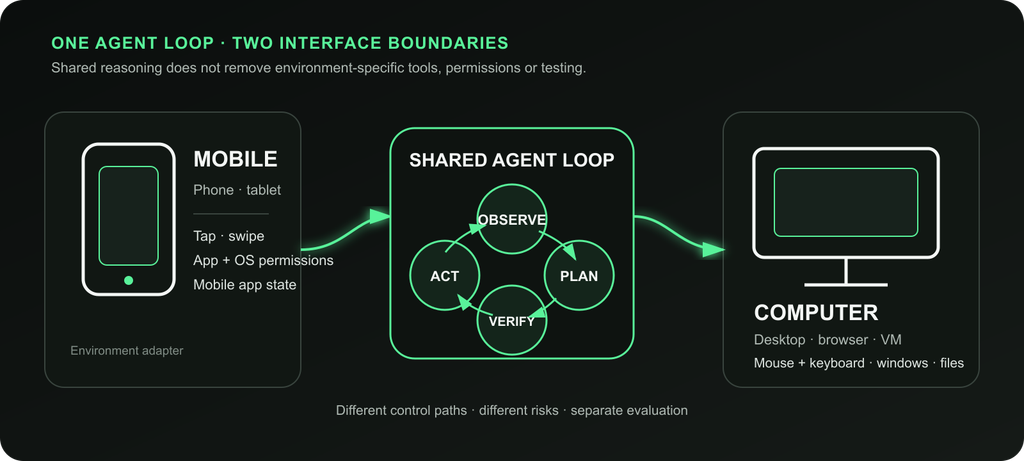
The simplest difference in mobile AI agent vs computer use agent is the operating environment. A mobile AI agent is built for smartphones, tablets, emulators, and mobile app workflows. It reads mobile screens, interprets app layouts, and acts through taps, swipes, mobile typing, app switching, notifications, permissions, and sometimes mobile-specific APIs.

A computer use agent is built for desktops, browsers, laptops, cloud workstations, or virtual machines. It observes screens or browser state and acts through mouse movement, clicks, typing, scrolling, file access, browser navigation, and desktop software interaction.

The two systems often use the same high-level loop:

  1. Receive a user goal.
  2. Observe the interface.
  3. Interpret the current state.
  4. Plan the next step.
  5. Take an action.
  6. Check the result.
  7. Repeat until the task is complete or needs human approval.

The reason they are not interchangeable is that mobile and desktop environments represent work differently. A mobile checkout flow may hide options behind bottom sheets, permission prompts, biometric confirmations, and app-specific gestures. A desktop workflow may involve browser tabs, spreadsheets, downloaded files, enterprise dashboards, and keyboard shortcuts.

flowchart TD

A useful shorthand is this: mobile agents are more device-contextual, while computer use agents are more work-contextual. A mobile automation agent may be better for app testing, field service, travel, accessibility, or mobile commerce. A desktop automation agent may be better for research, data entry, spreadsheets, document processing, support operations, and browser-based workflows.

Mobile AI agent vs computer use agent: Definitions and technical boundaries

A mobile AI agent is an AI system designed to understand and operate mobile app or mobile OS environments. It may use screenshots, OCR, vision-language models, Android accessibility data, UI hierarchy trees, app state, or device metadata to understand what is happening on screen.

Mobile agents can act through:

  • Taps.
  • Swipes.
  • Long presses.
  • Text entry.
  • App switching.
  • Menu navigation.
  • Permission handling.
  • Notification interaction.
  • App-exposed functions where available.

The AndroidWorld benchmark is a useful reference point because it evaluates autonomous agents on real Android tasks across multiple apps. It highlights both the promise and the difficulty of mobile GUI automation: mobile agents can navigate real apps, but success depends on UI understanding, task length, app design, and action reliability.

A computer use agent is an AI system that operates a desktop, browser, or virtual computer. Anthropic describes computer use as allowing a model to use a computer by looking at the screen, moving a cursor, clicking buttons, and typing text, as described in Anthropic’s computer use announcement. OpenAI described Operator as an agent that could use its own browser to view webpages and interact through typing, clicking, and scrolling in OpenAI’s Operator announcement.

Computer use agents can act through:

  • Mouse movement.
  • Single and double clicks.
  • Keyboard input.
  • Scrolling.
  • Dragging.
  • Copy and paste.
  • Browser tab navigation.
  • File upload and download.
  • Document editing.
  • Spreadsheet interaction.
  • Terminal or code execution when allowed.

The technical boundary is not intelligence alone. A highly capable model can still fail if the interface layer is unstable, the permission model is restrictive, or the agent cannot reliably verify the result. That is why GUI control is powerful but fragile. It can work where APIs do not exist, but it is more vulnerable to UI changes, loading delays, authentication friction, ambiguous buttons, and malicious content.

Term Meaning Practical scope
AI agent A system that plans, uses tools, acts, observes, and iterates Broad category covering chat, tools, APIs, GUI control, and automation
GUI agent An agent that controls graphical interfaces Includes mobile, browser, desktop, and app automation
Mobile AI agent An agent built for smartphone or tablet environments Best for mobile apps, sensors, notifications, and device workflows
Computer use agent An agent built for desktop, browser, or virtual computer environments Best for knowledge work, SaaS, documents, files, and browser tasks
Mobile automation agent A mobile AI agent focused on repeatable app or device workflows Common in QA, field work, app support, and mobile commerce
Desktop automation agent A computer use agent focused on desktop or browser workflow automation Common in back-office, research, support, and data entry

Mobile AI agent vs computer use agent: Side-by-side AI agent comparison

A strong AI agent comparison starts with environment fit. The same natural-language request can require very different engineering depending on where the agent must act.

Dimension Mobile AI agent Computer use agent Practical implication
Primary environment Smartphone, tablet, emulator, mobile OS Desktop, browser, laptop, virtual computer Choose based on where the workflow actually happens
Main input actions Tap, swipe, long press, mobile typing Click, type, scroll, drag, keyboard shortcuts Action models are not interchangeable
Screen design Small screens, app-specific layouts, bottom sheets, gestures Larger screens, browser tabs, windows, documents Desktop often supports denser workflows
Context Location, camera, microphone, Bluetooth, contacts, calendar, notifications Files, SaaS tools, browser sessions, spreadsheets, internal systems Mobile is stronger for physical context; desktop is stronger for work context
Permissions Mobile app permissions, accessibility permissions, OS sandboxing Browser permissions, file access, OS permissions, VM/container permissions Both need least-privilege access
Best use cases Mobile QA, field service, travel, app troubleshooting, accessibility Research, reporting, document processing, back-office updates, support operations Many businesses need a hybrid approach
Reliability challenge OS restrictions, app UI changes, gesture complexity, device variance Web changes, auth flows, file risk, desktop state complexity APIs are usually more reliable when available
Security risk Personal data, messages, location, payment apps, sensors Enterprise data, email, local files, SaaS sessions, documents Human approval is essential for high-impact actions
Deployment On-device, emulator, device farm, hybrid cloud Local desktop, remote browser, VM, container, cloud workstation Desktop/browser agents can often scale more easily in cloud environments

A mobile AI agent may be the right choice for a technician filling out inspection forms in a field service app. A computer use agent may be the right choice for a support team that needs to read tickets, search internal documentation, update a CRM, and draft customer responses.

The overlap appears in hybrid workflows. A travel planning task might begin in a browser, continue through a mobile airline app, and end with notifications on a phone. Customer support may require reproducing a bug on a mobile emulator while updating records on a desktop dashboard. In these cases, the better design is not mobile-only or desktop-only. It is a controlled agent system that combines mobile control, browser control, APIs, and human review.

Mobile AI agent vs computer use agent architecture and reliability

GUI agent architecture layers

The architecture of mobile AI agent vs computer use agent follows the same conceptual loop, but each layer connects to a different execution environment.

Perception layer

A mobile AI agent may perceive state through screenshots, OCR, visual reasoning, accessibility APIs, Android UI hierarchy data, app metadata, or testing logs. Structured UI information can make automation more reliable than raw pixel coordinates because the agent can identify buttons, text fields, and containers more directly.

A computer use agent may perceive screenshots, browser DOM data, accessibility trees, OCR output, file contents, terminal output, or application state. Anthropic’s computer use tool documentation describes an agent loop in which the model requests computer actions, the application executes them, and observations are returned to the model.

Planning and memory

Both agent types need planning. The agent must translate a goal like "prepare the report" or "complete the app flow" into steps. It must also remember what it has already done, what state it observed, what assumptions it made, and what still requires confirmation.

Useful memory can include:

  • Task state.
  • User preferences.
  • Prior successful workflows.
  • App or website navigation patterns.
  • Temporary credentials or session context, if allowed.
  • Verification notes and final outcomes.

Memory must be governed carefully. A mobile device may contain contacts, messages, photos, location history, and sensitive apps. A desktop may contain enterprise documents, email, internal dashboards, and local files. In both cases, more memory is not automatically better. The safer design stores only what is necessary and makes access visible, revocable, and auditable.

Action layer

The action layer is where the largest practical differences appear.

A mobile AI agent acts through taps, swipes, typing, permission dialogs, app switching, and mobile-specific automation tools. It may run on a real device, emulator, device cloud, or a hybrid on-device plus cloud architecture.

A computer use agent acts through mouse, keyboard, browser, file, and sometimes API actions. It may run inside a local workstation, a cloud browser, a virtual machine, or a container. Anthropic recommends virtualized or containerized environments with minimal privileges for computer use, especially when agents interact with untrusted interfaces.

Tool and API integration

GUI control should not be the default for every task. APIs are usually more stable, easier to audit, and less likely to break when a button moves. The best production systems often combine:

  • GUI control for interfaces without APIs.
  • APIs for structured operations.
  • Retrieval tools for knowledge.
  • Code execution for transformations.
  • Databases for verified state.
  • Browser automation for web-only flows.
  • Human approval for high-impact decisions.

Anthropic’s guidance on building effective agents emphasizes matching agent designs to tasks where open-ended reasoning and tool use are genuinely needed. That is a critical point for both mobile and desktop automation: use an agent when the task requires adaptation, not when a deterministic script or stable API would be safer.

flowchart LR

Reliability remains one of the biggest limitations. GUI agents can misread screens, click the wrong control, fail to notice loading states, or follow malicious instructions embedded in webpages, emails, documents, or app content. Benchmarks such as AndroidWorld, OSWorld, and WebArena help measure progress, but benchmark success does not guarantee safe production behavior in real user accounts.

Mobile AI agent vs computer use agent use cases, risks, and selection criteria

The best AI agent use cases are specific, supervised, and bounded. The wrong use cases are broad, high-stakes, irreversible, or exposed to adversarial content without controls.

Best-fit mobile AI agent use cases

A mobile AI agent is strongest when the workflow depends on mobile apps or device context.

Common examples include:

  • Mobile app QA testing.
  • App onboarding flow validation.
  • Field service form completion.
  • Mobile device troubleshooting.
  • Accessibility support for app navigation.
  • Travel workflows involving mobile boarding passes or ride apps.
  • Mobile commerce comparison and cart preparation.
  • Smart hardware setup through companion apps.
  • Notification summarization and response drafting, with permission controls.

A mobile automation agent is especially useful in QA because it can operate apps on emulators or real devices, reproduce flows, collect screenshots, and test UI behavior across versions. It can also help support teams understand what a user sees on a phone rather than guessing from a desktop dashboard.

Best-fit computer use agent use cases

A computer use agent is strongest when the workflow depends on browsers, files, SaaS tools, and documents.

Common examples include:

  • Browser research.
  • Data entry.
  • CRM updates.
  • Spreadsheet cleanup.
  • Report generation.
  • Invoice processing.
  • Support ticket triage.
  • Document summarization.
  • Web app QA testing.
  • Internal knowledge search.
  • Developer workflows involving IDEs, terminals, logs, and documentation.

A desktop automation agent is often easier to scale in a business setting because it can run in remote browsers, virtual machines, or controlled workspaces. That makes it attractive for back-office tasks where the environment can be locked down and monitored.

Security and privacy risks

Agent security approval gate

Mobile AI agents and computer use agents both create a powerful risk: they can read untrusted content and take actions on behalf of a user. The most important threat is prompt injection, where malicious instructions are hidden in content the agent sees. OWASP maintains a useful reference on prompt injection, and the risk becomes more serious when the agent can access tools, accounts, files, or payment flows.

Key risks include:

  • Prompt injection from webpages, emails, documents, app messages, and UI text.
  • Sensitive information exposure.
  • Unauthorized purchases or account changes.
  • Credential leakage.
  • Overbroad device or file permissions.
  • Malicious UI design that tricks the agent.
  • Ambiguous accountability when an agent acts through a user account.
  • Compliance problems in enterprise or regulated environments.

OpenAI’s Operator announcement described safety controls such as user confirmations and takeover mode for sensitive data. These patterns are useful beyond any single product. Agents should not enter passwords, approve payments, delete files, send sensitive messages, or modify business records without appropriate user confirmation and policy enforcement.

The NIST AI Risk Management Framework is also relevant for organizations building governed AI systems. It emphasizes risk mapping, measurement, management, and governance, which align well with agent deployment requirements.

Risk Mobile AI agent exposure Computer use agent exposure Recommended mitigation
Prompt injection Messages, app content, webpages, notifications Webpages, email, documents, SaaS content Treat external content as untrusted and restrict tool authority
Sensitive data Contacts, photos, location, messages, mobile apps Files, email, SaaS records, browser sessions Use least privilege, redaction, and local processing where appropriate
Unauthorized action Purchases, bookings, permission changes Orders, emails, file changes, enterprise updates Require confirmation gates and spending or action limits
Permission abuse Accessibility access, sensors, notifications File system, browser, OS, network access Use scoped, revocable, logged permissions
UI fragility App updates, device differences, custom UI Website changes, desktop state, popups Use evals, retries, structured UI data, and API fallback
Compliance risk Personal and regulated mobile data Enterprise and regulated business data Add audit logs, policy controls, and review workflows

Selection criteria

Choose a mobile AI agent when:

  • The workflow primarily happens inside mobile apps.
  • The task depends on phone context such as location, camera, notifications, or device state.
  • The use case involves mobile QA, field service, accessibility, travel, app support, or smart hardware setup.
  • The agent must work on real phones, tablets, or emulators.

Choose a computer use agent when:

  • The workflow primarily happens in browsers, desktop apps, files, spreadsheets, or SaaS systems.
  • The task involves research, reporting, data entry, document processing, customer support, or developer workflows.
  • The agent can run safely in a VM, container, remote browser, or controlled desktop.
  • APIs are unavailable, incomplete, or insufficient for the full workflow.

Use a hybrid approach when:

  • The user journey crosses mobile and desktop.
  • A support team needs mobile reproduction and desktop case management.
  • A workflow starts in an app and finishes in a browser, or the reverse.
  • The product strategy requires cross-device AI operation.

Do not use an autonomous GUI agent when:

  • A stable API can complete the task more safely.
  • The action is irreversible or high-stakes.
  • The environment is adversarial and cannot be sandboxed.
  • The agent needs unrestricted access to sensitive accounts.
  • The business cannot provide audit logs, approvals, monitoring, and rollback procedures.

flowchart TD

Mobile AI agent vs computer use agent FAQs

Are mobile AI agents and computer use agents the same?

No. They share agentic architecture, but they operate in different environments. A mobile AI agent is optimized for mobile apps, taps, swipes, permissions, and device context. A computer use agent is optimized for desktops, browsers, files, SaaS tools, and keyboard or mouse actions.

Can a mobile AI agent control any app?

Not reliably. Mobile OS sandboxing, app permissions, custom UI components, app-store restrictions, authentication flows, and anti-abuse protections can limit what a mobile AI agent can do. Android environments may offer more automation pathways than iOS in some contexts, but every deployment still requires careful permissioning and testing.

Can a computer use agent control any website?

A computer use agent can interact with many websites through browser actions, but it cannot guarantee success on every site. CAPTCHA, multifactor authentication, dynamic UI changes, popups, session timeouts, and safety restrictions can interrupt automation.

Which is better for business automation?

A computer use agent is usually better for desktop, browser, and back-office automation. A mobile AI agent is better for mobile app workflows, field operations, mobile QA, device support, and app-first user journeys. Many organizations will eventually need both.

Which is better for mobile app testing?

A mobile AI agent or mobile automation agent is the better fit because it operates directly in mobile environments. It can test app screens, flows, permissions, gestures, and device-specific behavior more naturally than a desktop-focused agent.

Should teams use GUI agents or APIs?

Teams should use APIs when APIs are stable, available, and sufficiently complete. GUI agents are valuable when APIs do not exist, when workflows require visual navigation, or when an agent must operate the same interface a human uses. The strongest architectures combine GUI control with APIs, tools, permissions, and human-in-the-loop safeguards.

What is the future of mobile AI agent vs computer use agent?

The future is hybrid. Real workflows span phones, browsers, desktops, APIs, cloud services, and connected devices. The most useful systems will likely combine mobile control, desktop control, tool access, on-device AI, cloud reasoning, hardware-backed privacy, audit logs, and explicit user approval for sensitive actions.

For companies building AI agent hardware and software, the core challenge is not only making agents more capable. It is making them understandable, permissioned, observable, and trustworthy enough to operate real interfaces safely.

Share:
Natalie
Natalie

Natalie Yevtushyna AI writer — daily AI insights, tool breakdowns and briefings at Aiden covering what's actually moving in artificial intelligence.