Claude vs GPT-5 for Business Automation
Claude and GPT-5 solve different sides of business automation: Claude is usually stronger for governed document-heavy knowledge work, while GPT-5 is usually stronger for broad, tool-heavy, multimodal, and coding-centered automation.
For a practical business automation AI comparison, the right question is not simply "Which model is smarter?" The better question is: "Which model fits the workflow, data sensitivity, integration stack, and approval process?" In business automation 2026, companies are moving beyond chat prompts toward AI agents that retrieve information, use tools, execute multi-step tasks, and escalate work to humans when risk is high. That shift makes Claude vs GPT-5 an architecture decision, not just an AI model comparison for business.
Business automation AI comparison: Why Claude vs GPT-5 depends on workflow design
The strongest business automation AI comparison starts with workflow design because enterprise value comes from repeatable execution, not one-off answers. Claude and GPT-5 can both summarize, draft, reason, code, and analyze information, but they tend to shine in different automation patterns.
Claude is often the better starting point when work depends on careful reading, long-context reasoning, sensitive documents, and structured interpretation. That makes it a strong candidate for legal, HR, compliance, research, policy review, SOP analysis, and executive briefing workflows. Anthropic’s enterprise positioning emphasizes governance, identity management, audit tooling, data controls, configurable retention, and not using customer prompts and responses for training by default.
GPT-5 is often the better starting point when automation needs broad tool use, multimodal inputs, coding, data analysis, file work, workspace agents, and API-driven execution. OpenAI positions GPT-5 as a unified system with routing, deeper reasoning modes, improved coding, writing, visual perception, and agentic tool use. For teams building an AI assistant for business tasks across sales, marketing, support, engineering, operations, and admin work, GPT-5 has a strong general-purpose advantage.
A modern enterprise may need both. Claude can act as the careful reasoning layer for sensitive knowledge workflows, while GPT-5 can power dynamic automation across apps, data, code, and multimodal business tasks.
| Decision area | Claude is usually stronger when… | GPT-5 is usually stronger when… | Practical recommendation |
|---|---|---|---|
| Document analysis | The workflow uses contracts, policies, research, SOPs, or long internal documents | Documents are part of a broader tool-based workflow | Test both on real company files |
| Agentic execution | The workflow needs careful interpretation and governed knowledge work | The workflow needs app actions, tools, scheduling, files, Slack-style collaboration, or API execution | Choose based on integrations and controls |
| Coding | The work involves code review, architecture explanation, and technical documentation | The work involves end-to-end coding, debugging, and developer tooling | Benchmark on your own repositories |
| Multimodal work | Text-heavy analysis is the priority | Images, files, voice, data, and visual perception matter | GPT-5 is likely the better first test |
| Governance | Sensitive document reasoning is central | Broad productivity agents need workspace controls | Verify enterprise security documentation directly |
| Scalability | The company wants controlled knowledge workflows | The company wants cross-functional AI productivity | Use a model portfolio when stakes are high |
The biggest mistake is treating "best AI for business automation" as a universal ranking. A support team, legal team, and engineering team may all need different automation behavior. A procurement leader should therefore evaluate models against actual workflows, not generic benchmark headlines.
Business automation AI comparison: What business automation 2026 requires from AI models
Business automation 2026 is increasingly agentic. The market has moved from "AI writes a response" to "AI plans, retrieves, checks, drafts, routes, escalates, and records the result." That evolution changes the role of AI models. Claude and GPT-5 are reasoning engines, but enterprise automation also needs orchestration, permissions, monitoring, approvals, and rollback options.
Vendor and analyst research points in the same direction: enterprises are prioritizing AI agents, governance, lifecycle management, workflow orchestration, and human oversight. UiPath’s 2026 automation trends report, for example, emphasizes agentic automation, governance, and operating-model reinvention. SAP has also announced plans to bring Claude into SAP Business AI Platform through Joule and Joule agents, showing how model capabilities are being embedded into enterprise systems rather than used only through standalone chat interfaces.
A strong enterprise AI automation architecture typically includes five layers:
- Model layer: Claude, GPT-5, or another model handles reasoning, language, classification, extraction, and planning.
- Agent layer: The agent defines goals, retrieves context, selects tools, and manages task steps.
- Integration layer: Connectors link the agent to CRM, ERP, ticketing, files, email, chat, code repositories, or internal databases.
- Governance layer: Identity, role-based access, retention, audit logs, human approvals, and data boundaries control risk.
- Monitoring layer: Evaluations, analytics, feedback loops, incident review, and version history keep automation reliable.
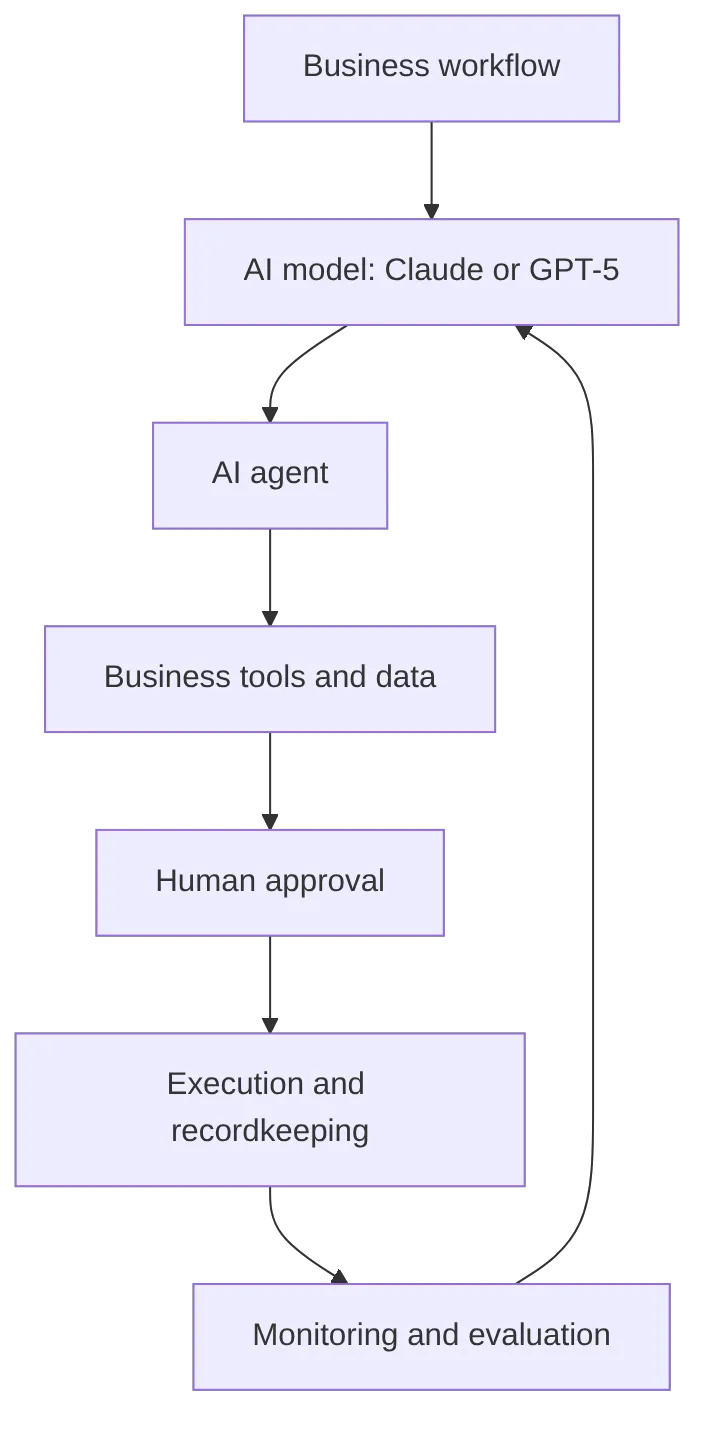
This structure matters because workflow automation AI can fail in ways that simple chat does not. A bad answer in a chat window is a quality issue. A bad answer connected to a CRM, payment system, HR database, code repository, or customer support tool can become an operational, legal, financial, or reputational problem.
Claude and GPT-5 both need guardrails. The model should not be allowed to approve refunds, change employee records, send regulated communications, merge code, or update financial systems without clear permissions and human-in-the-loop review. The more powerful the AI assistant becomes, the more important governance becomes.
For an AI agent platform like Aiden, the strategic takeaway is especially important: the model is not the full automation product. Business value comes when models are embedded into agents that can operate across software systems, devices, local environments, and human approval loops. That does not require claiming any specific Aiden product capability. It simply reflects the direction of enterprise AI automation: model choice must connect to where and how agents execute work.
Business automation AI comparison: Claude strengths, limitations, and best-fit workflows
Claude is strongest in a business automation AI comparison when the work requires careful interpretation, long-context reasoning, structured writing, and governance-sensitive knowledge work. It is not only a chatbot for drafting text. In enterprise settings, Claude is often evaluated as a controlled reasoning assistant for documents, policies, technical material, and internal knowledge.
Claude advantages for enterprise AI automation
Claude is a strong candidate for document-heavy automation because many business tasks depend on understanding long, dense, and nuanced material. Examples include:
- Contract review and clause extraction.
- HR policy Q&A and handbook comparison.
- Compliance memo drafting.
- SOP analysis and process documentation.
- Research synthesis.
- Board briefing preparation.
- Engineering documentation review.
- Customer escalation summaries that require policy interpretation.
This makes Claude especially useful when accuracy, caution, and structured reasoning matter more than speed or creative variety. In legal, HR, finance, and policy workflows, conservative behavior can be a feature rather than a flaw.
Claude Enterprise is also positioned around enterprise controls, including admin management, identity provider sign-in, audit infrastructure, data controls, and configurable retention. Those details matter because sensitive departments need more than output quality. They need procurement confidence, access control, offboarding, retention policies, and auditability.
Claude limitations for workflow automation AI
Claude is not automatically the best AI for every business automation workflow. Public enterprise pricing can be less transparent. Exact model availability and context-window details should be verified directly before procurement. Claude may also feel more cautious in fast-moving creative, multimodal, or tool-heavy workflows where teams want speed, experimentation, image work, data actions, and broad app connectivity.
Claude also still needs orchestration. It may reason well over documents, but production automation requires connectors, permissions, retrieval systems, monitoring, test sets, fallback behavior, and human approvals. No model removes the need for workflow design.
Best Claude use cases by department
| Department | Claude fit | Example automation |
|---|---|---|
| Legal | High | Contract review, clause comparison, legal memo drafting, policy Q&A |
| HR | High | Handbook Q&A, onboarding SOPs, policy interpretation, review summaries |
| Operations | High | SOP cleanup, process analysis, risk review, internal documentation |
| Finance | Medium-high | Expense policy checks, financial narrative review, invoice explanation |
| Engineering | High | Code review, architecture summaries, documentation, technical analysis |
| Customer support | Medium-high | Policy-based response drafting, escalation summaries, knowledge-base interpretation |
| Marketing | Medium | Long-form thought leadership, research summaries, structured editing |
Claude is often the better first test when the automation is document-heavy, regulated, or sensitive. That does not mean Claude is always more accurate than GPT-5. It means Claude’s product positioning and typical strengths align well with workflows where controlled reasoning over internal knowledge is the main job.
Business automation AI comparison: GPT-5 strengths, limitations, and best-fit workflows
GPT-5 is strongest in a business automation AI comparison when teams need broad productivity, coding, data work, multimodal inputs, and agentic task execution. OpenAI presents GPT-5 as a unified system that can route between faster responses and deeper reasoning depending on the task. For business users, that means GPT-5 is designed less like a narrow document assistant and more like a flexible AI operating layer.
GPT-5 advantages for AI assistant for business tasks
GPT-5 is a strong fit for cross-functional teams because business automation often involves more than text. A sales workflow may require account research, CRM notes, proposal drafting, email personalization, and follow-up scheduling. A support workflow may involve ticket history, attachments, policy lookup, response drafting, and escalation. An engineering workflow may require code generation, debugging, test writing, documentation, and repository analysis.
GPT-5 is particularly attractive where automation includes:
- Coding and debugging.
- Data analysis and spreadsheet interpretation.
- File uploads and document work.
- Image and visual understanding.
- Voice and multimodal interactions.
- Workspace agents.
- API-driven workflow automation.
- Tool use across apps and internal systems.
OpenAI’s enterprise help materials also describe workspace agents that can use tools, apps, files, custom MCP servers, scheduled recurring runs, Slack-style channels, version history, and analytics. Those capabilities are important for teams that want automation to move from chat assistance into repeatable agentic work.
GPT-5 limitations for enterprise AI automation
GPT-5’s breadth is also a management challenge. A powerful assistant connected to files, tools, chat channels, and APIs needs clear boundaries. Enterprises must handle data access, prompt injection, tool misuse, hallucinated actions, cost escalation, and unclear accountability.
Model naming and availability can also change quickly across product surfaces, tiers, and APIs. Enterprise teams should verify current model names, defaults, usage limits, and admin settings before finalizing an AI model comparison for business.
Router-based behavior can be useful, but it may make outcomes feel less transparent than choosing a single fixed model. Procurement and technical teams should test GPT-5 on repeatable evaluation sets, not just ad hoc prompts.
Best GPT-5 use cases by department
| Department | GPT-5 fit | Example automation |
|---|---|---|
| Operations | High | Reporting, workflow planning, app-assisted task execution |
| Customer support | High | Response drafting, ticket summaries, multimodal case review |
| Sales | High | Account research, personalized outreach, CRM note summaries |
| Marketing | High | Campaign concepts, content repurposing, creative drafts |
| Finance | Medium-high | Spreadsheet analysis, variance explanations, report drafting |
| HR | Medium-high | Onboarding drafts, employee communications, scheduling support |
| Engineering | High | Code generation, debugging, tests, documentation |
| Executive admin | High | Meeting summaries, research briefs, calendar and email assistance |
GPT-5 is often the better first test when the workflow is tool-heavy, cross-functional, coding-heavy, data-rich, or multimodal. It is also a strong choice when the company wants one AI assistant for business tasks across many teams.
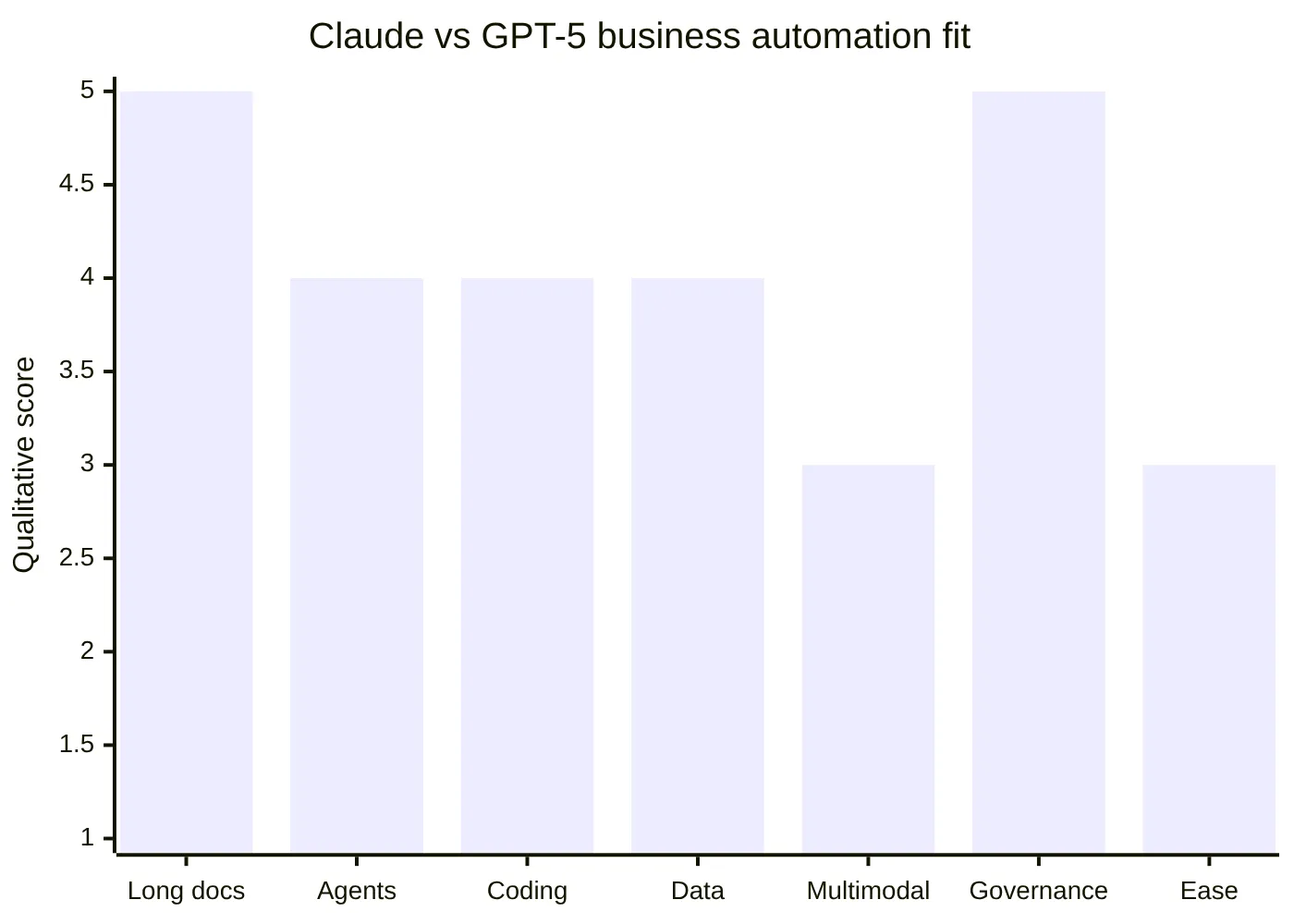
The chart above uses a qualitative analyst assessment based on public product positioning, not a benchmark dataset. Claude scores highest where business automation depends on long documents and governance-sensitive reasoning. That is why many enterprises should test Claude first for policy, legal, HR, compliance, and structured internal knowledge workflows.
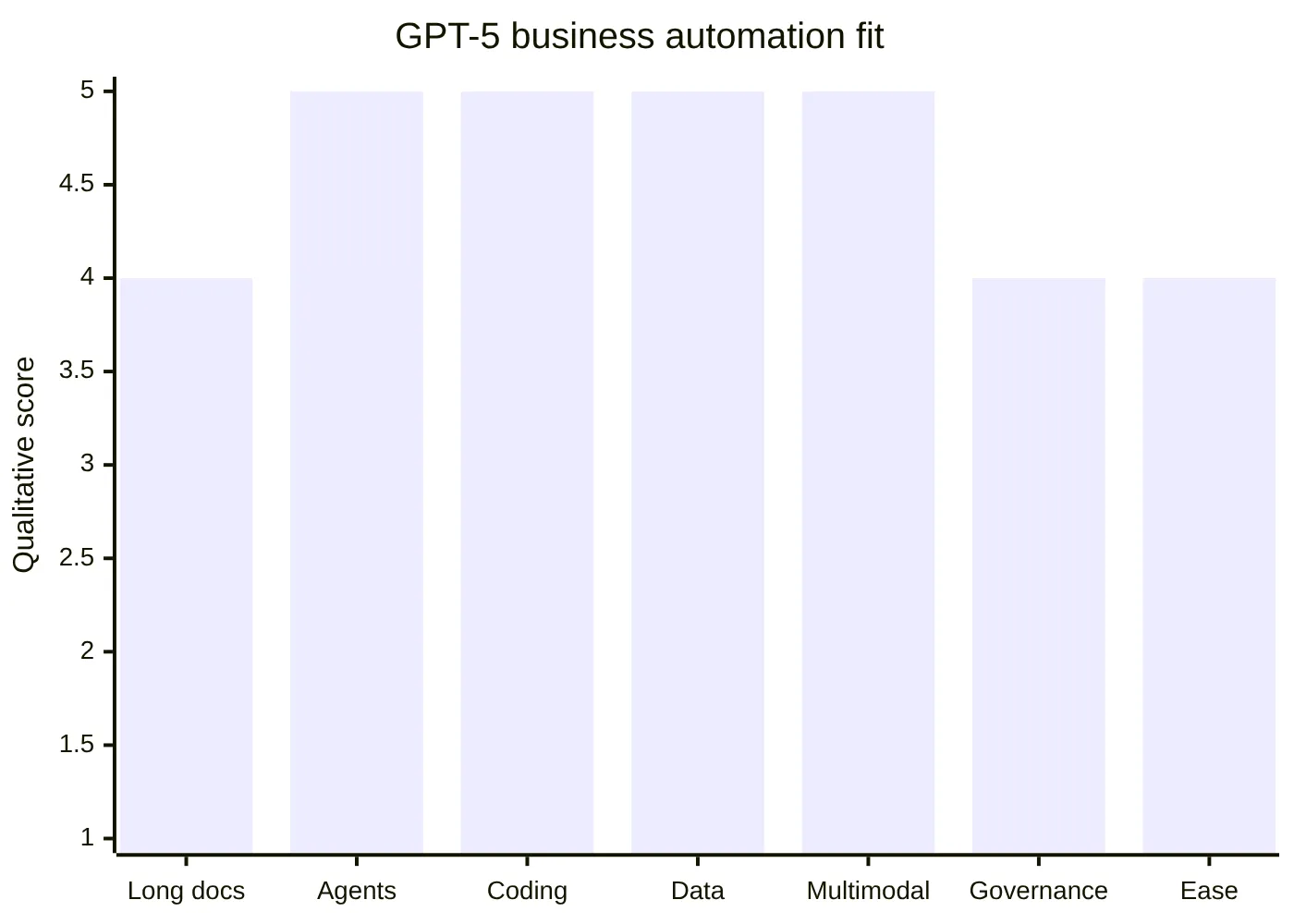
GPT-5 scores highest where business automation requires broad execution across data, tools, code, multimodal inputs, and workspace agents. The practical lesson is not that GPT-5 replaces Claude. It is that GPT-5 often fits broader automation patterns, while Claude often fits deeper governed reasoning patterns.
Business automation AI comparison: How to choose the best AI for business automation
The best AI for business automation is the one that passes real workflow tests under real constraints. A polished demo is not enough. Enterprises should test Claude and GPT-5 with internal documents, representative prompts, business tools, data boundaries, human approval points, and measurable outcomes.
Step 1: Define the workflow before choosing the model
Start by naming the workflow in operational terms. Avoid vague goals such as "use AI for productivity." Define the exact process:
- "Summarize customer support tickets and draft approved responses."
- "Extract renewal risks from enterprise contracts."
- "Generate weekly sales account briefs from CRM notes."
- "Review pull requests for security and documentation issues."
- "Draft onboarding plans from role descriptions and internal policies."
Once the workflow is clear, classify it by complexity and risk.
| Workflow type | Better first test | Reason |
|---|---|---|
| Long legal or policy document review | Claude | Strong fit for dense, sensitive knowledge work |
| Sales outreach and CRM productivity | GPT-5 | Strong fit for fast drafting and tool-connected workflows |
| Code generation and debugging | GPT-5 and Claude | Both are strong; test on your repositories |
| HR handbook Q&A | Claude | Strong fit for structured policy interpretation |
| Marketing campaign ideation | GPT-5 | Strong fit for broad creative and multimodal work |
| Executive research briefs | Claude and GPT-5 | Claude for long synthesis, GPT-5 for broad research and presentation support |
| Support ticket automation | GPT-5 and Claude | GPT-5 for speed and tools, Claude for policy-heavy cases |
Step 2: Classify data sensitivity
Data sensitivity determines governance requirements. A low-risk marketing outline and a high-risk employee relations summary should not use the same automation rules.
Sensitive workflows should require enterprise-grade controls such as SSO, role-based access, retention settings, admin management, audit logs, and human review. Claude’s enterprise positioning is strong in this area. GPT-5’s enterprise ecosystem also includes workspace controls and agent management capabilities, but buyers should verify current security and privacy details directly.
Step 3: Map integrations and execution points
Workflow automation AI becomes useful when it connects to business systems. List every system the AI needs to read from or write to:
- CRM.
- ERP.
- Ticketing system.
- File storage.
- Email.
- Calendar.
- Chat.
- Data warehouse.
- Code repository.
- HRIS.
- Finance tools.
- Internal knowledge base.
- Device, kiosk, desktop, or edge environment.
This is where the model-to-agent distinction matters. Claude and GPT-5 may answer questions, but agents execute workflows. If the business needs software actions, local task execution, or hardware-adjacent automation, the surrounding agent architecture matters as much as the model.
Step 4: Add human approval where risk is high
Human-in-the-loop design is not a sign that AI failed. It is how enterprises make automation safe. The AI can draft, summarize, classify, and recommend. Humans should approve high-impact actions such as:
- Sending legal or regulated communications.
- Updating financial records.
- Changing employee data.
- Issuing refunds or credits.
- Publishing customer-facing claims.
- Merging production code.
- Modifying access permissions.
- Executing physical or device-level actions.
This is especially important for AI agent hardware and software environments. When agents can interact with devices, local systems, or operational workflows, approval logic must be explicit.
Step 5: Evaluate outputs with a scorecard
A reliable AI model comparison for business should include more than subjective preference. Use a scorecard with clear criteria.
| Evaluation criterion | What to measure |
|---|---|
| Accuracy | Did the answer match trusted internal references? |
| Completeness | Did the model include all required details? |
| Hallucination rate | Did it invent facts, citations, policies, or actions? |
| Latency | Was the response fast enough for the workflow? |
| Cost | What is the expected subscription, API, and review cost? |
| Tool reliability | Did the agent use the right system in the right order? |
| Security | Did it respect permissions and data boundaries? |
| Auditability | Can the company trace inputs, outputs, approvals, and actions? |
| User adoption | Did employees trust and use the output? |
| Maintainability | Can prompts, connectors, and evaluations be updated easily? |
The winning model is the one that performs well under your workflow conditions. For some companies, that will be Claude. For others, GPT-5. For many enterprises, it will be a model-flexible architecture that uses multiple AI systems with clear routing rules.
Business automation AI comparison: Final recommendation for enterprise AI automation
A balanced business automation AI comparison gives Claude the advantage for governed knowledge work and gives GPT-5 the advantage for broad agentic automation. Claude is the better first candidate for long-context documents, legal and HR policies, compliance-sensitive summaries, structured research, and careful internal knowledge workflows. GPT-5 is the better first candidate for coding, data analysis, multimodal productivity, workspace agents, sales and marketing workflows, customer support acceleration, and cross-tool business execution.
The most mature answer is often not "Claude or GPT-5." It is "Claude where careful reasoning is needed, GPT-5 where broad execution is needed, and a governed automation layer around both."
Use Claude when the task is document-heavy, policy-sensitive, or risk-aware. Use GPT-5 when the task is dynamic, multimodal, coding-heavy, data-rich, or tool-connected. Use both when different departments have different automation needs.
For business automation 2026, the model is only one layer. The durable advantage comes from workflow design, agent orchestration, access control, human approval, monitoring, and the ability to adapt as models change. Companies that build model-flexible automation strategies will be better prepared than companies that bet everything on one assistant.
For organizations exploring AI agent automation strategies, the practical next step is to map where AI agents can reduce repetitive work, where humans must stay in control, and where model choice should remain flexible. That workflow-first approach is the safest path to enterprise AI automation that actually scales.
For a deeper look at how AI agents fail in production and what patterns actually work, see Why Most AI Agents Fail in Production. For teams evaluating agent frameworks to build on top of these models, see How to Compare AI Agent Frameworks in 2026.
Related posts
Why CrewAI beats LangChain for multi-agent work
CrewAI vs LangChain compared by workflow shape, showing when role-based agents beat graph orchestration for multi-agent systems.
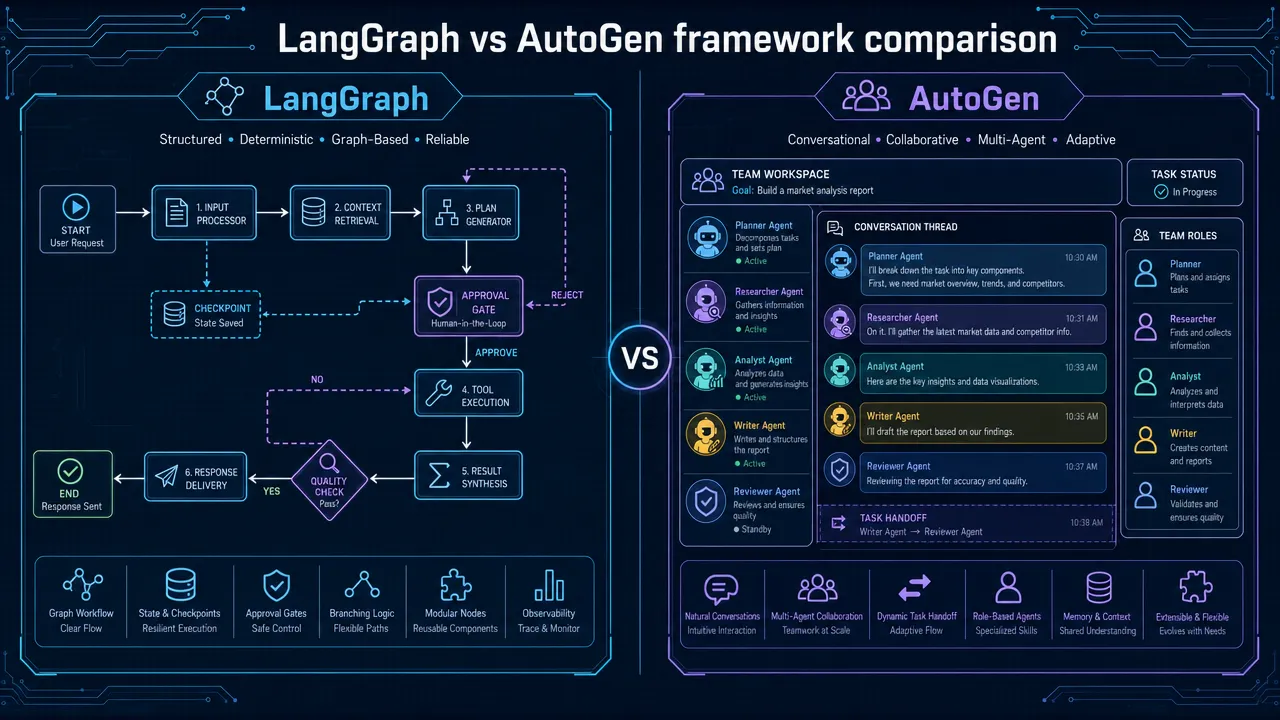
LangGraph vs AutoGen: Which AI Agent Framework Handles Complex Workflows in 2026?
LangGraph vs AutoGen comparison: assess state, checkpoints, human review, and collaboration to choose the right AI agent framework
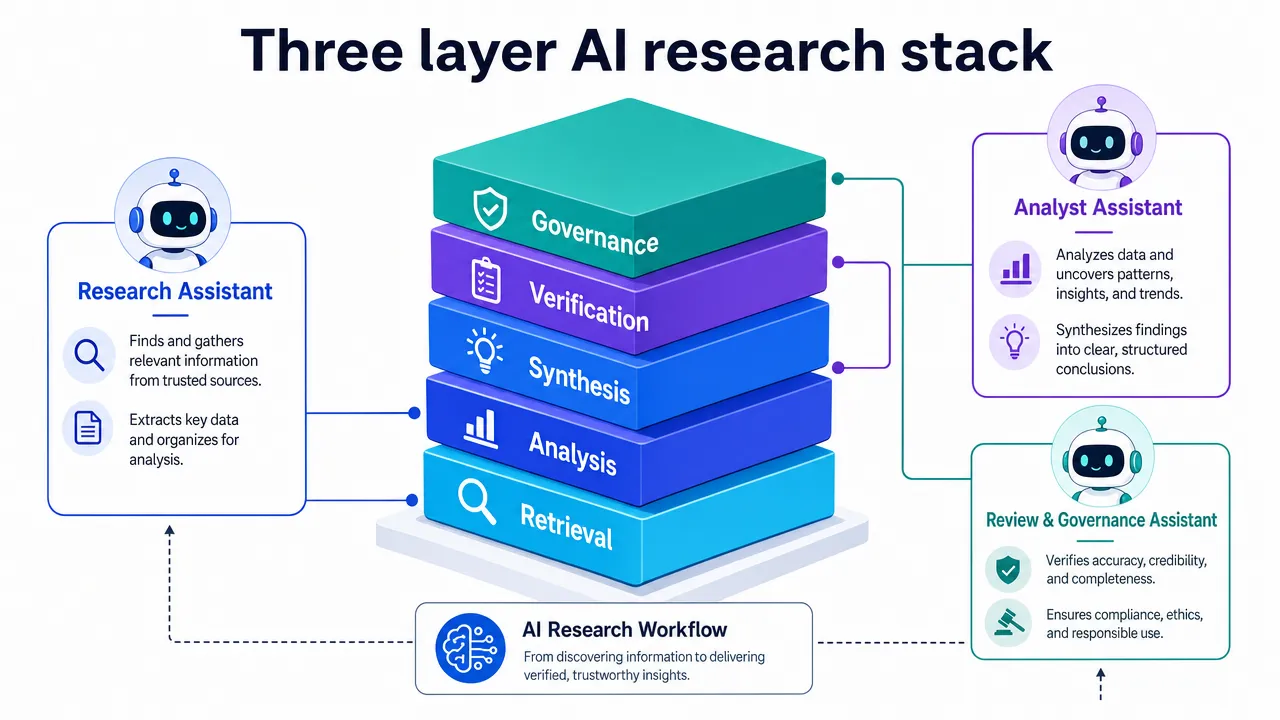
Perplexity vs ChatGPT vs Claude: Which AI is Best for Research in 2026?
Perplexity vs ChatGPT vs Claude research 2026: compare retrieval, analysis, synthesis, citations, and verification workflows.