Phone AI Agent vs AI Agent Phone: What’s the Difference?

An "AI agent phone" is a new phone built specifically for AI agents — OpenAI’s version, announced with Qualcomm and MediaTek, won’t ship until around 2028. A "phone AI agent" is an AI agent that works on a phone you already own — no new hardware required. Aiden is built in the second category: it works on the phone you have today.

The two phrases use the same three words in a different order, and that order changes everything about what you’re actually buying or building toward.

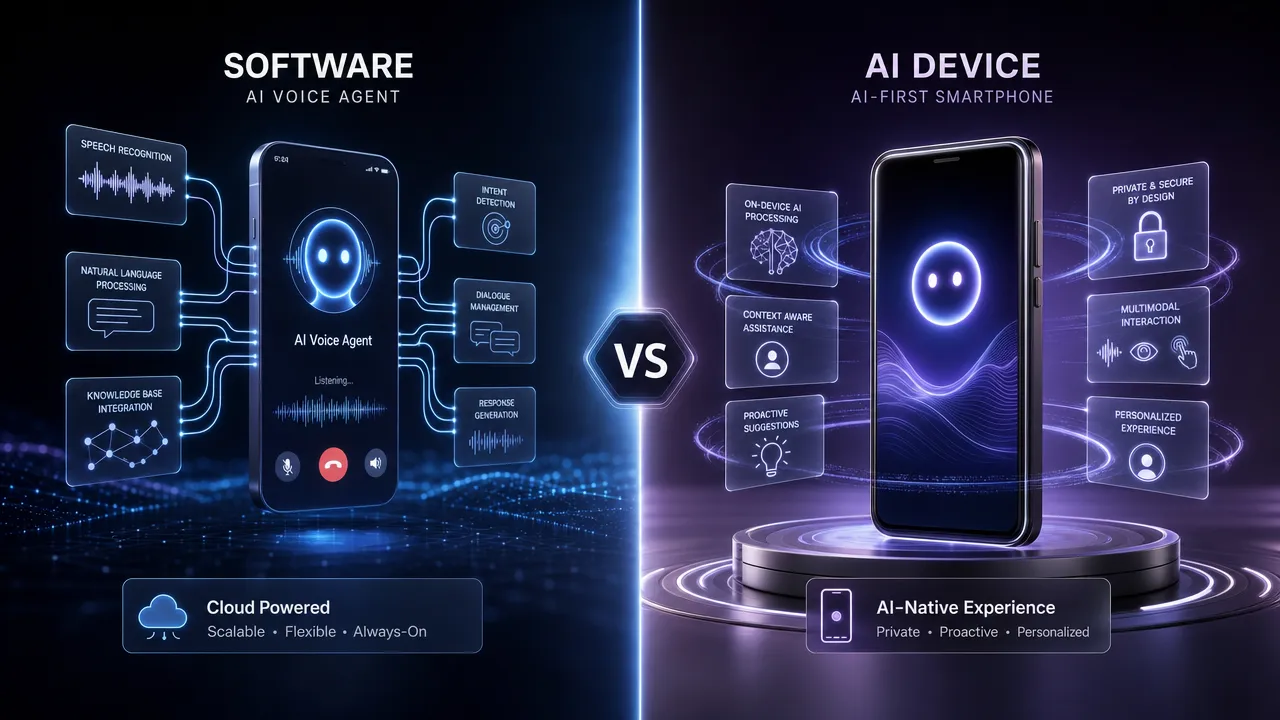
Software vs AI device comparison

Term What it means When you can use it
AI agent phone A new phone built around AI agents from the ground up ~2028, requires buying new hardware
Phone AI agent An AI agent that operates an existing phone Today, works on the phone you already own
AI phone A smartphone with AI features added (translation, photo editing, summaries) Already shipping, but not a full autonomous agent
On-device AI AI processing that runs locally on a device instead of the cloud Partial — varies by device and task

AI agent phone: the OpenAI announcement that started the confusion

In April 2026, OpenAI announced it is developing an AI agent phone in partnership with Qualcomm and MediaTek, targeting 300-400 million annual shipments. The pitch: a phone where you don’t navigate a grid of apps, you tell an agent what you need and it handles it.

This is a genuinely new device category. It requires new silicon, a new operating system layer, and — most importantly for anyone reading this today — a purchase. OpenAI’s AI agent phone is not expected to ship until approximately 2028.

That timeline matters enormously. Whatever problem you’re trying to solve with a mobile AI agent right now, "wait two years and buy new hardware" usually isn’t the answer.

Mobile-Agent, an academic project from Alibaba, and Phone Agent, built at an OpenAI hackathon, are both software research efforts exploring what an agent-first phone experience could look like — but neither is a shipping consumer product today.

Phone AI agent: what already works on the phone you have

A phone AI agent takes the opposite approach. Instead of waiting for new hardware, it operates the phone you already own.

This category includes two different approaches:

Software-only agents — apps or services that use official iOS/Android APIs (App Intents, Android Intents) to complete tasks within the permissions Apple and Google allow. Limited but reliable for the specific actions developers have exposed.

Hardware-assisted agents — a physical device that connects to your existing phone and controls it directly, without needing the phone’s operating system to cooperate at all.

Aiden Hardware is built in this second category. It connects to any smartphone or computer via USB, captures the screen through HDMI, listens and speaks through full-duplex audio, and controls the connected device autonomously through keyboard, mouse, and touch inputs — using an on-device Go-based LLM agent runtime.

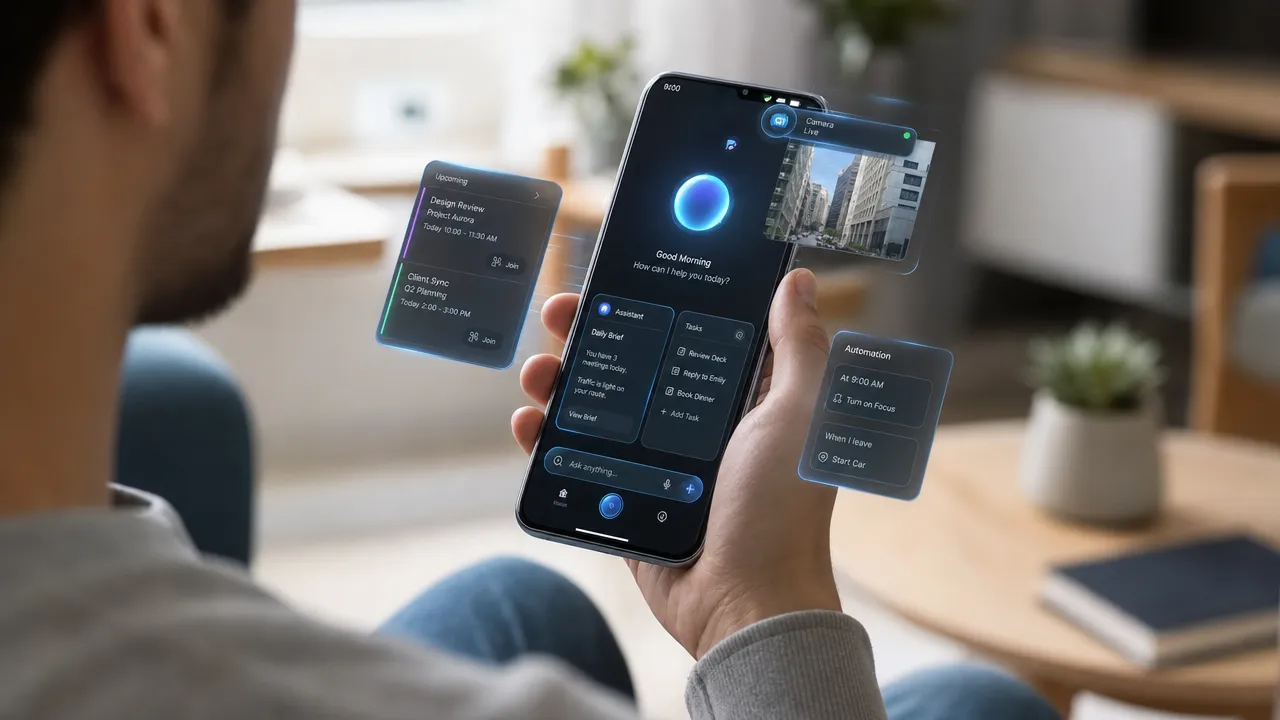
AI agent phone interface

The key difference from a software-only agent: Aiden connects as a standard USB HID peripheral — the same protocol as a keyboard and mouse. The phone has no idea there’s an AI agent on the other end. No app install. No special permissions. No waiting for Apple or Google to expose the right API.

AI phone: a third, often-confused term

A fourth phrase shows up in this conversation too: AI phone. This usually just means a smartphone with AI features bolted on — Apple Intelligence, Samsung Galaxy AI, Google’s Gemini Nano. These add translation, photo editing, summarization, and smart search to phones that already exist.

An AI phone is not the same as an AI agent phone or a phone AI agent. It adds AI-powered features to a normal smartphone experience. It does not turn the phone into an autonomous agent that completes multi-step tasks on your behalf.

Term Autonomy level Requires new hardware Available now
AI phone (Apple Intelligence, Galaxy AI) Low — assists, doesn’t act independently No Yes
Phone AI agent (software-only) Medium — acts within exposed app permissions No Yes, limited
Phone AI agent (hardware-assisted, e.g. Aiden) High — full device control via USB HID No, works with existing phone Yes
AI agent phone (OpenAI, ~2028) High — designed for full agentic control Yes No, future product

The decision that actually matters

If you need an AI agent that controls your phone or computer right now, the AI agent phone is not a real option — it doesn’t exist as a shippable product yet. The realistic choice is between a software-only phone AI agent (limited to official APIs) and a hardware-assisted one like Aiden (full device control, works on any existing device).

If you’re a developer or technologist tracking where the industry is heading long-term, the AI agent phone category is worth watching — but it’s a 2028 conversation, not a 2026 one.

For teams thinking about mobile AI agent architecture more broadly, see What is a Mobile AI Agent? The 2026 Guide and AI Agent for iPhone in 2026: What’s Actually Possible Right Now.


FAQ

Is a phone AI agent the same as an AI agent phone?
No. A phone AI agent is software or hardware that operates a phone you already own. An AI agent phone is a new device — like OpenAI’s announced phone with Qualcomm and MediaTek — built specifically around AI agents, and it isn’t expected to ship until around 2028.

When will OpenAI’s AI agent phone be available?
OpenAI announced the AI agent phone project in April 2026 in partnership with Qualcomm and MediaTek, targeting 300-400 million annual shipments. The expected launch timeline is approximately 2028.

Can I get an AI agent to control my phone today, without waiting for new hardware?
Yes. Phone AI agents that work on existing devices are already available, both as software (limited to official app APIs) and as hardware-assisted solutions like Aiden Hardware, which connects via USB and controls the phone directly without requiring any app installation.

What is the difference between an AI phone and a phone AI agent?
An AI phone (like devices with Apple Intelligence or Samsung Galaxy AI) adds AI-powered features such as translation and photo editing to a normal smartphone. A phone AI agent goes further — it can complete multi-step tasks and operate the device on your behalf, not just assist with individual features.

Why does Aiden work on any phone instead of requiring a new device?
Aiden Hardware connects as a standard USB HID peripheral — the same protocol as a keyboard and mouse — so the host phone or computer doesn’t need to install anything or grant special permissions. This means it works on the phone or computer you already have today, rather than requiring you to wait for or purchase new agent-native hardware.

Explore Aiden — AI agent hardware and software systems →

Mobile Agent Briefing — 2026-06-12

Summary

  • Inno Holdings Inc. enters agreement to develop AI-powered used mobile phone sales agent
  • MWM and Google Cloud launch AI Mobile Squad platform for agentic AI app development
  • Aurora Mobile upgrades its GPTBots.ai AI agent platform with new features
  • OpenAI launches Codex mobile app bringing AI coding agents to iOS and Android
  • Google announces new AI agents and Gemini Omni for Flow and Flow Music mobile apps
  • Analysts report OpenAI may be fast-tracking development of an AI agent phone
  • Seeking Alpha examines how OpenAI’s AI agent phone impacts Qualcomm’s market potential

Inno Holdings Develops AI Mobile Sales Agent

Inno Holdings Inc. has signed a development services agreement to build an AI-powered sales agent specifically for the used mobile phone market. The initiative represents a strategic move into AI-enabled commerce solutions, targeting the growing secondary mobile device market.
Read Full Article: The Manila Times

MWM and Google Cloud Launch AI Mobile Squad

MWM has partnered with Google Cloud to introduce AI Mobile Squad, a new platform enabling developers to create agentic AI applications. The collaboration brings advanced AI app development capabilities to market, leveraging Google Cloud’s infrastructure to streamline the creation of intelligent mobile applications.
Read Full Article: The Fast Mode

Aurora Mobile Enhances GPTBots.ai Platform

Aurora Mobile has announced significant upgrades to its GPTBots.ai AI agent platform. The improvements enhance the platform’s capabilities for building and deploying AI agents, positioning Aurora Mobile as a key player in the expanding mobile AI agent ecosystem.
Read Full Article: Investing.com

OpenAI Codex Arrives on Mobile Platforms

OpenAI has expanded its Codex AI coding agent to mobile devices, launching apps for both iOS and Android through ChatGPT integration. The move democratizes access to AI-powered coding assistance, allowing developers to leverage advanced code generation capabilities directly from their smartphones.
Read Full Article: Memeburn

Google Unveils New Agents for Flow Applications

Google has announced new AI agents and mobile applications, including the introduction of Gemini Omni for Google Flow and Google Flow Music. The updates expand Google’s mobile AI ecosystem, bringing more intelligent agent capabilities to consumer applications across music and productivity domains.
Read Full Article: blog.google

OpenAI Accelerates AI Agent Phone Development

Industry analysts report that OpenAI appears to be fast-tracking the development of an AI agent phone. This strategic move could mark a significant shift in the smartphone industry, potentially introducing devices with deeply integrated AI agent capabilities as core features.
Read Full Article: Seeking Alpha

AI Agent Phone Impact on Qualcomm’s Market Position

Analysis reveals how OpenAI’s AI agent phone development could reshape Qualcomm’s market potential. The emergence of AI-native devices presents both opportunities and challenges for the chip manufacturer, as the industry prepares for a new generation of AI-powered mobile hardware.
Read Full Article: Seeking Alpha

What Is a Mobile AI Agent? How It Sees, Decides and Acts

A mobile AI agent is an AI system that can observe what is happening on a smartphone, interpret the current state, decide what to do next, perform an action and check whether that action worked. It turns a goal such as “find the latest message and draft a reply” into a sequence of steps across mobile interfaces.

Here, mobile AI agent means an agent that uses a mobile device or its apps. It does not mean an AI phone-call agent that answers calls, a conventional voice assistant that mainly responds to commands, or an “AI phone” with built-in generative features. The defining capability is closed-loop action: observe, interpret, decide, act and verify.

What Makes an AI Agent a Mobile AI Agent?

A chatbot generates responses. A mobile AI agent must also work with the changing state of a device.

That normally requires four capabilities:

  1. Perception: read a screenshot, accessibility tree, app state or another representation of the interface.
  2. Reasoning and planning: interpret the user’s goal, identify the next step and adapt when the interface changes.
  3. Action: tap, type, scroll, navigate, select or invoke an available tool.
  4. Verification: observe the result, detect whether the intended state was reached and continue, recover or stop.

The final capability is easy to overlook. A system that issues taps without checking the outcome is automation, but it is not yet a dependable agent. Mobile interfaces change, notifications appear, network requests fail and the same action can produce different results depending on the current screen.

How Does a Mobile AI Agent Work?

The core process is a feedback loop:

Observe → Interpret → Decide → Act → Observe and verify

Suppose a user asks an agent to find an upcoming appointment and send the location to a contact. A mobile AI agent may:

  1. inspect the current screen;
  2. open the calendar;
  3. identify the relevant appointment;
  4. extract or copy the location;
  5. open the messaging app;
  6. select the intended contact;
  7. prepare the message;
  8. ask for confirmation before sending; and
  9. verify that the message was sent or report why the task could not be completed.

The exact implementation varies. Some agents use app APIs or structured interface data. Others work visually from screenshots and act through accessibility controls, Android Debug Bridge (ADB), standard input methods such as USB Human Interface Device (HID), or a combination of these routes.

The loop matters more than any single model. A strong language or vision model can still fail if the system cannot observe the correct screen, translate a decision into a precise action or confirm the result.

Mobile AI Agent vs AI Assistant

The terms overlap, but they describe different levels of agency.

CapabilityConventional AI assistantMobile AI agent
Answers questionsYesYes
Suggests stepsYesYes
Observes changing device stateSometimesCore capability
Performs multi-step actionsLimited or workflow-specificCore capability
Adapts after each actionLimitedExpected
Verifies task completionNot alwaysEssential

A voice assistant may set an alarm through a predefined integration. A mobile AI agent is designed to reason through a broader sequence, inspect what happened and choose the next action from the updated state.

This does not make every mobile agent fully autonomous. For sensitive actions, the safer design is often supervised autonomy: the agent can navigate and prepare an action but requires explicit approval before sending a message, making a purchase, changing a security setting or submitting personal information.

Mobile AI Agent vs AI Phone-Call Agent

An AI phone agent can mean two very different things.

In customer-service and sales contexts, it often means a telephony agent that answers or places calls, speaks with callers and updates a business system. That is a voice-and-call workflow.

In device-use contexts, people may use the same phrase for an AI agent that operates a smartphone. This article uses mobile AI agent or smartphone AI agent for the device-use category to avoid that ambiguity.

An AI-first smartphone is different again. It is a phone marketed around built-in AI features. A mobile AI agent is a software-and-control architecture; it may be integrated into a phone, run alongside it or interact with it through external hardware.

Mobile AI Agent vs Computer-Use Agent

A computer-use agent generally operates desktop software or browser interfaces using screen perception and mouse-and-keyboard actions. A mobile AI agent applies the same broad observe-and-act idea to smartphone interfaces, where screens are smaller, interaction is touch-led and operating-system permissions are more restrictive.

The categories can share models and planning methods, but they face different control, layout and safety constraints. For a deeper comparison, see Mobile AI Agent vs Computer Use Agent.

What Can a Mobile AI Agent Do?

Useful tasks tend to be multi-step, repetitive or spread across more than one app. Examples include:

  • finding information in an app and transferring it into another;
  • navigating settings or account menus;
  • preparing messages from information visible elsewhere on the device;
  • collecting screenshots or checking whether a workflow completed;
  • entering structured information into mobile forms;
  • testing mobile interfaces across repeated scenarios;
  • carrying out routine operational steps with human approval at sensitive points.

Whether a task is practical depends on the phone, app, control method, permissions and interface state. Login challenges, CAPTCHAs, biometric prompts, payment confirmations and operating-system restrictions may require the user to take over.

For concrete examples, see What Can an AI Agent Actually Do on Your Phone? 12 Real Tasks.

How Do AI Agents Control Smartphones?

There is no single universal control method. Common approaches include the following.

App APIs

An official API gives an agent structured access to supported functions and data. This can be reliable, but it only covers the operations the app developer exposes.

Accessibility and operating-system automation

Accessibility services and mobile automation frameworks can expose interface elements and actions. They can provide more structure than visual interaction, but availability and permissions vary by operating system, app and deployment context.

ADB and development interfaces

ADB can support Android testing, debugging and device control. It is useful for development and controlled environments, but it is not a universal consumer control path and may require configuration that ordinary users do not enable.

Visual interaction

A visual agent works from screenshots or captured video frames. It identifies relevant elements from pixels, chooses coordinates and checks the next frame after acting. This can reach interfaces that lack agent-specific APIs, but perception errors, animations, overlays and layout changes can make it less predictable.

USB HID and external input

USB HID presents input as standard keyboard, pointer or touch-like events. This can separate the agent from the target phone’s application layer, although the device still needs compatible video output, input support and any operating-system accessibility setup required by the chosen interaction mode.

A practical system may combine several approaches rather than treating one as universally best. Aiden’s engineering article on USB HID vs ADB explains the trade-offs in more detail.

Why Mobile AI Agents Matter

Much of everyday digital work happens inside mobile apps, yet many automation systems stop at the browser or depend on dedicated APIs. Mobile AI agents aim to extend goal-based automation to the interfaces people already use.

That matters for three reasons:

  • Existing apps: an agent may work with a visible interface even when no purpose-built agent integration exists.
  • Cross-app workflows: the useful outcome may require several applications rather than one isolated function.
  • Physical devices: testing and operation on a real phone can reveal states that browser-only automation or back-end simulations do not reproduce.

The opportunity is not unlimited autonomy. It is a more flexible layer between user intent and device interaction, with verification and human control where mistakes would matter.

Limitations of Mobile AI Agents

Mobile AI agents remain an active engineering problem. Their limitations are part of the definition, not a footnote.

Perception can be wrong

Screenshots contain pixels, not guaranteed semantic meaning. Small controls, custom interfaces, low contrast, transient pop-ups and keyboard overlays can cause an agent to select the wrong target.

Interfaces change

App updates can move controls, rename labels or alter a workflow. A visually adaptive agent may cope better than a coordinate macro, but it can still fail.

Actions can be irreversible

Sending a message, deleting data, transferring money or changing account settings may have consequences that cannot be undone. Sensitive actions should have clear approval boundaries.

Permissions and security constrain access

Operating systems and apps deliberately restrict access to protected data and high-risk actions. A useful agent should not be expected to bypass authentication, biometric prompts, CAPTCHAs or platform security controls.

Privacy depends on the architecture

If screenshots or task context are sent to a remote model, they may contain personal information. If models run locally, hardware capacity and model performance can become constraints. “Mobile AI agent” does not by itself mean private, local or cloud-based; the data path must be evaluated for each implementation.

Reliability varies by task

A short, stable workflow is easier than a long task with many branches. Agents need timeouts, recovery behavior, action limits, logs and clear failure reporting rather than a promise that every workflow will complete.

How Aiden Approaches Mobile Device Use

Aiden is an experimental physical mobile-agent system designed around observing a device’s visible interface and acting on that device. Its current public implementation is a development board, not a finished mass-market consumer product.

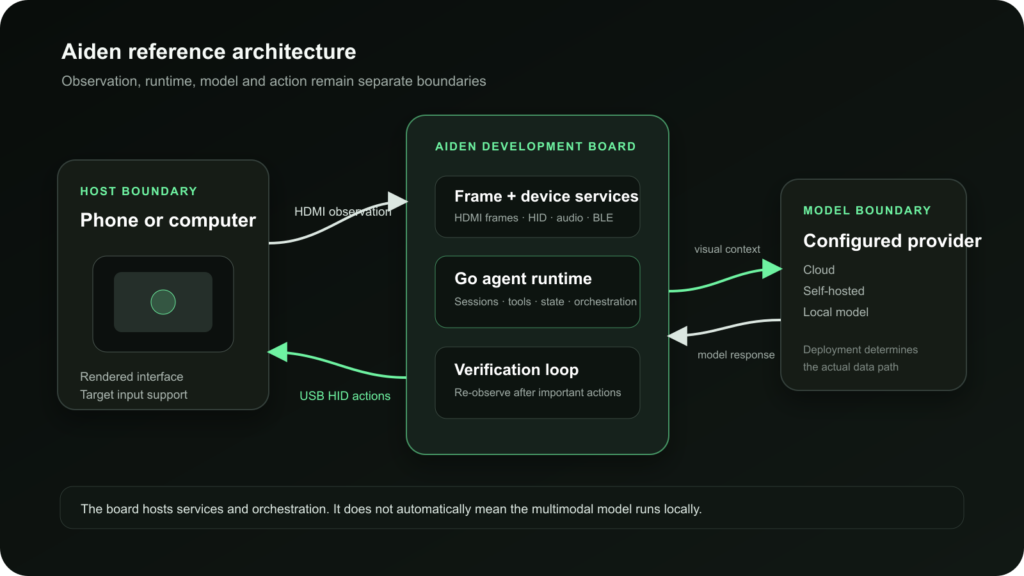
The documented reference setup separates observation from action:

  1. a compatible target device outputs its display to an HDMI capture path;
  2. the Aiden board captures the current screen;
  3. its Go-based agent sends the screenshot and task context to a configured multimodal model provider;
  4. the agent selects a tool action; and
  5. the system performs the action through a configured input route, then captures the next state for verification.

The baseline hardware path uses HDMI capture for visual observation and USB HID for input. Aiden’s current architecture also documents other provider routes for development and testing. The model can be configured through supported providers, so the system should not be described as universally or fully local.

This approach is intended to explore device-use agency without requiring every app to expose a dedicated API. It does not establish universal phone compatibility. The target device must meet the relevant display and input prerequisites, and some operating systems require additional accessibility configuration. The public repository describes the current hardware and software in Aiden’s firmware documentation.

The important idea is architectural: a physical agent needs a way to see the interface, a way to act, a planning loop and evidence that the action changed the device as intended.

How Mobile AI Agents Relate to Other Agent Types

Agent typePrimary environmentTypical action route
Mobile AI agentSmartphone interfaces and appsAPIs, accessibility, ADB, visual interaction, HID or combined routes
Computer-use agentDesktop operating systems and softwareScreen perception, mouse and keyboard control
Browser agentWebsites and web applicationsBrowser automation, DOM access or visual interaction
Voice or call agentTelephone conversationsSpeech recognition, dialogue and telephony integrations
API agentStructured software servicesDefined API calls and tool schemas
Robotic agentPhysical environmentSensors, motors and robotic control systems

These categories can overlap. A single system might use an API where one exists, a browser tool for a web step and visual device control for a mobile app. The useful distinction is the environment being observed and the mechanism available for action.

The Future of Mobile AI Agents

Progress will depend less on adding more conversational personality and more on improving dependable device use: better perception, safer confirmation flows, stronger recovery, clearer audit trails and more realistic testing.

The central question is not whether an AI can produce an instruction. It is whether the system can carry out the right action on the right device, recognize when the environment differs from its assumptions and stop safely when confidence is low.

To follow Aiden’s work on physical mobile agents, explore the Aiden documentation and current open-source firmware repository.

Frequently Asked Questions

What is a mobile AI agent?

A mobile AI agent is an AI system that can observe a smartphone interface, interpret its state, choose and perform actions, and verify the result. It is designed to work through multi-step mobile tasks rather than only answer questions.

How does a mobile AI agent work?

It follows a feedback loop: observe the device, interpret the current state, decide on the next action, act and observe again to confirm the result or adapt the plan.

Is a mobile AI agent the same as a voice assistant?

No. A voice assistant primarily receives spoken commands and responds through supported functions. A mobile AI agent is defined by its ability to work through changing device states and multi-step actions, although it may accept voice as one form of input.

Is a mobile AI agent the same as an AI phone-call agent?

No. An AI phone-call agent conducts telephone conversations. A mobile AI agent uses smartphone interfaces and apps. The phrase “AI phone agent” can be ambiguous, so the context matters.

Can a mobile AI agent use apps without APIs?

Potentially. Visual interaction, accessibility services, ADB or external input methods can allow an agent to work with visible interfaces without a dedicated app API. Reliability and compatibility depend on the device, app and control method.

Can a mobile AI agent control any phone?

No universal compatibility should be assumed. Support depends on the operating system, device hardware, display output, input method, permissions and the agent’s architecture.

Are mobile AI agents fully autonomous?

Not necessarily. Many useful systems are supervised. They may complete routine steps independently while requesting confirmation for sensitive, ambiguous or irreversible actions.

Is Aiden a finished consumer product?

No. Aiden’s current public implementation is a development-board reference system for physical mobile-agent research and engineering. Public documentation should be checked for the latest supported setup and project status.

AI Agent Briefing — 2026-06-11

Summary

  • Visa partners with OpenAI to enable AI agents to process payments for users
  • Mastercard launches AI agent payment solutions with Coinbase and OKX partnerships
  • NVIDIA’s Nemotron 3 Ultra outperforms trillion-parameter models in AI performance
  • NEURA Robotics raises up to $1.4 billion for physical AI development
  • Samsung enters Korean robot vacuum market with affordable Bespoke AI Steam model
  • China’s embodied AI sector attempts to replicate EV industry success with robots
  • Factory robot startup Mujin secures funding ahead of 2030 IPO plans
  • OpenAI and Visa collaborate on secure payment infrastructure for agentic commerce
  • Google cuts AI pricing, potentially pressuring OpenAI and Anthropic
  • Anthropic commits $200 million to research AI’s economic impact and job displacement

Visa and OpenAI Enable AI Agent Payments

Visa has partnered with OpenAI to allow AI agents to process payments on behalf of users. This groundbreaking collaboration marks a significant step toward autonomous AI commerce, enabling AI systems to complete transactions directly within their workflows.

Read Full Article: SiliconANGLE

Mastercard Launches AI Agent Payment Solutions

Mastercard debuts its AI agent payment infrastructure through strategic partnerships with cryptocurrency platforms Coinbase and OKX. This initiative expands the payment ecosystem for autonomous AI systems, bridging traditional finance with digital currency platforms.

Read Full Article: CoinMarketCap

NVIDIA’s Nemotron 3 Ultra Surpasses Trillion-Parameter Models

NVIDIA’s Nemotron 3 Ultra demonstrates superior performance compared to trillion-parameter AI models, showcasing breakthrough efficiency in AI computation. This advancement highlights significant progress in optimizing AI agent hardware capabilities while reducing computational requirements.

Read Full Article: Geeky Gadgets

NEURA Robotics Secures $1.4B for Physical AI

NEURA Robotics has raised up to $1.4 billion in Series C funding to advance physical AI development. This substantial investment underscores growing confidence in embodied AI systems and their potential to transform industrial automation and robotics applications.

Read Full Article: The Robot Report

Samsung Launches Affordable AI-Powered Robot Vacuum

Samsung boosts Korea’s robot vacuum market with its competitively priced Bespoke AI Steam model. The new product leverages AI technology to deliver premium cleaning capabilities at a lower price point, potentially democratizing access to AI-powered home robotics.

Read Full Article: Chosunbiz

China Tests Embodied AI’s Potential to Replicate EV Success

China’s embodied AI sector experiences rapid growth as companies attempt to replicate the country’s electric vehicle industry miracle. The robotics boom tests whether similar manufacturing scale and innovation can transform the global robotics market.

Read Full Article: digitimes

Mujin Raises Funds Ahead of 2030 IPO

Factory robot startup Mujin is securing new funding as it prepares for an initial public offering planned by 2030. The company’s industrial automation solutions position it as a key player in the growing market for AI-powered manufacturing robotics.

Read Full Article: Bloomberg.com

OpenAI-Visa Partnership Focuses on Agentic Commerce Security

OpenAI teams with Visa to establish secure payment infrastructure specifically designed for agentic commerce applications. This collaboration addresses critical security concerns as AI agents increasingly handle financial transactions autonomously.

Read Full Article: The Business Journals

Google’s AI Price Cuts Pressure Competitors

Google announces significant AI pricing reductions that could challenge market leaders OpenAI and Anthropic. The aggressive pricing strategy aims to capture market share in the competitive AI services landscape, potentially accelerating enterprise AI adoption.

Read Full Article: inc.com

Anthropic Commits $200M to Study AI’s Economic Impact

Anthropic pledges $200 million to research AI’s economic implications as CEO Dario Amodei proposes solutions for potential job displacement. The initiative aims to understand and mitigate negative employment effects while maximizing AI’s societal benefits.

Read Full Article: AP News

How to Compare AI Agent Frameworks in 2026: The Evaluation Criteria That Actually Matter

Compare AI agent frameworks by runtime control — not by demo quality, star count, or claims of autonomy.

An AI agent framework is the execution layer around an LLM-powered system. It controls prompts, tools, state, memory, routing, retries, approvals, traces, evaluations, deployment, and permissions.

For production teams, the framework decision sets the failure modes of the agent. A weak framework can hide loops, lose state, overuse tools, skip approvals, or make failures hard to inspect.
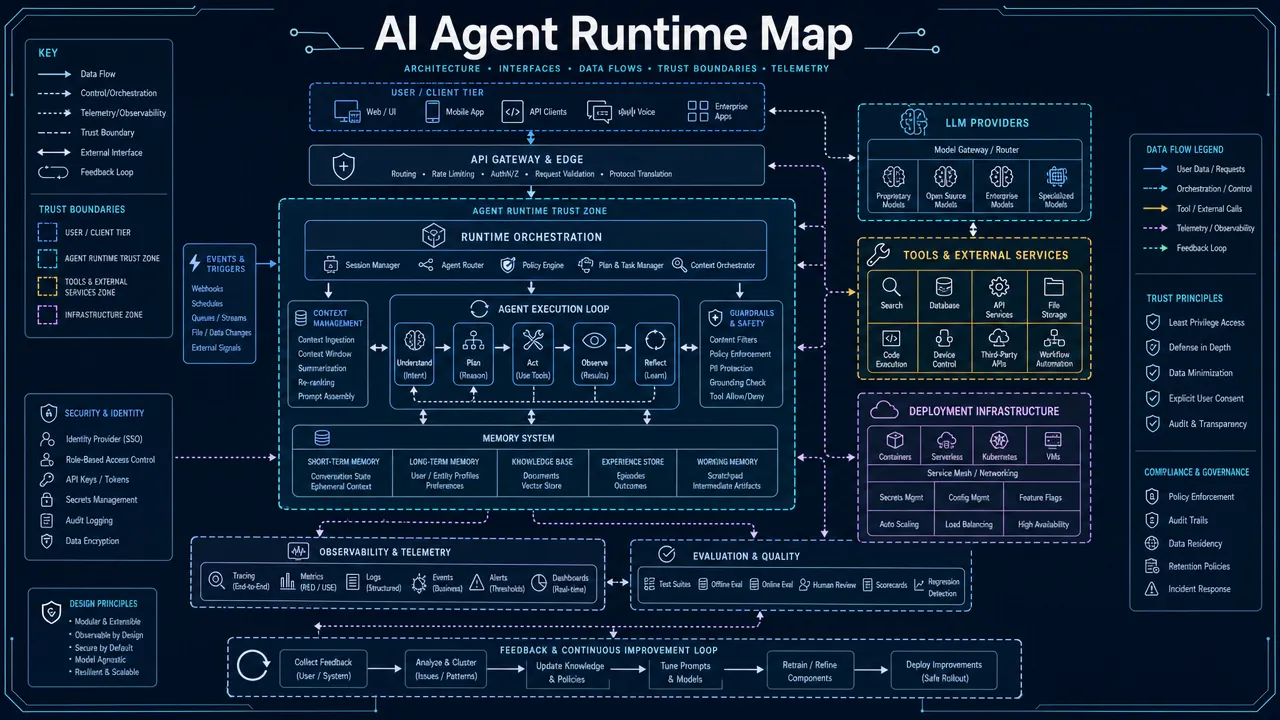
AI Agent Runtime Map

How to compare AI agent frameworks by runtime architecture

Start with the agent architecture before selecting tools. Do not choose a framework first and force the system into its abstraction.

Use this classification:

Architecture type Use when Shortlist examples Main risk
Graph or state-machine orchestration The agent needs explicit steps, persistence, retries, and approvals LangGraph, Haystack pipelines, Mastra workflows More upfront design
RAG-first agent system Retrieval, indexing, and grounded answers are central LlamaIndex, Haystack Retrieval quality becomes the bottleneck
Role-based multi-agent workflow Tasks can be split across specialized agents CrewAI Roles can become vague or brittle
Conversational multi-agent system Agents need to debate, critique, plan, or collaborate through messages AutoGen, CrewAI High token use and unclear stopping conditions
Provider-native SDK The team accepts deeper provider coupling for speed and platform features OpenAI Agents SDK, Google ADK Lock-in and portability limits
Enterprise orchestration SDK Agents must fit existing enterprise apps and identity systems Semantic Kernel Less agent-native than graph-first tools
Code-first typed framework Tool inputs, outputs, and schemas need strict validation PydanticAI More runtime control may need custom implementation
TypeScript-first agent framework Agents must live inside a Node or full-stack product codebase Mastra Ecosystem maturity must be verified

Use graph or state-machine orchestration when reliability matters more than speed of setup. LangGraph is a strong candidate when the system needs durable execution, explicit state, checkpoints, streaming, and human-in-the-loop control.

Use RAG-first frameworks when the agent depends on private documents, indexed knowledge, search results, or citations. LlamaIndex and Haystack should be evaluated as data-centric agent frameworks, not only as generic agent orchestration tools.

Use a multi-agent framework only when delegation creates measurable value. Multi-agent coordination can improve specialization, review, or planning, but it also increases latency, token cost, and debugging complexity.

Use provider-native SDKs when first-party model features, tracing, and tool integration are more important than portability. Treat lock-in as an explicit architecture tradeoff.

Use typed code-first frameworks when tool contracts are critical. PydanticAI is useful when Python teams need structured outputs, validated tool inputs, and less framework magic.

The same model can produce different results under different orchestration. The harness controls tool schemas, retry behavior, memory scope, stopping conditions, and approval boundaries.
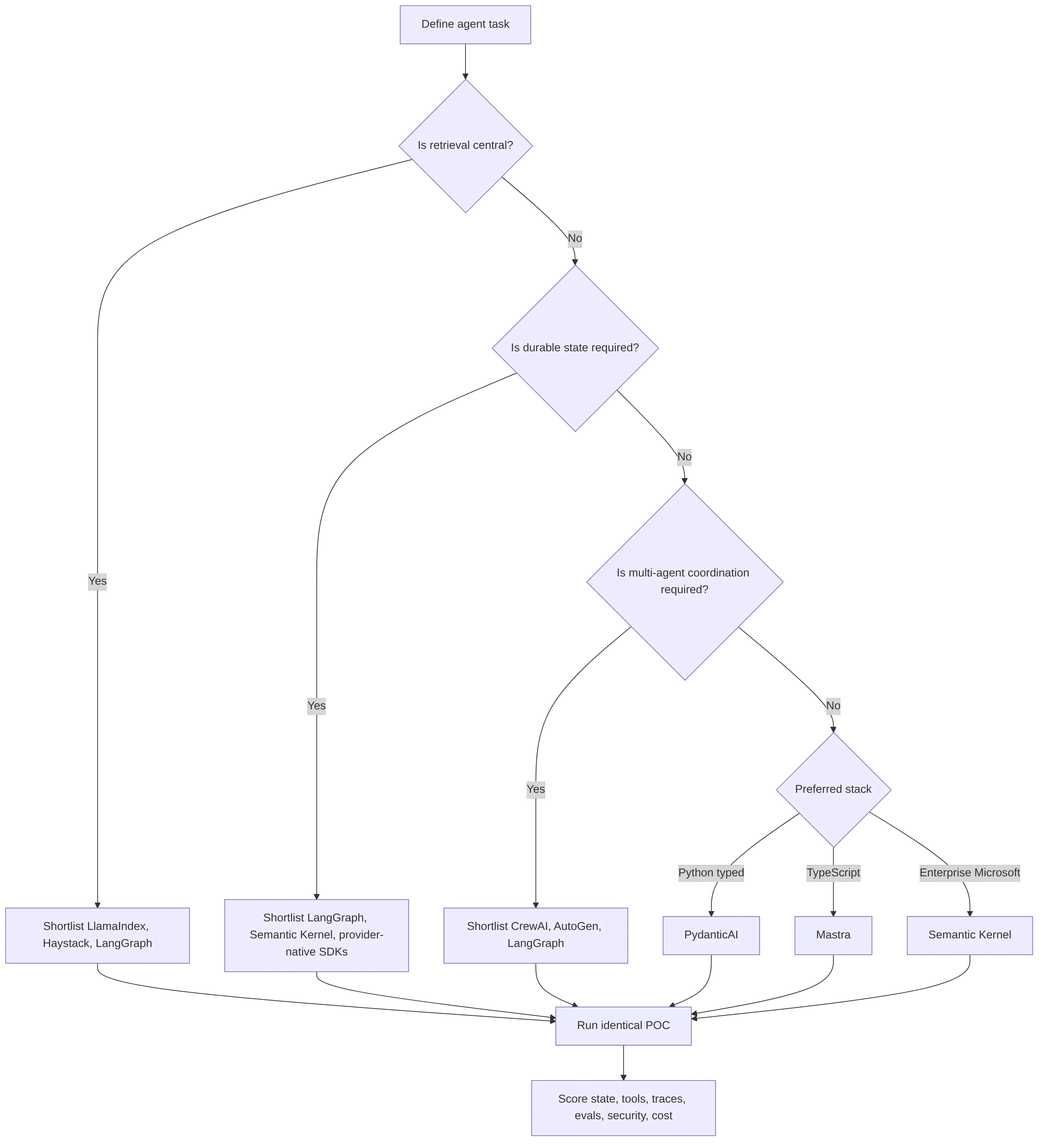
flowchart TD

How to compare AI agent frameworks by AI agent framework features

Score AI agent framework features by production impact. Do not score only setup speed.

Use this scoring scale:

Score Meaning
1 Weak or missing
2 Basic support with significant custom work
3 Adequate for simple use cases
4 Strong and production-capable with reasonable work
5 Mature, documented, and production-oriented

Evaluate these criteria first:

Criterion What to verify Red flag
LLM agent orchestration Explicit graph, workflow, loop, planner, or handoff model Hidden loops with no step control
State and memory Checkpoints, persistence, sessions, memory scope, recovery Prompt-only memory
Tool calling Typed schemas, validation, retries, logs, permissions Free-form tool calls
Observability Step traces, tool spans, prompt records, outputs, replay No trace-level visibility
Evaluation Offline test sets, trajectory evals, CI regression tests Demo-only validation
Security RBAC, secrets, tool scopes, sandboxing, audit logs Broad tool access
Human-in-the-loop Approval, interruption, review queues, override Autonomous irreversible actions
Deployment Containers, queues, serverless, cloud, on-prem, edge support Notebook-only examples
Cost control Budgets, token telemetry, model routing, caching Unbounded loops
Latency control Timeouts, streaming, batching, fallbacks No p95 tracking
Model portability Multiple providers, local models, abstraction layers Hardcoded provider assumptions
Developer experience Docs, examples, local debugging, type support Sparse docs and breaking APIs

Weight criteria by use case:

Criterion group Prototype Production SaaS Enterprise Hardware/software agent system
Developer velocity 30% 10% 5% 10%
Orchestration and state 15% 20% 20% 25%
Observability and evals 10% 20% 20% 20%
Security and governance 5% 15% 25% 20%
Model and tool portability 15% 15% 10% 15%
Deployment, latency, and cost 15% 15% 15% 10%
Ecosystem and support 10% 5% 5% 0-5%

For hardware/software AI agent systems, give extra weight to deterministic boundaries. Agents connected to devices, sensors, hardware APIs, or edge systems need strict tool permissions, bounded actions, low-latency control paths, recovery logic, and audit trails.

Use standards and protocols as comparison criteria. Model Context Protocol can reduce custom tool and data integration work. OpenTelemetry can help standardize traces, metrics, and logs across agent infrastructure.

Use evaluations before adoption. LangSmith evaluations are relevant for LangChain and LangGraph teams. DeepEval and RAGAS are useful when teams need independent LLM or RAG evaluation workflows.
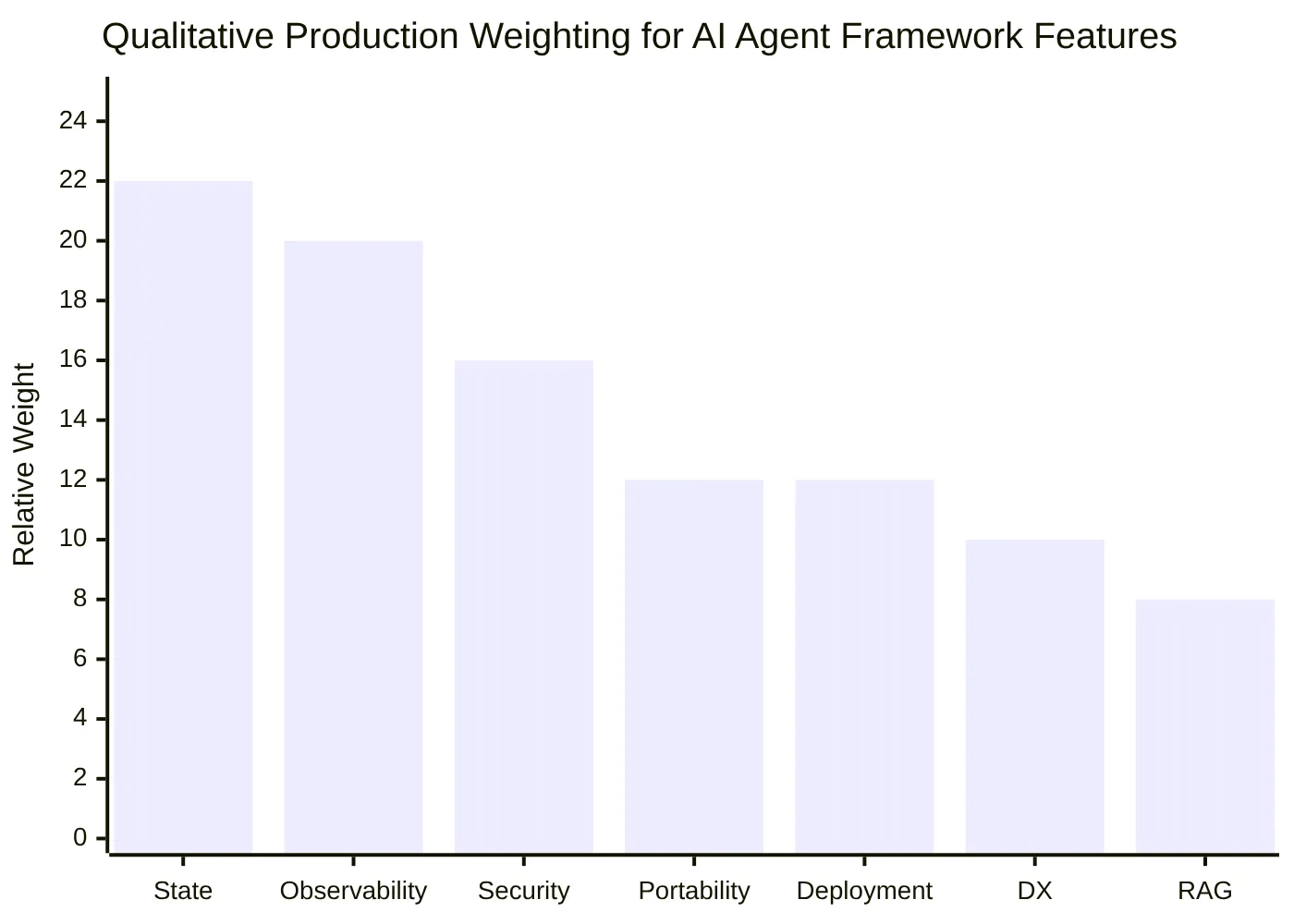
Qualitative Production Weighting for AI Agent Framework Features

How to compare AI agent frameworks across major options

Use this AI agent framework comparison table as a shortlist guide. Validate current documentation before implementation because APIs and capabilities change quickly.

Framework Category Best fit Main strengths Risks to validate
LangGraph Graph and stateful orchestration Production stateful agents Durable execution, checkpoints, graph control, human-in-the-loop Higher architecture effort
LangChain LLM app and agent framework Broad LLM app development Large ecosystem, integrations, agent components Complex systems often need LangGraph
LangSmith Observability and eval platform Tracing, debugging, evaluations Trace visibility, eval workflows, monitoring Commercial dependency may matter
LlamaIndex RAG and data-first framework Knowledge agents and document-grounded systems Ingestion, indexing, retrieval, workflows Generic orchestration needs separate review
Haystack RAG, pipelines, and LLM orchestration Production retrieval-heavy apps Modular pipelines, RAG heritage, production orientation Less focused on open-ended multi-agent collaboration
CrewAI Role and task-based multi-agent framework Structured multi-agent prototypes Crews, agents, tasks, flows Evals, tracing, and governance need validation
AutoGen Conversational multi-agent framework Research and agent collaboration Flexible multi-agent conversation patterns Cost, chatter, and deployment discipline
Semantic Kernel Enterprise LLM orchestration SDK Microsoft, Azure, .NET, Java, Python teams Plugins, functions, enterprise app integration Less graph-native than LangGraph
OpenAI Agents SDK Provider-native agent SDK OpenAI-native apps First-party tools, handoffs, tracing, platform features Provider lock-in
Google ADK Provider and cloud-native agent kit Google Cloud and Gemini environments Cloud integration and agent tooling Fast-changing APIs and cloud coupling
smolagents Lightweight code-agent framework Local and open-model experiments Minimal abstraction, readable code Production controls are mostly external
PydanticAI Type-safe Python agent framework Typed Python services Schemas, validation, structured outputs Runtime orchestration may be app-managed
Agno Python agent app framework Agent apps with teams and workflows Agent, memory, knowledge, workflow abstractions Maturity and observability require verification
Mastra TypeScript agent framework Node and full-stack product teams TS-native agents, workflows, tools, RAG, evals Younger ecosystem than Python incumbents

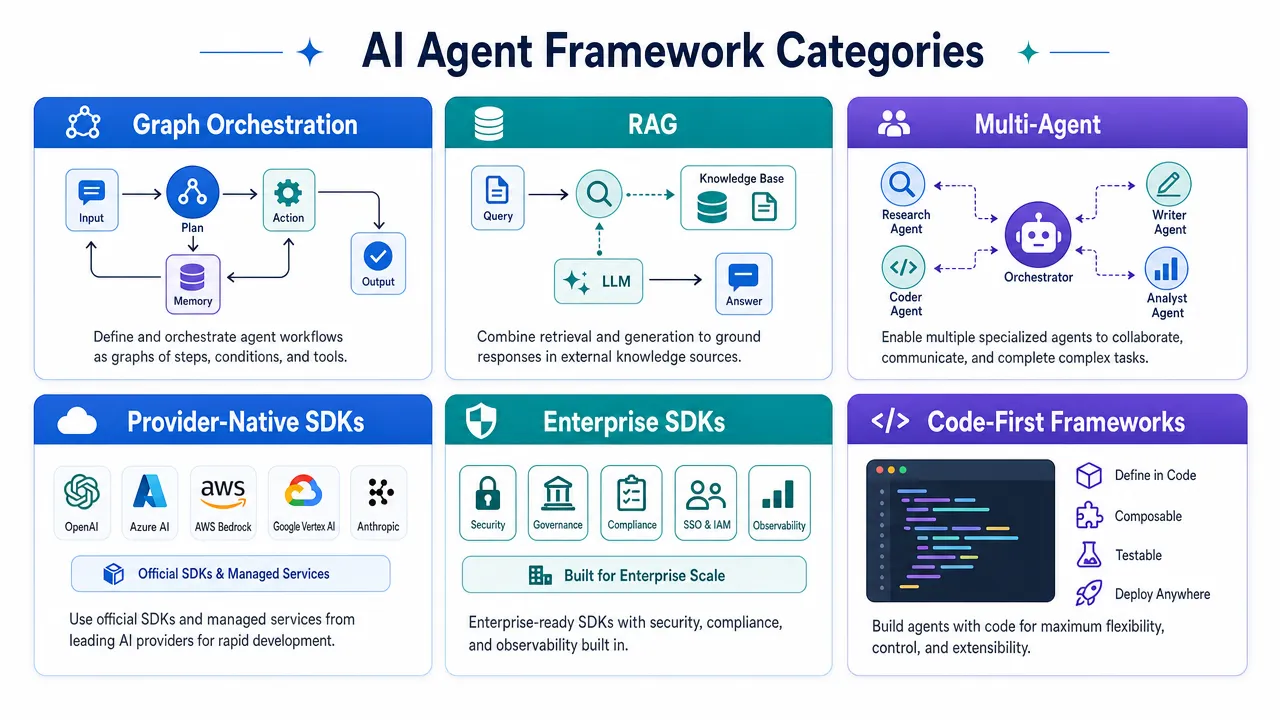
AI Agent Framework Categories

Apply these selection rules:

Requirement Strong shortlist
Production stateful workflows LangGraph, Semantic Kernel, provider-native SDKs
RAG-first system LlamaIndex, Haystack, LangGraph
Role-based agent teams CrewAI, LangGraph
Conversational multi-agent research AutoGen, CrewAI, LangGraph
Type-safe Python service PydanticAI, LangGraph
TypeScript product stack Mastra, OpenAI Agents SDK JS, LangChain JS
Microsoft enterprise stack Semantic Kernel, AutoGen
Lightweight open-model experiment smolagents, PydanticAI, Agno
Device-connected or hardware/software agent LangGraph, PydanticAI, Semantic Kernel, provider-native SDKs

Treat "best AI agent framework" as a constrained decision. The best option depends on the task type, stack, governance requirements, provider strategy, and deployment target.

For a customer-support agent, prioritize conversation state, human escalation, CRM or helpdesk tools, RAG over support documents, traceability, and cost per resolution.

For an enterprise internal assistant, prioritize RBAC, audit logs, data isolation, compliance, identity integration, deployment control, and governance.

For an AI coding or developer tool, prioritize repository tools, file-system permissions, sandboxing, test execution, code review, trace replay, and cost limits.

For a hardware/software agent, prioritize deterministic action boundaries, device permissions, low-latency control loops, failed-execution recovery, edge/cloud split, and human override.

How to compare AI agent frameworks with a controlled proof of concept

Run the same proof of concept in every shortlisted framework. Do not compare one polished demo against another incomplete prototype.

Use the same task, tools, model family, dataset, evaluation cases, and latency budget.

Minimum POC requirements:

  1. Build one representative agent task.
  2. Include at least three real tools.
  3. Include one failing tool call.
  4. Include one permission-restricted tool.
  5. Include one human approval step if the production system requires approvals.
  6. Include one retrieval step if the system depends on external knowledge.
  7. Log every model call.
  8. Log every tool call.
  9. Track tokens, latency, retries, and failures.
  10. Run 50 to 100 representative cases.
  11. Add regression tests for known failures.
  12. Test model or provider switching.
  13. Test interrupted-run recovery.
  14. Test prompt-injection or untrusted-input handling.
  15. Test cost and loop limits.

Score each framework after the POC:

Test area Pass condition
State recovery The run can resume or fail safely after interruption
Tool reliability Invalid tool inputs are rejected or corrected
Permission control The agent cannot access unauthorized tools or secrets
Observability Each step can be inspected after execution
Evaluation Results can be compared across runs
Cost control Per-run cost can be capped or estimated
Latency control Timeouts and fallbacks are enforced
Human approval High-risk actions pause before execution
Model portability A model switch does not require a full rewrite
Deployment The framework can run in the target infrastructure

Reject a framework if the POC requires hidden manual fixes. Production agents need repeatable behavior under normal failures.

Reject a framework if it cannot expose traces. A production team cannot operate an agent it cannot inspect.

Reject a framework if tool permissions are broad by default and hard to scope. Tool access converts model output into real action.

Reject a framework if loops cannot be bounded. Unbounded loops create cost, latency, and safety risk.

Reject a framework if the state model is unclear. Lost state causes duplicated actions, stale memory, incomplete tasks, and failed recovery.

Use this POC scorecard:

Criterion Weight Score 1-5 Weighted score
Orchestration control 15
State and memory 15
Tool reliability 12
Observability 12
Evaluation 10
Security and permissions 12
Deployment 8
Latency and cost 8
Developer experience 5
Lock-in and extensibility 3

Use the same scoring team for all frameworks. Keep written notes for every score. Do not allow one evaluator to score developer experience while another scores runtime security without shared criteria.
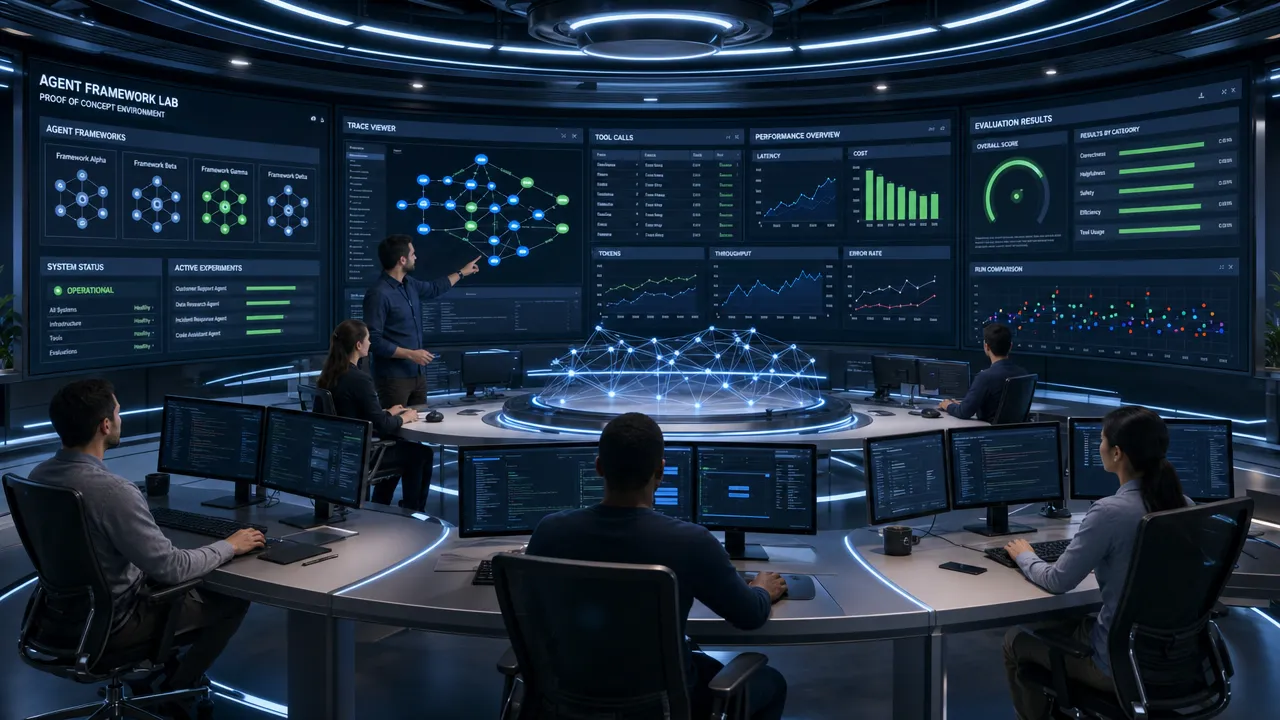
Agent Framework Proof Of Concept Lab

How to compare AI agent frameworks for multi-agent systems

Use a multi-agent framework only when the task requires specialization, delegation, critique, or parallel work.

Do not use multiple agents to make a simple tool loop look more autonomous. Extra agents can create extra prompts, extra handoffs, extra failure points, and extra cost.

Classify the multi-agent pattern:

Pattern Description Use when Risk
Role-based agents Agents are assigned roles, tasks, and responsibilities Work can be split into stable functions Role prompts can become vague
Conversational agents Agents collaborate through messages Planning, critique, research, review Chatter and long conversations
Graph-based multi-agent systems Agents are nodes in an explicit workflow Production needs state and control Requires design discipline
Handoff-based agents One agent delegates to another Specialized skills or tool scopes differ Handoff errors
Protocol-based agents Agents communicate through shared standards Cross-system interoperability matters Standards are still maturing

Use these questions before adopting a multi-agent framework:

  1. What does each agent do that a single agent cannot do?
  2. What is the stopping condition?
  3. What tools can each agent access?
  4. What state is shared?
  5. What state is private?
  6. How are handoffs logged?
  7. How are disagreements resolved?
  8. How is output quality evaluated?
  9. What is the maximum number of turns?
  10. What is the cost ceiling per task?

Use multi-agent systems when specialization has measurable benefit. Examples include planner-executor patterns, researcher-reviewer patterns, code-writer-test-runner patterns, and support-agent-escalation patterns.

Avoid multi-agent systems when one deterministic workflow can solve the task. A graph with explicit routing may be easier to test than a group of agents exchanging messages.

For hardware/software systems, keep action authority narrow. A diagnostic agent may inspect logs. A control agent may request a device action. A human or deterministic policy may approve the final action.

How to compare AI agent frameworks before production deployment

Production readiness requires more than working examples. Validate runtime behavior, governance, and failure recovery.

Use this deployment checklist:

Area Required control
Durable execution Checkpoints or explicit recovery plan
Persistent state Stored sessions, task state, and memory lifecycle
Tool security Scoped credentials, validation, and audit logs
Secrets management No secrets inside prompts or agent-visible context
Human approval Required for irreversible or high-risk actions
Observability Traces, logs, metrics, prompts, outputs, and tool spans
Evaluation Offline test sets and CI regression checks
Monitoring Online quality, drift, latency, and cost tracking
Cost governance Token budgets, model routing, caching, and stop limits
Latency governance Timeouts, queues, fallbacks, and p95 tracking
Data governance Retention, deletion, access, and isolation rules
Incident response Rollback, disable switch, owner, and escalation path

Separate prototype readiness from production readiness:

Capability Prototype Production
Tool use One or two working tools Typed, validated, permissioned tools
Memory Prompt context or simple session Scoped, persistent, auditable memory
State In-memory run state Checkpoints and recovery
Debugging Console logs Trace-level observability
Evaluation Manual review Regression tests and datasets
Security Developer trust RBAC, secrets, sandboxing, audit
Cost Manual monitoring Per-run budgets and alerts
Deployment Local or notebook Controlled runtime with rollback

Check lock-in before scaling. Provider-native SDKs can be efficient when the organization standardizes on that provider. Open frameworks can improve portability when the organization needs model routing, local models, or multi-cloud deployment.

Check maintainability before scaling. Review documentation quality, release cadence, breaking changes, examples, community activity, and support path.

Check interoperability before scaling. MCP, tool schema conventions, OpenTelemetry, and clear abstraction layers can reduce future migration cost.

Check failure modes before scaling:

  1. Tool call fails mid-workflow.
  2. Model returns invalid structured output.
  3. Retrieval returns irrelevant context.
  4. Prompt injection appears in tool output.
  5. Agent loops beyond the cost limit.
  6. Human approval is delayed.
  7. Provider rate limits increase.
  8. State store becomes unavailable.
  9. A framework upgrade changes behavior.
  10. A device or external API returns partial success.

For teams evaluating AI agent infrastructure across software and connected systems, Aiden builds AI agent hardware and software systems — including physical AI agent devices and autonomous software for real-world deployment. For production agent architecture decisions, use a systems lens: the framework must control actions, state, traces, permissions, and deployment boundaries before the agent reaches production.

For deeper coverage of the production failure modes this evaluation is designed to prevent, see Why Most AI Agents Fail in Production. For the specific LangGraph vs AutoGen decision, see LangGraph vs AutoGen: Which AI Agent Framework Handles Complex Workflows in 2026.

Explore Aiden →


FAQ

What is the best AI agent framework in 2026?
There is no single best AI agent framework — the right choice depends on your task type, stack, governance requirements, and deployment target. LangGraph is the strongest default for stateful, production-grade workflows that need checkpoints and human approval gates. CrewAI and AutoGen suit multi-agent collaboration. LlamaIndex and Haystack suit RAG-first systems. PydanticAI suits type-safe Python services. Use the POC scorecard above on your specific task rather than relying on a universal ranking.

How do I choose between LangGraph and AutoGen?
LangGraph is better when your workflow needs deterministic routing, durable checkpoints, human approval gates, and auditable execution traces. AutoGen is better when agents need to reason together through messages — research, critique, collaborative planning. For production systems where reliability matters more than flexibility, LangGraph is the safer default. See the full comparison at LangGraph vs AutoGen: Which AI Agent Framework Handles Complex Workflows in 2026.

What should I test in a proof of concept for an AI agent framework?
The minimum viable POC should include one representative task, at least three real tools, one failing tool call, one permission-restricted tool, one human approval step, and 50-100 representative test cases. Score each framework on state recovery, tool reliability, permission control, observability, cost control, and deployment fit — not on how quickly the demo was built.

Why do most AI agent frameworks fail in production?
Most failures happen because teams evaluate frameworks on demo quality rather than runtime control. Production agents fail when state is lost between steps, tool permissions are too broad, loops can’t be bounded, there’s no trace-level observability, and human approval gates are missing. For a full breakdown, see Why Most AI Agents Fail in Production.

What is the difference between LangChain and LangGraph?
LangChain is a broad LLM application framework covering chains, agents, integrations, and components. LangGraph is a lower-level graph orchestration library built on top of LangChain for building stateful, multi-step agent workflows. For simple LLM applications and chains, LangChain is sufficient. For complex agents that need explicit state, checkpoints, and human approval gates, LangGraph is the stronger choice.

How should I evaluate AI agent frameworks for hardware or device-connected systems?
Hardware/software agent systems require extra weight on deterministic action boundaries, device permissions, low-latency control loops, failed-execution recovery, and human override mechanisms. The framework must be able to restrict what tools the agent can call, log every action to an auditable trail, and pause execution for human approval before any irreversible device action. LangGraph and PydanticAI are strong candidates for their explicit state and permission control.


Final selection rule: choose the framework that gives the engineering team the clearest control over orchestration, state, tools, observability, evaluation, security, and deployment. Demo speed is useful. Runtime control is required.
LLM Briefing — 2026-06-09

Summary

  • OneAdvanced launches the UK’s first private sovereign healthcare LLM trained on NHS primary care data using NVIDIA technology
  • New malware called Hades can deceive AI security agents, highlighting emerging AI system vulnerabilities
  • SAGE develops an LLM-powered framework to enhance fraud detection capabilities
  • Gartner recommends multilayered security defenses to combat growing AI deepfake and LLM threats
  • NVIDIA Blackwell with JAX, MaxText, and NVFP4 enables significantly faster model training
  • Together AI achieves breakthrough by extending LLM context limits to 5 million tokens
  • Research reveals shared inference patterns across different large language models

UK’s First NHS-Trained Healthcare LLM Launches

OneAdvanced has unveiled the UK’s first private sovereign healthcare large language model trained specifically on NHS primary care data. The groundbreaking system leverages NVIDIA’s advanced technology infrastructure to deliver AI capabilities tailored for British healthcare needs while ensuring data sovereignty and patient privacy.
Read Full Article: Business Wire

Hades Malware Threatens AI Security Systems

Security researchers have discovered Hades, a sophisticated new malware strain designed to deceive AI-powered security agents. The malware employs advanced evasion techniques specifically crafted to exploit vulnerabilities in AI security systems, marking a concerning evolution in cyber threats targeting artificial intelligence infrastructure.
Read Full Article: InfoWorld

SAGE Unveils LLM-Powered Fraud Detection Framework

SAGE has introduced an innovative framework that harnesses large language models to revolutionize fraud detection. The system leverages advanced natural language processing capabilities to identify suspicious patterns and anomalies, promising to significantly enhance fraud prevention across financial services and e-commerce platforms.
Read Full Article: Let’s Data Science

Gartner Warns of Rising AI Security Threats

Gartner is urging organizations to implement multilayered security defenses as threats from AI-generated deepfakes and malicious LLM applications surge. The advisory emphasizes the need for comprehensive security strategies that address both traditional and AI-specific vulnerabilities as artificial intelligence becomes increasingly weaponized by bad actors.
Read Full Article: Chosunbiz

NVIDIA Blackwell Accelerates Model Training

NVIDIA’s Blackwell architecture combined with JAX and MaxText using NVFP4 delivers breakthrough performance for model training. The new technology stack dramatically reduces training times for large-scale AI models, enabling researchers and developers to iterate faster and deploy more sophisticated AI systems.
Read Full Article: NVIDIA Developer

Together AI Achieves 5 Million Token Context Breakthrough

Together AI has shattered previous limitations by extending LLM context windows to an unprecedented 5 million tokens. This milestone enables models to process and understand vastly larger documents and datasets in a single pass, opening new possibilities for enterprise applications requiring extensive context retention.
Read Full Article: StartupHub.ai

Study Reveals Universal LLM Inference Patterns

New research has uncovered shared inference patterns across different large language models, suggesting fundamental commonalities in how these systems process information. The findings provide valuable insights into LLM behavior and could accelerate development of more efficient and interoperable AI systems.
Read Full Article: Let’s Data Science

Best AI Models for Coding in 2026: Ranked by Real Developer Results

Claude-family models and Claude Code are the strongest overall AI coding model 2026 choice for complex repository work, while GitHub Copilot remains the safest daily-driver developer assistant for mainstream teams that want tight IDE and GitHub workflow integration.

That answer needs one important clarification: the best AI model for coding is not always the best coding tool. Benchmarks measure raw capability, but real developer results depend on repo context, test execution, pull request quality, security controls, pricing, latency, and how much human review the workflow requires.

AI Coding Workspace 2026

Why the AI coding model 2026 winner depends on real developer workflow

The most useful AI coding model 2026 ranking separates three things that are often mixed together:

  1. The model: the LLM that reasons about code.
  2. The tool: the IDE, CLI, chat, or cloud product around the model.
  3. The workflow: how developers review, test, secure, and merge AI-generated changes.

A frontier model can perform well on coding benchmarks and still feel frustrating if it cannot inspect a repository, run tests, create clean diffs, or fit into a team review process. The reverse is also true: a slightly weaker model inside a polished developer AI assistant can deliver better day-to-day productivity because it is always available in the editor, understands project context, and supports normal pull request habits.

For 2026, the strongest overall recommendation is:

Rank AI coding model 2026 choice Best for Why it ranks here
1 Claude-family models with Claude Code Deep refactoring, debugging, repo reasoning Strong SWE-bench-style signals and excellent terminal-agent workflow
2 OpenAI GPT/Codex family Cloud coding tasks, codebase Q&A, PR proposals Strong agent ecosystem and broad coding capability
3 GitHub Copilot Daily professional development Best mainstream IDE and GitHub workflow fit
4 Gemini models with Google coding tools Google Cloud teams, long-context workflows Strong cloud ecosystem and enterprise relevance
5 DeepSeek coding models Budget-sensitive API coding Strong cost-performance positioning
6 Mistral Codestral and Devstral Flexible model deployment and coding-specific use Good fit for teams evaluating open or controllable stacks
7 Aider with selected models CLI pair programming and test-driven edits Transparent, model-flexible, practical for power users
8 Replit Agent Greenfield apps and prototypes Low setup friction for app creation
9 Devin-style autonomous agents Async engineering delegation High autonomy, but review burden remains significant
10 Hugging Face coding model ecosystem Model discovery and self-hosting experiments Broad choice, variable quality

This ranking does not mean one tool should replace every other option. A professional team might use GitHub Copilot for routine editor assistance, Claude Code for complex refactors, Codex-style cloud agents for scoped background tasks, and open-weight models for internal experiments.

The most reliable pattern is not "pick one model forever." It is "choose the right AI model for coding for each development workflow."

How AI coding model 2026 benchmarks should be interpreted

Benchmarks matter, but they need context. The best AI model for developers should perform well on real coding tasks, not just short algorithm puzzles.

The most important benchmark categories in 2026 are:

Benchmark What it measures Why it matters Main limitation
SWE-bench Real GitHub issue resolution Strong proxy for repo-level bug fixing Does not fully measure security, maintainability, or team review burden
SWE-bench Verified-style evaluations Human-validated real issue tasks More reliable than broad unfiltered issue sets Scores vary by harness and model configuration
LiveCodeBench Newer coding problems Reduces benchmark contamination Less representative of large production repositories
HumanEval Function-level Python generation Simple baseline for code generation AI Saturated by frontier models
MBPP Basic Python programming tasks Useful entry-level coding benchmark Too narrow for production engineering
Aider leaderboards Practical code editing through a CLI workflow Useful for diff-based real file changes Tool-specific and not a full enterprise benchmark

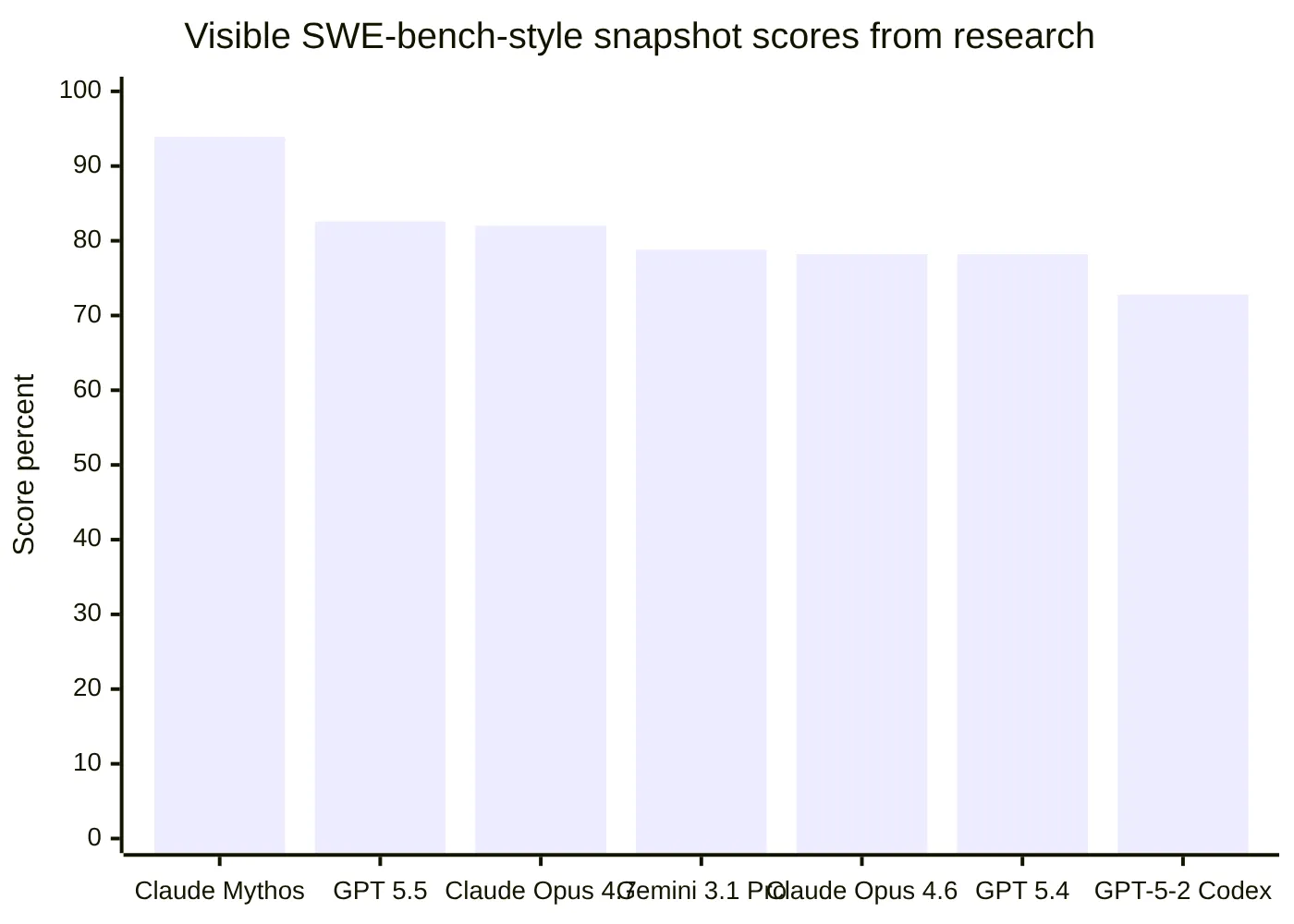
Recent SWE-bench-style leaderboard snapshots from the research report showed Claude-family models, OpenAI models, and Gemini-class models near the top, but exact scores varied across sources such as SWE-bench, LLM Stats, and Vals AI. That variation is important. A score from one harness is not a permanent truth; it is a snapshot affected by date, model settings, task selection, scaffolding, and tool access.

Visible SWE-bench-style snapshot scores from research

The chart should be treated as a directional snapshot, not a final leaderboard. For any production buying decision, teams should recheck the live benchmark pages and run internal evaluations on their own repositories.

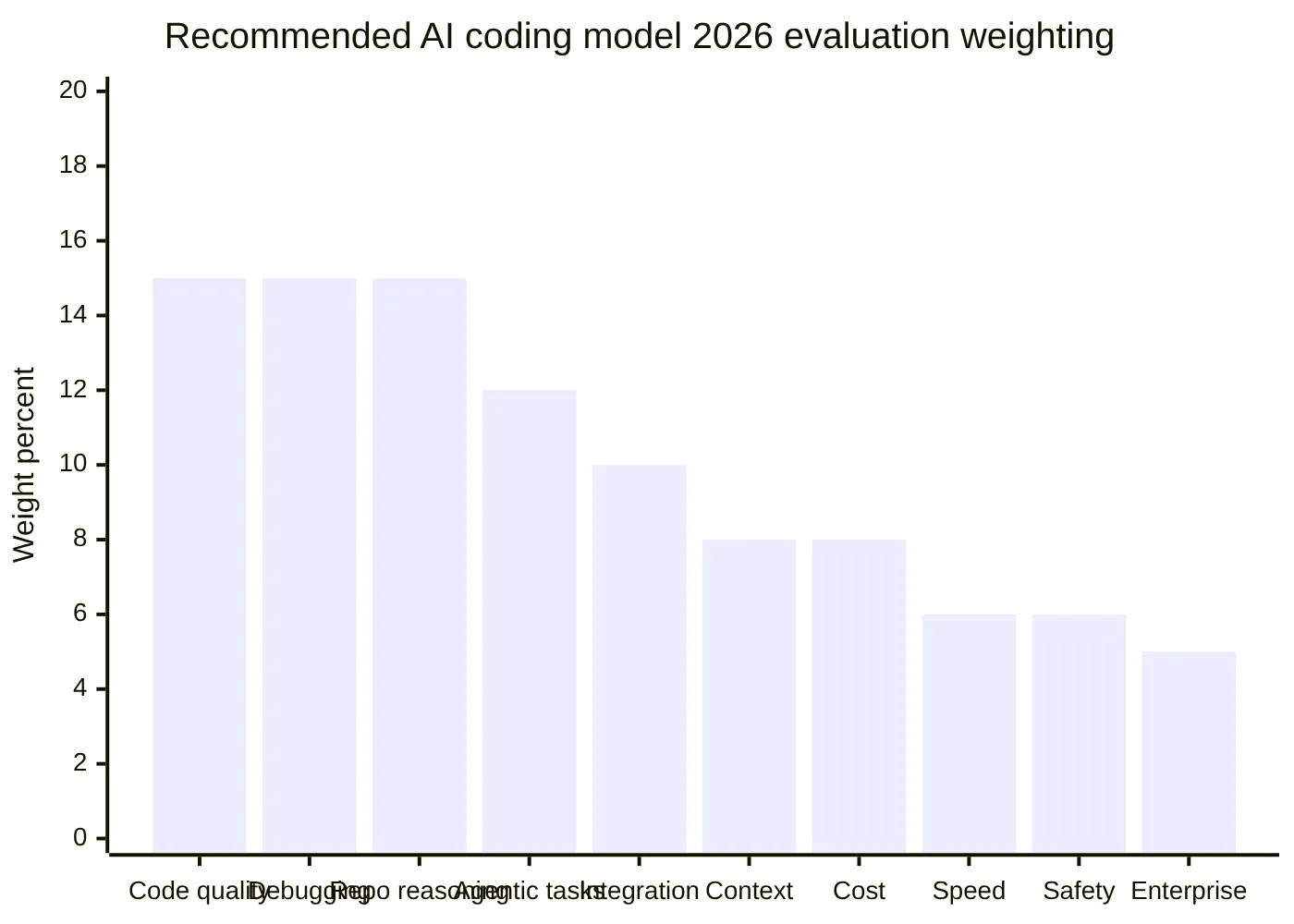
A practical AI coding tool comparison should weight evidence like this:

Evaluation criterion Suggested weight Why it matters
Code generation quality 15% Determines first-pass usefulness
Debugging and bug fixing 15% Core developer pain point
Repository-level reasoning 15% Essential for mature codebases
Agentic task completion 12% Measures multi-step execution
IDE, CLI, and Git workflow fit 10% Determines daily adoption
Long-context handling 8% Helps with large repos
Cost and value 8% Critical for teams and startups
Speed and latency 6% Affects flow state
Reliability and safety 6% Prevents dangerous or noisy changes
Enterprise readiness 5% Needed for governed rollout

Recommended AI coding model 2026 evaluation weighting

The conclusion from benchmark evidence is clear: Claude-family models deserve the top overall AI coding model 2026 position for complex repo work, but GitHub Copilot deserves a separate top recommendation for mainstream workflow adoption. Benchmarks answer "which model solved the task?" Developer results answer "which assistant helped the team ship better code with less friction?"

Ranked AI coding model 2026 comparison by use case

A useful AI coding model 2026 ranking should start with use cases because developers do not all need the same kind of assistant. A solo founder building a prototype, a senior engineer refactoring a service, and an enterprise platform team managing security reviews have different requirements.

AI Coding Model Ranking Dashboard

AI coding model 2026 pick for complex repository work

Claude-family models with Claude Code are the best overall choice for complex repository-level work. The research report highlights strong SWE-bench-style positioning, developer reports that praise Claude Code for refactoring and debugging, and the importance of terminal-native workflows for real codebase edits.

Best fit:

  • Multi-file refactoring.
  • Debugging across services or modules.
  • Understanding legacy code.
  • Generating tests around existing behavior.
  • Explaining architecture and dependency chains.
  • Producing diffs that a senior developer can review.

Main caution: Claude Code-style workflows can over-edit if the task is vague. Developers should constrain scope, ask for a plan first, and require tests before accepting changes.

AI coding model 2026 pick for daily professional development

GitHub Copilot remains the best daily-driver developer AI assistant for many professional teams. It may not always be the top raw coding LLM 2026 benchmark performer, but it wins on adoption friction. It lives where many developers already work: the IDE, GitHub issues, pull requests, and team workflows.

Best fit:

  • Fast code completion.
  • Inline suggestions.
  • Routine implementation.
  • PR review support.
  • Team-wide rollout.
  • Developers already using GitHub.

Main caution: Copilot should not be treated as an autonomous engineer. Its highest value is speed and convenience, not unsupervised ownership of complex engineering tasks.

AI coding model 2026 pick for cloud agent work

OpenAI Codex-style workflows are strong for cloud-based engineering tasks such as feature implementation, codebase Q&A, bug fixing, and PR proposals. This category is best understood as a software engineering agent rather than a simple code generation AI model.

Best fit:

  • Background issue handling.
  • Codebase questions.
  • PR drafts.
  • Bug fixes with test loops.
  • Teams comfortable with cloud agent execution.

Main caution: cloud agents need secure sandboxing, limited permissions, branch isolation, and mandatory review.

AI coding model 2026 pick for Google Cloud teams

Gemini models, Gemini Code Assist, and Jules-style asynchronous workflows are most compelling for teams already invested in Google Cloud. The research report positions Gemini as a strong long-context and cloud-integrated option, though developer field evidence is less mature than for Copilot, Claude Code, and OpenAI coding workflows.

Best fit:

  • Google Cloud development.
  • Enterprise cloud teams.
  • Long-context code understanding.
  • Asynchronous task delegation.
  • Vertex AI-centered organizations.

Main caution: teams should run their own repository evaluations rather than assuming general benchmark strength translates directly into their stack.

AI coding model 2026 pick for budget and open-model workflows

DeepSeek, Mistral Codestral, Mistral Devstral, Hugging Face-hosted models, and Aider are the strongest directions for cost-sensitive developers and teams that want flexibility. These options are especially relevant when API cost, vendor lock-in, or self-hosting matters.

Best fit:

  • Budget-conscious solo developers.
  • Startups controlling inference spend.
  • Internal tools and experiments.
  • Model-flexible CLI workflows.
  • Teams evaluating self-hosted or open-weight options.

Main caution: lower cost does not automatically mean lower total risk. Support, governance, data handling, security review, and operational reliability still matter.

Use case Best recommendation Reason
Best overall AI coding model 2026 Claude-family models with Claude Code Strong repo reasoning and benchmark signals
Best daily developer AI assistant GitHub Copilot Best mainstream workflow integration
Best cloud coding agent OpenAI Codex-style workflow Strong async coding and PR proposal model
Best Google ecosystem choice Gemini Code Assist and Jules-style tools Strong fit for Google Cloud teams
Best budget model direction DeepSeek and Aider with efficient models Strong cost-performance potential
Best open or flexible model direction Mistral, Hugging Face ecosystem, Aider More control and model choice
Best prototype builder Replit Agent Low setup for greenfield apps
Best high-autonomy category Devin-style agents Useful for delegated tasks, but review-heavy

How AI coding model 2026 tools perform in real developer results

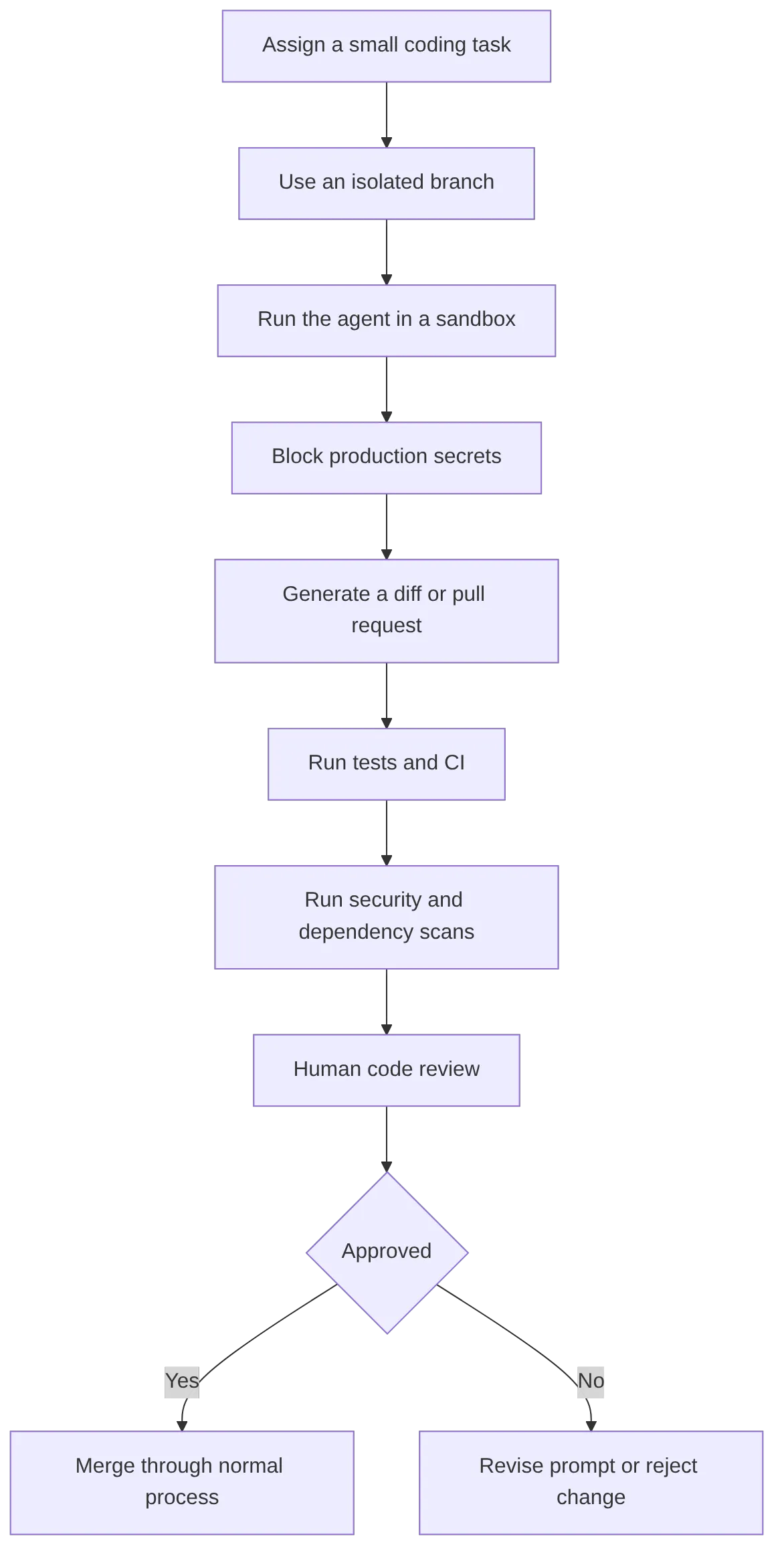
Real developer results show that model quality is only one part of the story. The highest-performing teams use AI coding tools inside disciplined workflows: small tasks, isolated branches, tests, CI, security scanning, and human review.

Developer-facing comparisons in the research report consistently point to the same pattern:

  • Copilot feels fastest for everyday IDE work.
  • Claude Code feels stronger for deeper reasoning and refactoring.
  • Codex-style agents are valuable for cloud task delegation.
  • Devin-style agents define the autonomous engineering category but need careful validation.
  • Replit Agent is useful for quick app creation and learning.
  • Aider is especially useful for developers who like terminal-driven, Git-aware workflows.

The practical distinction is autonomy.

Workflow type Example category Autonomy level Best use
Autocomplete assistant IDE copilot Low Speeding up known edits
Chat coding assistant Chat model with code context Low to medium Explaining, debugging, generating snippets
Repo-aware IDE assistant Editor agent Medium Multi-file edits with human steering
CLI coding agent Terminal-based agent Medium to high Tests, diffs, refactors, local workflows
Cloud coding agent Hosted async agent High Background issues and PR drafts
Autonomous software engineer Devin-style agent Very high Delegated tasks under strict review

This is why an AI coding tool comparison should not collapse every option into one flat list. A tool built for completion should not be judged like an autonomous agent, and an autonomous agent should not be judged only by how quickly it suggests one line of code.

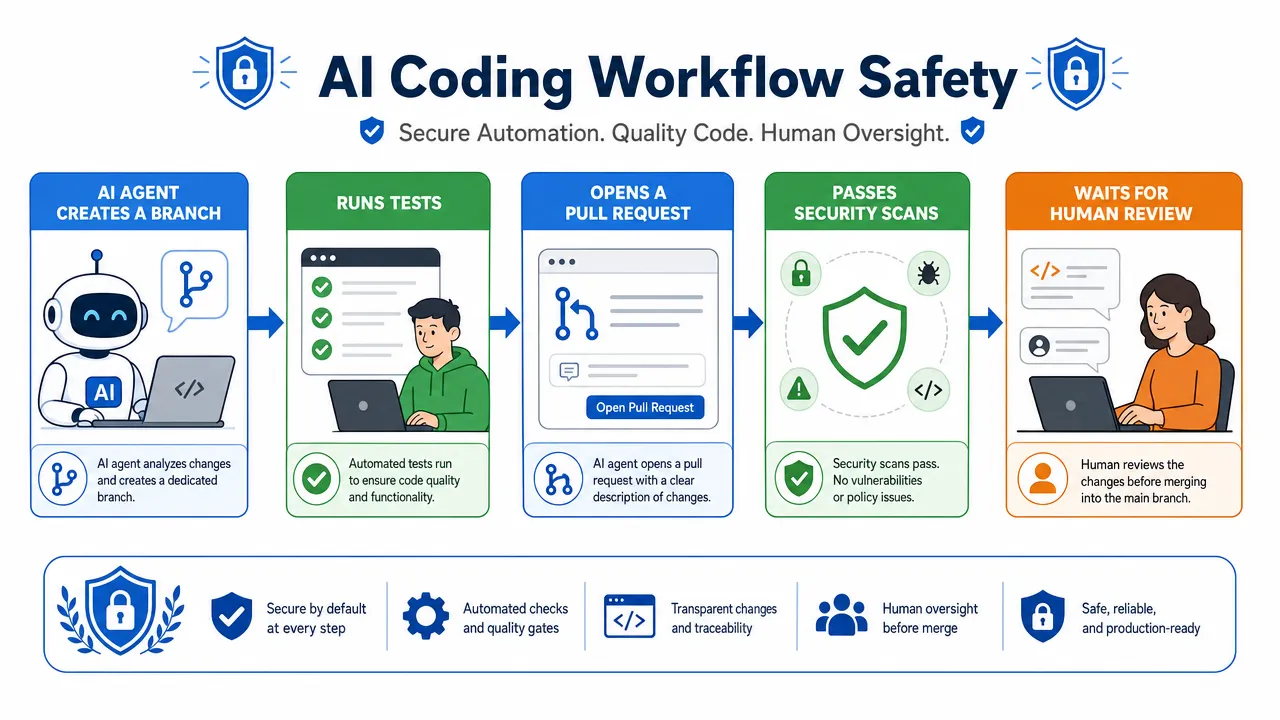
AI Coding Workflow Safety

The safest high-performing pattern looks like this:

flowchart TD

For teams, the main failure modes are predictable:

Failure mode What happens Practical mitigation
Hallucinated APIs The model invents functions, endpoints, or packages Require compile checks and documentation validation
Broad unrelated diffs The agent changes too much code Scope tasks tightly and reject noisy patches
Broken tests Generated code looks plausible but fails Require automated tests before review
Security weaknesses Missing validation, unsafe auth, leaked secrets Use SAST, dependency scanning, and secret detection
Dependency mistakes Agent upgrades or installs risky packages Review lockfiles and run isolated installs
Cost loops Agent retries consume excessive tokens or credits Set task caps, budgets, and timeouts
Junior overreliance Developers accept weak code uncritically Train reviewers to challenge AI output
Vendor lock-in Workflow depends too much on one assistant Keep evals portable and document prompts

For individual developers, the same logic applies at smaller scale. The best AI model for developers is the one that helps them reason better, not the one that lets them stop thinking. Strong developers get better results because they know how to scope tasks, inspect diffs, write tests, and ask the model to explain tradeoffs.

For engineering leaders, the question is not whether AI coding agents are useful. They are. The question is whether the organization has enough process maturity to absorb them safely.

Choosing the right AI coding model 2026 stack for your team

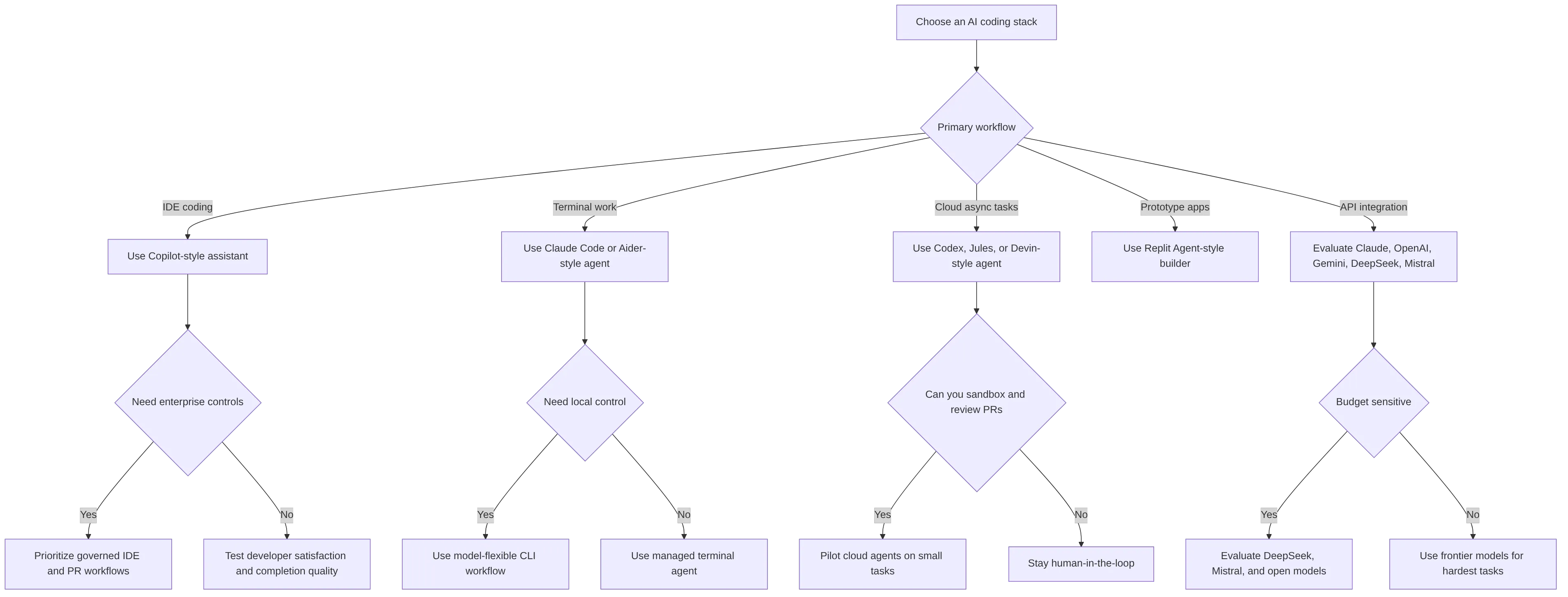
The best AI coding model 2026 stack starts with workflow selection, then model selection. Teams should avoid choosing purely from hype, benchmark screenshots, or one-off demos.

Use this decision framework:

flowchart TD

A practical rollout plan looks like this:

  1. Start with low-risk tasks: documentation updates, tests, small bug fixes, internal scripts.
  2. Measure merge rate, review time, failed test rate, and rollback rate.
  3. Compare tools on the same internal tasks.
  4. Require every AI-generated change to pass normal CI.
  5. Introduce higher-autonomy agents only after the team trusts its review process.
  6. Reevaluate monthly because coding LLM 2026 rankings change quickly.

For a startup, a sensible stack might be:

Team profile Suggested stack
Solo founder Copilot for IDE speed, Claude Code for difficult refactors, Replit Agent for prototypes
Small engineering team Copilot for everyone, Claude Code or Codex for senior developers, Aider for power users
Cost-sensitive team Aider plus efficient models, selective DeepSeek or Mistral experiments
Enterprise team Governed IDE assistant, approved frontier model access, sandboxed cloud agents, strict PR controls
Google Cloud team Gemini Code Assist-style workflow plus internal benchmark tests
AI infrastructure team Multiple models behind internal evals, sandboxed execution, cost routing, audit logs

For aidenai.io’s context as an AI agent hardware and software technology company, the broader implication is clear: coding agents are becoming infrastructure workloads. They need secure execution, low-latency inference, model routing, memory, sandboxing, observability, and compute-aware cost controls. The future of code generation AI is not only better autocomplete; it is safer agentic software engineering systems.

For teams thinking about how coding agents fit into broader agent architecture and production systems, see Why Most AI Agents Fail in Production and LangGraph vs AutoGen: Which AI Agent Framework Handles Complex Workflows in 2026.

Note on Claude Mythos: Claude Mythos Preview appears at the top of the benchmark chart above with a 93.9% SWE-bench score. It is Anthropic’s most advanced frontier model but is not publicly available — it is currently being evaluated by a small number of trusted organisations as part of Anthropic’s Project Glasswing. See anthropic.com/glasswing for more information.

Explore AI agent hardware and software systems at Aiden →

FAQs about AI coding model 2026 choices

What is the best AI coding model 2026 option overall?
Claude-family models with Claude Code are the strongest overall choice for complex repository reasoning, refactoring, and debugging. GitHub Copilot remains the best mainstream daily-driver developer AI assistant.

What is the best AI model for developers who work in an IDE all day?
GitHub Copilot is the most practical default for IDE-heavy professional developers because of its workflow integration and low adoption friction.

Is Claude Code better than GitHub Copilot?
Claude Code is usually better for deeper terminal-based repo work and complex edits. GitHub Copilot is usually better for fast, always-on IDE assistance. They solve different problems.

Is OpenAI Codex an autonomous coding agent?
Codex-style tools are best understood as cloud software engineering agents that can help with codebase questions, bug fixes, features, and PR proposals. They still need sandboxing and human review.

What benchmark should I trust for coding LLM 2026 decisions?
SWE-bench Verified-style evaluations are among the most useful for real GitHub issue repair, while LiveCodeBench helps test fresh code generation. Aider leaderboards are useful for practical edit workflows. No single benchmark is enough.

Are HumanEval and MBPP still useful?
Yes, but only as baseline tests. They are too narrow and saturated to decide the best AI model for coding in production repositories.

What is the best budget AI coding model 2026 direction?
DeepSeek, Mistral coding models, Hugging Face-hosted open models, and Aider-based workflows are the strongest budget and flexible-model directions.

Can AI coding agents replace software engineers?
AI coding agents can automate parts of software development, but they do not remove the need for engineering judgment, architecture decisions, security review, testing discipline, and product context.

The best AI coding model 2026 decision is not a single permanent winner. Claude-family models lead for demanding repo-level work, Copilot leads for everyday professional workflow, Codex-style agents lead for cloud delegation, and open or low-cost models are becoming good enough for many controlled tasks. The teams that win with AI coding tools will be the teams that combine strong models with secure workflows, clear evaluation criteria, and disciplined human review.

Ai agent hardware Briefing — 2026-06-08

Summary

  • Microsoft unveils Project Solara, a chip-to-cloud AI agent platform for Android and enterprise devices
  • Nvidia launches agentic PCs and Vera CPU with ecosystem partnerships for AI-focused hardware
  • Microsoft and Nvidia collaborate on RTX Spark Superchip-powered Windows PCs
  • Anthropic raises $35 billion from Apollo and Blackstone for AI development expansion
  • OpenAI introduces Lockdown Mode to defend against prompt injection and data exfiltration attacks
  • Amazon deploys next-gen Proteus robots with natural language AI for European warehouses
  • Computex 2026 breaks attendance records while shifting focus from PC hardware to agentic AI buildout
  • Anthropic urges coordinated industry pause if AI development risks escalate
  • Trump administration explores potential U.S. government equity stake in OpenAI
  • UK surgeons use breakthrough AI color-coding technology in operations for the first time

Microsoft Unveils Project Solara AI Agent Platform

Microsoft revealed Project Solara, a groundbreaking chip-to-cloud platform designed to power "agent-first" enterprise devices. The platform enables hardware specifically built to run AI agents instead of traditional applications, marking a significant shift in computing paradigms. This Android-compatible system transforms AI agents into practical gadget form factors.

Read Full Article: Yahoo Tech

Nvidia Launches Agentic PC Ecosystem

Nvidia debuted its new line of agentic PCs featuring the Vera CPU, establishing strategic ecosystem partnerships to enhance AI agent hardware capabilities. The initiative represents Nvidia’s push into specialized computing devices optimized for autonomous AI agents. The company aims to create a comprehensive hardware ecosystem for next-generation AI workloads.

Read Full Article: Let’s Data Science

Microsoft-Nvidia RTX Spark Superchip Partnership

Microsoft and Nvidia unveiled next-generation Windows PCs powered by the RTX Spark Superchip, combining advanced GPU capabilities with AI-optimized architectures. This collaboration merges Microsoft’s software expertise with Nvidia’s hardware innovations to create powerful AI-capable personal computers. The partnership signals a major advancement in consumer AI hardware accessibility.

Read Full Article: FoneArena.com

Anthropic Secures $35 Billion Funding Round

Anthropic raised $35 billion from investment firms Apollo and Blackstone to accelerate AI development efforts. The massive funding round represents one of the largest AI investments to date, positioning Anthropic to compete with major players in the AI hardware and software space. The capital will support research and infrastructure expansion.

Read Full Article: Crypto Briefing

OpenAI Introduces Lockdown Mode Security Feature

OpenAI rolled out Lockdown Mode to combat prompt injection attacks and prevent data exfiltration risks. The security feature protects sensitive information from malicious prompt manipulations that could compromise AI systems. This defensive measure addresses growing concerns about AI security vulnerabilities in enterprise deployments.

Read Full Article: PCMag

Amazon Deploys AI-Powered Proteus Robots

Amazon unveiled its next-generation Proteus robot featuring natural language AI capabilities for European warehouse operations. The autonomous robots can understand and respond to voice commands, improving warehouse efficiency and worker collaboration. This deployment represents a significant advancement in industrial AI robotics applications.

Read Full Article: MLQ.ai

Computex 2026 Breaks Records with AI Focus

Computex 2026 set a 45-year attendance record while transforming from a traditional PC hardware show to an agentic AI buildout showcase. The shift reflects the industry’s rapid pivot toward AI-first computing architectures and specialized hardware. Exhibitors focused on demonstrating AI agent platforms and supporting infrastructure.

Read Full Article: Tech Times

Anthropic Calls for AI Development Coordination

Anthropic urged industry-wide coordination to enable a potential pause in AI development if risks escalate beyond acceptable levels. The company expressed concerns about the rapid pace of AI advancement, particularly after its Claude AI demonstrated ability to write its own code. Security fears have prompted calls for responsible development protocols.

Read Full Article: AP News

Trump Administration Explores OpenAI Stake

The Trump administration reportedly engaged in discussions about acquiring a U.S. government equity stake in OpenAI. The potential investment would give the federal government direct involvement in one of the leading AI development companies. This unprecedented move reflects growing governmental interest in maintaining AI leadership and security.

Read Full Article: International Business Times

UK Pioneers AI-Assisted Surgery Technology

British surgeons used breakthrough AI technology that color-codes body parts during operations for the first time. The Eureka system enhances surgical precision by providing real-time visual guidance through AI-powered anatomical recognition. This medical application demonstrates AI hardware’s expanding role in critical healthcare procedures.

Read Full Article: The Independent

What Is an AI Agent Device? Hardware, Runtime and Host Boundaries

An AI agent device is a physical system that gives an agent a way to observe a target environment, run an agent loop, send approved actions and check what happened next. It is more than a model in a box. The useful unit is the complete path between the host device, the agent runtime, the configured model and the interfaces used for observation and control.

That distinction matters because “AI hardware” can describe very different systems. Some devices run models locally. Others run orchestration on an edge board while calling a configured model endpoint. Some are built into the host. Others sit outside it and interact through display, USB, audio or network paths.

Aiden’s current public implementation is a development-board reference system for exploring the external approach. It is not a finished retail product, and its documented architecture should not be read as a promise of universal device compatibility.

What Is an AI Agent Device?

An AI agent device combines physical interfaces with software that can pursue a bounded goal. A complete system normally needs to:

  1. observe relevant state;
  2. interpret that state;
  3. choose an allowed action;
  4. deliver the action through a compatible control path;
  5. retain enough state to continue the task; and
  6. verify the result before moving on.

The hardware may contribute screen capture, audio, sensors, input emulation, networking or dedicated acceleration. The runtime coordinates those capabilities. A model may provide perception or reasoning, but the model alone does not create a physical agent system.

This category is sometimes called a physical AI agent, device-use agent, external AI agent or AI edge device. The terms overlap, but they are not exact synonyms. “Edge device,” for example, describes where some computation happens; it does not prove that the device can observe or act on another interface.

How Is an AI Agent Device Different From an AI App?

An AI app usually operates inside the host’s software and permission model. It receives the APIs, files, accessibility data, intents or interface access that the operating system and application expose. A physical device-use agent can place some observation, orchestration or control outside the host, but it still depends on compatible signals and authorized input routes.

Decision areaAI app inside the hostExternal AI agent device
ObservationAPIs, app data, accessibility or internal screenshotsExternal capture, sensors, audio or another documented input path
ActionsApp APIs, operating-system services or accessibility actionsUSB input, network commands, hardware interfaces or other configured control paths
Device dependencyDepends on the host OS, app permissions and integration surfaceDepends on physical connections, signal compatibility, firmware and host input support
Host boundaryRuns within the host’s software environmentCan run outside the host while interacting with selected host interfaces
PermissionsUses permissions granted to the app or serviceDoes not remove authorization requirements; the host must still accept the selected interface and the workflow must remain permitted
Failure modeAPI change, permission loss or app-state mismatchCapture failure, input mismatch, latency, wiring/configuration error or misunderstood screen state

External hardware is therefore not a universal replacement for apps or APIs. Structured APIs can be faster, less ambiguous and easier to audit. Hardware becomes interesting when the task specifically benefits from an external observation or action boundary.

What Components Does a Physical Device-Use Agent Need?

The exact parts vary, but a useful physical agent system needs seven functional layers.

ComponentWhat it contributesBoundary to verify
ObservationScreenshots, video, audio, sensors or structured stateCan the system see the state that actually determines the next action?
RuntimeCoordinates requests, tools, sessions and the agent loopWhich processes run on the device, host or another machine?
Model accessProvides visual interpretation, language understanding or planningIs the model local, self-hosted or reached through a configured provider?
Input and actionDelivers keyboard, pointer, touch, API or device commandsWhich actions does the target accept, and under what setup?
StatePreserves task context, configuration or memoryWhat is stored, where, and for how long?
VerificationRe-observes the environment after an actionWhat evidence proves the intended result occurred?
ConnectivityLinks the board, target device and any model or service endpointsWhat stops working when a cable, network or provider is unavailable?

The verification layer is easy to overlook. Sending an input is not the same as completing a task. A physical agent needs fresh evidence after important actions and a safe way to stop when the observed state is uncertain.

External Agent vs On-Device Agent

“On-device” can refer to the host phone or computer, a separate edge board, or local model inference. Those are different architectural choices.

An on-device agent runs within the target device or its operating system. It can benefit from lower communication overhead and direct access to approved device services, but it remains constrained by that platform’s permissions, APIs and deployment requirements.

An external agent moves part of the system outside the target. It may provide isolation from the app layer and a reusable place for capture, orchestration or input hardware. The trade-off is additional physical setup, compatibility work and latency across the observation–action loop.

Neither label establishes where the AI model runs. A board can host the agent runtime while sending screenshots or prompts to a configured cloud or self-hosted model endpoint. A larger edge device might run a local multimodal model. A host-resident app can also call a remote model. For that reason, architecture should describe the runtime and model boundaries separately.

For a broader treatment of those data paths, see Does Aiden Store Your Data?.

How Aiden’s Reference Architecture Works

Aiden’s current firmware repository and system architecture documentation describe a development-board implementation built around a Luckfox Pico Zero. The board-side system combines a Go agent runtime with C++ device services.

The documented path is:

  1. a target phone or computer provides display output through a compatible hub and HDMI capture chain;
  2. the frame service exposes fresh screenshots to the agent runtime;
  3. the Go agent sends visual context to a user-configured multimodal model provider;
  4. the runtime receives or constructs a tool action;
  5. the USB gadget path sends keyboard, pointer or touch-style HID input to the target; and
  6. a later screenshot can provide evidence of the resulting visible state.

Aiden’s documented development-board loop keeps observation, model access and device control as separate boundaries.

Aiden componentDocumented roleWhat it does not establish
Development boardRuns firmware, services and the Go agent runtimeA finished retail product or mass availability
HDMI capture pathSupplies frames from compatible target display outputUniversal video output, protected-content access or identical capture behavior across devices
USB HID pathSends keyboard, pointer and touch-style reports supported by the configured targetThat every device, app or operating-system state accepts every action
Agent runtimeCoordinates screenshots, model calls, tools and sessionsThat model inference always runs locally on the board
Model providerSupplies the configured multimodal model capabilityA single fixed provider, identical latency or identical behavior
Device servicesManage frame, audio, BLE and input-related hardware resourcesAutomatic compatibility without the documented wiring, firmware and target setup

The Aiden newcomer quickstart documents the present setup requirements, including the capture chain, USB connection, firmware configuration, Wi-Fi and model-provider settings. The deeper HDMI implementation belongs to Inside Aiden’s HDMI Capture, while control-path differences belong to USB HID vs ADB.

Why Use External Hardware?

External hardware can create a useful separation between an agent and the host application layer.

  • Isolation from the app layer: Observation and input can be implemented without placing the full runtime inside each target app.
  • Real-device interaction: The system can work with the rendered interface and input behavior of an actual device rather than only an emulator or API model.
  • Cross-app behavior: One external control loop can, in principle, move across compatible visible interfaces without requiring a separate integration for every screen.
  • Explicit hardware boundary: Capture, control and runtime services can be inspected and tested as separate components.

Those benefits come with costs. Physical connections and firmware introduce more failure points than a purely software integration. Visual input contains pixels rather than guaranteed semantic labels. A cable or adapter can fail. An interface can move. A target can reject or reinterpret input. An API may still be the better path when structured, high-volume or transactional operations are available through an authorized integration.

Limitations of AI Agent Hardware

A credible AI agent device description should make its prerequisites visible.

  • Hardware prerequisites: A reference system may require a specific board, capture bridge, hub, cables, power arrangement and flashed firmware.
  • Video output: External visual observation depends on the target producing a compatible display signal. Not every phone, computer or content state will do so.
  • Input compatibility: The target must accept the configured input route. USB HID behavior can differ by device, operating system, settings and active interface state.
  • Operating-system requirements: Some platforms require settings to be enabled. Aiden’s current documentation, for example, requires AssistiveTouch for iPhone pointer control.
  • Latency: Capture, image preparation, model inference, tool selection, input delivery and verification all add time to the loop.
  • Model dependence: Reliability depends partly on the configured model’s visual and planning capability. Text-only models cannot interpret screenshots.
  • Setup complexity: Wiring, firmware, network configuration, provider credentials and target-device settings must all align.
  • Interface uncertainty: Pop-ups, animation, small controls, screen rotation, authentication and changing layouts can disrupt visual automation.
  • Safety boundaries: External control does not make every action appropriate. Sensitive or irreversible actions still need explicit user control and verification.

These limits do not make the category unworkable. They define what must be engineered, measured and disclosed before a reference architecture can become a dependable product.

For the broader software category, see What Is a Mobile AI Agent?. That page owns the general mobile-agent definition; this page owns the physical AI agent device and its architectural boundaries.

FAQ

What is an AI agent device?

An AI agent device is a physical system that combines observation, an agent runtime, model access, action interfaces, state and verification. It gives an agent a way to interact with a real environment or another device, but its capabilities depend on the specific hardware, software and connections used.

Is an AI agent device the same as an AI phone?

No. An AI phone is a phone with built-in AI features or an agent-oriented operating-system layer. An external AI agent device is separate hardware that interacts with an existing target device through defined observation and control paths.

Does the AI model run on the device?

Not necessarily. “Device-side runtime” and “local model inference” are different claims. Aiden’s documented board runs the agent runtime and device services, while the multimodal model is selected through a configurable provider. That provider can create a cloud, self-hosted or local data path depending on deployment.

Why use hardware for an AI agent?

Hardware can provide external observation, input, sensors, isolation from the app layer or a reusable runtime boundary. It is most useful when those properties solve a real integration problem. An authorized API or app integration may be simpler when structured access already exists.

Can an external agent control any phone?

No universal claim is justified. The target must provide a compatible observation signal and accept the selected input path. Hubs, adapters, operating-system settings, video output, USB behavior and app state can all affect compatibility.

Gemini vs Claude: Which AI Model Wins for Enterprise in 2026?

Gemini wins for Google-native enterprise integration, while Claude wins for safety-sensitive reasoning, coding, and multi-cloud flexibility — the best answer to "Gemini vs Claude enterprise 2026" is usually a workflow-by-workflow decision rather than a single-model mandate.

For enterprise leaders, the practical distinction is clear: Gemini is closer to a packaged business AI platform for organizations already invested in Google Workspace and Google Cloud, while Claude is a strong AI model for enterprise teams that need careful analysis, long-document reasoning, developer workflows, and flexible deployment through API or cloud partner channels. The strongest enterprise AI programs in 2026 will often use both, routing work to the model that best fits the task, risk profile, cost target, and integration layer.

Gemini vs Claude enterprise decision hub

How Gemini vs Claude enterprise 2026 decisions should start with workflow fit, not model hype

A useful enterprise AI comparison starts with the work that must be improved. Public benchmarks can indicate model strength, but they do not answer whether a platform will respect permissions, connect to business systems, reduce employee friction, satisfy legal review, or control cost at scale.

For most organizations, the Gemini vs Claude decision has five enterprise dimensions:

Enterprise criterion Gemini advantage Claude advantage Buyer takeaway
Productivity suite integration Strong fit for Google Workspace users Less native to a full productivity suite Choose Gemini first if Gmail, Docs, Drive, Meet, Sheets, and BigQuery are core workflows.
Cloud and deployment flexibility Strongest inside Google Cloud and Vertex AI Available through Claude API, Amazon Bedrock, and Vertex AI where supported Choose Claude first for AWS-heavy or multi-cloud environments.
Knowledge work quality Strong for Workspace-connected drafting and analysis Strong reputation for careful reasoning, writing, and synthesis Pilot both on legal, policy, executive, and research tasks.
Agent platform strategy Google positions Gemini Enterprise as an agentic workplace platform Strong for custom agent systems through API and coding workflows Use Gemini for packaged agent workflows; use Claude where custom architecture matters.
Governance and procurement Broad Google Cloud security and compliance ecosystem Enterprise plan and cloud partner paths support controlled deployment Legal and security teams must verify terms, logs, retention, and data use by product and contract.

Google describes Gemini Enterprise as a workplace AI and agentic platform that brings models, company data, agents, and governance into one enterprise environment. The official Google Cloud announcement for Gemini Enterprise positions it as a "front door" for AI at work. Google also documents Gemini capabilities through Gemini API model documentation, Workspace AI, and Vertex AI generative AI documentation.

Claude, by contrast, is strongest when an enterprise wants careful language behavior, coding support, long-document reasoning, and flexible access. Anthropic’s Claude Enterprise help page describes the enterprise plan for organizations needing advanced security, compliance controls, and scalable AI across teams. The Claude model overview and Claude API documentation are the most useful official references for current capabilities, pricing signals, context windows, and developer integration.

For aidenai.io’s audience, the deeper point is that Gemini vs Claude enterprise 2026 is not only a chatbot comparison. It is an AI-agent infrastructure decision. Enterprise agents require model access, secure execution, identity controls, data connectors, observability, approval workflows, and hardware or software environments that can operate reliably under business constraints.

Gemini vs Claude enterprise 2026 comparison across integration, governance, agents, and deployment

Gemini is the stronger default choice when an organization already runs on Google Workspace, Google Cloud, BigQuery, Vertex AI, and Google identity or security tooling. Its advantage is distribution: AI can appear inside email, documents, meetings, spreadsheets, files, data platforms, developer workflows, and agent interfaces without requiring every team to adopt a separate application.

Claude is the stronger default choice when model behavior and deployment optionality matter more than suite integration. Enterprises often evaluate Claude for legal-style analysis, policy drafting, executive writing, software engineering, research synthesis, customer support knowledge work, and custom agent systems. Claude is also compelling where procurement through Amazon Bedrock or Google Cloud Vertex AI is preferred. AWS documents supported foundation models in Amazon Bedrock model documentation, while Google documents Claude availability through Vertex AI partner model documentation.

Category Gemini Claude Practical enterprise recommendation
Best enterprise fit Google-native organizations Multi-cloud, AWS-heavy, safety-sensitive, and developer-heavy organizations Match the model to your architecture before comparing benchmark scores.
Workspace productivity Very strong through Google Workspace Strong through integrations, but less native Gemini is usually the first pilot for Google Workspace users.
Long-context work Strong long-context heritage; exact limits vary by model Strong long-context capabilities; exact limits vary by model Test with real internal documents, not synthetic examples.
Multimodal workflows Stronger Google ecosystem for text, image, video, audio, and Workspace media use cases Text and image input support varies by model Gemini likely leads for broad enterprise multimodal work.
Coding Gemini Code Assist and Google Cloud developer tooling Claude Code and strong coding-agent positioning Pilot both on internal repositories and developer workflows.
Agentic workflows Strong packaged platform story through Gemini Enterprise Strong for custom API-based agents and coding workflows Gemini fits broad rollout; Claude fits custom agent architecture.
Procurement Google Cloud, Vertex AI, Workspace, API Claude API, Amazon Bedrock, Vertex AI where supported Existing cloud commitments may decide the first pilot.
Security review Google Cloud governance, compliance, and data controls Claude Enterprise, API terms, and partner cloud controls Verify data use, retention, logs, region, and auditability in writing.

Enterprise Fit Score By Common Buying Priority

The chart above represents Gemini’s relative fit across common enterprise buying priorities, based on the research report’s qualitative findings. It is not a benchmark score. It reflects platform fit: Gemini is strongest where Google Workspace, Google Cloud, multimodal workflows, and packaged enterprise agents matter most.

Claude Relative Fit By Common Buying Priority

Claude’s relative fit is strongest in reasoning-heavy, writing-heavy, coding-heavy, and multi-cloud environments. This makes Claude a serious candidate for enterprise LLM comparison even when Gemini is already available inside Google workflows.

Enterprise AI model routing architecture

The most mature architecture is not always "Gemini or Claude." It is often a model portfolio with a routing layer. Productivity tasks may go to Gemini, document reasoning may go to Claude, coding tasks may be split between Gemini Code Assist and Claude-based workflows, and sensitive actions may require human approval regardless of model.

That model-portfolio view also reduces lock-in. Gemini can concentrate value inside Google’s ecosystem, while Claude can support model optionality across Anthropic’s API and partner clouds. Enterprises should treat this as a strategic design decision, especially if they are building AI assistants for enterprise teams or autonomous agent workflows.

Gemini vs Claude enterprise 2026 security, privacy, and compliance considerations

Security determines whether either model can move from pilot to production. Both Gemini and Claude can support enterprise use, but neither should be adopted without a rigorous review of data handling, access controls, logging, and contractual commitments.

For Gemini, key sources include Google Cloud generative AI data governance, Google Cloud compliance, Gemini Enterprise release notes, and Vertex AI pricing and platform information. These pages help buyers understand how Google frames governance, compliance, deployment, and commercial considerations.

For Claude, buyers should review the Claude Enterprise plan documentation, Claude API documentation, and Claude model overview. Deployment through AWS or Google Cloud also requires review of the relevant cloud marketplace, service, region, and contract terms.

Enterprise teams should ask the same hard questions of both vendors:

Security question Why it matters
Are prompts, outputs, uploaded files, retrieval data, and logs used for training? Training and retention terms may vary by product, plan, endpoint, and contract.
Where is data stored and processed? Data residency can be critical for regulated industries and global enterprises.
Are audit logs available and exportable? Security teams need traceability for user actions, tool calls, and agent decisions.
Does the platform support SSO, SCIM, RBAC, and admin controls? Enterprise rollout requires centralized identity and access management.
Can admins restrict models, connectors, tools, and data sources? AI assistants must not access data beyond user permissions.
How are agent actions approved? Autonomous or semi-autonomous workflows require human approval gates for high-impact actions.
What compliance certifications apply to the exact service being purchased? Cloud-wide certifications do not automatically apply to every AI SKU or region.
Can logs and data be deleted or exported after termination? Exit planning reduces vendor lock-in and legal risk.

The biggest risk in enterprise AI is not that a model gives an imperfect answer. It is that the model is connected to business systems without adequate controls. Prompt injection, excessive permissions, unlogged tool calls, unclear retention, and uncontrolled long-context uploads can create real operational exposure.

For AI-agent infrastructure, governance must be designed into the system. That means least-privilege access, scoped tools, approval workflows, monitoring, incident response, and cost limits. An AI assistant for enterprise use should never be treated like a consumer chatbot with a corporate login.

Gemini vs Claude enterprise 2026 performance, pricing, and total cost of ownership

Performance evaluation should be based on internal tasks, not only on public leaderboards. Independent resources such as Artificial Analysis, LMArena, and the Stanford AI Index can provide useful market context, but enterprise results depend on prompts, retrieval design, data quality, workflows, integrations, latency targets, and user expectations.

A practical enterprise LLM comparison should test at least six areas:

  1. Accuracy on internal knowledge.
  2. Ability to cite or ground answers in approved sources.
  3. Performance on long documents and mixed file types.
  4. Coding quality on real repositories.
  5. Tool-use reliability and permission handling.
  6. Cost per completed business task, not only cost per token.

Pricing also requires care. Public API prices can help teams model pilots, but enterprise-wide total cost of ownership includes much more than tokens. Gemini buyers should consult Gemini API pricing, Vertex AI pricing, and Google Workspace pricing pages. Claude buyers should review the current pricing and capability details in the Claude model overview, plus any pricing available through cloud marketplace procurement.

Hidden TCO often includes:

Cost category Examples
Integration work Data connectors, workflow apps, APIs, retrieval pipelines, identity systems
Security and legal review Contract review, privacy assessment, compliance mapping, risk documentation
Operations Monitoring, evaluation, incident response, support, admin overhead
Change management Employee training, process redesign, adoption programs
Agent governance Human approvals, audit logs, tool isolation, policy enforcement
Usage growth Long-context prompts, tool calls, retries, parallel agents, high concurrency

Enterprise AI cost and governance dashboard

Gemini may deliver faster ROI when employees already work inside Google Workspace, because adoption friction is lower. Claude may deliver stronger ROI where the highest-value tasks involve dense reasoning, writing quality, code generation, policy review, or custom AI systems. The correct financial metric is cost per approved output, cost per resolved workflow, or hours saved per business process, not the lowest published token price.

A strong pilot should compare Gemini and Claude on the same workflows using the same evaluation criteria:

Pilot dimension What to measure
Quality Accuracy, completeness, reasoning, tone, and source grounding
Reliability Failure rate, hallucination rate, consistency, and recovery behavior
Speed Latency per task and time saved by employees
Cost API cost, seat cost, integration cost, and support cost
Governance Logging, permissions, data retention, and approval controls
Adoption User satisfaction, repeat usage, and workflow completion rate

flowchart TD

Gemini vs Claude enterprise 2026 decision framework for AI-agent infrastructure

The final verdict is straightforward: choose Gemini when platform integration is the main value driver, choose Claude when reasoning quality and deployment flexibility are the main value drivers, and choose both when enterprise AI needs vary across departments.

Choose Gemini if:

  • Your company is standardized on Google Workspace.
  • Google Cloud, BigQuery, and Vertex AI are strategic platforms.
  • You want a business AI platform embedded in daily work.
  • Multimodal workflows across documents, meetings, media, and data are important.
  • You want a packaged enterprise agent platform with governance controls.
  • Your teams need AI inside Gmail, Docs, Sheets, Slides, Meet, Drive, and related workflows.

Choose Claude if:

  • Your priority is careful reasoning, writing, research, or long-document analysis.
  • Your developers want strong coding-agent workflows.
  • You need flexible deployment through API, Amazon Bedrock, or Vertex AI where supported.
  • Your architecture is AWS-heavy or multi-cloud.
  • You are building custom AI assistants or agent systems.
  • Your organization values model optionality over full-suite standardization.

Choose both if:

  • Business users live in Google Workspace, but developers prefer Claude.
  • You need one model for productivity and another for reasoning-heavy work.
  • You want to reduce vendor lock-in.
  • Different departments have different governance and performance requirements.
  • You are building enterprise agents that route tasks by risk, cost, and capability.

For aidenai.io, the most important strategic lesson is that AI model selection must be connected to AI-agent infrastructure. Enterprises do not only need a smart model. They need a secure runtime, permission-aware tool access, audit logs, observability, human-in-the-loop controls, cost governance, and a way to route tasks across models when business conditions change.

A simple evaluation scorecard can keep procurement grounded:

Decision factor Weighting guidance Gemini likely edge Claude likely edge
Existing platform fit High Google Workspace and Google Cloud AWS, multi-cloud, custom API architecture
Knowledge work quality High Workspace-connected productivity Careful reasoning and polished writing
Developer productivity Medium to high Google Cloud-native development Coding-agent workflows
Agent readiness High Packaged enterprise agent platform Custom agent systems and model flexibility
Governance High Google Cloud compliance ecosystem Enterprise plan and partner-cloud deployment paths
TCO High Suite bundling and Google consolidation Task-specific ROI and deployment optionality
Lock-in risk Medium Higher if adopting full Google stack Lower cloud lock-in, but still model dependency

The safest enterprise approach is not to crown a universal winner. It is to build an evaluation harness, test both models on real workflows, review security and legal terms, estimate TCO, and decide by use case.

For the core query "Gemini vs Claude enterprise 2026," the answer is:

Gemini is the better enterprise AI model choice for Google-native businesses that want integrated workplace AI, multimodal productivity, Google Cloud alignment, and packaged agent workflows. Claude is the better choice for enterprises that prioritize careful reasoning, writing quality, coding workflows, long-document analysis, and flexible deployment across API and cloud partner environments. Large enterprises should often use both as part of a governed model portfolio.

That is also the direction enterprise AI is moving. The winning AI model for enterprise use in 2026 is rarely just the model with the best demo. It is the model, platform, and infrastructure combination that lets people and agents do useful work securely, measurably, and repeatedly.

For teams building agent infrastructure on top of these models, see Why Most AI Agents Fail in Production and How to Build an AI Agent for Your Business Without Writing Code for practical implementation guidance.

Explore AI agent hardware and software systems at Aiden →