What Can an AI Agent Actually Do on Your Phone? 12 Real Tasks
Mobile AI agents can already help with bounded smartphone tasks such as navigating a visible interface, finding information, preparing messages, entering data, testing app flows and checking whether an expected screen appeared. What they can do reliably depends on the phone, app, permissions, observation method and control route.
The important distinction is between a capability that is documented today, a task tested in a development or benchmark environment, and a plausible future workflow. A successful demo on one device is not proof of universal app compatibility. For sensitive or irreversible actions, the agent should prepare the step and wait for a person to approve it.
How This Guide Labels Mobile AI Agent Use Cases
Each example uses one of three evidence labels:
- CURRENT / DOCUMENTED: The underlying capability exists in current platform, testing or agent documentation. Availability still varies by product and setup.
- TESTED / EXPERIMENTAL: The task has been exercised in a benchmark, development environment or prototype, but should not be treated as universally reliable.
- DIRECTIONAL EXAMPLE: The workflow is technically plausible, but this article does not claim that Aiden or another product completes it end to end today.
These labels describe evidence, not risk. A documented capability can still require human approval, and an experimental task may be acceptable in a controlled test environment.
Mobile AI Agent Use-Case Matrix
| Category | Example task | Evidence label | Main risk | Human approval |
|---|---|---|---|---|
| Navigation and lookup | Open a known app or setting and find visible information | CURRENT / DOCUMENTED | Wrong destination or stale information | Usually review only |
| Cross-app transfer | Move selected information from one app into a draft in another | TESTED / EXPERIMENTAL | Wrong source, destination or formatting | Before sharing or submission |
| Messaging preparation | Summarize a thread and prepare a reply | CURRENT / DOCUMENTED | Missing context, tone or recipient errors | Before sending |
| Mobile form entry | Fill a draft from approved source data | TESTED / EXPERIMENTAL | Misread fields or sensitive-data exposure | Before submission |
| Testing and QA | Run a defined app flow and preserve screenshots or traces | CURRENT / DOCUMENTED | False pass/fail result or untested state | Review failures and releases |
| Settings navigation | Open a named setting and navigate to a control | TESTED / EXPERIMENTAL | Device/OS differences or unintended changes | Before changing security or privacy settings |
| Monitoring and verification | Check whether an expected state appeared | CURRENT / DOCUMENTED | Visual ambiguity or state drift | Escalate unclear results |
| Repetitive operations | Work through a bounded multi-step checklist | DIRECTIONAL EXAMPLE | Long-flow fragility and accumulated errors | At checkpoints and final action |
Navigation and Lookup
Status: CURRENT / DOCUMENTED
What the agent does: Opens a known application, screen or setting; searches or navigates; and returns visible information such as a status, date, label or option.
What it needs: A supported route to launch or navigate the interface, permission to view the relevant information and a clear description of the target state.
What can go wrong: The app may open on an unexpected screen, search results may be stale, or the agent may confuse two similarly named items. A changed layout can also break a previously successful path.
Human approval: Read-only lookup usually needs review rather than pre-approval. If the next step changes data or settings, the agent should pause first.
This is one of the most suitable forms of phone automation because progress is visible and the task has a clear completion condition. It is also a useful building block for more complex workflows.
Cross-App Information Transfer
Status: TESTED / EXPERIMENTAL
What the agent does: Reads selected information in one app, opens another app and places that information into a draft. An example might be copying an appointment location into an unsent message.
What it needs: Access to both interfaces, a reliable way to identify the source and destination, and a transfer method such as clipboard, structured phone tools or controlled text input.
What can go wrong: The agent may copy the wrong item, lose formatting, select the wrong contact or continue from an outdated screen. Cross-app handoffs also increase the chance that state changes between observation and action.
Human approval: Required before sending, publishing or submitting the transferred information.
Aiden’s public benchmark documentation includes controlled phone-tool and notes-entry scenarios, but those tests should not be read as proof that every cross-app workflow works on every physical phone. Benchmark fixtures and real-device testing cover different parts of the problem.
Messaging Preparation
Status: CURRENT / DOCUMENTED
What the agent does: Summarizes visible conversation context, identifies open questions and prepares a proposed reply.
What it needs: Authorized access to the relevant thread, enough context to understand the conversation and a clear recipient or channel.
What can go wrong: Older context may be missing, tone can be inappropriate, names can be confused and content may include private information that should not be forwarded.
Human approval: Always appropriate before sending an external message unless the user has established a narrow, low-risk rule for that exact workflow.
The credible current use case is preparation, not silent communication. The agent can reduce reading and drafting effort while the user remains responsible for the recipient, meaning and final send action.
Mobile Form Entry
Status: TESTED / EXPERIMENTAL
What the agent does: Identifies fields, maps approved source information into a draft and flags missing or uncertain values.
What it needs: A readable form, an authorized source for each value, stable controls and a clear distinction between drafting and submission.
What can go wrong: Labels can be misread, fields may move, validation can fail and a plausible-looking value can be placed in the wrong field. CAPTCHAs, multifactor authentication and identity checks may stop the workflow.
Human approval: Required before submitting personal, financial, legal, medical, employment or other consequential information.
Form entry demonstrates both the value and the limits of visual app automation. The interface can make the task possible without a dedicated API, but the consequences of one wrong field can outweigh the time saved.
Mobile Testing and QA
Status: CURRENT / DOCUMENTED
What the agent does: Runs a defined app sequence, records actions, captures pre- and post-task evidence and reports whether explicit conditions were met.
What it needs: A controlled test environment, a known starting state, a task specification, expected outcomes and a way to preserve traces or screenshots.
What can go wrong: A test can pass for the wrong reason, fail because of the environment rather than the product, or miss a state that was not included in the task design. Simulated and physical-device results are not interchangeable.
Human approval: A person should review failures, ambiguous evidence and release decisions. An automated verdict should not be the sole basis for shipping a consequential change.
Aiden’s benchmark documentation describes current evaluation routes for phone UI, memory, planning, perception and environment-control tasks. Its reports can include task status, traces and pre/post screenshots. The documentation also distinguishes mock fixtures, MobileGym and real-device testing, which is important when interpreting results.
Device Settings Navigation
Status: TESTED / EXPERIMENTAL
What the agent does: Opens a named settings area and navigates to a requested control or information screen.
What it needs: The correct device and operating-system context, an available control method and a target that can be recognized despite version or language differences.
What can go wrong: Settings move between OS versions, similar labels can lead to the wrong page and some controls require authentication or explicit user action. The same instruction may produce different paths on different devices.
Human approval: Required before changing privacy, security, account, network, accessibility or device-management settings.
The Aiden benchmark quickstart includes a defined open_settings task. That supports the status of settings navigation as a tested task, not a claim that arbitrary settings changes are reliable or appropriate.
Monitoring and Verification
Status: CURRENT / DOCUMENTED
What the agent does: Observes whether an expected result appeared after an action—for example, whether a destination screen loaded, a field contains the intended value or a visible confirmation is present.
What it needs: A specific success condition, current screen evidence and a failure path when the result is absent or ambiguous.
What can go wrong: A confirmation can be visually similar to an error, the screen may update slowly or another process may change the state after the agent checks it.
Human approval: Not normally needed for observation itself. The agent should escalate when the evidence is unclear instead of repeatedly acting.
Verification is not just another use case; it is part of every trustworthy device-use loop. A tap is an attempted action. The observed result is the evidence.
Repetitive Operational Tasks
Status: DIRECTIONAL EXAMPLE
What the agent does: Works through a bounded checklist such as checking a queue, opening each eligible item, preparing an update and recording the result.
What it needs: Stable controls, a narrow task definition, observable progress, explicit stop conditions, error handling and checkpoints.
What can go wrong: Small errors accumulate over long sequences. Items may differ from the expected pattern, sessions can expire and the agent can lose track of which records were completed.
Human approval: Appropriate at defined checkpoints and before any external, sensitive or irreversible final action.
This is a useful direction for device-level task automation, but the phrase “repetitive” does not make a workflow safe or ready. The longer the sequence, the more important state tracking, interruption and recovery become.
What Mobile AI Agents Still Cannot Reliably Do
Current mobile agents should not be described as universally capable phone operators.
- Universal app compatibility: A workflow that works in one app, version or device configuration may fail elsewhere.
- Permissions: Agents cannot legitimately use data, sensors or controls that the user, operating system or application has not authorized.
- Authentication: Sign-ins, re-authentication checks and account-recovery flows can interrupt automation and may require the account holder.
- Biometric prompts: Face, fingerprint and other identity checks require the authorized user or an approved platform flow.
- CAPTCHAs: These are access-control boundaries, not challenges an agent should be designed to bypass.
- Payments and purchases: An agent can help research or prepare a transaction, but the user should verify the amount, recipient and terms before confirmation.
- Long fragile workflows: Each additional screen and branch creates another opportunity for state drift or accumulated error.
- Highly dynamic interfaces: Animations, personalized layouts, pop-ups and rapidly changing content can make perception unreliable.
- Unsupported hardware routes: An agent cannot observe or control a device without a compatible, authorized observation and input path.
- Sensitive actions without approval: External messages, account changes, deletion, financial steps and disclosure of personal information need explicit boundaries.
A mobile agent can also fail gracefully. Stopping because it lacks evidence is often the correct behavior.
What Makes a Task Suitable for a Mobile AI Agent?
A strong candidate task has most of these properties:
- Visible UI: The relevant state can be observed.
- Observable progress: Each action produces evidence that the workflow advanced.
- Reversible steps: Mistakes can be corrected before consequences leave the device.
- Reasonable duration: The task is short enough to limit accumulated error.
- Stable controls: Important targets remain identifiable across expected states.
- Clear completion condition: The agent can tell whether the requested outcome was reached.
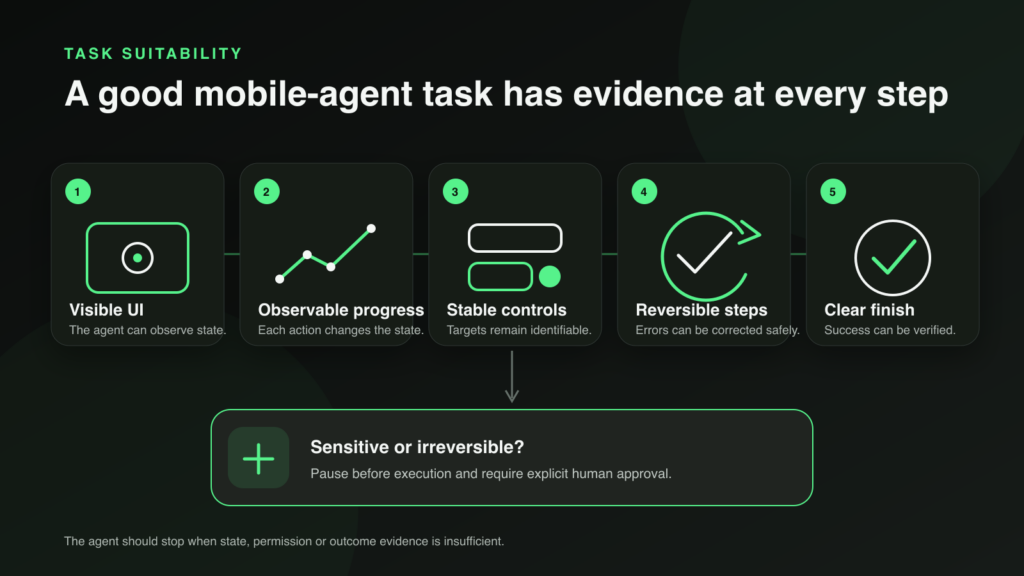
A suitable task provides evidence at every step. Sensitive or irreversible actions should pause for explicit human approval.
Poor candidates include open-ended work with no stopping condition, tasks that depend on hidden state, workflows dominated by authentication barriers and actions where one mistake creates an immediate high-impact consequence.
How Aiden Fits Into Mobile AI Agent Use Cases
Aiden is a supporting implementation example, not evidence that every use case in this guide is a current Aiden capability.
Its public system and benchmark materials explore a device-use loop in which an agent observes an interface, reasons about the current state, acts through an available tool or input route and checks subsequent evidence. The current public implementation is a development platform, not a finished universal phone agent.
The Aiden benchmark is particularly relevant because it preserves task-level evidence instead of treating a successful-looking demo as sufficient. Mock tasks, simulated environments and real-device tests answer different questions, and the documentation identifies those boundaries.
For the underlying category, read What Is a Mobile AI Agent?. For interface access without dedicated integrations, see Can AI Agents Use Apps Without APIs?. For the implementation case study, read How Aiden Controls a Phone With No API, No Jailbreak and No App. For a deeper comparison of input routes, see USB HID vs ADB: How AI Agents Actually Control Your Phone.
Human control remains part of the implementation. The Right to Interrupt explains why a device agent needs a path for the user to stop or redirect work while it is happening—not only approve the final screen.
Choosing a Mobile AI Agent Use Case
Start with one bounded task rather than “control my phone.” Define:
- the exact starting state;
- what the agent is allowed to observe;
- which actions it may take;
- the evidence required after each important step;
- when it must ask for approval;
- how the user can interrupt it; and
- what counts as success, failure or handoff.
Then test the workflow across the devices, operating-system versions, languages and app states that matter. Expand only when the evidence supports it.
FAQ
What can an AI agent do on a phone today?
Depending on the platform and setup, mobile agents can navigate supported interfaces, find visible information, prepare messages, enter draft data, run testing workflows and verify screen states. Support is not universal across apps or devices.
Can an AI agent work across multiple phone apps?
In some tested or integrated environments, yes. Cross-app work requires a reliable way to observe each interface, transfer data and confirm the destination. Sending or submitting information should normally require human approval.
Can a mobile AI agent send messages automatically?
It may be technically possible in a supported workflow, but message preparation is the safer default. The user should verify the recipient, content and context before an external message is sent.
Are mobile AI agents reliable enough for payments?
They can help compare options or prepare information, but payment confirmation should remain with the authorized user. Amounts, recipients, fees and terms can change, and mistakes may be difficult to reverse.
What is the difference between a documented and experimental use case?
A documented use case has current platform, tool or system documentation supporting the underlying capability. An experimental use case has been exercised in a benchmark, prototype or controlled environment but should not be generalized to every app or device.
Does Aiden support every task in this guide?
No. Aiden is included as a real development and benchmarking example. Each claimed capability should be tied to current documentation, tested hardware, software configuration and task evidence.
Related posts
How to Build an AI Agent for Your Business Without Writing Code in 2026
Build AI agent business no code 2026 with a workflow-first framework for data access, approvals, risk controls, and ROI tracking.
Debugging an iOS Bug: Why Command+V Stops Working with External Keyboards
Fix iOS external keyboard modifier keys that fail with AssistiveTouch pointer input. Explore Aiden’s HID workaround—read the case study.
Does Aiden Store Your Data?
Aiden data storage: assess no-backend architecture, provider data flows, local context, and retention gaps before deployment decisions.